> ## Documentation Index
> Fetch the complete documentation index at: https://bilt.me/docs/llms.txt
> Use this file to discover all available pages before exploring further.
# Live Preview
> Watch your app run live in the browser — or in a streamed iOS simulator
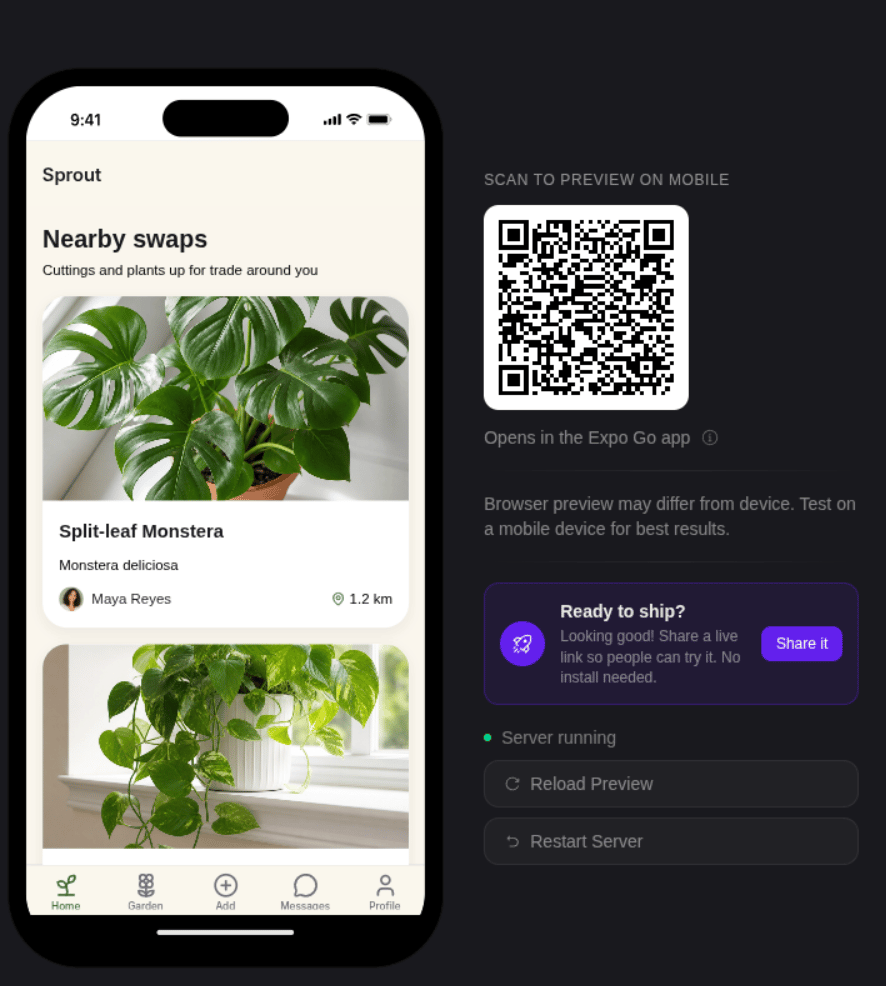
Bilt shows a live preview of your app right in your browser. As the AI builds, you watch your app come together — no Mac, no Xcode, no local setup.
 ## How it works
When you create or update a project, Bilt builds your app in a **cloud development sandbox** and shows it in a live web preview next to the chat. Each chat message rebuilds the app and the preview refreshes.
You interact with the preview just like a web app — click, scroll, and navigate between screens to test your full flow.
To try your app on a real phone, scan the **Expo Go** QR code in the preview panel. See [Get & Share Your App](/docs/guides/get-and-share-your-app).
## What you get
* **Live preview in the browser** — Not a mockup or screenshot. Your real app, running and updating as you chat.
* **Instant updates** — Each chat message rebuilds the app. Changes appear in the preview within seconds.
* **Native iOS view** — Switch the preview to a cloud-streamed iOS simulator to see the real native look.
* **No local setup** — Everything runs in the cloud. Works from any browser on any OS.
* **Try it on your phone** — Scan the Expo Go QR code to open your app on a real device.
* **Shareable** — Send a preview link to anyone. They can open and try your app in their browser.
## Preview during development
The preview sits alongside the chat interface. As you describe changes, you can watch the app update live:
1. Type a message — "add a tab bar with Home, Search, and Profile tabs"
2. The AI writes the code and triggers a rebuild
3. The preview refreshes with the new tabs visible
4. Test the navigation and send follow-up instructions
## Sharing preview links
Every project gets a shareable preview URL. Anyone with the link can open and try your app in their browser — useful for:
* **Stakeholder reviews** — Share with clients, investors, or teammates
* **User testing** — Get feedback on flows before publishing
* **Bug reports** — Share the exact state someone else can reproduce
See [Project Sharing](/docs/features/project-sharing) for more on collaboration.
## How it works
When you create or update a project, Bilt builds your app in a **cloud development sandbox** and shows it in a live web preview next to the chat. Each chat message rebuilds the app and the preview refreshes.
You interact with the preview just like a web app — click, scroll, and navigate between screens to test your full flow.
To try your app on a real phone, scan the **Expo Go** QR code in the preview panel. See [Get & Share Your App](/docs/guides/get-and-share-your-app).
## What you get
* **Live preview in the browser** — Not a mockup or screenshot. Your real app, running and updating as you chat.
* **Instant updates** — Each chat message rebuilds the app. Changes appear in the preview within seconds.
* **Native iOS view** — Switch the preview to a cloud-streamed iOS simulator to see the real native look.
* **No local setup** — Everything runs in the cloud. Works from any browser on any OS.
* **Try it on your phone** — Scan the Expo Go QR code to open your app on a real device.
* **Shareable** — Send a preview link to anyone. They can open and try your app in their browser.
## Preview during development
The preview sits alongside the chat interface. As you describe changes, you can watch the app update live:
1. Type a message — "add a tab bar with Home, Search, and Profile tabs"
2. The AI writes the code and triggers a rebuild
3. The preview refreshes with the new tabs visible
4. Test the navigation and send follow-up instructions
## Sharing preview links
Every project gets a shareable preview URL. Anyone with the link can open and try your app in their browser — useful for:
* **Stakeholder reviews** — Share with clients, investors, or teammates
* **User testing** — Get feedback on flows before publishing
* **Bug reports** — Share the exact state someone else can reproduce
See [Project Sharing](/docs/features/project-sharing) for more on collaboration.