> ## Documentation Index
> Fetch the complete documentation index at: https://bilt.me/docs/llms.txt
> Use this file to discover all available pages before exploring further.
# Base Your App on a Web App
> Link an existing web app repository so Bilt can build a matching mobile app
This guide walks you through linking an existing web app's GitHub repository to your Bilt project. Once linked, Bilt clones the web app into the sandbox alongside your mobile app so the agent can work across both codebases — ideal when you already built a site with [Lovable](https://lovable.dev), [v0](https://v0.dev), or similar tool and want a matching mobile app.
## Prerequisites
* A Bilt project
* A [GitHub](https://github.com) account connected to Bilt
* The web app you want to base your app on, pushed to a GitHub repository
## Step 1: Connect a GitHub account
Web App Sync uses the same GitHub accounts as the GitHub integration. If you haven't connected one yet:
1. Go to your project → **Settings → GitHub → Accounts**
2. Click **Connect GitHub account** and install the Bilt GitHub App
3. Grant access to the repository that holds your web app (choose **All repositories** or select it specifically)
See the [connect GitHub guide](/docs/guides/connect-github) for details.
## Step 2: Link the web app repository
1. Open **Settings → Convert Website**
2. Choose the **GitHub account** that owns the web app repository
3. Select the **repository** from the list
4. Click **Connect repository**
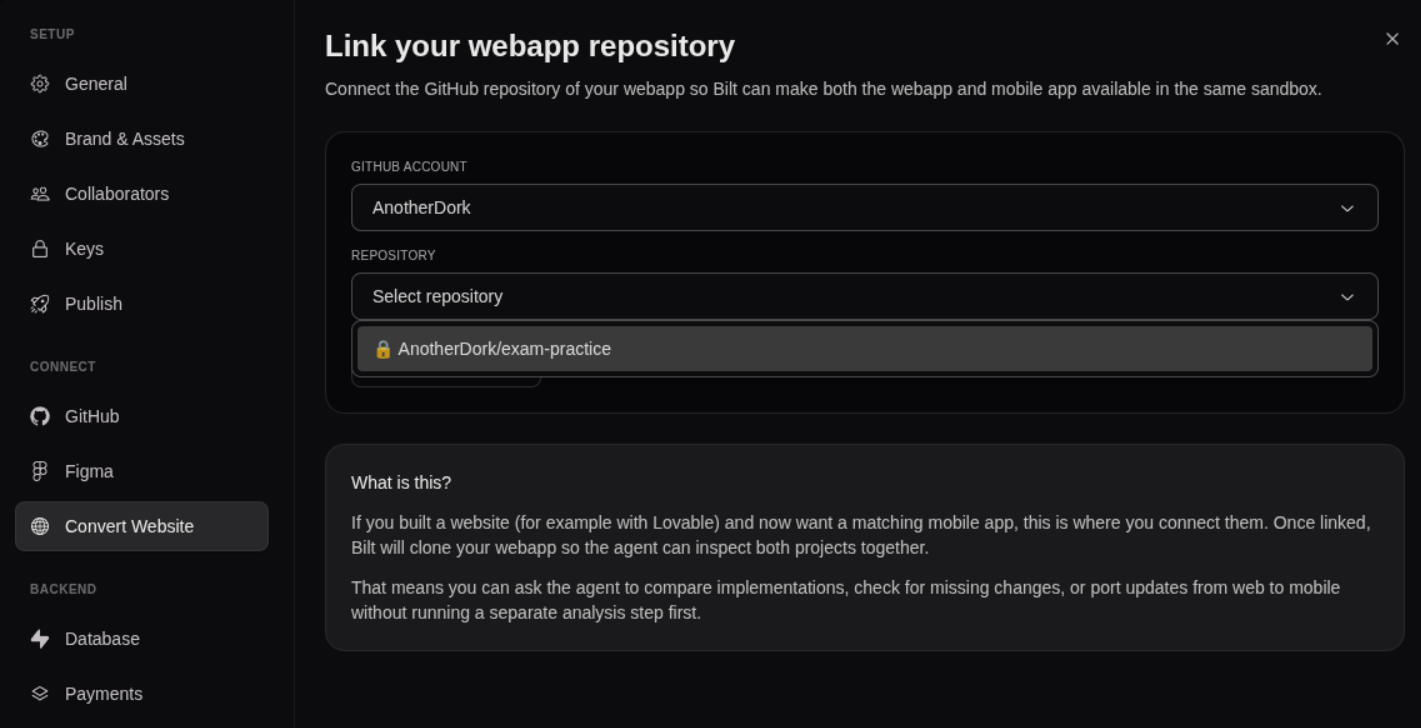 Once linked, the tab shows the connected repository. From the next session onward, Bilt clones it into the sandbox alongside your mobile app.
## Step 3: Build your mobile app from the web app
With both codebases in the same sandbox, ask Bilt to work across them:
```text theme={null}
Recreate the dashboard screen from the web app as a native mobile screen.
```
```text theme={null}
Port the authentication flow from the web app to the mobile app.
```
```text theme={null}
Compare the web app and mobile app and list features that are missing on mobile.
```
Bilt reads the web app directly, so it can match designs, reuse logic, and keep the mobile app aligned with the web version.
Web App Sync clones the web app as a read-only reference for building your mobile app — it does not push changes back to the web app repository. To mirror your Bilt project to its own GitHub repo, see the [connect GitHub guide](/docs/guides/connect-github).
## Further reading
* [Web App Sync feature](/docs/features/webapp-sync) — Feature overview
* [GitHub Integration feature](/docs/features/github-integration) — Mirror your Bilt project to GitHub
Once linked, the tab shows the connected repository. From the next session onward, Bilt clones it into the sandbox alongside your mobile app.
## Step 3: Build your mobile app from the web app
With both codebases in the same sandbox, ask Bilt to work across them:
```text theme={null}
Recreate the dashboard screen from the web app as a native mobile screen.
```
```text theme={null}
Port the authentication flow from the web app to the mobile app.
```
```text theme={null}
Compare the web app and mobile app and list features that are missing on mobile.
```
Bilt reads the web app directly, so it can match designs, reuse logic, and keep the mobile app aligned with the web version.
Web App Sync clones the web app as a read-only reference for building your mobile app — it does not push changes back to the web app repository. To mirror your Bilt project to its own GitHub repo, see the [connect GitHub guide](/docs/guides/connect-github).
## Further reading
* [Web App Sync feature](/docs/features/webapp-sync) — Feature overview
* [GitHub Integration feature](/docs/features/github-integration) — Mirror your Bilt project to GitHub