> ## Documentation Index
> Fetch the complete documentation index at: https://bilt.me/docs/llms.txt
> Use this file to discover all available pages before exploring further.
# Quickstart
> Build your first app in under 5 minutes
Build a working iOS app from a text description — no code, no install, no Mac required.
**Estimated time:** 5 minutes
By the end of this guide, you'll have a live app running in a cloud iOS simulator and a preview link you can share.
Open the dashboard and follow along — free to start.
## Step 1: Create an account
Sign up at [bilt.me/sign-up](https://bilt.me/sign-up). You'll land on your dashboard, ready to build.
## Step 2: Describe your app
Type a description of what you want to build in the prompt box on your dashboard. Be as specific or general as you like:
```text Simple theme={null}
A habit tracker where I can add daily habits and mark them complete
```
```text Detailed theme={null}
A recipe app with categories (breakfast, lunch, dinner), a favorites list,
a shopping list that auto-generates from selected recipes, and a clean
minimal design with a warm color palette
```
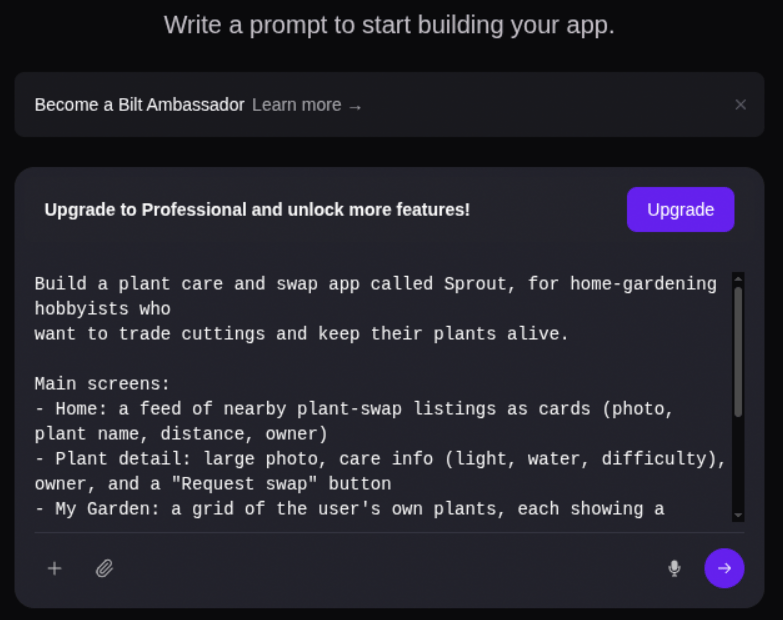 See the [prompting guide](/docs/guides/prompting) for tips on writing prompts that get better results.
## Step 3: Watch it build
Bilt's AI generates your app in real time. You'll see:
* **Live code generation** — The AI writes React Native code as you watch
* **Live preview** — Your app appears in a live preview right in the browser
* **Progress updates** — Status messages show what the AI is working on
See the [prompting guide](/docs/guides/prompting) for tips on writing prompts that get better results.
## Step 3: Watch it build
Bilt's AI generates your app in real time. You'll see:
* **Live code generation** — The AI writes React Native code as you watch
* **Live preview** — Your app appears in a live preview right in the browser
* **Progress updates** — Status messages show what the AI is working on
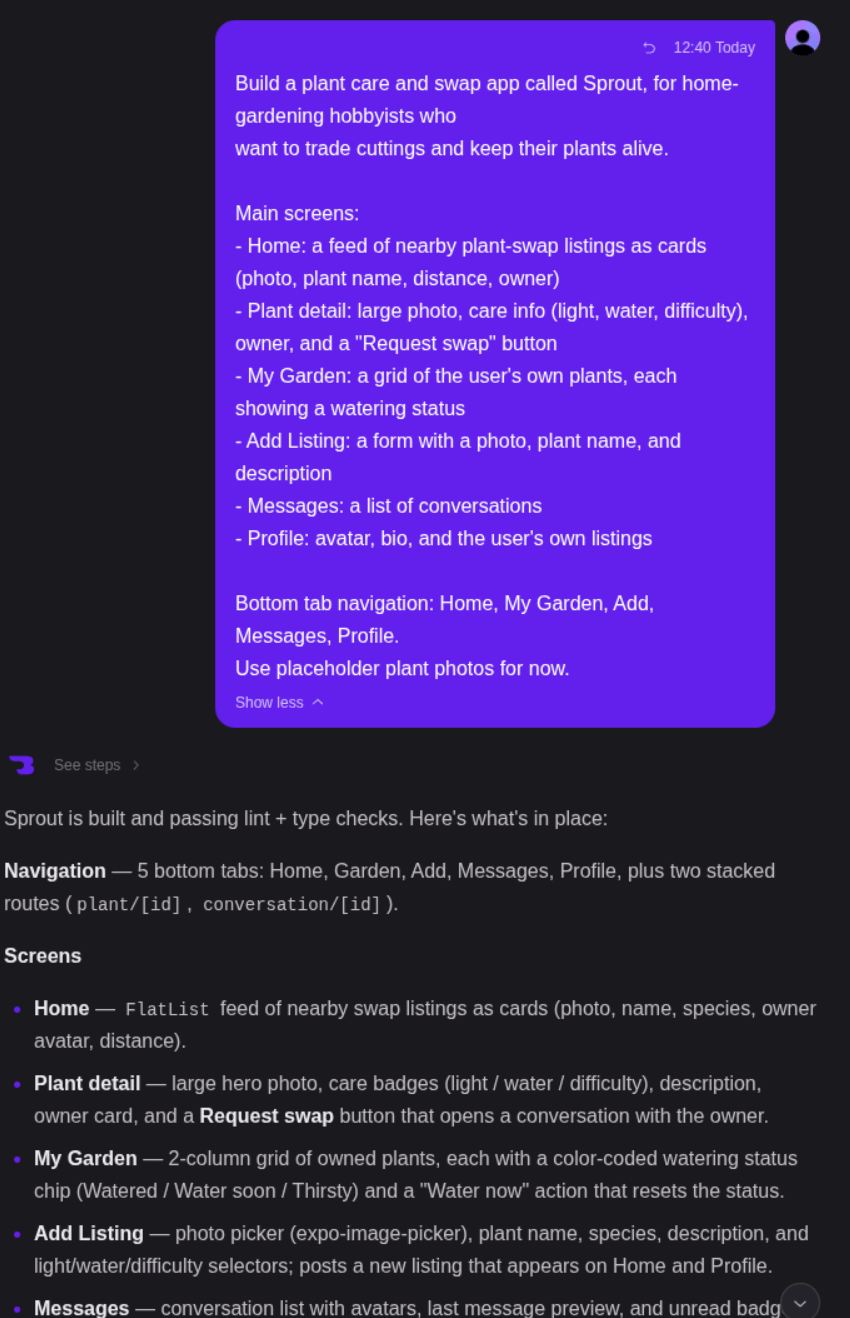 No Xcode, no local setup, no waiting for builds. The app runs live as it's created.
## Step 4: Iterate with chat
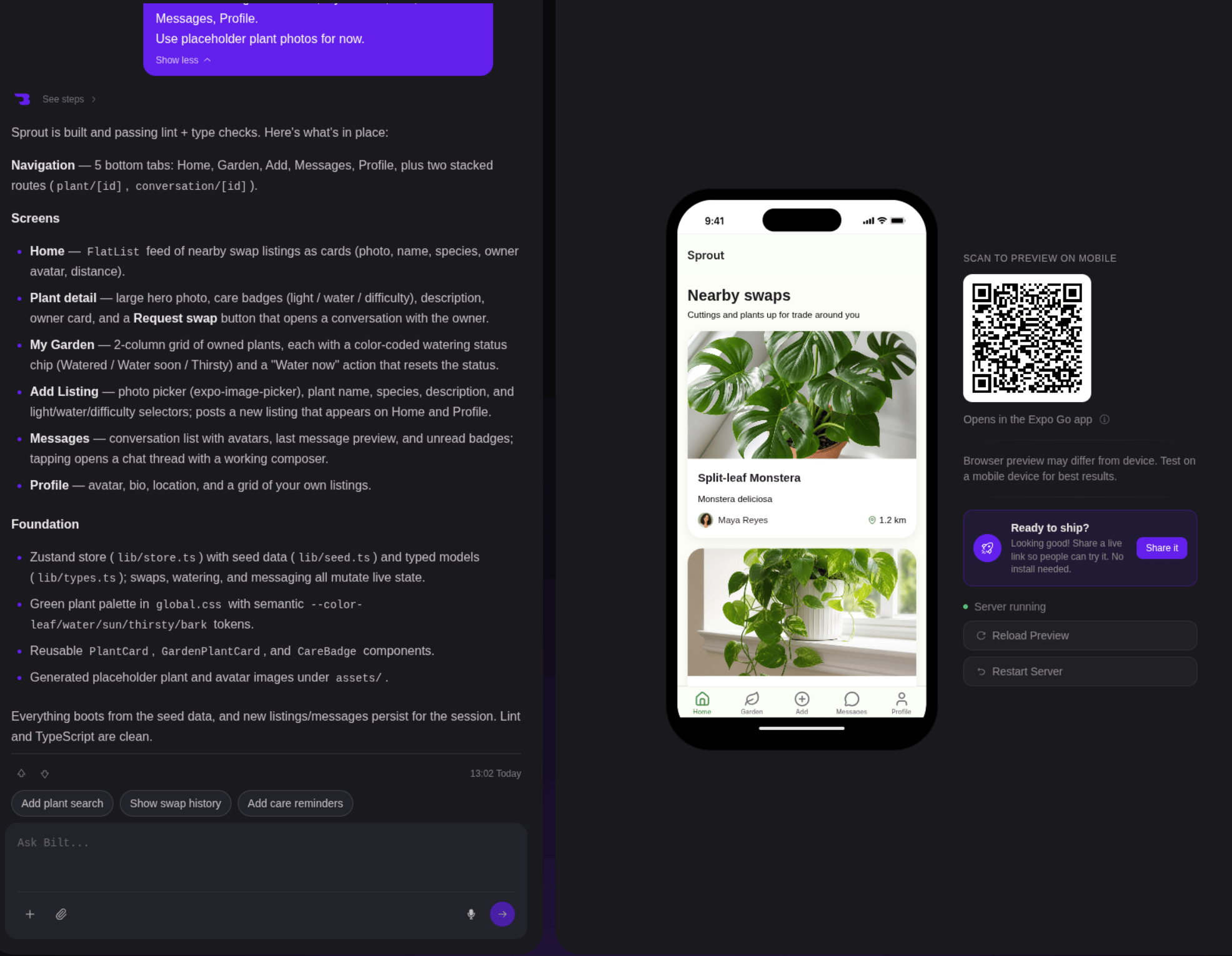
Your app is live — now refine it by chatting with the AI:
```text theme={null}
Add a dark mode toggle in settings
```
```text theme={null}
Make the navigation bar sticky and change the accent color to teal
```
```text theme={null}
Add sign-in so users can create accounts and save their data
```
Each message triggers a new build cycle. The preview updates in real time so you can see changes instantly.
No Xcode, no local setup, no waiting for builds. The app runs live as it's created.
## Step 4: Iterate with chat
Your app is live — now refine it by chatting with the AI:
```text theme={null}
Add a dark mode toggle in settings
```
```text theme={null}
Make the navigation bar sticky and change the accent color to teal
```
```text theme={null}
Add sign-in so users can create accounts and save their data
```
Each message triggers a new build cycle. The preview updates in real time so you can see changes instantly.
 ## Step 5: Share or ship
Once you're happy with your app:
* **Share a preview link** — Send a live link to testers or stakeholders
* **Push to GitHub** — Connect a repo to keep your code in version control
* **Publish your app** — Submit to the App Store, Google Play, or both directly from Bilt
* **Export the code** — Download the full React Native source and continue on your own
## What just happened?
Behind the scenes, Bilt:
1. Interpreted your description and planned the app architecture
2. Generated production-ready React Native code
3. Built the app in a cloud sandbox
4. Showed your app in a live preview in your browser
5. Applied your chat messages as iterative updates
All of this happens in the cloud — nothing installed on your machine.
## Next steps
Write better prompts for better apps
Add sign-in, a database, and file storage with Bilt Cloud
Version control your app code
Ship to the App Store, Google Play, or both
**Prefer working from an AI agent?** See the [MCP quickstart](/docs/quickstart-mcp) to connect Bilt to Claude, Cursor, or OpenClaw.
## Step 5: Share or ship
Once you're happy with your app:
* **Share a preview link** — Send a live link to testers or stakeholders
* **Push to GitHub** — Connect a repo to keep your code in version control
* **Publish your app** — Submit to the App Store, Google Play, or both directly from Bilt
* **Export the code** — Download the full React Native source and continue on your own
## What just happened?
Behind the scenes, Bilt:
1. Interpreted your description and planned the app architecture
2. Generated production-ready React Native code
3. Built the app in a cloud sandbox
4. Showed your app in a live preview in your browser
5. Applied your chat messages as iterative updates
All of this happens in the cloud — nothing installed on your machine.
## Next steps
Write better prompts for better apps
Add sign-in, a database, and file storage with Bilt Cloud
Version control your app code
Ship to the App Store, Google Play, or both
**Prefer working from an AI agent?** See the [MCP quickstart](/docs/quickstart-mcp) to connect Bilt to Claude, Cursor, or OpenClaw.