Draftbit pricing starts simply: Free, $20/month Standard, $40/month Pro, $200/month Team, then custom Enterprise pricing.
Draftbit stays cheapest when you can handle export, store accounts, and release fixes yourself. The budget changes once credit limits, add-on credits, publishing fees, and help finishing the app enter the build.
If you want the app, backend, and store build and publishing workflow in one place, Bilt is worth comparing before you choose a Draftbit plan. This guide explains where Draftbit's plan math gets complicated, so you can choose the path that actually gets your app shipped.
TL;DR
- Plan range. Draftbit’s named self-serve plans run from $0 to $200 per month. Enterprise uses custom pricing.
- Credit system. AI actions use included monthly credits. Add-on credits become a cost when repeated revisions push past the plan allowance.
- No rollover safety net. Monthly plan credits do not roll over, so uneven build pace can waste paid credits.
- Publishing fees. Budget separately for Apple’s $99/year developer account and Google Play’s $25 one-time registration fee.
- Year-one floor. A solo Draftbit build starts around $364-$604 before add-on credits or expert help, once Apple and Google store fees are included.
- Buyer verdict. Free and Standard work best for evaluation and early building. Pro makes sense when source export, simulators, or store prep enter the plan. Bilt fits non-technical builders who want the app, backend, signing, and store workflow handled together.
Quick answer: how much does Draftbit cost?
Draftbit costs $0 to $200 per month across its named self-serve plans. Enterprise uses custom pricing, so the budget depends on four cost buckets: subscription, credit usage, app store fees, and help finishing the app.
Prices checked in June 2026 against Draftbit’s official pricing page.
- Free: $0/month
- Standard: $20/month
- Pro: $40/month
- Team: $200/month
- Enterprise: custom pricing
Third-party directories may show older figures, including $59 or $79, because SaaS pricing changes faster than listings update.
Use Draftbit's official pricing page as the source of truth, then budget around credit limits, Apple and Google developer accounts, and launch help.
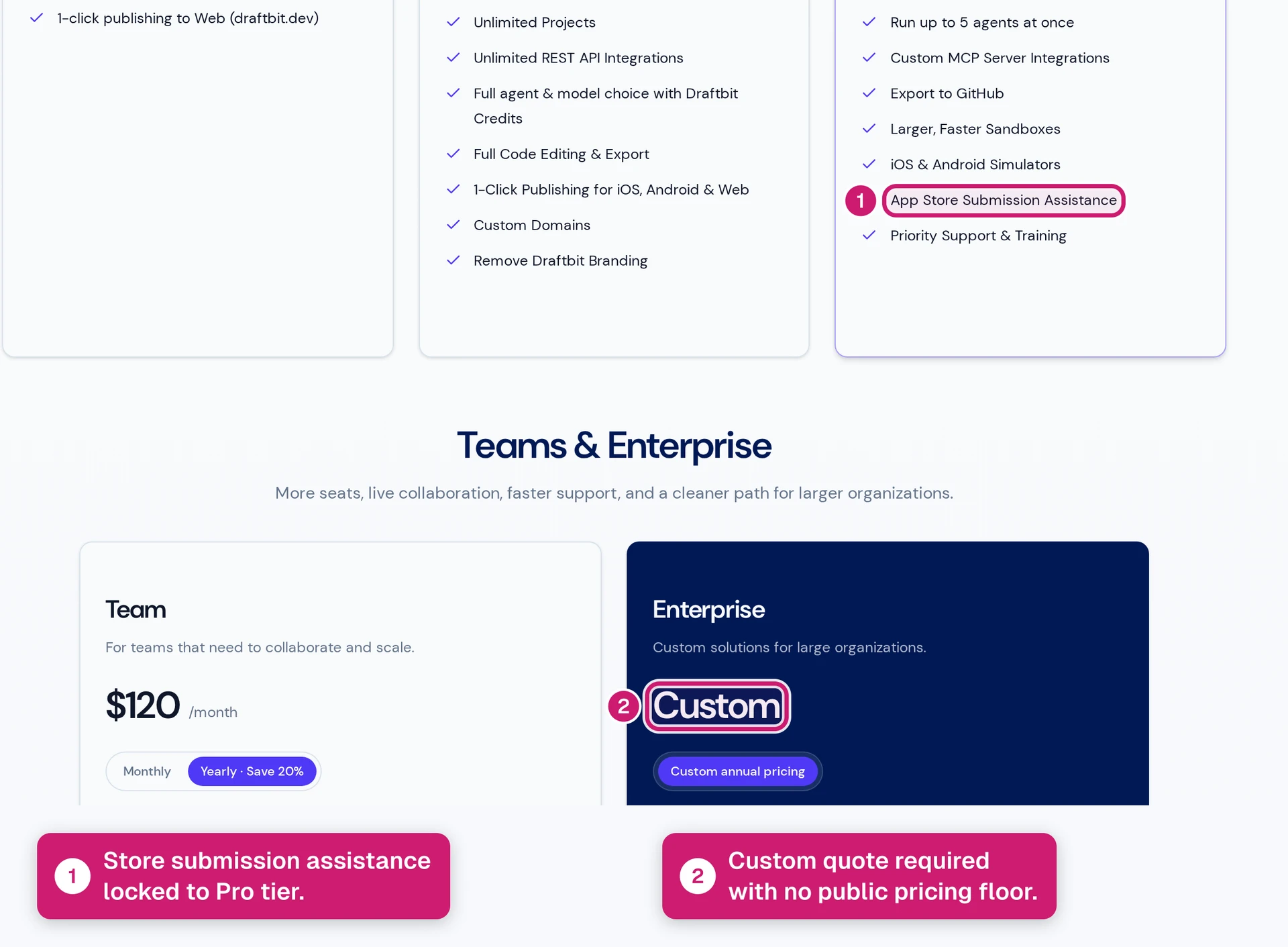
Worth it? Draftbit is worth considering if you want a visual React Native workspace and you are comfortable owning the launch path after the build.
It gets expensive when export, debugging, store submission, or expert help becomes part of the plan.
If you want to describe your idea and move toward store submission in one workflow, Bilt is the simpler path.
Draftbit pricing plans at a glance
Draftbit has five public pricing tiers, from Free to custom Enterprise pricing. Higher tiers mainly change credit room, source export, collaboration, and launch support.
| Plan | Price | Included credits | Best for | Launch note |
|---|---|---|---|---|
| Free | $0/month | 10,000/month | Early evaluation | draftbit.dev publishing only |
| Standard | $20/month | About 25,000/month | Solo builders | Build and refine before export or store prep |
| Pro | $40/month | About 50,000/month | Launch prep | Source export, simulators, and submission assistance |
| Team | $200/month | Capped shared pool | Collaborating teams | Up to 10 seats; check credit needs |
| Enterprise | Custom | Custom | Larger organizations | Confirm seats, credits, support, and service scope |
Free ($0/month)
Draftbit labels this plan Free Forever, and the price is $0/month. Use Free as an evaluation tier, not a production App Store path.
- Use the 3 projects and 10,000 monthly credits to test one small app idea against the builder.
- Publish to draftbit.dev for internal review while the app remains a prototype.
- Use Free to decide whether Draftbit's visual builder matches the app you want to make.
- Leave Free once the prototype needs more credits or a serious publishing path.
Older references to 2 projects or 5 screens are stale enough to verify before you plan around them.
Standard ($20/month)
Standard is the first paid Draftbit tier to consider when the Free sandbox feels cramped. At $20/month, the value is more room while the app is still changing.
- What Standard actually buys:
- About 25,000 included monthly credits, with the current number worth confirming on Draftbit pricing before you budget.
- Enough scope to keep working on a multi-screen app after the Free sandbox feels cramped.
- Continued building inside Draftbit while GitHub handoff and store-submission support wait for Pro.
Use Standard to keep paid experimentation cheap:
- Keep building while the app shape still changes.
- Learn your monthly credit burn before committing to Pro.
- Delay GitHub export and store-submission help until the app is closer to launch.
Move to Pro when source-code ownership enters the schedule. Simulator testing and submission assistance belong in that same decision, so Standard is better treated as build momentum before launch prep.
Pro ($40/month)
Pro is where Draftbit starts to look less like a sandbox and more like launch prep. At $40/month, the plan matters because source export, simulators, and submission assistance enter the workflow.
- Plan around 50,000 monthly credits before full-app testing begins. Authentication, payments, and multi-step onboarding usually create more AI revision than a static content app.
- Code handoff: GitHub export gives a developer the React Native codebase for review or custom work.
- Device testing: iOS and Android simulators help catch platform behavior before Xcode setup consumes the week.
- Submission assistance: Draftbit can guide parts of App Store and Google Play submission. You still handle store accounts, metadata, privacy answers, and release-path decisions.
Pro becomes worth the extra cost once launch work replaces pure building:
- Export the code for developer review or custom React Native work.
- Test iOS and Android behavior before you promise the app to users.
- Budget time for store submission because the monthly fee covers the Draftbit workspace. Store review takes separate effort.
Budget manual launch work outside Draftbit:
- App Store Connect and Google Play Console setup
- Xcode signing decisions when the iOS build needs attention
- Store metadata and screenshots
- Privacy answers and review follow-up
Team ($200/month)
Draftbit Team is the first plan to treat as a shared workspace purchase. At $200/month, Team gives you up to 10 seats and a capped shared credit pool.
Do not buy Team because one person occasionally reviews the app. The plan makes sense when several people actively build in the same workspace.
Two Pro accounts cost $80/month. Team costs $120/month more, so the shared workspace has to save daily coordination time.
Use the math this way:
- Start with Pro when one builder owns the app and another person only reviews occasionally.
- Move to Team when multiple people need one workspace. The 10-seat allowance and centralized billing are the point.
- Stay on separate Pro accounts when each builder needs a separate sandbox more than shared project control.
Team still uses a capped credit pool. Check the live Draftbit pricing page before buying, because a larger group can burn through credits faster than one Pro user.
Buy Team when shared ownership matters more than the $120/month difference.
Enterprise (custom pricing)
Draftbit Enterprise is custom priced, so treat it as a quote. A useful quote separates the software subscription from support and service work.
Enterprise belongs in the conversation when Draftbit has to fit an organization's process:
- Project volume exceeds the self-serve plans.
- Priority support needs a named path.
- Purchasing needs vendor paperwork.
- Security or contract review has to happen before purchase.
- Service work needs a separate quote from the software subscription.
The 10-seat limit belongs to Team. Enterprise seat counts and credit allowances should be confirmed during sales.
Ask sales to spell out the quote before you commit:
- Seat count: Who gets access, and what changes if the team grows?
- Credit allowance: How much AI usage is included each month?
- Support path: What response time or named support channel is included?
- Service work: What setup, build, or launch help is billed outside the subscription?
- Contract terms: What happens at renewal, cancellation, or downgrade?
Get the Draftbit quote in writing and separate the subscription from service work. That split matters more than any fixed Enterprise number copied from an old directory.
Why other sites show different Draftbit prices
Different Draftbit prices usually come from stale pages. Third-party directories and older blogs often lag official vendor pages after pricing changes.
Draftbit changed its packaging in 2022 and later moved into its current Free-to-Enterprise lineup. That is why older names like Starter, Basic, or legacy Pro still appear around the web.
| Older price you may see | Why it appears | How to treat it |
|---|---|---|
| Basic around $19/month | Legacy directory listing | Not current naming |
| Starter at $39/month | Older blog pricing | Check current tiers |
| Pro around $59/month | Legacy plan structure | Compare current Pro |
| Pro at $99/month | Older blog pricing | Check current tiers |
| Team around $199/month | Pre-current rounding | Current Team is $200/month |
| Enterprise around $995/month | Enterprise reference pricing | Confirm scope and billing |
Use Draftbit's official pricing page as the source of truth for current plan details. Older prices are useful for history, not budgeting. For Enterprise, treat any fixed price from another site as stale until Draftbit scopes a quote. The current page wins.
How Draftbit credits work
Draftbit credits are the usage meter for AI work inside the builder. The subscription opens the builder, while credits decide how much AI help you can use each month.
Plan around the messy middle of the build. A first screen may feel cheap, but revision cycles usually burn through the monthly pool faster.
Use the live plan allowances as a starting point:
| Plan | Monthly credits | What to watch |
|---|---|---|
| Free | 10,000 | Enough to test a small idea, but too tight for production launch work |
| Standard | About 25,000 | Better for one focused MVP with manual cleanup between AI passes |
| Pro | About 50,000 | Better for repeated AI revision, source export, and launch prep |
| Team | Capped shared pool | Multiple builders can drain the pool faster than one Pro user |
| Enterprise | Custom | Confirm the allowance in the quote before signing |
- Pro gives about 50,000 credits: Better for larger flows that need weekly iteration and frequent agent troubleshooting.
Credits usually go toward AI-assisted work:
- Code generation: Complex requests use more credits because Draftbit has to produce more app logic.
- Component creation: AI-made UI elements and layout changes draw from the same pool.
- Agent conversations: Troubleshooting, edits, and refinements count against the month.
- Full-screen generation: Bigger screens can consume credits faster than small copy or styling tweaks.
Manual work is the cheap lever. Clean up simple UI issues yourself, then save credits for harder AI tasks.
Three mechanics decide how risky a plan feels:
- Credits reset monthly: Unused credits expire at the end of the billing cycle.
- No rollover: A quiet week does not increase next month's AI budget.
- Supplemental credits can help: Extra credits can stretch one launch sprint, but regular add-ons mean the monthly plan no longer describes your spend.
The practical test is simple. Choose Standard when one tight build cycle is enough; choose Pro when repeated AI revision, source export, or store prep starts.
What Draftbit really costs (the full picture)
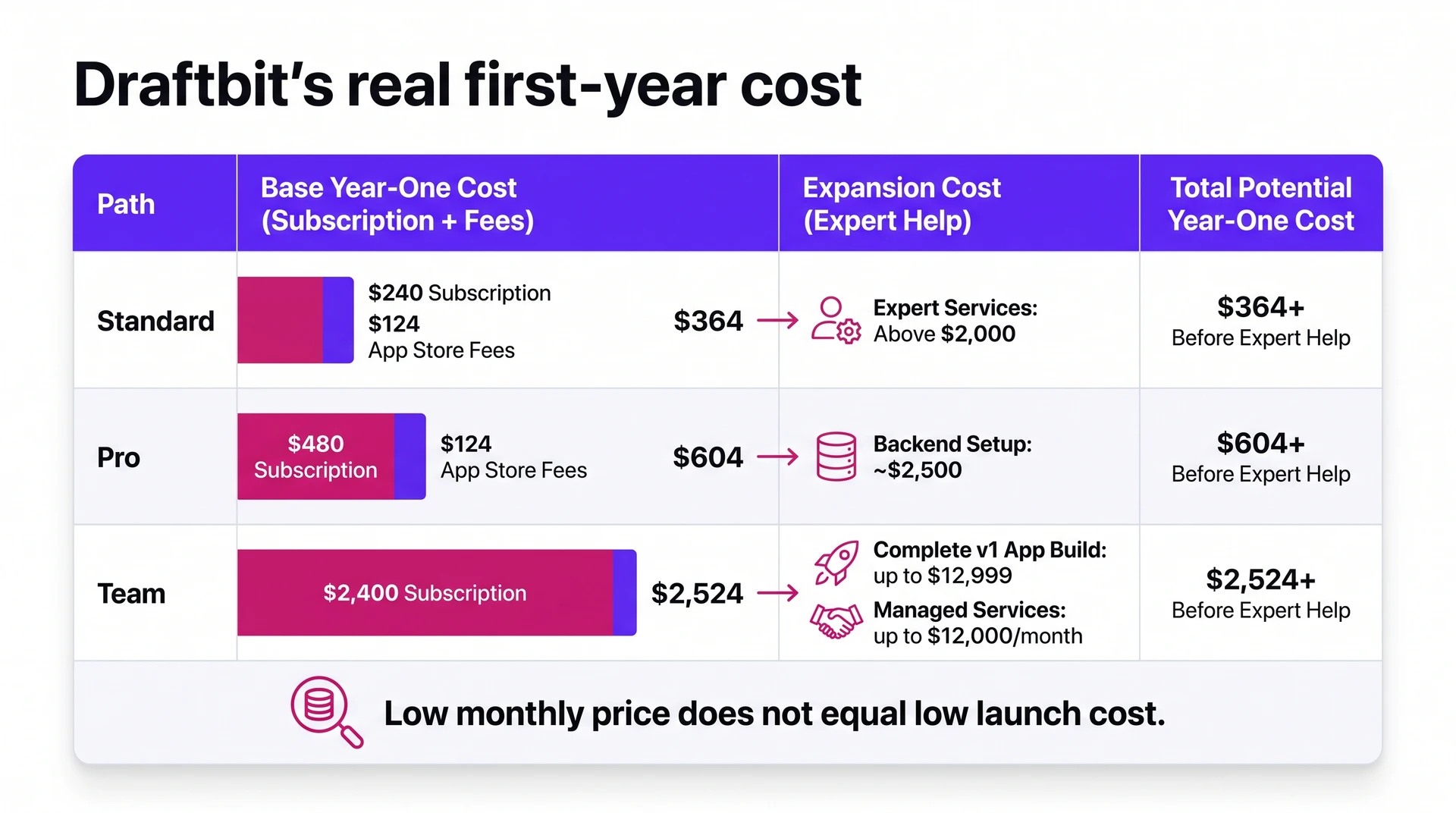
Draftbit's subscription price is only the floor. The year-one cost has four parts: subscription, included credit allowances or add-on credits, store fees, and any help needed to finish the app.
Use these planning numbers before add-on credits or expert work:
- Standard year one: $364 before expert help, based on $240 in subscription fees plus $124 in store fees.
- Pro year one: $604 before expert help, based on $480 in subscription fees plus $124 in store fees.
- Team year one: $2,524 before expert help, based on $2,400 in subscription fees plus $124 in store fees.
Those estimates assume one iOS and Android launch, with $99/year for Apple and $25 one-time for Google Play.
Help finishing the app is the swing factor:
- Expert services: Published Draftbit expert-help examples start above $2,000, so verify the current service page before budgeting around that number.
- Launch packages: Published one-time package examples range from about $2,500 for backend setup to $12,999 for a complete v1 app build.
- Managed services: Higher-touch managed-service examples can reach $12,000/month, depending on scope.
- Review sentiment: Read comments about expert services as anecdotal unless you verify current reviews. The recurring complaint is cost versus support depth.
Publishing can add time even when the subscription includes assistance. Draftbit Pro's App Store support is guided help, so you still need to understand the steps needed to ship a React Native app.
Expect work around:
- Build tooling: Expo or React Native CLI may handle builds after React Native source export. Xcode can enter the iOS side.
- Store setup: App Store Connect metadata and privacy details still need attention.
- Signing: Certificates and provisioning profiles can slow iOS submission.
- Review fixes: Build settings and compliance issues may require another export.
The $364-$604 range is the solo-builder floor. The estimate includes the subscription and store account fees, but not add-on credits, expert help, or paid launch services.
Add services and Draftbit quickly becomes a $2,000-$13,000+ launch budget, so verify current service pricing before you plan around it.
Bilt changes the budget conversation here. If you are pricing Draftbit because you want a real app in the App Store, start building free with Bilt before you commit.
You can build a first version and see how much launch work Bilt handles before choosing a paid plan.
Which plan should you choose?
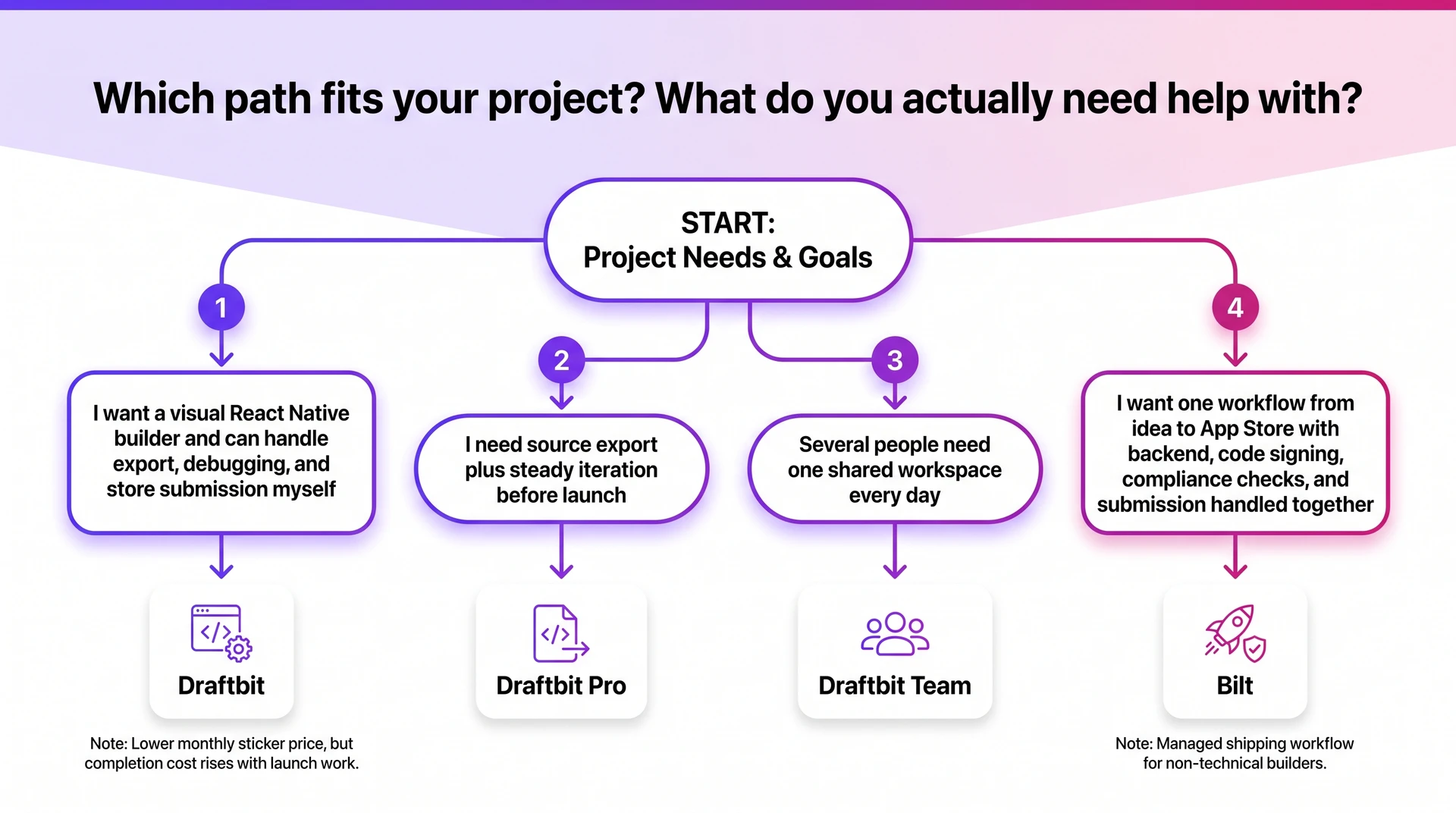
The plan choice is a budget decision first. Start with the cheapest plan that solves today's constraint, then upgrade only when the next step depends on credits, export, publishing, or collaboration.
| Situation | Plan to consider | Use it for | Avoid if |
|---|---|---|---|
| Exploring Draftbit | Free | Test the builder and UI direction | You need a production App Store path |
| One small MVP | Standard ($20/month) | Build and refine one small app | Source export, simulators, or submission help are already planned |
| Launch prep | Pro ($40/month) | Export, simulators, and submission assistance | You only need an internal prototype |
| Multiple contributors | Team ($200/month) | Daily collaboration in one workspace | Reviewers only need occasional access |
| Security or compliance needs | Enterprise | Support, paperwork, and controls | A self-serve plan covers the workflow |
- Credit pressure: Move to Pro when the monthly pool runs out before a complete iteration loop.
- Complex scope: Payments or authentication usually create more revision cycles, especially when backend logic has to work before launch.
- Code ownership: Move to Pro when a developer needs React Native source export outside Draftbit.
- Publishing work: Move to Pro before store prep when review issues or build fixes are already slowing the launch.
- Collaboration: Move to Team once more than one person needs regular project access.
Practical path:
- Use Free for evaluation.
- Use Standard for a small first app.
- Use Pro for steady iteration and App Store prep.
- Use Team only after collaboration makes the higher monthly price worthwhile.
If the goal is managed App Store completion, compare Draftbit against Bilt before you pick a Draftbit plan. Bilt is built for non-technical builders who want the app, backend, and store workflow handled together.
Draftbit vs the alternatives: is the price justified?
Draftbit's $20 and $40/month plans make sense when you want a visual React Native workspace and can own the steps after the app leaves the builder.
The price weakens when export is only the midpoint and the budget shifts to App Store Connect setup, release fixes, and post-launch bugs.
Treat Draftbit as low-code React Native production, not a web-wrapper tool. Compare paths by completion cost instead of monthly subscription alone.
| Path | Starting cost signal | What you still handle | Best fit |
|---|---|---|---|
| Draftbit self-serve | $20-$40/month for Standard or Pro | Credit usage, store accounts, export, and release fixes | Technical builders who want a visual React Native workspace |
| Bilt | Free tier; paid self-service plans start at €25/month | Apple and Google developer accounts still apply | Non-technical builders who want a native app, backend, signing, and store build/upload workflow in one place |
| Visual no-code builders | Varies by platform | Native limits, backend fit, source ownership, and App Store path | Simple apps where templates are enough |
| Custom agency or development team | Typical $30k-$100k+ basic-app range | Scope, timeline, maintenance budget, and handoff | Funded teams that need custom engineering |
Read the table by completion risk before sticker price. A cheaper monthly plan can cost more once export, store setup, or release fixes enter the build.
Bilt's pricing makes the most sense when completion matters more than the monthly tool fee:
- React Native output: The app compiles into iOS and Android builds instead of staying as a browser wrapper.
- Source code export: You can access and own the application code.
- Publishing workflow: Code signing, asset generation, and App Store Connect submission are handled inside the workflow.
Draftbit's monthly price makes sense for a visual React Native builder. The cheaper path gets expensive when launch work becomes the bottleneck.
When Draftbit's pricing stops making sense
Draftbit pricing starts to strain a solo budget in the last 5%, when the first version looks done but release work still needs attention. Credits then go toward repairs, store prep, and repeated attempts to get the same flow working.
- Bug-fix loops: A broken login flow can consume credits across several repair attempts before a user sees anything new. Track repeated sessions that end with the same flow still broken.
- Credit resets: Quiet planning months get expensive when unused credits reset before launch week. Schedule heavier Draftbit work for the sprint that includes QA and publishing.
- Purchased credits: Add-on credits are useful for one launch sprint. Regular add-ons mean the plan price has stopped describing your monthly spend.
- Expert help changes the category: A payment flow or store submission issue can move the project from a subscription decision to a services decision.
Budget for outside help before treating Draftbit as solo-builder software, especially when payments, authentication, or store submission is in scope.
- Team pressure: The $200/month Team tier makes sense when collaboration is daily. Occasional testing or light API help is a weak reason to jump tiers.
Use these triggers as a gut check:
- You buy extra credits two months in a row.
- You need expert help before the first launch.
- You need a developer to handle React Native export.
- App Store submission becomes the bottleneck.
- Team is being considered for occasional review instead of daily collaboration.
These are the moments where a low monthly tool starts acting like a launch project. That is where Bilt's one-workflow model becomes worth comparing.
Skip the credit math: Bilt goes from idea to App Store in one workflow
If you are comparing Draftbit because you want a real mobile app, the hard part is getting from first build to App Store approval.
Bilt keeps the app build, backend, code signing, and store workflow in one place. You can build first and upgrade when you need more prompt room.
Bilt product demo: describe an app, get a native app in live preview.
| Bilt plan | Monthly price | Best for | Monthly AI tokens |
|---|---|---|---|
| Free | €0 | Testing an app idea before paying | 3M |
| Professional | €25/month | Building with more iteration room | 10M |
| Professional Plus | €50/month | Heavier build and revision cycles | 20M |
| Professional Max | €100/month | Running several live apps | 45M |
| Professional Ultra | €250/month | Highest self-service token allowance | 115M |
| Enterprise | Custom quote | Large teams and custom needs | Confirm in quote |
Annual billing saves 2 months on paid self-serve plans. Tokens are the usage unit, so compare the monthly token allowance with your expected build usage.
Where Bilt changes the workflow
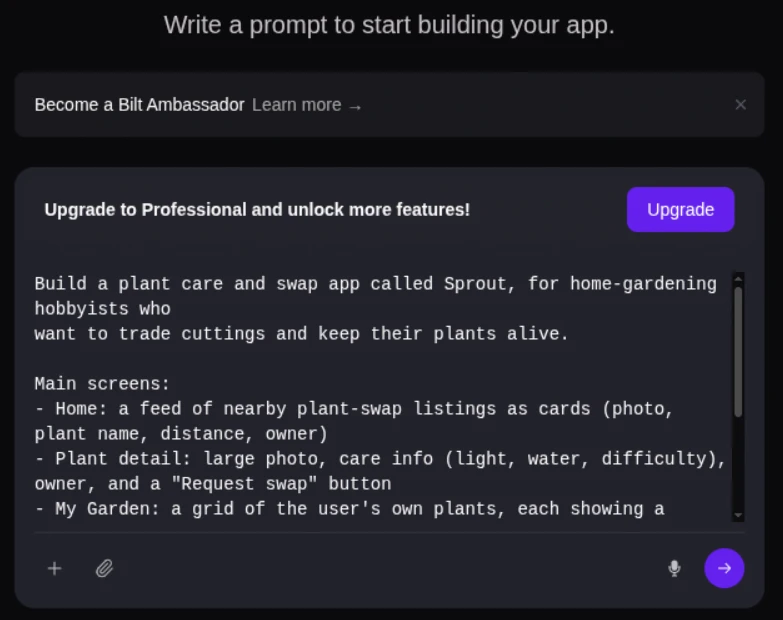
- Prompt to app: Turn a plain-English app description into a working native iOS and Android app in minutes, then try it in Bilt's live browser preview.
- Native code: Build on React Native for iOS and Android, so the app can move from prototype to developer handoff without a rebuild.
- Backend included: Add authentication, database, storage, and server logic with Bilt Cloud, plus iOS subscription paywalls through Bilt Payments.
- Store handoff: Generate builds, then handle store work inside Bilt: code signing, certificates, provisioning profiles, App Store Connect upload, and Google Play internal-testing delivery.
- Code ownership: Export the React Native source code when a developer needs to inspect, extend, or take over the project.
Traditional custom app development can still take 3-6+ months, depending on app scope and Apple or Google review cycles. Bilt gives you a testable app before you commit to that calendar.
Apple and Google developer account fees still apply when you publish. Bilt builds, signs, and uploads iOS builds to App Store Connect, then you submit them for Apple review.
On Android, Bilt builds the .aab and can send it to Google Play's internal testing track. The first release may require a manual upload in Play Console.
| Milestone | Bilt path |
|---|---|
| First working version | Minutes |
| Backend setup | Built in |
| Store build and upload | Bilt-assisted workflow; final review submitted in store tools |
| Source code | Exportable React Native |
Build first, pick the plan second.
Start with Bilt's free tier when you need proof before a paid plan. Describe your app idea, test the first version, and check backend and store-readiness before upgrading.
If you are comparing Draftbit because you want to ship a native mobile app, start building free with Bilt. Want to compare token room first? See all plans.
Common questions about Draftbit pricing
Use these answers before you pay for Draftbit, especially if credits, export, submission support, or downgrade limits could affect your build.
Is Draftbit free?
Yes. Draftbit has a Free Forever plan at $0/month, but you should treat it as an evaluation plan unless your app can stay inside the free limits.
Check the Free Forever limits before you plan a production build:
- Projects: Up to 3 projects. Use 1 slot for the main prototype and 2 for throwaway tests.
- Credits: 10,000 monthly credits. Spend credits on the flows you expect to keep, then upgrade with real usage data.
- Publishing: Web publishing to a draftbit.dev domain. Use draftbit.dev for internal review before you commit to a paid publishing workflow.
Older posts may mention 2 projects or 5 screens. Use the official FAQ limits above, then upgrade once the app needs more projects, more credits, or a production publishing path.
Can I try before I commit?
Draftbit does not advertise a time-limited trial for paid plans on its pricing or FAQ pages. Use the Free Forever plan as your trial window.
Build 1 realistic flow before upgrading:
- Create the project you would upgrade.
- Use the 10,000 monthly credits on the flow you expect to keep.
- Publish to draftbit.dev and collect approval before moving to Standard or Pro.
Do credits roll over?
Included monthly credits reset each billing cycle, so plan to use the allowance inside that month. Unused included credits do not roll over.
Treat purchased credits as separate capacity:
- Use purchased credits for temporary spikes instead of your baseline monthly budget.
- Keep a small reserve for late-build changes because purchased credits do not expire.
- Upgrade your plan once the included allowance keeps blocking planned work.
What happens to my projects if I downgrade?
Your existing Draftbit projects stay accessible after a downgrade, but the lower plan's limits apply immediately. Check those limits before changing plans.
Audit 2 areas before you downgrade:
- New projects: Bring the account within the lower plan's project limit before you expect to create another project.
- Higher-tier features: Export source code, document paid-plan workflows, and finish submission work before feature access changes. Downgrade after a release milestone, not in the middle of one.
Which Draftbit plan includes source code export?
Draftbit source code export belongs to Pro and above. If a developer needs the React Native codebase for review, custom work, or handoff, budget for Pro ($40/month) rather than Standard.
Can Draftbit publish to the App Store?
Draftbit can help with App Store submission on Pro and above, but publishing is not fully hands-off. You still need Apple and Google developer accounts, store metadata, privacy answers, and time for review fixes.
Is Draftbit cheaper than Bilt?
Draftbit lists Standard at $20/month, while Bilt Professional is €25/month, so compare the converted checkout totals before deciding which costs less.
Bilt can be cheaper when backend setup, code signing, store submission, or developer handoff would otherwise require paid help.
Do I need a developer to use Draftbit?
You can build visually in Draftbit without a developer. A developer becomes useful when source export, custom React Native work, backend bugs, or release fixes are in scope.
What is the cheapest way to launch a Draftbit app?
The cheapest path is to build on Free or Standard, upgrade to Pro only for export and submission prep, and avoid expert services unless a release blocker appears. Budget at least $124 for Apple and Google store accounts if you publish to both.
What are Draftbit credits used for?
Draftbit credits are used for AI work inside the builder, including code generation, component creation, agent conversations, and full-screen generation. They reset monthly, so use the allowance inside the billing cycle.
Is Draftbit Standard enough to launch an app?
Standard is better for building and refining. Pro is the safer launch plan because source export, simulators, and submission assistance sit at Pro and above.
Does Draftbit charge extra for expert help?
Yes, expert help and service packages can sit outside the monthly subscription. Verify current service pricing before you budget, because paid help can move Draftbit from a low monthly tool to a larger launch cost.