If you're checking Thunkable pricing in 2026, you're probably trying to answer one practical question: can you build and publish your first app without overspending?
Thunkable can be useful for beginners because it gives you a visual way to create mobile apps. The pricing gets more important once you move from experimenting to publishing.
This guide breaks down what each plan costs, where app store publishing starts, and whether Thunkable is worth it for first-time app builders in 2026.
Already know Thunkable is not the fit? Bilt takes you from app idea to App Store submission with no coding, and you can start free.
TL;DR:
- Thunkable's free plan cannot publish to the Apple App Store or Google Play.
- Publishing starts on Builder at $59/month, or $37/month when billed annually.
- Year-one cost for both stores starts at $568 with annual Builder, Apple Developer Program, and Google Play.
- Code ownership is the bigger long-term issue because Thunkable does not offer source code export.
Thunkable pricing at a glance
Short answer: Thunkable has a free plan, but app store publishing starts on the Builder plan. If your goal is to get an app into the Apple App Store or Google Play, the real starting price is $59/month, or $37/month when billed annually.
The main pricing caveats are simple:
- Free and Accelerator are for building, not store publishing. You need Builder or higher to publish to app stores.
- Annual prices are lower, but require commitment. Builder drops from $59/month to $37/month when billed annually.
- Published app limits matter. Builder includes 1 live published app, while Advanced includes unlimited live published apps.
Here is the clean pricing snapshot:
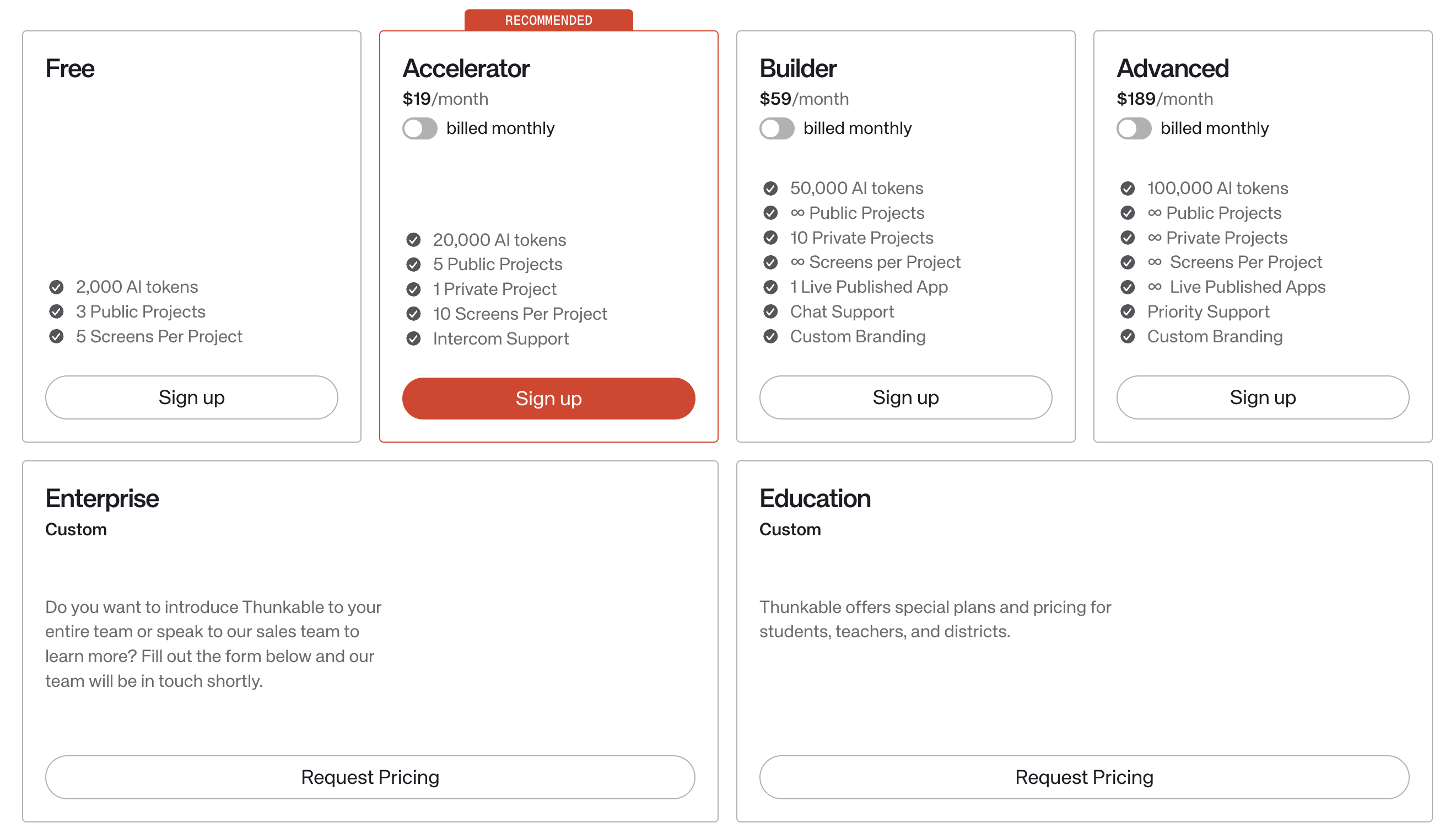
| Plan | Monthly Price | Annual Price (per month) | Published Apps |
|---|---|---|---|
| Free | $0 | $0 | 0 (no publishing) |
| Accelerator | $19/month | $18/month | 0 (no publishing) |
| Builder | $59/month | $37/month | 1 live app |
| Advanced | $189/month | $99/month | Unlimited live apps |
| Enterprise | Custom | Custom | Custom |
Which plan do you actually need?
The easiest way to choose a Thunkable plan is to ask one question: do you need a live app in the Apple App Store or Google Play? If not, keep costs low while you validate the idea.
- Choose Free if you are learning Thunkable, testing the interface, or building a tiny public prototype.
- Choose Accelerator if you need more room for learning and prototyping, but app store publishing is not the main job yet.
- Choose Builder only when app store publishing matters, because this is the first tier that unlocks store submission and supports one live published app.
- Choose Advanced when you are managing multiple live apps, working more professionally, or need team-level room beyond one published app at a time.
If you are unsure, start below the publishing line. Upgrade only when the app needs to move from prototype to live product.
Plan-by-plan breakdown
The breakdown below starts with the free tier, then moves up based on when you need publishing, more live apps, or team support.
Free plan ($0)
Free gives you a low-risk way to learn Thunkable and sketch a small public prototype. Its limits arrive before a typical app launch.
- Projects: 3 public projects, so anything private, client-facing, or proprietary needs a paid tier.
- Screens: 5 screens per project, enough for a home screen, 2 or 3 content screens, and a settings, form, or signup screen.
- AI tokens: 2,000 tokens, which is useful for trying AI generation but not much runway for repeated revisions.
- Storage: 100MB, fine for lightweight assets but restrictive if your prototype depends on lots of images, audio, or uploaded files.
- Publishing: No Apple App Store or Google Play publishing, so this plan stops before the launch step.
That makes Free workable for a single-purpose demo: a habit tracker, class assignment, landing-style app, or simple directory. Once your idea needs more screens, privacy, or app store distribution, you have outgrown the free tier.
For classroom projects, the free tier can also feel tight. Public-only projects and the 5-screen cap make class use less flexible than a larger paid or education plan.
Accelerator plan ($18-$19/month)
Accelerator removes the Free plan's tightest building limits, but store publishing still starts on Builder.
For $18 to $19/month, the two upgrades that matter most are:
- More room to build: 20,000 AI tokens, 5 public projects, 1 private project, and 10 screens per project.
- Human help: Intercom support when you need help in the editor.
A solo builder validating one habit-tracker idea can use Accelerator to test flows privately and revise the prototype. Store release still requires Builder.
(Source: Thunkable pricing page.)
Builder plan ($37-$59/month)
Builder opens the first route to a live Thunkable app. Publishing begins here, which explains the jump from $0 to $59/month. (Source: Thunkable pricing page.)
The useful upgrade is the production slot. Treat the other limits as constraints around that launch.
- AI tokens: 50,000 tokens for AI-assisted generation and edits
- Projects: unlimited public projects plus 10 private projects, enough to keep unfinished work out of public view
- Screens: unlimited screens per project, which matters once onboarding and settings flows grow
- Publishing: 1 live published app, so the second production app forces another plan decision
- Support: chat support, which is fine for solo work but thin when a client launch is blocked
- Branding: custom branding for a more finished public app
In practice, the 1-live-app cap is the friction point. You can build up to 10 private projects, but only one app can sit in production.
Unlimited screens help when one app gets larger. They do not help when your roadmap turns into separate apps for different customers, brands, or locations.
Advanced plan ($99-$189/month)
Advanced is priced for accounts that keep a portfolio of apps live at the same time.
Thunkable's public pricing table lists Advanced at about $99/month on annual billing or $189/month month to month. It also lists unlimited live published apps on this tier.
- AI tokens: 100,000 tokens for heavier AI-assisted iteration
- Publishing: unlimited live published apps, compared with 1 live published app on Builder
- Branding: removal of Thunkable branding on this tier
- Support: priority support through the standard support channels
- Real-world fit: separate client or department apps that must stay live at the same time
The price jump is easiest to justify when the account holds multiple live properties, such as a client app plus an internal tool. For one consumer app, Builder usually creates the same publishing outcome.
The app cap does not remove the launch work.
You still need:
- Apple and Google developer accounts
- Store assets for each app
- Review fixes after submission
Compare higher-tier alternatives before committing:
- FlutterFlow when Flutter-based visual tooling matters.
- Adalo when web-first no-code app work is the main goal.
- Bilt when you want a real native app with React Native code you own, built without coding.
Enterprise and education (custom pricing)
Thunkable lists Enterprise and Education as request-based plans, so pricing comes from a custom quote.
Ask for a quote when the blocker is organizational rollout rather than another solo-builder limit.
- SSO and admin controls: Useful when IT needs centralized login and permission management.
- Volume seats: Better for schools or teams where many people need access under one program.
- Institutional requirements: Relevant when security review or purchasing paperwork is part of rollout.
- Classroom programs: Education pricing fits courses where many students build apps under one program.
- Large app programs: Enterprise is more about seats and controls than app count because Advanced already lists unlimited live published apps.
How Thunkable billing actually works
Thunkable uses flat monthly or annual subscriptions, not usage-based billing. You pay for a plan, then work within that plan's caps.
Thunkable includes an AI-token allowance with each plan. Token rules differ from publishing and project limits.
- Unused AI tokens expire: Any included balance left at reset does not carry forward.
- Monthly plans replenish at cycle end: Included tokens refresh when the monthly billing cycle ends.
- Annual plans replenish monthly: Included tokens refresh at the beginning of each month.
- Extra AI tokens are available: Thunkable says users can buy more after using their included token balance.
- Other plan limits remain plan-specific: Check the relevant feature limit before assuming an AI-token rule applies.
- No overage fees: Thunkable blocks the capped feature instead of charging extra.
- Plan caps reset by billing cycle: AI tokens and other usage limits refresh on your next cycle.
- Unused AI tokens do not roll over: If you do not use them before reset, they are not carried forward.
- Annual billing lowers the monthly price: For example, Accelerator is cheaper per month annually than month-to-month.
- Upgrades unlock blocked features: If you hit a publishing or usage cap mid-cycle, upgrading is the practical way to keep going.
| Billing dimension | How Thunkable handles it |
|---|---|
| Billing model | Flat monthly or annual subscription |
| Overage charges | None, capped features block |
| Plan limits | Hard caps by plan |
| AI token reset | Refreshes each billing cycle |
| Unused tokens | No rollover |
| Annual discount | Lower monthly equivalent |
| Mid-cycle caps | Upgrade or wait for reset |
Knowing how the billing model works makes the real cost of publishing easier to size up. That is where first-time builders get surprised.
What it costs to publish a Thunkable app
The minimum realistic cost to publish a Thunkable app is the Builder plan plus developer accounts from Apple and Google.
For both stores in year one, the cleanest math is:
- Builder annual: $444/year
- Apple Developer Program: $99/year
- Google Play Developer account: $25 one-time
- Year-one minimum: $444 + $99 + $25 = $568
With monthly Builder billing, the platform cost is $708/year. Using the US Apple and Google fees cited below, the first-year total for both stores is $832. (Sources: Thunkable pricing page and the official store-fee citations below.)
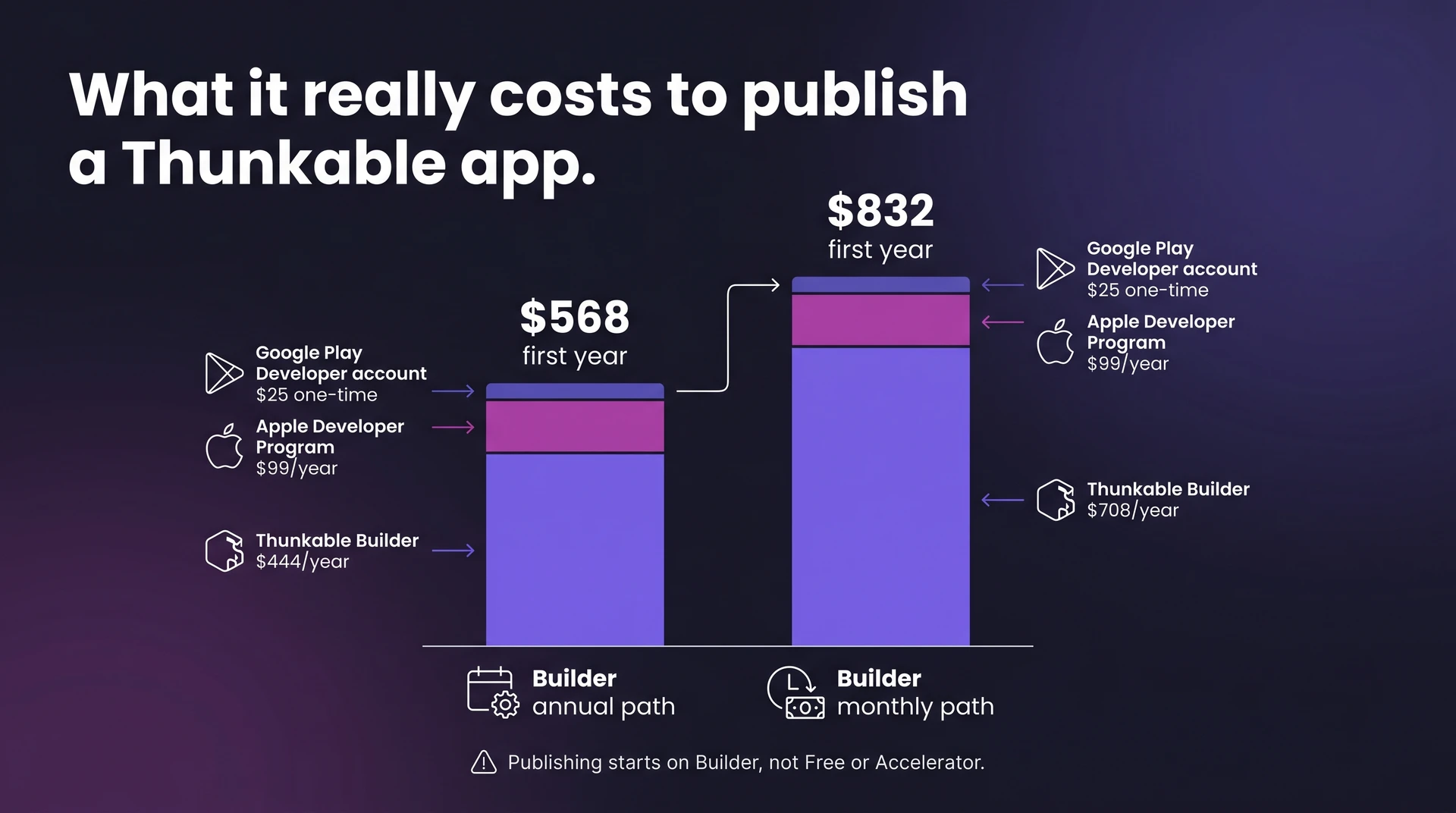
Builder is the minimum because app store publishing starts there. Free and Accelerator are better treated as testing or early-building plans, not launch plans.
Advanced becomes the relevant budget line when you need more than one live published app. At annual billing, Advanced starts at $99/month, or $1,188/year, before Apple or Google fees.
| Cost item | Amount | Frequency | Required for |
|---|---|---|---|
| Builder, annual billing | $37/month ($444/year) | Annual | Any store publishing |
| Builder, monthly billing | $59/month ($708/year) | Monthly | Any store publishing |
| Advanced, annual billing | $99/month ($1,188/year) | Annual | 2+ live apps |
| Apple Developer Program | $99 | Per year | App Store publishing |
| Google Play Developer account | $25 | One-time | Google Play publishing |
| Year-one minimum | $568 | First year | Both stores, annual Builder |
| Year-one monthly Builder | $832 | First year | Both stores, monthly Builder |
| Cost item | Amount | Frequency | Required for |
|---|---|---|---|
| Builder, annual billing | $37/month ($444/year) | Annual | Any store publishing |
| Builder, monthly billing | $59/month ($708/year) | Monthly | Any store publishing |
| Advanced, annual billing | $99/month ($1,188/year) | Annual | 2+ live apps |
| Apple Developer Program | $99 | Per year | App Store publishing |
| Google Play Developer account | $25 | One-time | Google Play publishing |
| Year-one minimum | $568 | First year | Both stores, annual Builder |
| Year-one monthly Builder | $832 | First year | Both stores, monthly Builder |
Hidden costs and gotchas
Thunkable’s sticker price is not the full cost of shipping. The biggest gotcha is that publishing starts at Builder, and Builder is still a one-live-app tier.
Budget for these costs before you commit:
- Publishing minimum: You need Builder to publish an app. Builder costs $59/month, or $37/month when billed annually, and supports 1 live published app at a time.
- App store accounts: Apple Developer Program costs $99/year. Google Play Console costs $25 one time.
- Payment processing: Transaction fees depend on what you sell: digital goods generally use Apple or Google in-app purchasing, while physical goods and real-world services can use Stripe or another provider. These fees are separate from your Thunkable subscription.
- Backend services: Apps that rely on Firebase, Airtable, or similar services can carry separate usage-based costs for databases, authentication, storage, or automation.
- Leaving Thunkable: Thunkable does not offer source code export, so moving to another stack means rebuilding instead of taking the code with you.
- Custom-tier features: Responsive app features are custom-pricing territory, so price that separately before treating a self-serve plan as enough.
Is Thunkable worth it?
Thunkable is worth considering when you need a quick cross-platform prototype and accept no-code tradeoffs. The value gets weaker once publishing, multiple live apps, or long-term code ownership become part of the plan.
Thunkable is a good fit if you want:
- Rapid iOS and Android deployment: You want one visual builder for both mobile platforms without hiring developers.
- Simple MVP validation: You need a basic app to test demand before investing in custom development.
- Community project adaptation: You want to start from existing community-built projects instead of a blank canvas.
- No-code workflow: You prefer visual building over learning React Native, Swift, Kotlin, or backend setup.
Thunkable is a poor fit if you need:
- Publishing on a tight budget: Free exploration does not cover official store publishing, and Builder starts at $37-$59/month with 1 live app.
- Source code ownership: Thunkable does not offer source code export, so a rewrite is likely if you outgrow the platform.
- Multiple published apps: Builder includes 1 live published app, so multi-app teams need a higher tier.
- Complex business logic: Role-based permissions and custom API chains can turn into dense block logic that is hard to audit.
- Production performance headroom: Test complex screens before you commit.
- Large lists and media-heavy feeds
- Live chat or other frequent refresh screens
- Offline sync and repeated API calls
- Expected user load, since Thunkable does not publish a universal concurrency ceiling
The decision usually comes down to publishing limits, code ownership, and complexity ceilings.
Choose Thunkable when speed matters more than ownership. Choose a native or code-export workflow when the product will keep evolving.
Still hitting a wall before the App Store? See how Bilt is different
Thunkable's hardest gap shows up after the prototype, when the next step is a published app you can own and keep changing.
Describe an app and watch Bilt turn it into a native app in live preview.
Here's how Bilt closes that gap:
- Publishing path: Thunkable puts official store publishing behind Builder, which starts at $37-$59/month and includes 1 live app. Bilt builds around App Store and Google Play submission from the start.
- We handle the setup: Bilt handles the launch work:
- Frontend and backend setup
- Code signing and certificates
- Provisioning profiles
- Store build delivery: Bilt uploads iOS builds to App Store Connect and sends Android bundles to Google Play internal testing when configured; you submit the iOS build for Apple review, and a first Play release may require manual upload.
- Native code ownership: Bilt creates iOS and Android apps with React Native code you own, so you are never locked in.
- Keep improving after launch: Describe the screen, flow, or feature you want to change. Bilt updates the real native app for iOS and Android without rebuilding every screen by hand.
- Pricing path: Start building on Bilt's permanent free tier. According to Bilt pricing, Professional plans start at $25/month and include roughly 40-100 prompts per month, depending on prompt complexity.
Thunkable still fits if you prefer visual building and its plan limits match the product. Pick Bilt when the blocker is the handoff from idea to native app store release.
Describe your app idea and Bilt builds it. Start with Bilt for free, and check Bilt pricing when you're ready to publish.
Common questions about Thunkable pricing
These quick answers cover the pricing questions that usually come up right before you choose a Thunkable plan.
Does Thunkable offer a free trial?
Thunkable offers an ongoing Free plan for evaluating the builder. Its published limits include:
- 2,000 AI tokens
- 3 public projects
- 5 screens per project
- 100MB storage
- No Apple App Store or Google Play publishing
Free projects appear in Thunkable's Public Gallery, where other people can preview and remix them.
Check Thunkable's pricing page before subscribing for any temporary promotion. (Source: Thunkable pricing page.)
Can I start free and upgrade later?
Yes. Start on Thunkable's Free plan, then upgrade when the project needs private work or store publishing.
Upgrade before adding proprietary material to a public project, including:
- Private screens and workflows
- Credentials and integrations
- Client information
- Unreleased product details
Free projects are listed in the Public Gallery for others to preview and remix. Private projects are excluded from that gallery.
Store publication requires an eligible active subscription. Budget for recurring paid access before launching an app that needs to stay live.
Are there overage fees?
Thunkable sells extra AI tokens after the included allowance is used. Project and screen caps follow plan-specific rules, so there is no single overage policy for every limit.
- Monthly subscriptions: Tokens replenish at the end of each billing cycle.
- Annual subscriptions: Tokens replenish at the beginning of each month.
- Unused tokens: The remaining balance expires at reset.
Check the relevant plan limit before assuming it follows the AI-token rules. (Source: Thunkable pricing page.)
Can I export my app, or am I locked in?
Thunkable does not allow source code export, so you are locked into Thunkable for the app’s underlying build. If you leave, migration means rebuilding the app on another platform.
That risk grows with each part you build inside the platform:
- screens
- workflows and logic
- integrations
If code ownership matters, Start building with Bilt. Bilt generates production-ready React Native code you own, so you can keep building on or off the platform.