Researching Adalo's pricing usually comes down to one question: does drag-and-drop app building still fit your budget in 2026?
The answer is trickier than it used to be. Visual no-code builders now sit beside AI-native tools that turn a single prompt into a real native app.
Adalo still works for simple MVPs and builders who like hands-on visual control. But removing branding, publishing to the app stores, and scaling all live above the free tier, so your plan choice matters from day one.
Adalo's solo paid plans run $36-$52/month before developer accounts. The breakdown below covers every tier, hidden costs, and how Adalo compares with AI app builders.
TL;DR
- Free plan: useful for prototypes, with Adalo branding, a database record cap, and no native mobile publishing.
- Starter ($36/month): removes branding and works as the paid baseline for a simple public MVP.
- Professional ($52/month): adds more capacity for serious launches, including 2 published apps, 5 editors, and 25GB storage.
- Team ($160/month): fits teams managing several apps or collaborators, with 125GB of team storage.
- Year-one baseline: budget at least $556 for Starter billed annually, Apple Developer Program access, and Google Play Console access.
Adalo plans at a glance
Adalo's pricing is easiest to read as a ladder: prototype for free, then upgrade when publishing, storage, or team workflow starts to matter.
The Free tier starts at 500 database records. Storage then scales by plan: Starter includes 5GB, Professional includes 25GB, and Team includes 125GB.
| Plan | Monthly Price | Data Storage | Best For |
|---|---|---|---|
| Free | $0/month | 500 records (per app) | Basic prototyping |
| Starter | $36/month | Scaled up from Free | Solo builders / MVPs |
| Professional | $52/month | Scaled up from Starter | Growing apps |
| Team | $160/month | 125GB/team | Multi-app teams |
What each plan includes
Adalo plan differences are easiest to judge by the limit that blocks shipping first. Look less at the plan name and more at what the plan lets you publish.
Free plan
Prototype first: Use Adalo Free to test screens and data flow before comparing paid tiers.
- Price: $0.
- Storage: 500 database records per app across the built-in database.
- Branding: Adalo watermark remains visible to users, which makes Free feel like a test workspace.
- Publishing: Web publishing only, with Adalo branding. App Store and Google Play publishing require a paid tier.
- Practical fit: Useful for prototypes and internal demos, but too tight for a real user base once records start accumulating.
Starter plan ($36/month)
Starter is where Adalo starts to look usable for a public MVP. This is the first paid plan where the upgrade changes shipping, rather than just presentation.
- Price: $36/month.
- Branding: Removes Adalo watermark from your app.
- Publishing: Automated App Store and Google Play publishing are included. Web publishing and custom domains are included too.
- Storage: 5GB data storage per team, which is enough for lighter MVPs before media files become the constraint.
- Database records: Paid tiers are described as unlimited database records, so Starter removes the Free plan record ceiling.
- Usage fees: Adalo's flat subscription model makes Starter easier to budget during early traffic tests.
Professional plan ($52/month)
Professional becomes relevant when 25GB storage or a five-person editing team is part of the launch plan.
- Price: $52/month.
- Publishing: Automated Apple App Store and Google Play publishing remain included at this tier.
- Published apps: 2 published apps, each with its own database.
- Team access: 5 app editors or collaborators per team.
- Storage: 25GB data storage per team, which is a meaningful step up from Starter's 5GB.
- Database records: Unlimited database records on paid tiers, based on Adalo's pricing update.
- Custom domain: Custom domains are included here too; Professional's bigger upgrade is capacity and collaboration.
- Practical fit: Professional is the sensible default when a serious Adalo app needs room beyond a Starter-level MVP.
Team plan ($160/month)
Team makes sense when Professional no longer covers the number of apps or people sharing the workspace. The clearest capacity jump is 125GB storage.
- Price: $160/month.
- Storage: 125GB data storage per team. Adalo directs larger business needs to Adalo Blue rather than listing a Business tier.
- Branding: Adalo watermark stays removed, and custom domains remain available.
- Publishing: Automated App Store, Google Play, and web publishing are included.
- Workspace fit: More editors and more app capacity are the reason to compare Team against Professional.
- Practical fit: Move to Team when several teammates own the build or one account manages multiple live products.
How Adalo's pricing actually works
Adalo pricing is mostly predictable because it is subscription-based. Your bill changes based on plan tier, billing cycle, published app needs, and editor access.
- Published apps and editors: These are the main variables to check before choosing a tier.
- Draft apps: Unpublished work stays outside the live app count until you publish.
- Database records, API calls, and end users: These affect plan fit through limits rather than raising the subscription price by themselves.
Adalo’s pricing page shows a 20% discount on paid plans when you choose annual billing instead of month-to-month billing.
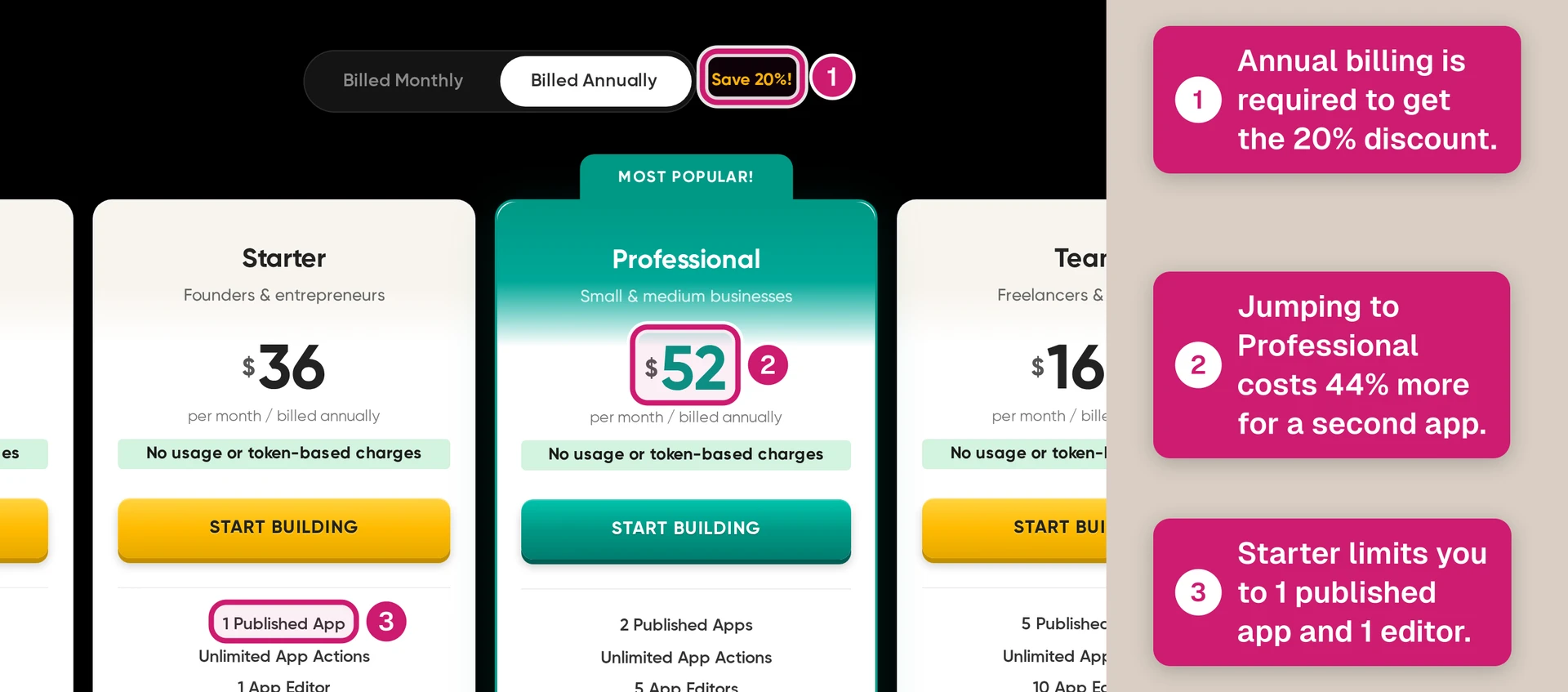
- Starter: $36/month annually vs. about $45/month monthly, saving about $9/month.
- Professional: $52/month annually vs. about $65/month monthly, saving about $13/month.
- Team: $160/month annually vs. about $200/month monthly, saving about $40/month or $480/year.
So the pricing decision is less about surprise usage fees and more about commitment. Monthly billing costs more but keeps flexibility; annual billing lowers the effective monthly price if you already know Adalo fits your app.
Which plan should you choose?
Choose the plan based on what you are trying to ship and the limits you expect to hit. Starter sets the minimum paid baseline; Professional becomes relevant when higher limits or integrations matter.
- If you are prototyping: Start with Free or Starter only if you are validating screens, flows, and basic data structure.
- If you are building a simple MVP: Starter can work when the app is simple and you can live within the plan limits.
- If you want App Store or Google Play distribution: Starter is the minimum paid tier for the $556 year-one baseline. Use Professional when you need higher limits or external integrations.
- If your app needs external APIs or geolocation: Treat Professional as the practical starting point. Stripe payments are available on paid plans, with Stripe fees charged separately.
- If multiple people are building the same app: Team fits when collaboration is the bottleneck. Solo builders can usually stay below Team.
Adalo gives you hands-on control of each screen, but that control also means more time in the builder.
Bilt is worth considering if you would rather describe the app and move toward a native build faster.
What Adalo really costs in year one
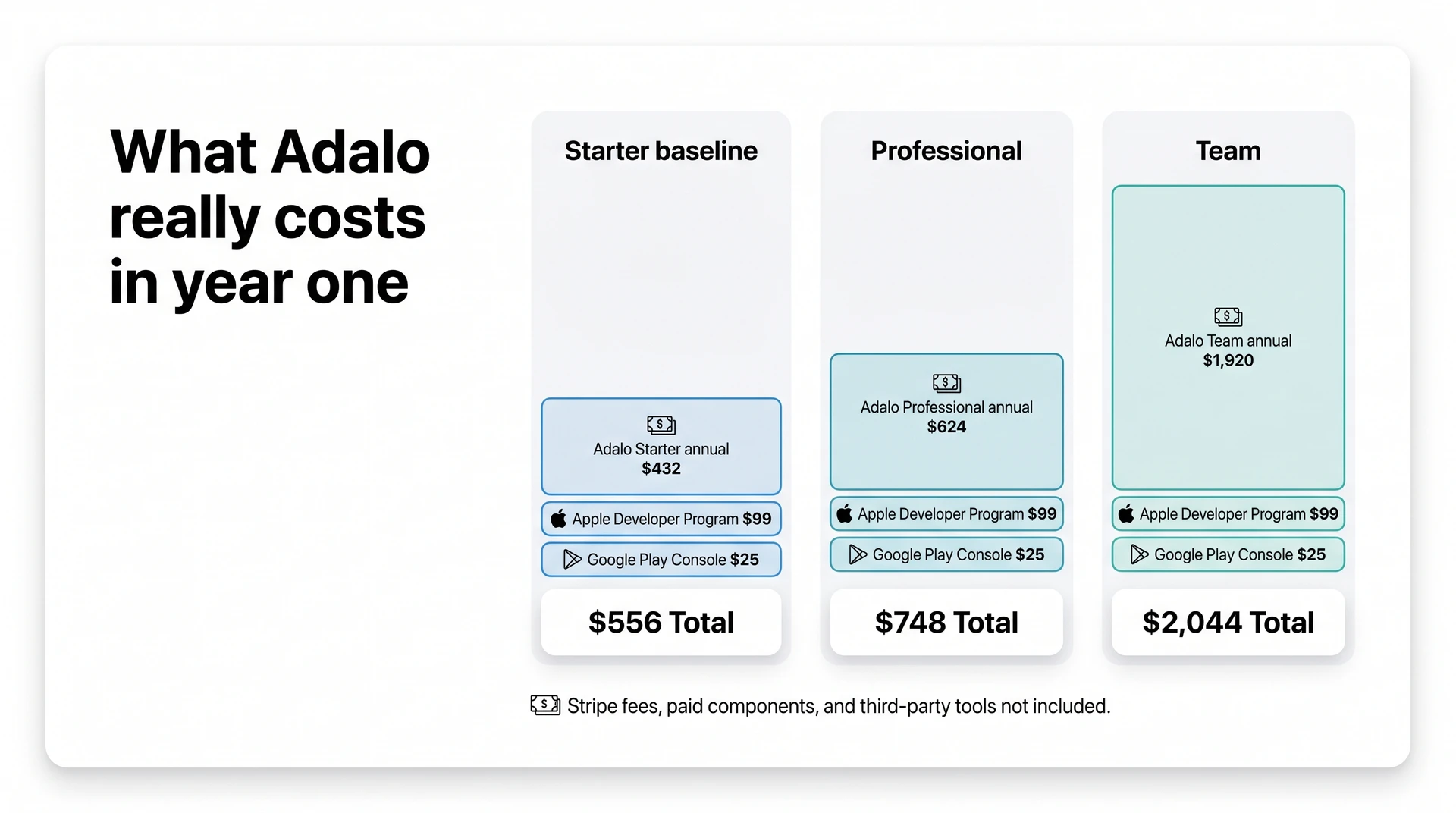
For an Adalo app on the lowest paid tier, expect $556 in year-one baseline costs before Stripe fees or paid add-ons. That assumes Starter at $36/month billed annually, plus Apple and Google developer accounts.
| Cost item | Year-one cost | When it applies |
|---|---|---|
| Adalo Starter | $432/year | Lowest paid tier with App Store and Google Play publishing (the $556 baseline once you add developer accounts) |
| Adalo Professional | $624/year | Higher limits, more published apps, and storage |
| Apple Developer Program | $99/year | Required for App Store publishing |
| Google Play Console | $25 one-time | Required for Google Play publishing |
| Adalo Team | $1,920/year | Only if you need team collaboration instead of solo building |
Professional and Team raise the subscription cost. Stripe fees, paid components, and outside services sit in the hidden-cost budget below.
Hidden costs to budget for
Adalo’s subscription is only one part of the budget. The outside costs depend on how you publish, collect payments, and extend the app.
- Apple Developer Program: Apple charges $99/year to publish iOS apps through the App Store.
- Google Play Console: Google charges a $25 one-time fee to publish Android apps on Google Play.
- Stripe processing: Stripe payment integration is available on Adalo’s paid plans, but Stripe’s own fees still apply. Stripe pricing lists the standard online card rate as 2.9% + $0.30 per successful transaction.
- Paid marketplace components: A booking flow or advanced calendar may require a paid Adalo component instead of a built-in block. Check templates carefully because the demo screen may depend on a paid add-on.
- Third-party tools: Xano for backend data or Zapier for automation can add a separate monthly bill. Email platforms and analytics tools may also charge outside Adalo.
The component marketplace deserves special attention because a paid booking component or calendar component can change the real cost of a “simple” app. Check those add-ons before treating the Adalo subscription as the full monthly budget.
Before choosing a plan, map each launch feature against three buckets:
- Included in the Adalo plan
- Requires a paid marketplace component
- Depends on another paid service
Adalo vs the alternatives
Think of Adalo as a middle path: easier than developer-first tools, but costlier once publishing and add-ons enter. The comparison hinges on where mobile publishing starts.
Use the comparison as a budgeting check, then read the verdict through your app idea.
The deciding question is whether your product can stay inside Adalo's data model and action system.
Adalo can speed up a simple build when the answer is yes. Workarounds become the cost when the answer is no.
For options beyond Adalo, the mobile-publishing AI builder roundup compares ten tools by launch path, architecture, and limitations.
Is Adalo worth it in 2026?
Yes, Adalo can still be worth it in 2026 for simple mobile products. Use it for validation before relying on it for a complex production build.
An Adalo class-booking app can store class listings and collect reservation forms with standard screens and actions.
Automatic waitlist promotion and custom cancellation rules add workflow logic that may require external services.
Adalo is worth paying for when:
- Store publishing matters: Start with the lowest paid tier that covers your publishing needs, then move to Professional if storage, published apps, or integrations become the bottleneck.
- The app fits common patterns: A class booking app or basic directory is where Adalo makes the most sense.
- Speed matters more than polish: Adalo can turn a small idea into something testable in days or weeks.
- The feature ceiling is acceptable: Visual builders work when your screens and actions match patterns Adalo already supports.
Budget for another path when:
- Your data grows fast: The Free plan's 500-record cap per app is useful for prototypes, but that cap gets tight once users create profiles or listings.
- Your logic gets complex: Examples include driver-location updates or chat-like messaging. Multi-step approvals and background inventory syncs also push past Adalo's visual logic.
- You need code control: Adalo reserves source-code export for Enterprise; lower-tier teams stay inside Adalo as requirements change.
- You keep working around the tool: Repeated workarounds are the signal that Adalo has become the constraint.
Bottom line: Adalo still works for validating a simple mobile idea and shipping a basic product without a developer.
Need a native app without the drag-and-drop ceiling? Try Bilt
Describe your app in plain English, and Bilt builds a native app for iOS and Android. Bilt also handles the path to App Store and Google Play submission, without requiring you to hire a developer.
Adalo works for simple MVPs, but its visual builder can shape what the product becomes. Bilt gives you React Native source code you can export when the app needs more control.
Bilt covers the mobile publishing lifecycle from first prompt to store submission:
- Describe your idea: Explain the app in plain English, then revise each screen through chat.
- Own the source code: Generate a React Native app for iOS and Android, then export the code when you need control.
- Run the publishing workflow: Build screens, connect the backend, manage deployment, handle code signing, and prepare store submission.
- Keep iterating: Ask Bilt for screens, feature changes, color updates, or flow adjustments in the same chat.
- Preview before release: Check changes with live preview before you send the app for review.
Testing also works on real devices. Scan a QR code to open the current app in Expo Go on an iPhone or Android phone before you ship.
Bilt gives you a native path with code ownership when Adalo's pricing or export limits become blockers. Start building free when you are ready to turn your idea into an iOS and Android app.
Can I build an app for free with Adalo?
Yes, you can build and test an app on Adalo’s free plan. It is best treated as a prototyping plan, not a finished publishing setup.
Free apps include Adalo branding, and removing that branding requires a paid plan. Publishing native apps to the App Store or Google Play also requires moving off Free to a paid tier.
Does Adalo charge per user or per action?
Adalo charges by plan, not per user or per action. You pay a flat monthly subscription for the tier you choose.
As your app grows, the practical limits are plan features, publishing access, storage, and database capacity. It is not a metered model where every user action creates a separate charge.
How much does it cost to publish to the App Store?
To publish an Adalo app to the App Store, you need a paid Adalo plan that supports native publishing plus an Apple Developer Program account, which costs $99/year.
If you also publish to Google Play, add the Google Play Console fee of $25 one-time. Those store fees are paid directly to Apple and Google, not Adalo.
Does AI come at extra cost?
Adalo’s current pricing does not list AI as a separate paid add-on. The costs to watch are the ones that usually show up as your app gets more complex.
- Marketplace components: Some third-party components or templates may cost extra if the built-in editor does not cover what you need.
- Integrations and upgrades: External tools, paid integrations, and higher Adalo tiers can raise the monthly cost as you add more features, users, or publishing needs.