You are comparing AI no-code builders because you want to ship an app, not spend weeks polishing a preview that never reaches iOS or Android.
The first prompt is rarely the hard part. Non-technical builders tend to stall when authentication, payments, database structure, and deployment enter the project.
This guide compares 10 builders through five shipping-first criteria: output, backend depth, deployment, ownership, and total cost. The criteria show what happens after the first generation looks finished.
The short version: Bilt.me is the clearest route to a native iOS and Android app with Bilt-managed native builds, signing, and package upload, and exportable React Native code. You submit the iOS build for review and may need to upload the first Play release manually. Use hosted web builders for portals, and code-export tools when a developer handoff matters most.
10 best AI-powered no-code app builders at a glance
These ten AI no-code builders all start from prompts or visual AI, then split on native mobile versus hosted web and on whether you keep exportable code.
| Tool | Primary output | Starting paid price | Standalone code export |
|---|---|---|---|
| Bilt.me | Native iOS and Android (React Native per publisher materials) | Free; paid from €15 first month, then €25/mo. | Yes; full React Native source via GitHub with two-way sync |
| Bubble | Hosted web plus React Native mobile | Web $29/mo annual; mobile $42/mo annual | No; proprietary runtime |
| Glide | Responsive web and PWAs | $19/mo annual (Explorer) | No |
| Base44 | Hosted full-stack web | $16/mo annual or $20/mo | Not verified |
| Zite | Hosted web and PWAs | $15/mo annual or $19/mo | Schema/CSV only |
| ToolJet AI | Internal web apps | $79 per builder/mo (Pro) | JSON plus AGPL Community runtime |
| Emergent | React/Next.js web and Expo mobile | $10/mo (Starter) | Yes; GitHub sync |
| FlutterFlow | Flutter iOS, Android, web, desktop | $39/mo | Yes; ZIP, CLI, GitHub |
| Softr | Web portals and internal tools | $59/mo | Not a full standalone app |
| Figma Make | React web apps | $20/mo per full seat | Yes; GitHub sync |
What counts as an AI-powered no-code app builder?
An AI-powered no-code app builder turns natural-language instructions into working screens and app behavior without requiring the user to write code.
Classic no-code builders ask you to configure screens, data, and workflows through visual editors. AI-led tools begin with intent, such as “create an inventory tracker,” then use prompts to generate and revise the app.
A qualifying builder should generate more than a UI mock. The useful dividing lines are:
- First-prompt output: Screens and workflows should work together, rather than appearing as disconnected interface elements.
- Backend depth: Check whether the builder creates data models, authentication, permissions, and backend logic from the same project context.
- Iteration loop: You prompt, review, and test until the app handles the intended flow and its edge cases.
- Shipping target: The category includes hosted web apps, PWAs, and native mobile projects built with frameworks such as React Native or Flutter. Bilt produces native iOS and Android apps and publishes installable PWAs directly to the web.
Source-code export and self-hosting are separate capabilities. A builder can fit the category while keeping the app on a proprietary runtime, which makes ownership an evaluation question rather than a defining requirement.
5 questions to ask before comparing these builders
The comparison only works after you decide if you need a store-ready native app or a hosted web prototype you can iterate after the first prompt.
- What does the builder produce? Check whether the output is a native iOS and Android app, a web app, a PWA, or a website inside a mobile wrapper; thin wrappers can raise concerns under Apple’s minimum functionality rule.
- How deep does the backend go? Confirm how the builder handles authentication, database relationships, permissions, payments, and server-side logic once the app moves beyond its happy path.
- Who handles deployment? Look for real-device previews, code signing, production builds, store packaging, and submission support, then identify which steps still require manual work.
- What can you take if you leave? Source-code export and an open backend let you continue elsewhere, while a proprietary runtime can turn migration into a rebuild.
- What is the total cost to ship and run the app? Add the subscription, AI usage, build services, backend fees, and store accounts, including Apple’s $99 yearly fee and Google Play’s $25 one-time fee.
1. Bilt.me
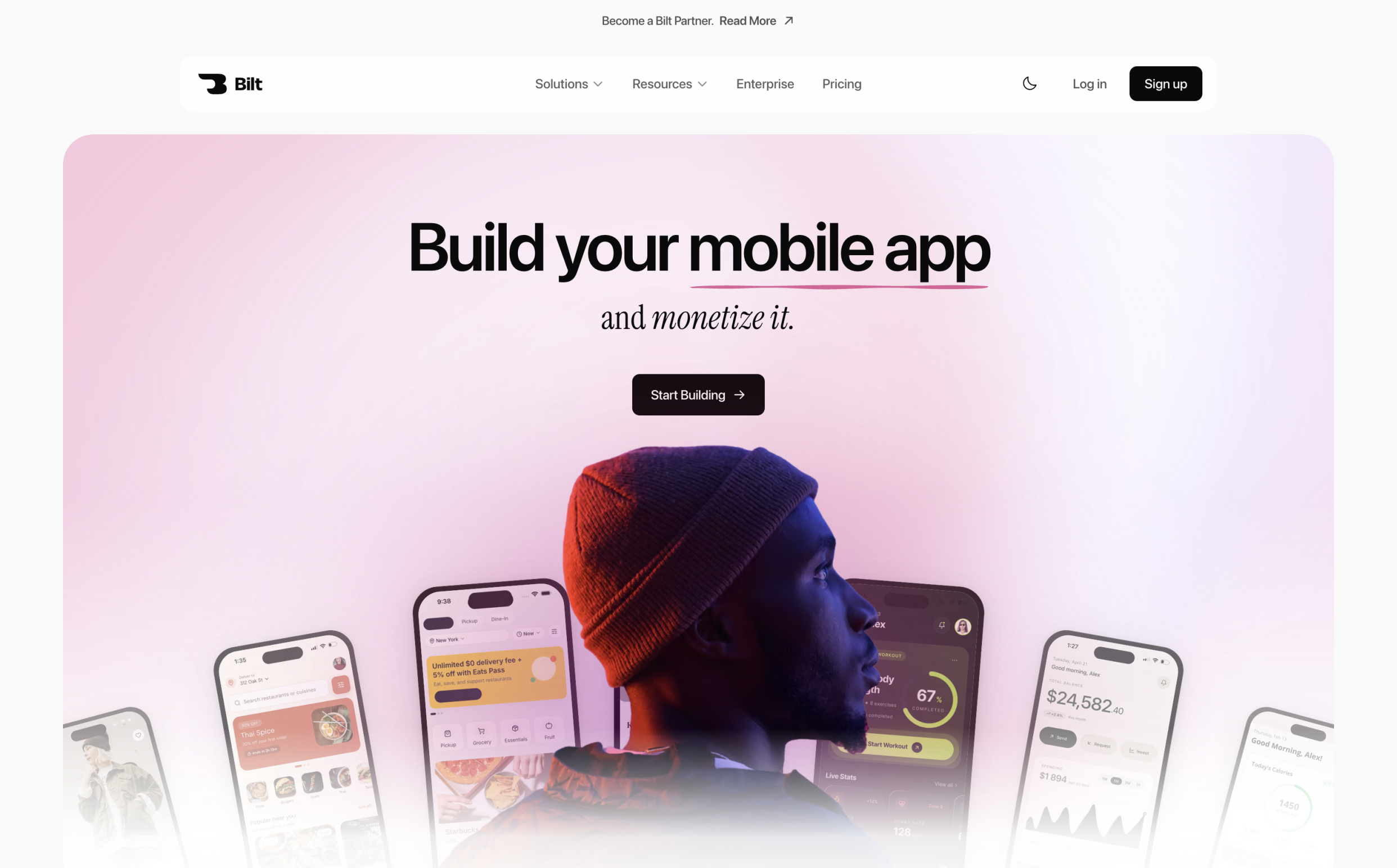
Bilt.me builds real native iOS and Android apps from a plain-English description. It combines React Native generation, backend setup, device previews, code export, and store build, signing, and upload workflows, while you complete App Store review submission in Apple's tools.
Bilt product demo: a plain-English app description becomes a native app in live preview.
Best for: Non-technical founders, small teams, and web-app owners who need a native iOS and Android app.
Small teams can use Collab to invite editors and work together in the same workspace and project.
How it handles app building: Bilt keeps React Native generation, backend setup, device previews, code export, and store build, signing, and upload workflows in one project. You submit the iOS build for review in App Store Connect.
Main tradeoff: You still need your own Apple Developer and Google Play Console accounts for store distribution.
Best-fit apps and use cases
Mo-Haven shows what that workflow can produce. Its solo creator built a low-pressure community app for open sharing and published it on the App Store.
- Consumer apps: Habit trackers can log streaks, while language-learning apps can combine lessons, flashcards, pronunciation practice, progress tracking, and rewards.
- Utility apps: Recurring reminders, location triggers, calendar sync, and push notifications can sit alongside authentication, payments, media, and stored data.
- Web-app extensions: Web App Sync clones an existing web app repository, including projects built with Lovable or v0, as a read-only reference while Bilt builds the native mobile app. The mobile version can add offline playback, notifications, GPS, or paywalls.
AI build and iteration experience
You begin by describing what the app should do in plain English. Bilt uses that description to generate the screens, core features, backend logic, and required integrations for the first working version.
Follow-up changes happen in the same conversation. You can add a screen, change the interface, or adjust a feature, while the retained context keeps earlier requirements and design choices in scope.
Bilt can also run through its seven MCP tools from clients such as Claude, Cursor, and OpenClaw.
Changes appear in Bilt’s live browser preview as the build updates. You can also switch to a cloud-streamed iOS simulator to inspect the native iOS view. For quick testing on a physical iPhone or Android phone, scan the QR code and open the app in Expo Go; use Test on iPhone when you need a real iOS binary and native APIs that Expo Go does not support.
Backend, auth, and app capabilities
The generated project includes the interface and backend-connected logic rather than stopping at screen design.
Bilt Cloud supplies a managed PostgreSQL database, authentication, file storage, and server-side automations without a separate backend account. Your plan limits determine the available cloud capacity.
Bilt can build authentication and media uploads, but cross-user data should refresh periodically or when a screen opens. The same workflow supports Bilt Payments, notifications, and other features that depend on the app's backend. Bilt Payments handles iOS subscription catalogs, entitlements, and server-side receipt verification, with mock purchases in previews and development builds. End-to-end Google Play billing remains in progress.
- Dedicated support and onboarding
- Custom API integrations and design systems
- Group-based access control
Output, deployment, and code ownership
Bilt generates React Native source code for iOS and Android. Connect a GitHub account and click Sync to GitHub; Bilt then keeps changes synchronized in both directions. The repository serves as the code-export path, so you can hand it to a developer, or continue building outside Bilt. Choose Publish to web to publish the current app as an installable PWA at a permanent web URL.
- iOS: Bilt handles build generation, code signing, certificates, and provisioning profiles, then uploads every completed build to App Store Connect with an automatic build-number increment and a TestFlight button. You need an Apple Developer account and complete the listing, attach the build, and submit it for review in App Store Connect.
- Google Play: Bilt builds a signed .aab and sends it to Google Play's internal testing track when publishing is ready. The first release may require you to download the .aab and upload it manually in Play Console. Store distribution requires an Apple Developer account at $99 per year, a Google Play Console account at $25 once, or both.
Pricing
Pricing: Bilt has a permanent Free plan. Professional is €15 for the first month for eligible new subscribers, then €25/month. Annual billing is €19/month billed annually. You can see all plans before upgrading.
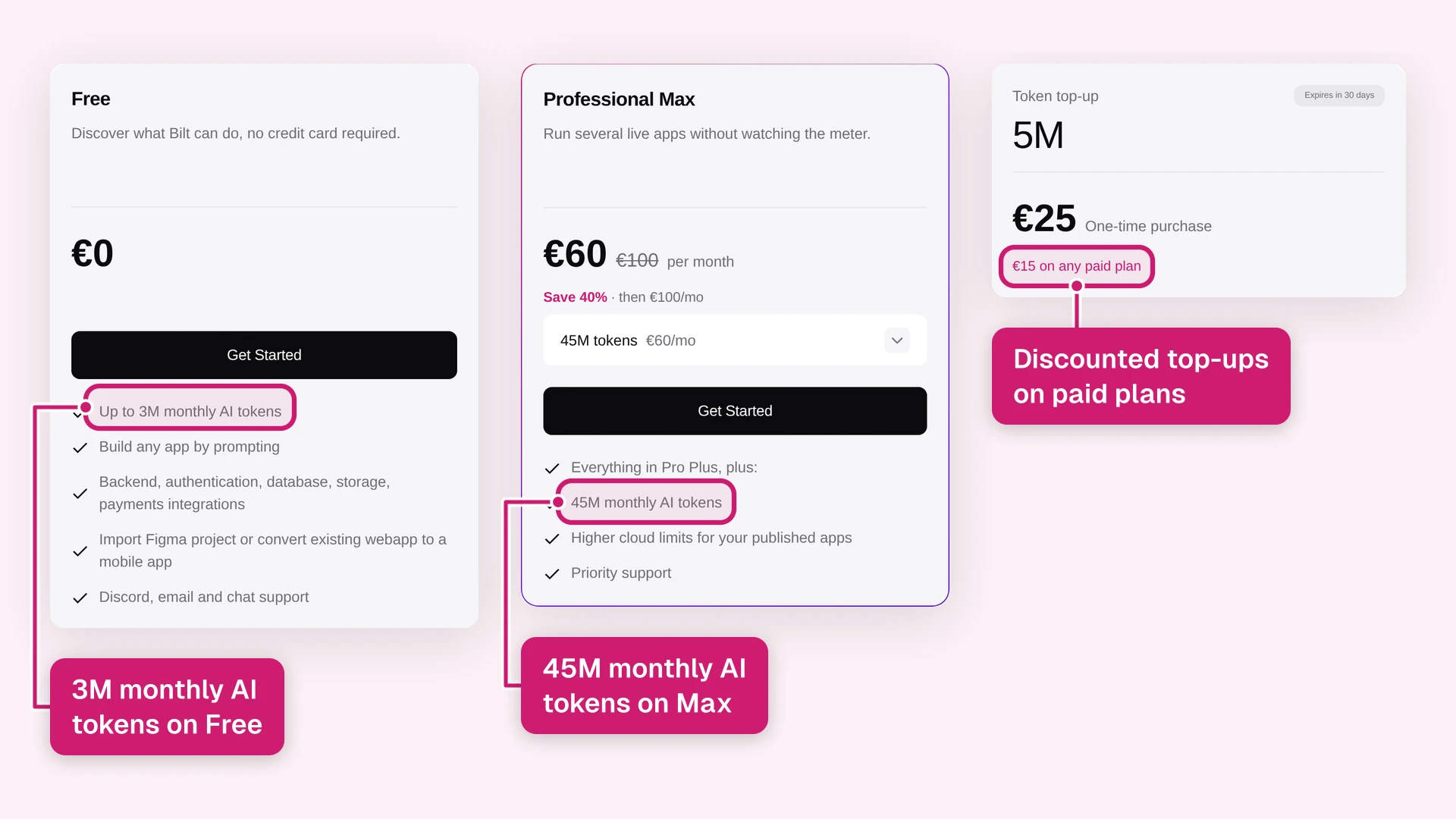
The free and paid tiers use monthly AI tokens:
- Free: Up to 3M tokens per month, accrued at 500,000 per day, plus a one-time 1M signup bonus for new accounts, authentication, database, storage, and live previews
- Professional, €25/month or €19/month billed annually: 10M tokens
- Professional Plus, €50/month or €39/month billed annually: 20M tokens
- Professional Max, €100/month or €79/month annually: 45M monthly tokens
- Professional Ultra, €250/month or €195/month annually: 115M monthly tokens
Annual billing saves two months. If you need more tokens before the next reset, 30-day top-ups on a paid plan cost €15 for 5M, €30 for 10M, or €60 for 20M tokens. Without a paid plan, the same packs cost €25, €50, or €100.
2. Bubble
Best for: Builders who need a hosted web app or React Native mobile app with visual control over data and workflows.
How it handles app building: Bubble generates database-backed apps and pages from a prompt, then opens the result in its visual editor for further configuration.
The editor exposes each generated element in a pixel-level visual tree. Teams can extend the app through:
- Plugins from Bubble's marketplace
- REST API connections
- Custom JavaScript plugins
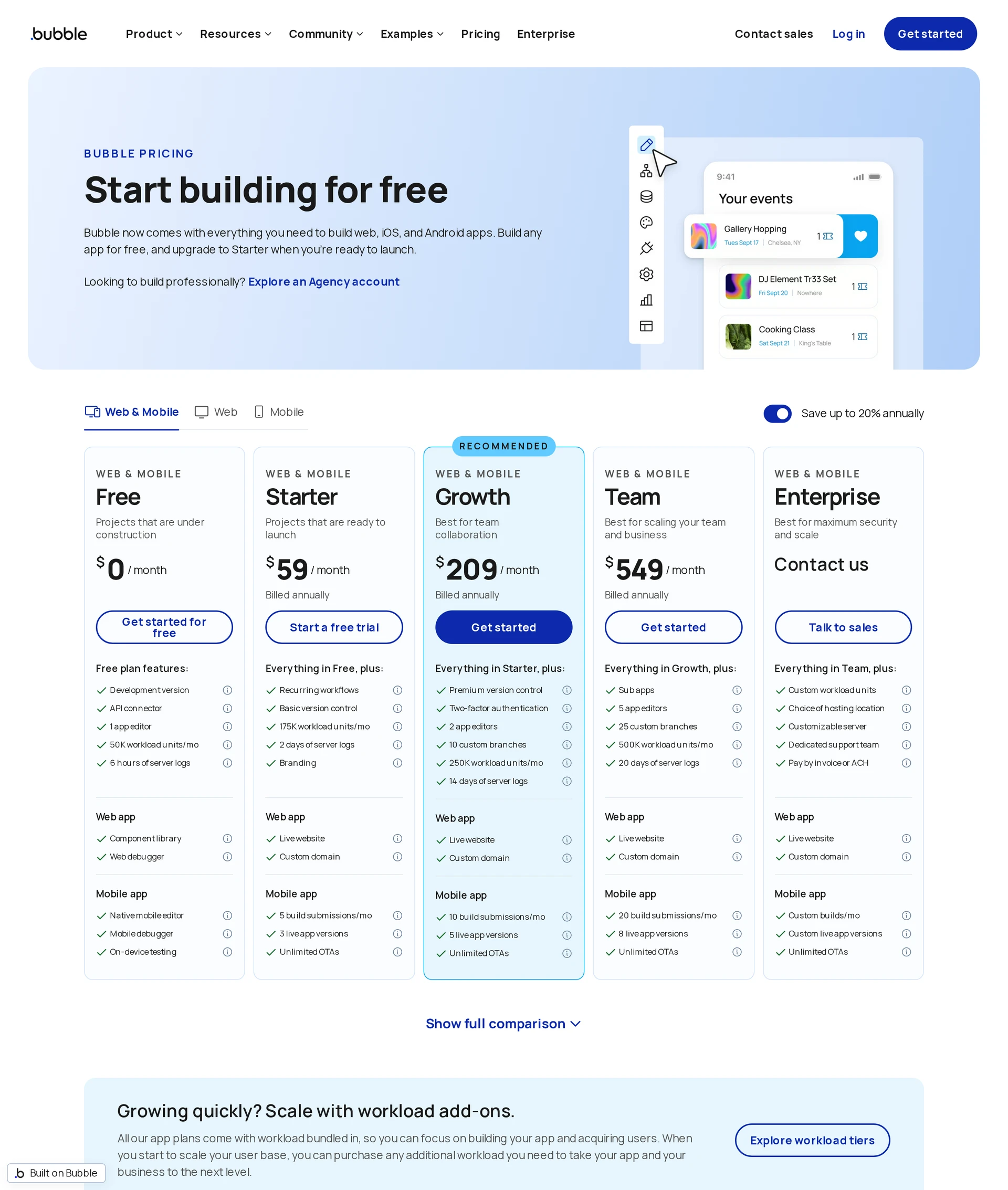
Pricing: Bubble's combined web-and-mobile Starter plan costs $59/month when billed annually. Workload is metered across the shared backend, so higher usage can increase the total cost.
Main tradeoff: Bubble hosts completed apps on its proprietary runtime. There is no source-code export, so moving away from Bubble means rebuilding the application elsewhere.
| Plan | Price |
|---|---|
| Free development | Free |
| Web (annual) | from $29/month |
| Mobile (annual) | from $42/month |
| Web plus mobile (annual) | from $59/month |
3. Glide
Glide is a component-based builder for responsive business web apps and PWAs connected to operational data. It focuses on internal tools, portals, and record-based workflows that run as responsive web apps or PWAs.
How it handles app building: Glide turns an existing data source into a browser-based app and connects to Google Sheets, Excel, Airtable, SQL databases, BigQuery, Snowflake, Salesforce, and HubSpot.
- Google Sheets, Excel, and Airtable
- SQL databases, BigQuery, and Snowflake
- Salesforce and HubSpot
Main tradeoff: Glide publishes web apps and installable PWAs rather than App Store or Google Play binaries. SQL databases, BigQuery, and Snowflake require Business or Enterprise access, while Salesforce and HubSpot require Enterprise.
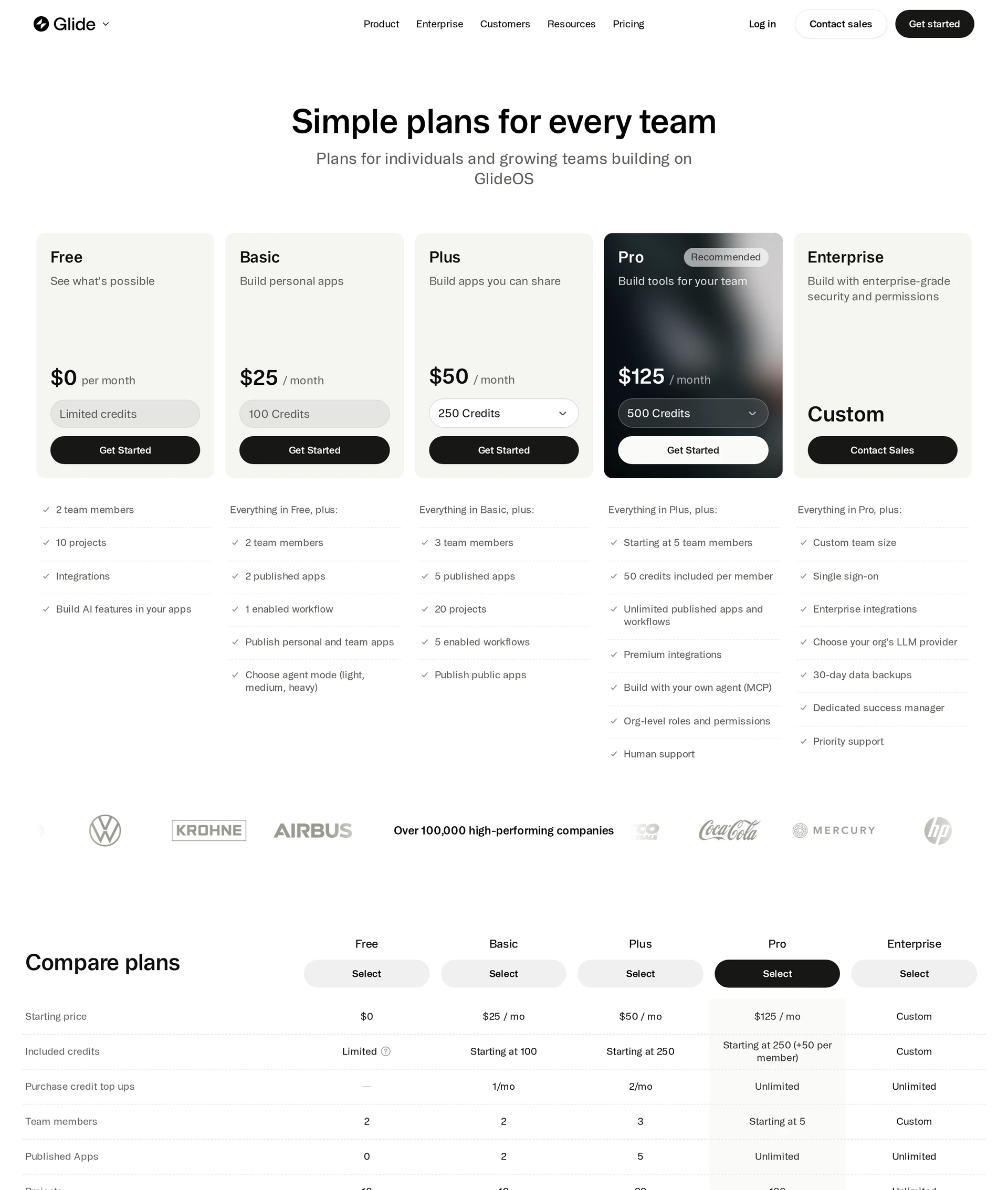
Pricing: Glide Classic Explorer costs $19/month when billed annually or $25/month month-to-month. Public apps start on Plus at $50/month, while Pro starts at $125/month for team tools and premium integrations.
4. Base44
Best for: Prompt-driven hosted web apps that need a frontend, backend, database, and authentication in one project.
How it handles app building: Base44 generates a hosted web application from a natural-language description, including frontend screens, database structures, backend logic, permissions, authentication, and hosting.
- Frontend screens and database structures
- Backend logic and permissions
- Authentication and hosting
Further changes can be made through prompts, the visual editor, or code access. Those three editing paths reduce the need to configure separate backend products while keeping manual edits available.
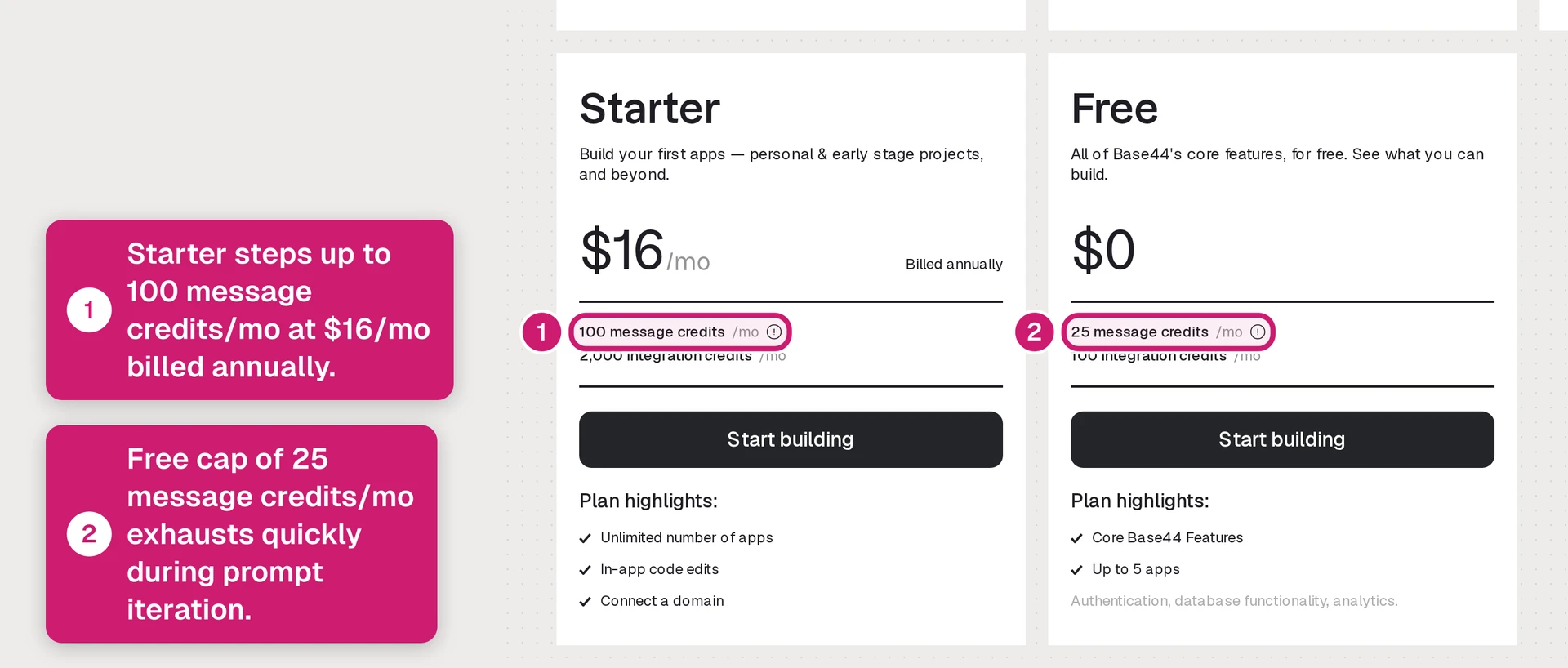
The free tier includes 25 message credits per month. Prompt-heavy iteration therefore moves into paid usage quickly.
Base44 publishes hosted web apps and supports two-way GitHub sync on paid plans. The full source can move to your repository, while connected third-party services still need their own configuration and accounts.
Pricing: Base44 Starter is $20/month, or $16/month when billed annually. Paid tiers increase monthly message and integration credits.
Main tradeoff: External email, SMS, and API services connect through user-supplied keys. Provider accounts, fees, and service limits remain separate from Base44.
| Plan | Price | Notes |
|---|---|---|
| Free | $0 | 5 AI message credits per day |
| Starter | $20/month or $16 annually | Paid entry tier |
| Builder | $50/month or $40 annually | Higher credit volume |
| Pro | $100/month | Upper standard tier |
| Elite | $160–$200/month | Highest published range |
5. Zite
Best for: Operations teams and agencies building permissioned portals and internal applications. Its seat-free collaboration model is useful when portal access can grow faster than the builder team.
How it handles app building: A prompt creates a hosted web app or PWA that you can refine on a visual canvas. Publishing stays on Zite's hosted path, while schema and CSV exports preserve the data structure.
Its workflow editor presents automations as a flowchart, so teams can inspect how triggers and actions connect. Zite uses usage-based billing rather than per-user licensing:
- End users: Unlimited on every plan
- App creators: Unlimited on every plan
- Metered usage: AI credits, database records, and workflow executions determine plan requirements
Main tradeoff: Zite charges by AI credits, database records, and workflow executions, so your plan requirement grows with app activity.
| Plan | Price |
|---|---|
| Free | Free tier |
| Pro | $15/month annually or $19 monthly |
| Business | $55/month annually |
| Team | $250/month annually |
| Enterprise | Custom |
6. ToolJet AI
ToolJet AI builds governed internal browser applications for IT and operations teams building governed internal browser applications.
Its Community Edition uses the AGPL-3.0 license and supports self-hosting with Docker or Kubernetes.
How it handles app building: ToolJet AI breaks generation into reviewable checkpoints for requirements, data sources, interface, and logic. It supports self-hosted, private-cloud, and managed deployment, plus custom JavaScript and Python.
- Deployment: Self-hosted, private-cloud, and managed options
- Logic: Custom JavaScript and Python alongside enterprise connectors
- Export: JSON application definitions that continue to run in the ToolJet runtime
Main tradeoff: Self-hosted projects need infrastructure and maintenance, while managed deployment costs depend on the selected plan.
Pricing: ToolJet Pro starts at $79 per builder per month.
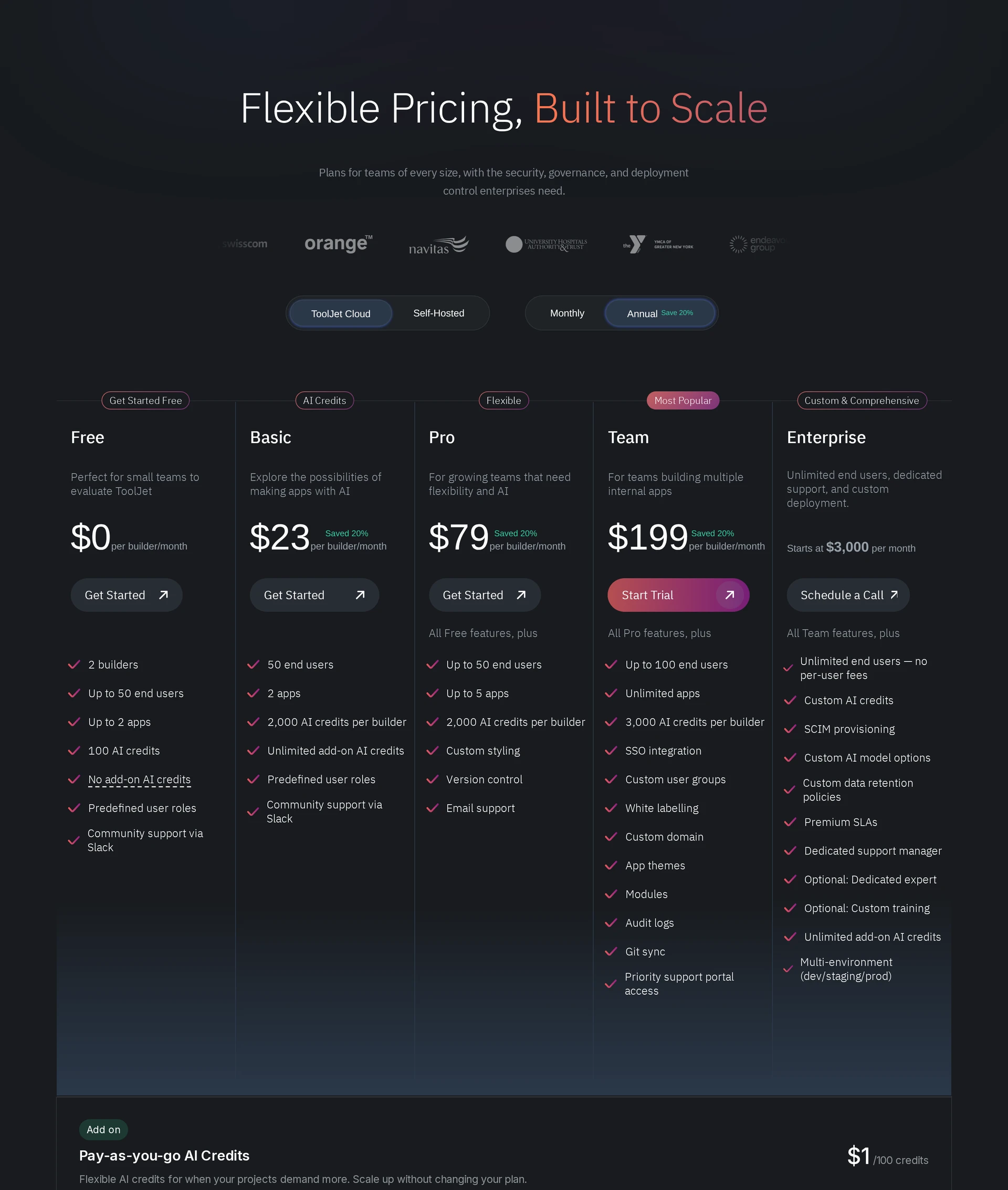
| Plan | Price |
|---|---|
| Community | Free |
| Pro | $79 per builder/month |
| Team | $199 per builder/month |
| Enterprise | From $3,000/month |
7. Emergent
Best for: Builders who want standard full-stack web or Expo mobile code with a GitHub handoff.
How it handles app building: Emergent generates full-stack applications from plain-English briefs. Its agents generate the interface, application logic, database, authentication, tests, and deployment artifacts.
A prompt can create a web or Expo mobile app with sign-in, stored data, and external integrations. GitHub supports continued development, but an Expo mobile project still needs a production build, store accounts, listings, testing, and submission before release.
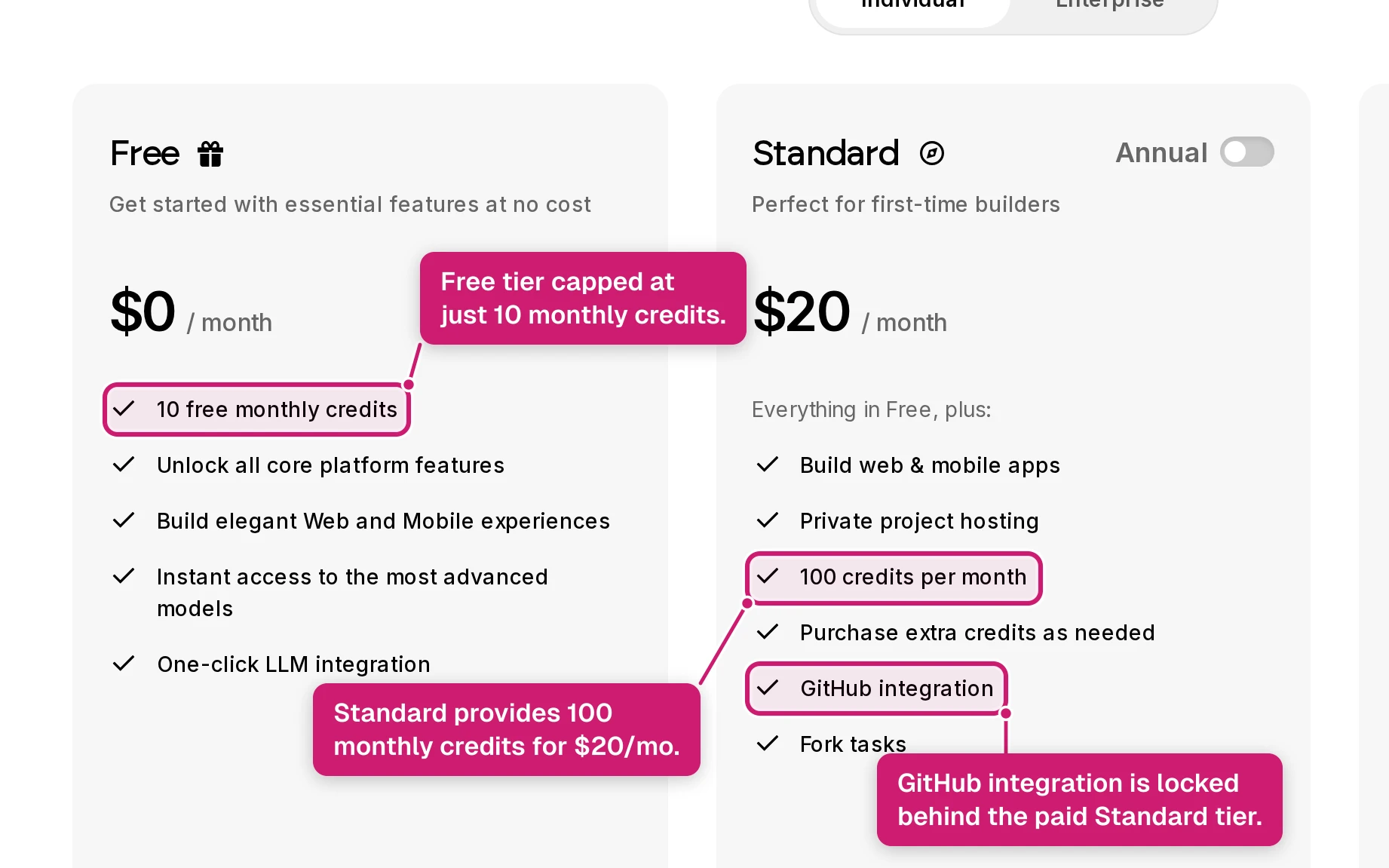
Pricing: Emergent has a free plan with 10 monthly credits. Standard costs $20/month, or $17/month annually, and includes 100 monthly credits plus GitHub integration. Pro costs $200/month, or $167/month annually.
The standard-code approach suits projects that need a live URL and a GitHub handoff. Generated details still require review and testing before release.
| Plan | Price | Notes |
|---|---|---|
| Free | $0 | 10 monthly credits |
| Standard | $20/month or $17 annually | 100 monthly credits; GitHub integration |
| Pro | $200/month or $167 annually | Paid plan |
| Enterprise | Custom | Enterprise plan |
8. FlutterFlow
Best for: Builders who want one Flutter codebase across iOS, Android, web, and desktop. The tradeoff is a Flutter-centered workflow.
How it handles app building: FlutterFlow uses one visual project to generate Flutter applications across iOS, Android, web, macOS, Windows, and Linux. You can keep editing in its canvas or take the project into Flutter tooling.
The practical details are:
- Output: Flutter code from a shared project, with code export for work outside FlutterFlow.
- Data: Native Firebase and Supabase connections sit alongside the visual UI.
- Fit: Startups, solo developers, and product teams building across mobile, web, and desktop from one Flutter codebase.
Main tradeoff: FlutterFlow uses a Flutter-centered workflow, so developer handoff requires Flutter tooling.
Pricing: FlutterFlow Basic costs $39/month and includes code download, APK download, and one-click store deployment. GitHub integration starts on Growth at $80/month for the first seat.
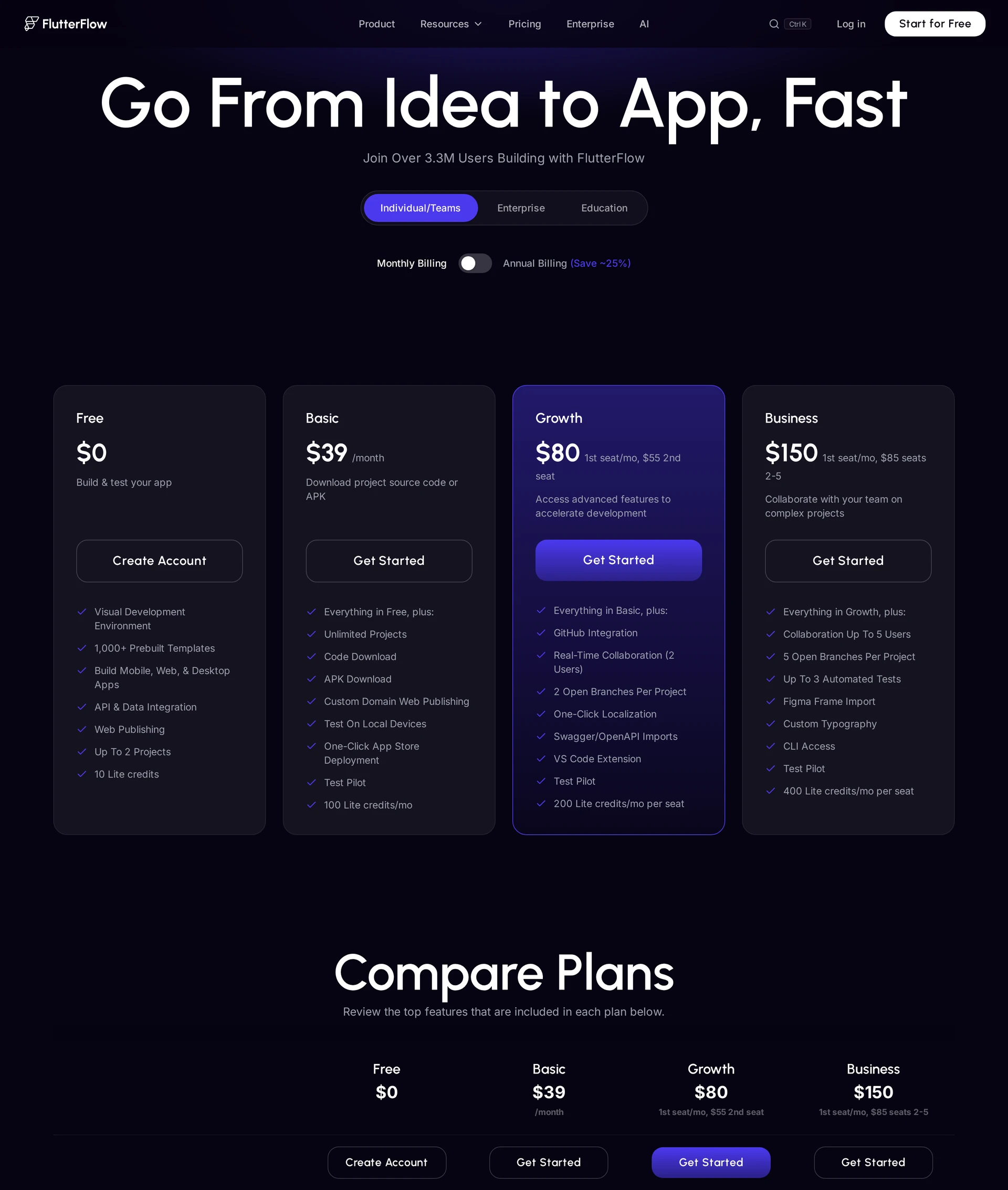
| Tool | Starting public price |
|---|---|
| FlutterFlow | $39/month (FlutterFlow pricing) |
| Bubble | Web $29/month annually; mobile $42/month annually |
| Glide | Explorer $25/month annually (Glide pricing) |
| Base44 | Starter $20/month or $16 annually |
9. Softr
Best for: Browser-based client portals and internal tools connected to existing data. Its browser-based output keeps the focus on controlled access to those records.
How it handles app building: Softr's AI Co-Builder turns a prompt into a multipage starting point with data and permissions mapped. Client portals and internal apps can connect to Airtable, Google Sheets, and Softr Databases.
That generated foundation can include:
- Relational schemas, sample data, and forms
- CRUD permissions and user roles
Main tradeoff: Softr keeps apps in the browser, so a native iOS or Android release needs a separate build and submission path.
Pricing: Softr Basic costs $19/month when billed annually or $25/month month-to-month on Softr pricing.
10. Figma Make by Figma
Best for: Early interactive web-app experiments built from prompts, screenshots, or existing Figma files.
How it handles app building: A generated application can move into Figma Design as editable vector and auto-layout layers, keeping interface refinement inside the design workflow.
One barbershop project shows how a design-first workflow can continue into production mobile development:
- The barbershop app design was generated in Figma Make.
- The creator ran Bilt's Figma plugin with a personal Bilt API key, added the file to Bilt, and attached selected frames in chat.
- Bilt was then used to turn that design into a production app.
Main tradeoff: Figma Make produces interactive web applications. A production mobile release needs a separate mobile development path.
Teams with Figma libraries can turn a prompt or existing file into an interactive web prototype inside their design system. The Figma AI app builder accepts prompts, screenshots, and existing files.
Pricing: Figma's Professional Full seat costs $16/month when billed annually or $20/month month-to-month and includes 3,000 AI credits per month. The free Starter plan includes up to 500 AI credits per month.
AI no-code app builders compared: output, backend, and cost
Bilt, Bubble, FlutterFlow, and Emergent all support mobile app paths, but they do not handle release the same way. Bilt combines native React Native output with managed build, signing, and upload workflows; the user performs App Store review submission. Code ownership varies across the group.
The meaningful differences appear after the demo: what ships, where data lives, whether source code leaves the platform, and what usage costs as the app grows.
| Builder or group | Shippable output | Backend and auth | Ownership path | Published cost signal |
|---|---|---|---|---|
| Bilt.me | Native iOS and Android apps; installable PWA at a permanent web URL | Built-in authentication, database, and storage | Full React Native source export and two-way GitHub sync | Free; paid from €15 first month, then €25/mo. |
| Bubble | Hosted web app or packaged React Native app | Relational database, authentication, privacy rules, and backend workflows | Runs on Bubble's proprietary runtime | Paid web plans start at $29/month annually; workload overages apply |
| FlutterFlow | Flutter apps for mobile, web, and desktop | Connects to Firebase or Supabase | Paid plans from $39/month can export the complete Flutter project | Subscription plus external backend costs |
| Emergent | React, Next.js, FastAPI, Node, or Expo React Native projects | Depends on the generated stack | Two-way GitHub sync | Hosting uses 50 credits per app monthly; complex tasks can use up to 1,000 credits |
| Figma Make | React and TypeScript web output | Depends on connected services | Editable code with GitHub sync | Check the plan against generation and hosting needs |
| Glide, Zite, ToolJet AI, Softr, Base44 | Hosted web app or PWA | Varies by builder; Zite includes a relational database and role-based access | Hosted platform path | Glide starts at $19/month annually; ToolJet Pro is $79 per builder/month |
If you need an app-store release, rule out web-only output first. If the product must outlive the builder, require exportable code and a backend you can move.
Which builder fits your project?
Start with where people will use the app, then rule out builders that cannot produce or publish that format.
- Native consumer app: Bilt.me generates exportable React Native code and manages native builds, signing, and uploads; you submit the iOS build for review. The first Google Play release may require a manual .aab upload. Bubble runs React Native apps on its platform, FlutterFlow exports Flutter projects, and Emergent generates Expo projects that still need a release workflow.
- Customer portal or PWA: Bilt publishes a PWA to a hosted HTTPS URL that people can install from the browser. Glide, Zite, Softr, and Base44 publish browser-based products when an app-store binary is unnecessary.
- Internal operations tool: ToolJet AI focuses on governed browser dashboards, while Bubble supports custom workflows on its hosted runtime.
- Developer handoff: Bilt, Base44, FlutterFlow, and Emergent provide standard code or GitHub paths. Figma Make can return generated work to editable design layers.
Make one requirement non-negotiable before building: a store binary, exportable source, or predictable internal-user cost. A polished prototype cannot compensate for the wrong production path.
What to test before you commit to a builder
Build a small version of the real workflow, then repeat it after changing the data model. The second pass exposes weak iteration, deployment, and ownership paths that the first prompt can hide.
- Change an existing feature. Add a field, update its validation, and move the related UI without regenerating the app.
- Pass: Existing screens and data still work.
- Fail: The builder ignores prior changes, breaks unrelated screens, or consumes credits through repeated repair prompts.
- Connect identity and real data. Create two user roles, protect one record type, and call a simple public GET endpoint.
- Pass: Each role sees the correct records, and API errors are visible enough to diagnose.
- Fail: Permissions exist only in the interface, sample data replaces persistence, or connector failures produce no useful error.
- Run the actual delivery target. Test the build on physical phones for a mobile app, or in supported browsers for a web app. With Bilt, use Expo Go on iPhone or Android for rapid testing, Test on iPhone for a real native binary, TestFlight for iOS beta testing, and the published PWA for browser testing.
- Pass: Login, loading states, navigation, and one failure path work outside the editor.
- Fail: The preview works, but the binary, PWA, or hosted release cannot reproduce it.
- Complete the handoff. Generate the promised store file, hosted URL, ZIP export, or GitHub repository without vendor help. If a platform creates a store file, confirm separately who completes App Store or Google Play submission.
- Pass: A teammate can deploy the artifact from written steps.
- Fail: Export omits dependencies, store submission requires an unplanned service, or the app only runs on the builder's runtime.
- Model one growth month. Price the expected builders, app instances, API calls, data updates, workload units, and hosting against the plan's meters.
- Pass: The bill is predictable, and staging uses separate data from production.
- Fail: Core usage has no clear unit cost, or testing AI edits requires touching live customer data.
Ready to go from idea to a real app? Start building with Bilt.me
The best builder is the one that survives testing, handoff, and release, not just the first prompt. Bilt turns your description into native React Native apps for iOS and Android that you can test on real devices.
Keep chatting to refine the screens and features. When the app is ready, Bilt builds, signs, and uploads the iOS build. You then attach it and submit it for review in App Store Connect. For Google Play, Bilt builds the .aab and can send it to internal testing, while the first release may require a manual Play Console upload.
Start building free and get a live iOS or Android preview from your idea. Free to start. No credit card.
FAQs
Do I need coding experience to use these builders?
No. You do not need traditional coding experience to build and deploy apps with modern AI-powered no-code builders.
You still need to define the flow clearly, such as who can sign in, what data each role sees, and what happens when a payment fails. Test those edge cases before launch.
Can no-code AI apps scale for enterprise use?
Some no-code AI apps can support enterprise use, but approval depends on the exact builder and plan. Review security, governance, integrations, performance, data location, support, and deployment control rather than treating code export as proof of scale.
Before approval, review the builder's operational controls:
- SSO and role-based access
- Audit logs for admin and user activity
- Data-retention terms
- The integration model for required business systems
Can I publish my app to the App Store and Google Play?
Yes, if the builder produces a store-ready iOS or Android package and the app meets each store's review rules. Native binaries use formats such as .ipa and .aab; wrapped web apps also need enough app-specific functionality to pass review.
The Apple program costs $99 per year, while a Google Play Console account costs $25 once. Personal Google Play accounts created after November 2023 need a closed test with at least 12 testers for 14 days before production access.
Is there a free AI app builder?
Yes. Bilt has a permanent free tier with up to 3M monthly AI tokens, accrued at 500,000 per day, plus a one-time 1M signup bonus for new accounts, authentication, database, storage, and live previews.
FlutterFlow's free plan includes two projects and five lifetime AI generation requests. Code download, APK download, and one-click app-store deployment start on its paid Basic plan.