You want customers to book an appointment, shop, or use your service from an app on their phones. Appy Pie offers a guided visual way to build that app, but the price on a plan card is only part of the decision. You need to know whether its templates fit your idea and what it will cost to publish and keep running.
For a straightforward app that fits those templates, Appy Pie can be worth paying for. Your target stores, the number of apps you need, and extras such as removing branding shape the total cost. If you need custom behavior or code a developer can take over later, compare the building model as well as the subscription.
Key takeaways
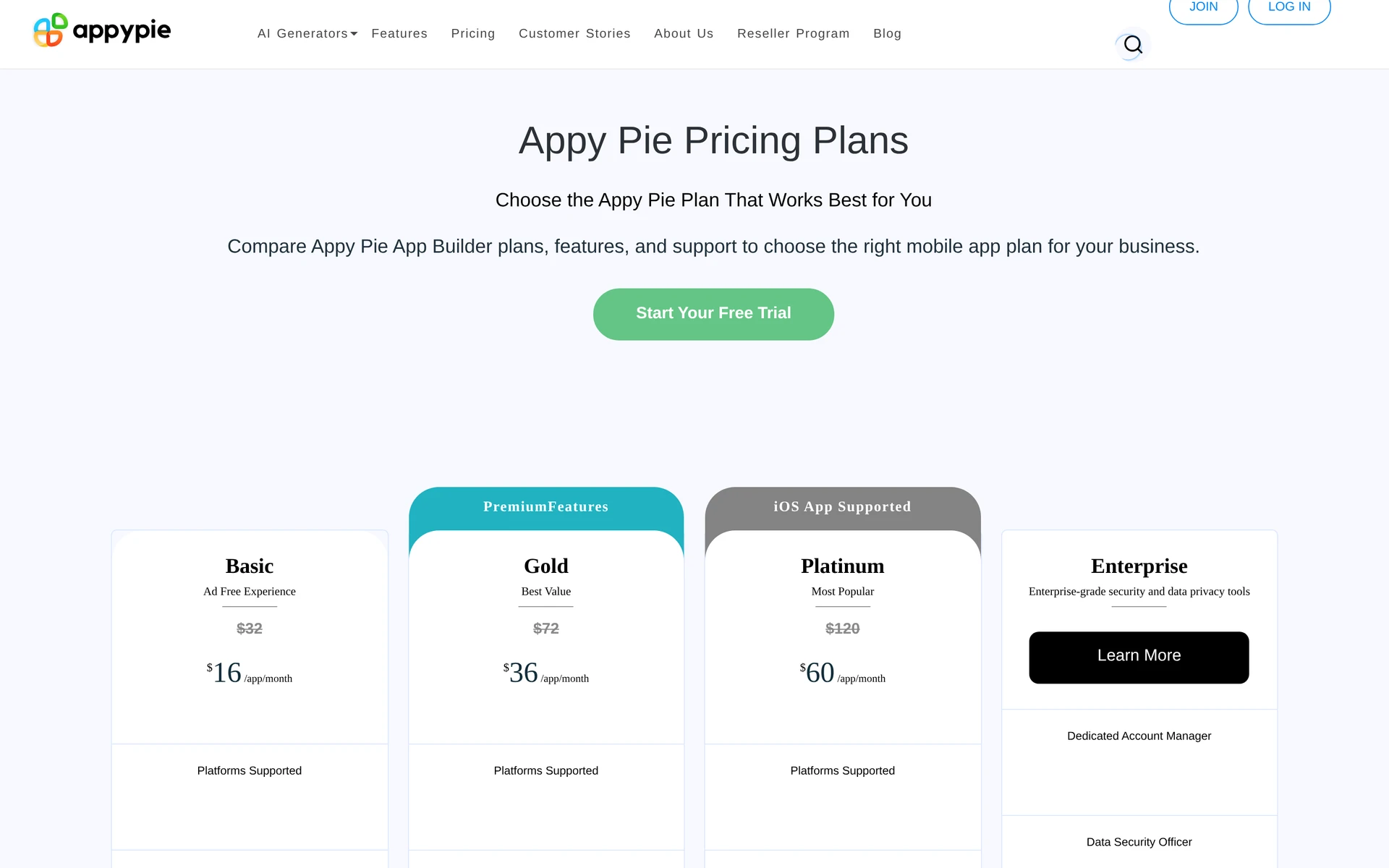
Appy Pie charges per app, per month: €14 for Basic, €36 for Gold and €60 for Platinum, before tax. Each plan card also shows a crossed-out price twice as high. That is a reference price, not what you pay.
- Costs beyond the plan: Apple charges $99 per year and Google Play charges $25 once. Removing Appy Pie’s branding needs the Add-On Package, which costs twice the plan price. Taxes and usage overages are extra.
- Fit: Basic suits a small Android app with modest usage. Platinum is the only self-serve plan that publishes to the App Store.
Appy Pie app builder pricing plans
Appy Pie shows euro prices to European visitors and dollar prices in the US, where Basic is $16.
| Plan | Price per app per month | Stores | App downloads per month | Push notifications per month | Support |
|---|---|---|---|---|---|
| Basic | €14 | Android | 500 | 500 | |
| Gold | €36 | Android | 1,000 | 1,000 | Email and chat |
| Platinum | €60 | Android and iOS | 2,000 | 2,000 | Email, chat and phone |
| Enterprise | Custom | By quote | Set by quote | Set by quote | 24/7, custom SLAs |
Basic (€14 per app per month)
Basic covers a single Android app.
- Platform: Basic includes Google Play publishing.
- Push notifications: 500 per month, for messages you send to someone’s phone even when the app is closed.
- App downloads: 500 per month.
- App management: Hosting and editing are included with no stated cap.
- Branding and support: Apps are ad-free and include email support.
Compare Gold before committing to Basic if either monthly allowance is too small.
Gold (€36 per app per month)
Gold is worth comparing with Basic when you need higher monthly allowances or chat support.
- Price step: Gold costs €22 more per month than Basic.
- Usage limits: Gold raises monthly app downloads and push notifications to 1,000 each, while remaining Android-only.
- Support: Gold includes email and chat support.
Platinum (€60 per app per month)
Platinum is the highest published self-serve plan.
- Price step: Platinum costs €24 more per month than Gold.
- Platform and usage: Platinum adds iOS support and raises monthly app downloads and push notifications to 2,000 each.
- Support: Platinum adds phone support to email and chat.
- Next tier: Requirements beyond Platinum move to an Enterprise quote rather than another published price.
Enterprise (custom pricing)
Enterprise pricing is quoted for organizations that need SSO, dedicated account management, a data security officer, custom data retention, or PCI DSS support.
Enterprise includes:
- Account service: A dedicated account manager.
- Identity: Active Directory and SSO.
- Security oversight: A data security officer and custom data retention.
- Payments compliance: PCI DSS.
- Service levels: Enterprise includes 24/7 support and custom SLAs, or service-level agreements, with response times of two to four hours. Its 99.9% uptime SLA sets a commitment for how often the service is available. It also lists HIPAA/HITECH-eligible compliance, which matters for apps handling health information and needs confirmation for your intended use.
How Appy Pie's billing actually works
There is no setup fee. The advertised prices are monthly, with yearly billing available through the Yearly tab.
- Multiple apps: Two apps require two plan subscriptions, even when one account manages both.
- Renewal: Subscriptions renew automatically until canceled, with cancellation taking effect at the next billing cycle.
- Trial conversion: The 7-day trial asks for a card or PayPal account, even though the homepage says no card is needed. It converts to a paid plan on day eight unless you cancel before it ends.
- Failed payments: After four failed attempts, an annual plan moves to monthly, then monthly to weekly. Four failed weekly attempts cancel the plan and you lose access.
- Yearly billing: The Yearly tab promises savings of up to 20%, but the pricing page shows no yearly figure. Check the exact amount at checkout before you choose yearly.
Alongside the plan subscription, Appy Pie sells separate prepaid credits for AI generation, media exports and messaging.
What Appy Pie really costs beyond the subscription
Publishing and running the app costs more than the subscription.
Apple charges $99 per year for an Apple Developer account, and Google Play charges $25 once for a developer account. Publishing to both stores adds $124 in the first year, then $99 per year afterward if Google's registration is already paid. Apple and Google charge these fees directly.
The Add-On Package costs twice the current plan price. It removes Appy Pie’s branding and adds resubmissions with no stated cap and a dedicated account manager. The recurring charge becomes three times the plan price per app. On Platinum, that is €60 plus €120, or €180 a month. Over 12 months, the plan costs €60 × 12 = €720 and the add-on costs €120 × 12 = €1,440. Together, that is €2,160 for the first year, plus $124 in store fees, before tax and overages.
Once an app exceeds its included downloads or push notifications, Appy Pie charges per extra unit.
- Extra app download: $0.009 per unit.
- Extra push notification: $0.001 per unit.
- Additional onboarding: Paid plans include up to three onboarding sessions. After that, help costs $25 an hour, sold in packages of at least ten hours.
- Android permission change: Appy Pie’s terms charge $99 each time you add or remove a permission in your Android build, such as permission to use the camera.
- Later submissions and resubmissions: The first store submission is included, and Appy Pie charges for the next ones. A store rejection does not qualify for a refund.
Which Appy Pie plan should you choose?
Pick by store first. Basic or Gold for Android, Platinum when you need iOS, and Enterprise when SSO or organization-specific security and account controls belong in the contract.
Choose the smallest tier that covers the app's hard requirements. Before paying annually, write down the target stores, expected usage, required controls, and support terms, then match each one to the plan or contract.
- Recheck the total cost when downloads or push usage repeatedly approaches the plan allowance.
- Ask Enterprise sales to confirm required identity, processing, compliance, and support terms in writing.
- Stay on monthly billing until your app and store targets settle, then compare the yearly total at checkout.
| Store target or requirement | Plan path | Check before buying |
|---|---|---|
| Android | Start with Basic | Confirm its download, push, and feature limits cover the app |
| Android with higher allowances | Compare Gold with Basic | Identify the exact Gold limit or feature the app needs |
| Apple App Store plus Android | Platinum | Lower self-service tiers do not include iOS publishing |
| App handling health data | Ask Enterprise sales | Confirm whether Appy Pie can meet the required security, data-handling, and support terms |
| SSO or organization-specific security controls | Enterprise quote | Put each identity, security, and support requirement in the contract |
Is Appy Pie worth the price?
Appy Pie is worth the price when you need one straightforward, template-led app and a guided visual workflow. Customization, usage limits, or a second app can push the cost up fast.
Appy Pie rates 4.5/5 for value for money on Capterra, where reviewers praise the no-code builder and the support team and flag per-app costs, overage charges and cancellation. In recent low ratings on Trustpilot, the most common complaint is a charge that arrived when the trial ended or after the user cancelled.
What if Appy Pie's app-building model doesn't fit your project?
Look at a different building model when the project needs direct code access, developer-led architecture decisions, or an exportable codebase for handoff.
- Custom logic: Core workflows depend on server-side rules or non-standard integrations that need direct code access.
- Technical control: Security, performance, or scaling decisions require a developer to work with the app's architecture.
- Developer handoff: You need full, extendable source code that another developer can maintain. Appy Pie hosts your app and does not offer code export; its own comparison table lists it as “No (hosted)”.
- Native delivery: You need store-ready native binaries and direct control over the release process.
| Need | Building model to evaluate |
|---|---|
| Direct work on custom logic, security, or scale | Custom mobile development |
| Fast internal workflows with managed infrastructure | Internal-tool builder |
| A WordPress or WooCommerce storefront app | Storefront-focused app builder |
| Deeper visual control over iOS and Android screens | Visual mobile app builder |
| Owned, handoff-ready source | Code-export tool or developer |
Want to own your app's code instead? Build it with Bilt
Appy Pie uses a visual building workflow. With Bilt, you describe the native iOS and Android app you want, refine it through conversation, and export the React Native source code for a developer to continue.
PostSlate cofounder Caius Anthony Lettermo says Bilt “guided me like a caring parent” from creating the app to launching it.
Bilt handles the build, signing and store submission. You publish under your own Apple Developer account ($99 a year) and Google Play developer account ($25 once), and Apple and Google still review the app.
Bilt has a permanent Free plan at €0. Professional costs €25/mo, or €19/mo billed yearly. See all plans for the available options.
New subscribers get 40% off their first month on any monthly paid plan. Professional is €15 for the first month, then €25/mo. The discount applies once per account and does not apply to annual billing.
Start building free if you want to describe your app and build from there.
FAQs
Does Appy Pie have a free plan?
Appy Pie has no permanent free plan for published apps. Its 7-day trial converts to a paid plan on day eight unless canceled before expiry.
You can build and preview an app during the trial. Publishing to the App Store or Google Play requires a paid subscription.
Can you cancel your Appy Pie subscription anytime?
Yes. You can cancel Appy Pie anytime. Cancellation stops future renewals at the end of the current billing cycle, with no prorated refund.
When the paid period ends, Appy Pie locks the app and it stops working. You can reactivate the plan at any time.
If you only need a break, pause the subscription instead. Appy Pie does not charge you while it is paused.
Is Appy Pie a legitimate company?
Yes. Appy Pie is a legitimate no-code app-building company.
Refund requests after the trial charge have a seven-day window. Appy Pie deducts 3% of the refund or the payment processor’s actual fee, whichever is higher.
How much does Appy Pie cost per year?
At the monthly rate, one app costs €168 a year on Basic, €432 on Gold and €720 on Platinum for the subscription alone. Use those totals when comparing the yearly amount shown at checkout.
Will Apple accept an app built with Appy Pie?
Apple and Google decide, and Appy Pie does not guarantee approval. Apple’s guideline 4.2.6 rejects apps made with a template or app-generation service unless the provider of the app’s content submits them.
Appy Pie publishes under your own developer account. If the app is for your business, open the Apple Developer account in your business’s name before you submit.
Does the AI app builder cost extra?
It can. Generating a first draft with AI is part of the 7-day trial. Check what AI use your plan covers and whether you’ll need the separate prepaid credits described above.