Base44's headline pricing runs from $0 to $200/month, or $16 to $160/month on annual billing.
I tested a basic CRM workflow with contact records and deal-stage updates against Base44's credit model.
- Free plan benchmark: The Free plan gives 25 message credits, so every AI revision became a budget decision.
This guide breaks down the advertised plans and the credit limits that can trigger upgrades.
How much does Base44 cost? (quick answer)
Base44 costs $0 to $200/month on monthly billing. Annual billing cuts paid tiers by 20%, bringing the range to $16 to $160/month.
Treat the published tier as the starting point. Some Trustpilot reviewers describe higher bills after heavier building or iteration.
| Plan | Monthly Price | Annual Price (per month) |
|---|---|---|
| Free | $0 | $0 |
| Starter | $20/mo | $16/mo |
| Builder | $50/mo | $40/mo |
| Pro | $100/mo | $80/mo |
| Elite | $200/mo | $160/mo |
Base44 plans at a glance
Base44 has five published plan tiers. Each tier changes the price and both monthly credit pools.
Message credits are used when you prompt the AI to build or edit. Integration credits cover external requests and app logic after the app runs.
| Plan | Monthly Price | Annual Price (per mo) | Message Credits | Integration Credits |
|---|---|---|---|---|
| Free | $0 | $0 | 25 | 100 |
| Starter | $20 | $16 | 100 | 2,000 |
| Builder | $50 | $40 | 250 | 10,000 |
| Pro | $100 | $80 | 500 | 20,000 |
| Elite | $200 | $160 | 1,200 | 50,000 |
The annual discount is consistent across paid tiers. The planning question is how many AI edits and live app actions your app needs each month.
How Base44 credits work
Base44 has two credit pools. Message credits track builder prompts, while integration credits track actions your published app runs for users.
Think of the system in four parts:
- Building credits: spent during AI prompting, generation, editing, and restructuring.
- App usage credits: spent when the live app runs integrations or external services.
- Reset timing: both pools reset monthly; unused credits do not roll over.
- Usage estimate: count build-time prompting and live app activity separately, because they draw from different pools.
Message credits vs integration credits
The short version: prompts spend message credits, while live app activity spends integration credits.
| Activity | Credit pool | How to estimate it |
|---|---|---|
| AI build prompt | Message credits | Count iteration rounds |
| AI edit prompt | Message credits | Larger changes may cost more |
| Manual editor change | None | No message-credit deduction |
| Live app action | Integration credits | Count user-triggered actions |
Use the published allowances as monthly ceilings. Per-action costs can vary by task, so estimate small edits separately from project-wide changes.
Manual editing is useful when you already know the exact change. It lets you make small fixes without spending message credits on another AI pass.
Common credit triggers
Message credits cover AI work:
- Generating new screens or components
- Editing existing screens through AI
- Restructuring data, workflows, or app logic
- Retrying a prompt when the first result needs correction
Integration credits cover live app activity:
- LLM or AI model calls
- Email sends
- File uploads and image analysis
- Database queries
- Third-party API calls
Plan for normal usage and error paths. A clean app flow spends credits predictably, while a buggy loop can repeat the same charge.
What happens when you run out of credits?
When Base44 credits run out, the affected activity pauses until your monthly reset or an upgrade.
- Existing apps: Already-built apps should remain accessible after a credit limit is reached.
- Message credits: New AI edits, generation requests, and build changes stop when you run out of message credits.
- Integration credits: App features that depend on external requests or backend logic can stop responding once integration credits are used up.
- Unused credits: Credits reset monthly, and unused credits do not roll over into the next billing cycle.
- Extra credits: Published plans point extra capacity toward the monthly reset or a higher tier instead of separate credit top-ups.
Upgrade pressure appears when a prototype becomes a live app. Lower tiers can feel fine during setup, then tighten once user traffic and repeated AI edits enter the picture.
Base44 plan breakdown
Base44 has five plans: Free, Starter, Builder, Pro, and Elite. The real difference is where each tier starts to break: build credits, integration credits, publishing access, or team workflow.
Free plan ($0/month)
Base44's Free plan is a sandbox. You get 25 message credits and 100 integration credits per month, with no custom domain publishing.
In my CRM build, 25 message credits made every AI revision feel expensive. Use Free to see whether Base44 fits the way you build, then upgrade before anyone depends on the app.
Starter plan ($16–$20/month)
Publishing starts on Starter at $20/month, or $16/month billed annually (Base44 pricing).
The plan includes:
- Custom domains
- In-app code editing
- 100 message credits
- 2,000 integration credits
- Unlimited app creation
Watch the message credits. When I refined one CRM screen through a few AI passes, the monthly limit stopped feeling generous. Fixing logic and rebuilding flows pushes Starter hard.
Starter works for personal projects and small internal tools. It is thin for client work, public MVPs, or anything with repeated AI edits.
Builder plan ($40–$50/month)
Builder costs $50/month, or $40/month billed annually (Base44 pricing).
The plan includes:
- 250 message credits each month
- 10,000 integration credits each month
- Custom domains
- GitHub integration
This is the first tier I would treat as a serious MVP plan. Starter gets you online, but Builder gives you enough room to build, revise, connect, and test without counting every prompt.
- Where Builder fits: MVPs, small SaaS projects, client-facing prototypes, and internal tools during active development.
- Where Builder runs out of road: Real users change the math. Daily automations, AI-powered features, file uploads, and integration-heavy workflows can push Builder toward Pro within the first month.
Pro plan ($80–$100/month)
Pro is built for live usage and costs $100/month, or $80/month billed annually (Base44 pricing).
The monthly allowances are:
- 500 message credits
- 20,000 integration credits
By this tier, the app is usually live and users are driving credit burn through real workflows. That is the signal to upgrade: Builder caps are interrupting normal daily usage, not just peak build sessions.
In my testing, Pro is where Base44 starts to feel less like a careful prototype budget and more like an operating plan. You still need to watch failed outputs, API-heavy features, and repeated automations.
- Best use case: Launched apps, active MVPs, and products where users trigger workflows, AI calls, uploads, emails, or automations.
- Still worth watching: High-volume production apps can still hit limits on Pro when AI calls and integration actions run throughout the day.
Elite plan ($160–$200/month)
Elite is Base44's top credit-volume tier, priced around $160 to $200 per month. It only makes sense after Pro is slowing the project down.
Elite is for production apps running constant AI operations: automation-heavy workflows, frequent integrations, and teams where multiple people are prompting and shipping changes. When two people share one project and both iterate daily, the credit math changes fast.
I would not start here. Elite is a response to proven usage, not a shortcut to a better build.
- Main caution: Elite gives you more room, but failed outputs, re-prompts, and live app activity still burn credits.
- Skip it if: You are testing an idea, building a simple internal tool, or only making occasional edits.
Hidden costs most users don't see coming
In my CRM-style build, credits ran out faster than the actual output justified.
Failed AI outputs are the first surprise. Message credits are spent even when the output needs correction, a re-prompt, or another debugging pass, so one feature can cost several interactions.
Live app usage is the second surprise. Integration credits are used by AI calls, file uploads, emails, automations, backend tasks, and image analysis triggered by real users.
- No top-up buffer: Base44 does not offer individual credit top-ups, so running out mid-project can force a full plan upgrade instead of a smaller one-time purchase.
- No rollover: Unused credits do not carry into the next billing period, which makes usage planning harder when build activity changes month to month.
- External AI costs: Claude API usage can add a separate bill when you use it heavily alongside your Base44 workflow.
- Domain renewals: Custom domain costs can show up after the first year, so the first-year price may not reflect the ongoing cost.
- Migration support: Moving backend logic, database structure, or workflows off Base44 can require developer help, which creates an exit cost many users do not budget for.
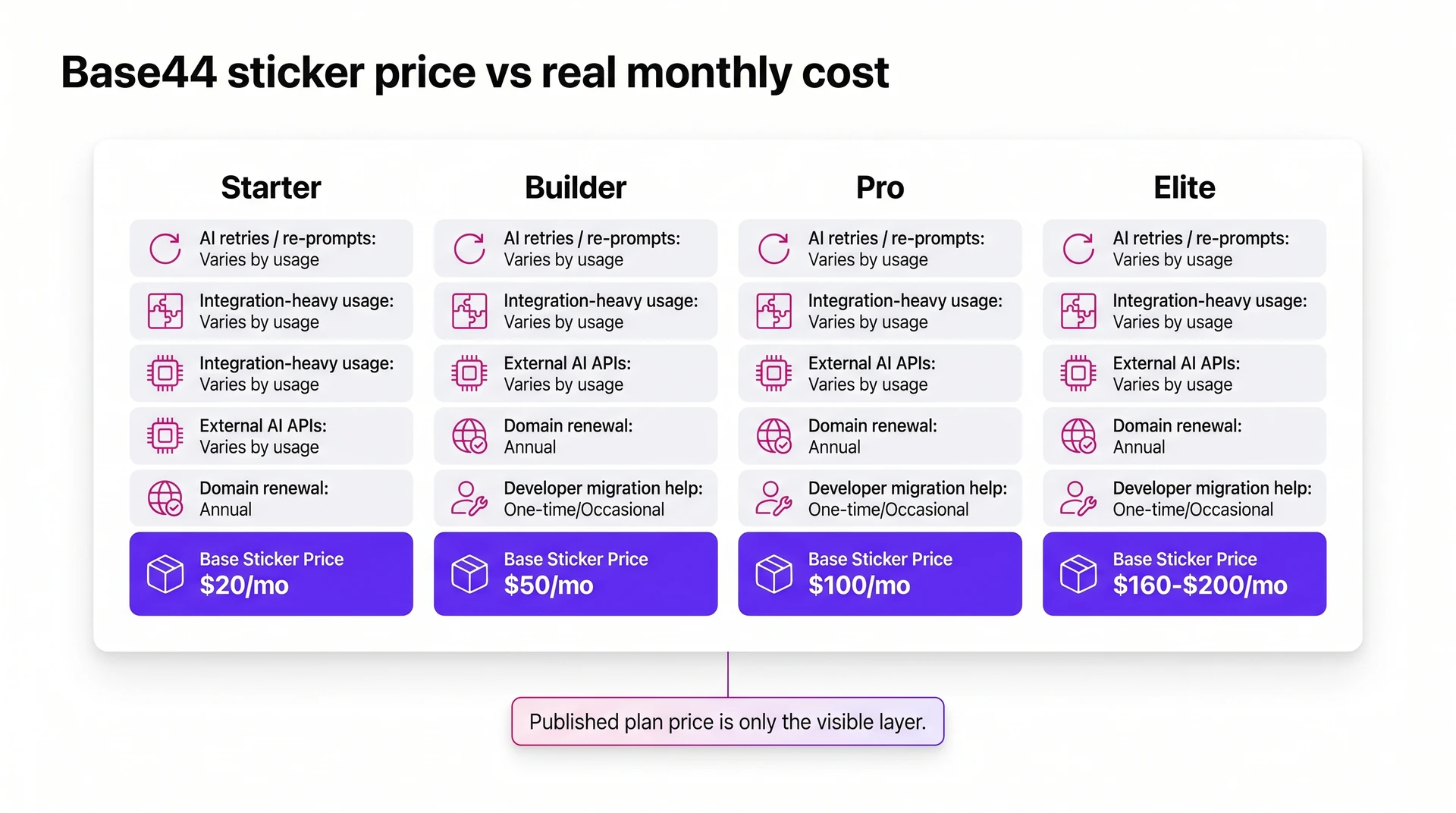
User reports describe bills rising beyond the published plan price during active development, but that outcome is not guaranteed.
The safer estimate is your plan price plus retries, integration usage, external APIs, domains, and developer support.
How to estimate your real monthly cost
Your real cost is the plan price plus the credits and services your app uses in a normal month. Estimate the total before you commit, especially if integrations are central to the product.
- Pick the base plan. Start with the monthly price: Starter at $20, Builder at $50, Pro at $100, or Elite at $160 to $200. Annual billing lowers them to about $16, $40, $80, and $160 per month.
- Map your workflow to credits. AI code changes draw from message credits, while AI agent actions, API calls, data syncs, and automated workflows can burn integration credits faster than brochure-style apps.
- Add production extras. Budget for third-party APIs, custom domains, team access, and services your app depends on. Heavy Claude API usage can add a separate monthly bill.
For example, a Builder plan app that runs 50 AI-assisted edits per month and uses about 3,000 integration credits from daily activity stays inside the plan limits.
Add a Claude API integration with frequent monthly calls, and the math changes. Factor external API costs into the tier decision before you commit.
Use a high-usage month for the estimate, not your quietest week. If that number still fits the budget, the plan is much safer.
Which Base44 plan should you choose?
Builder is the default choice for MVPs because it adds custom domains and GitHub export. That makes Builder the first plan that feels practical for a real launch.
Start by asking where your project is likely to break first: build credits, integration credits, publishing access, or team workflow.
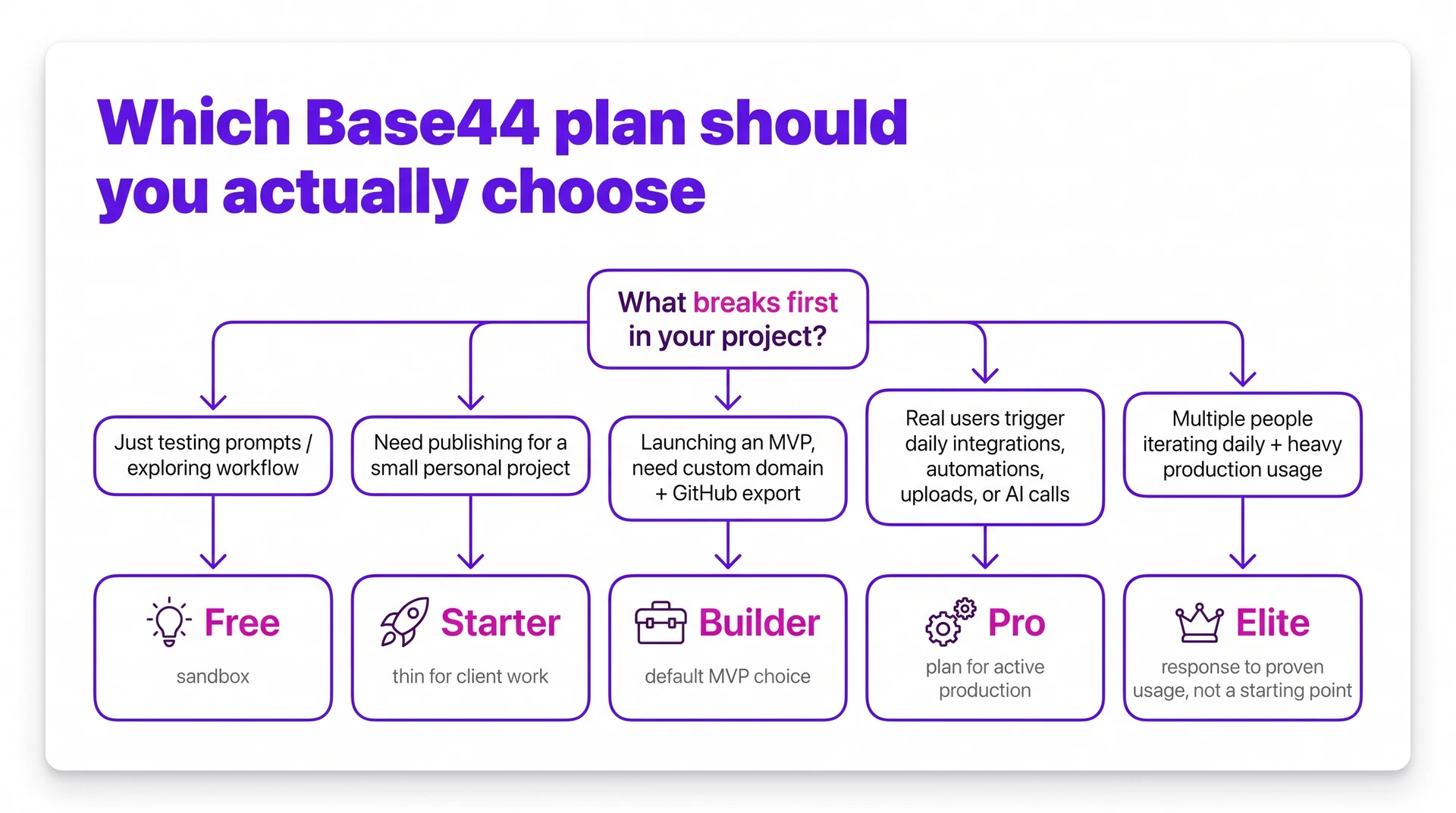
- Free: Use it to explore Base44, test prompts, or decide whether the workflow fits.
- Starter: Use it for personal learning or a small project that does not need production polish.
- Builder: Use it for MVPs, small teams, custom domains, and GitHub export.
- Pro: Use it when real users trigger integrations, automations, or data syncs every day.
- Elite: Use it for heavier client work, higher usage, and teams that need more monthly credit room.
The practical split is Builder versus Pro. Builder is the better starting point when the main workload is still building screens, testing flows, and connecting the first few features.
Pro makes more sense once users create daily credit burn. If the app sends emails, calls AI models, syncs data, or uploads files every day, price the project against Pro before the upgrade feels forced.
If you are building alone, start with Builder and watch integration credits closely. If the app is active in production, plan for Pro early instead of treating Pro as a surprise expense.
How Base44 pricing compares to alternatives
Base44 starts near the low end for AI app builders, then gets more expensive as you move up the plan ladder. The important question is what the tool is built to ship.
Use the category first:
- Base44: Full-stack web MVPs with AI-assisted building.
- Lovable: Web apps for builders who already think in Supabase-backed workflows.
- V0 generates frontend UI and has a free tier. Its Plus plan costs $30/month per user (V0 pricing).
- Rork and Bilt: Native mobile apps when app-store distribution matters.
- Bolt: AI coding with a free tier, paid Pro plan, and token top-ups.
- Bubble: Mature no-code workflows, with higher mid-tier pricing.
Rork is another option when native mobile is the requirement. Bilt sits in the same mobile-native category, with a free start and App Store and Google Play publishing support.
Price alone does not tell the full story. What each tool can ship matters more as the project gets serious.
Use this table as a directional comparison, not a complete plan breakdown.
| Platform | Entry paid | Higher tier | Mobile output |
|---|---|---|---|
| Base44 | $16-$20 | $80-$100 | Web apps need wrappers |
| Lovable | $25 Pro | $50 Business | Web app output |
| Bolt | $25 Pro | $30 Teams/user | Web app output |
| V0 | $30 Plus/user | $100 Business/user | Frontend UI output |
| Rork | $20 Pro | $200 Max | Native React Native |
| Bubble | $59 Starter/year | $209 Growth/year | Web app output |
My read on the table:
- Lovable is the closest web-app comparison when Supabase is already part of the plan.
- Bolt gives more code visibility, but token top-ups matter during long build sessions.
- V0 belongs in frontend design. It is not priced like a full app operations tool.
- Rork and Bilt are the native-mobile comparisons. Bilt starts free and includes the store-submission path.
- Bubble uses workload-unit pricing and starts at $59/month with annual billing (Bubble pricing). Costs can rise as app usage consumes more workload capacity.
What Base44 can't do once you outgrow it
Base44 is useful when you want a fast web app prototype. The problem starts when that prototype becomes a real product with real users, mobile expectations, and a need to leave the platform cleanly.
The ceilings usually show up in three places:
- Scale: As usage grows, no-code and AI-generated app architectures can become harder to trust, especially with complex queries, real-time sync, and high-frequency data exchanges.
- Migration: Code export is not available on Base44's lower tiers, and backend logic is still difficult to move without developer help.
- Mobile deployment: Base44 generates React/Vite web applications accessed through browser URLs, not native iOS and Android apps.
That last point matters most if your goal is the App Store or Google Play. To package a Base44 app for mobile stores, you need a wrapper such as Capacitor or PWABuilder.
A wrapper can put a web app inside a mobile shell, but it does not make the product native. Store submission, signing, assets, device behavior, and review risk still sit outside Base44.
When App Store distribution is the goal from day one, start with a mobile-first architecture rather than planning a wrapper after the prototype is built.
Build a native mobile app with Bilt
Base44's listed plan price excludes the web wrapper and mobile deployment work required for an app-store release.
That path can work for a web app that needs a mobile shell. Bilt starts with mobile from the first prompt, using real React Native code, built-in code signing, and store publishing support.
You describe the app in plain English, and Bilt builds a production React Native app for iOS and Android. You get a real native codebase, not a web wrapper, that you can preview, test, publish, and export.
Describe an app and watch Bilt turn it into a native app in live preview.
The architecture difference is simple.
- Base44: React/Vite web application, accessed through a browser URL, with mobile store distribution handled through third-party wrappers.
- Bilt: React Native application, built for iOS and Android. Bilt handles code signing, asset generation, and store build uploads for iOS and Android.
That changes what happens after the first impressive demo. Keep iterating in Bilt, test changes in a browser simulator, or scan a QR code to try the app on your real phone.
Bilt keeps the handoff practical:
- Code ownership: Export the React Native codebase and hand it to a developer later without reverse-engineering a locked platform setup.
- Store publishing: Bilt handles certificates, provisioning, signing, store assets, and build uploads. You submit the iOS build for App Review; a first Google Play release may need a manual upload.
- Cost clarity: Bilt is free to start, with paid plans for higher AI token allowances. Professional is €25/month with 10M monthly tokens, and Professional Plus is €50/month with 20M; annual billing is €19/month and €39/month, respectively.
You still need your own Apple Developer Program account for iOS publishing. That costs $99/year and is paid directly to Apple.
Base44 can prove the idea. Bilt gets your native app ready for the stores.
Describe your app and start building free today. Bilt builds a native iOS and Android app you can preview, test, and publish.
Want to compare usage first? See all plans.
Is Base44 completely free?
Yes. Base44 has a permanent free plan, and the free plan is mainly useful for testing ideas.
Here is what you get before paying:
- 25 monthly message credits
- 5 message credits per day
- 100 monthly integration credits
- Preview-only sharing, with no custom domain publishing
That is enough for a quick prototype or a few careful edits. The daily cap starts to bite once you are building in longer sessions.
What are the disadvantages of Base44?
Base44's biggest disadvantage is that small-plan limits can turn into product limits as your app grows.
Watch these tradeoffs before you commit:
- Credits expire monthly: A quiet month still wipes unused credits, so the plan only feels cheap when usage is steady.
- The free tier is narrow: 25 monthly message credits and a 5-message daily cap can disappear during one focused build session.
- The upgrade path jumps: Builder can feel tight before Pro makes financial sense, especially for side projects.
- Export access depends on plan: Free and Starter restrict code export. Once a project grows, moving backend logic without developer help becomes difficult regardless of tier.
- Mobile output is web-based: Base44 builds React/Vite web apps, so native iOS and Android app work sits outside the product.
Does Base44 offer any discounts?
Yes. Base44 discounts come from annual billing and verified student or educator pricing.
Annual billing is the simplest discount: Starter drops from $20 to $16 per month, Builder drops from $50 to $40, and paid plans are typically about 20% cheaper.
Students and educators can get up to 50% off Starter and Builder with annual billing. Monthly billing may qualify for 30% off for up to 12 months.
You need a valid university or institutional email for verification. After approval, the discount is applied through the billing dashboard.
| Discount | Applies to | What changes | Notes |
|---|---|---|---|
| Annual billing | Starter | $20/mo to $16/mo | Saves $48/year |
| Annual billing | Builder | $50/mo to $40/mo | Saves $120/year |
| Student/Educator annual | Starter and Builder | Up to 50% off annual billing | Valid university or institutional email required |
| Student/Educator monthly | Starter and Builder | 30% off monthly billing | Available for up to 12 months after verification |
Can I cancel my Base44 subscription anytime?
Yes. You can cancel Base44 anytime, and your paid access stays active until the current billing period ends.
The billing detail that matters is timing:
- Monthly plans: You keep access through the month you already paid for.
- Annual plans: Canceling mid-year does not include prorated refunds for unused months.
The annual price is lower month to month, but the commitment is a full year once purchased.