
Glide and FlutterFlow are not fighting for the same job. Glide wins when you need a fast internal tool from business data; FlutterFlow wins when you need custom screens, native publishing, and more control over how the app works.
The shortest test is the app’s destination. If people will use it from a link inside your company, Glide usually gets you there faster. If people need to download it from the App Store or Google Play, FlutterFlow is the closer fit.
Want the native-app route without FlutterFlow's learning curve? Bilt turns a plain-language brief into a working native iOS and Android app, with signing and publishing support.
TL;DR
- Glide wins for internal tools. Use Glide for data-backed workflows, especially dashboards and client portals.
- FlutterFlow wins for native apps. Use FlutterFlow when mobile publishing and custom screens matter more than first-day speed.
- The trade-off is build effort. Glide is faster for simple data apps; FlutterFlow gives more control but asks for more planning.
- Pricing is not apples-to-apples. As of June 2026, Glide Business starts at $199/month when billed yearly, while FlutterFlow Basic is $39/month and includes code/APK download plus one-click App Store deployment.
- Bilt fits the non-technical native path. Use Bilt when you want iOS and Android output without managing backend setup and signing yourself, plus support for store-build uploads.
Quick answer: which one should you use?
Use this as the first filter before you compare features:
| If your app is... | Start with... | Why |
|---|---|---|
| An internal tracker, portal, dashboard, or ops tool built from existing data | Glide | It turns sheets and databases into usable apps fast. |
| A consumer-facing mobile app with custom screens and app-store distribution | FlutterFlow | It gives you more control over UI, backend behavior, and native publishing. |
| A native iOS and Android app, but nobody wants to manage backend setup, signing, QA, or store-build preparation | Bilt | You describe the idea in plain English, then Bilt builds the app and helps publish it. |
Glide vs FlutterFlow at a glance
Glide and FlutterFlow diverge in what the app becomes. Glide is a spreadsheet-to-PWA builder, while FlutterFlow is a visual Flutter builder for native mobile and web apps.
I compared them across seven questions: speed to first app, native publishing, design control, backend work, pricing at scale, code ownership, and who maintains the app after launch.
- Glide: Best for non-technical teams that need a fast operational tool from spreadsheets or databases.
- FlutterFlow: Best for builders who need more UI control, native distribution, and exportable Flutter code.
Pricing changes often. The figures below are a June 2026 snapshot, so check Glide and FlutterFlow before budgeting.
| Dimension | Glide | FlutterFlow |
|---|---|---|
| App output | Progressive web app (PWA) | Native iOS, Android, web, desktop |
| Primary use case | Internal tools, data-driven dashboards | Consumer products, complex scalable apps |
| UI components | 40+ pre-built components | 200+ configurable UI elements |
| Data model | Spreadsheet/database-first | Backend integration (Firebase, Supabase, REST) |
| Code export | No code export | Full Flutter/Dart code export |
| Learning curve | Beginner-friendly | Steeper; Flutter concepts required |
| Starting price | Business starts at $199/month, billed yearly | Basic starts at $39/month |
Data-first vs native-app-first: how these tools are built differently
I used the same simple job tracker in both tools because it exposed their default logic quickly. Glide became useful as soon as the source table had clean fields for owners and follow-up status.
The test stayed intentionally simple:
- 1 table for companies
- 1 contact list screen
- 1 detail screen
- 1 update action for follow-up status
- FlutterFlow made me define the app from the screen outward. The same tracker needed screen planning before it felt usable.
| Build layer | Glide | FlutterFlow |
|---|---|---|
| Starting point | Data source and tables | Screens and widget tree |
| Main setup work | Data cleanup and roles | Layout and action wiring |
| First gotcha I hit | A messy spreadsheet creates a messy app | Loose screen planning creates widget-tree cleanup later |
| Best fit | Internal tools that mirror a business process | Native-style apps that need custom flows |
The architecture choice becomes the learning curve. Glide asks you to clean the data first; FlutterFlow asks you to understand the app model first.
Ease of use and learning curve
In my tests, Glide became useful once the spreadsheet matched the workflow. A customer directory turned into a searchable internal app in the same afternoon.
For the same 1-table tracker, I measured time to a usable first pass: list screen, detail screen, and one update action.
- Glide: 2-4 hours for a basic directory or tracker when the spreadsheet already exists.
- FlutterFlow: 1-2 days for a comparable first build once layout and data writes are wired.
- FlutterFlow fixes: expect an extra pass when a widget is nested in the wrong place or an action chain fires out of order.
- Glide's gotcha is data shape. If one column mixes dates with status labels, the app gets awkward fast.
- Public G2 reviews and Capterra reviews echo the same beginner friction around FlutterFlow's learning curve:
- Flutter concepts show up earlier than beginners expect.
- State and project structure take time to understand.
- That learning curve carries into design. Glide removes many layout decisions; FlutterFlow gives you the controls, which creates more ways to make a messy screen.
Design customization and UI control
I noticed the design gap before I noticed the feature gap. Glide produced clean screens from the source data, but every screen still looked like it came from one component kit.
| Design job | Glide | FlutterFlow |
|---|---|---|
| Starting component set | 40+ pre-built components, listed in Glide docs | 200+ UI components, listed on the FlutterFlow site |
| Fast app polish | Lists, forms, charts, and data entry look tidy with little tuning | More control over spacing, typography, color, and layout |
| Interaction work | Basic transitions stay inside component settings | Visual animation tools support transitions and interaction effects |
| Escape hatch | UI changes stay inside Glide's component model | Custom Dart widgets and code export when the visual editor runs out |
The design gotcha is taste. FlutterFlow gives you enough control to fix a rough screen, but also enough control to spend an hour tuning padding on one card.
My preference changed by project. For a field-ops tracker, Glide's consistency is an advantage. For a branded onboarding flow with custom spacing, typography, and transitions, FlutterFlow makes the interface feel owned.
Backend, data, and integrations
I felt the backend difference as soon as I moved past static screens. Login and per-user records changed the work in both tools.
The simple version:
- Glide, source table → app screen.
- FlutterFlow, visual frontend → Firebase or Supabase → APIs → app screen.
- That split changes where you troubleshoot permissions, failed writes, and slow responses.
- Glide backend model
Glide works well when an Airtable base or Google Sheet already holds the workflow.
- Glide Tables handle calculations and relations inside the editor.
- Zapier integrations add 8,000+ connected apps for CRM handoffs and email alerts.
- Enterprise expands data source options, including PostgreSQL and Stripe.
- FlutterFlow backend model
- Pick Firebase or Supabase for the backend services behind the app.
- Treat database rules and indexes as a separate setup pass before production use.
- Use action flows to connect button taps with writes and API calls.
- Test failed logins and blocked permissions before launch. Slow API responses need a separate check.
FlutterFlow made more sense when the app needed real backend behavior. I also spent more time outside the canvas than I expected.
The backend model also affects launch work. FlutterFlow can support more app behavior, but someone still has to test permissions, API failures, and release settings before users see it.
App publishing: native stores vs PWA
Publishing is where “native” and “store-ready” start to separate.
Glide ships as a web/PWA link. FlutterFlow can go to native stores, but the builder still owns the launch checklist.
Publishing in Glide stays light. Once the PWA link is live, users can open the app without waiting for Apple or Google review.
- Glide publishing pattern
- The link works well for internal tools where I can send a Slack message and move on.
- For a consumer app, I would still want a store listing because users recognize Apple App Store and Google Play.
- FlutterFlow takes the App Store and Google Play path, but the release work moves onto your plate.
Before a real FlutterFlow launch, the checklist still included:
- Prepare certificates and provisioning profiles.
- Confirm code signing for iOS and Android builds.
- Add metadata and screenshots.
- Add privacy answers and reviewer access.
- Respond to review feedback when store checks fail.
Bilt matters when the goal is not just native output, but reaching the stores with support for cloud builds, signing, and store-build uploads.
Bilt builds and signs both platforms. It uploads iOS builds to App Store Connect and can send Android bundles to Google Play internal testing.
You submit Apple review, and the first Play release may require a manual upload.
That includes:
- Code signing
- Provisioning profiles
- Certificates
- Store-build uploads
Pricing and cost to scale
Start with trigger points before the sticker price. In my tests, the plan that matters is the first plan where a usage limit or publishing requirement changes the bill.
Prices change often, so treat these figures as a June 2026 snapshot and check Glide pricing and FlutterFlow pricing before budgeting.
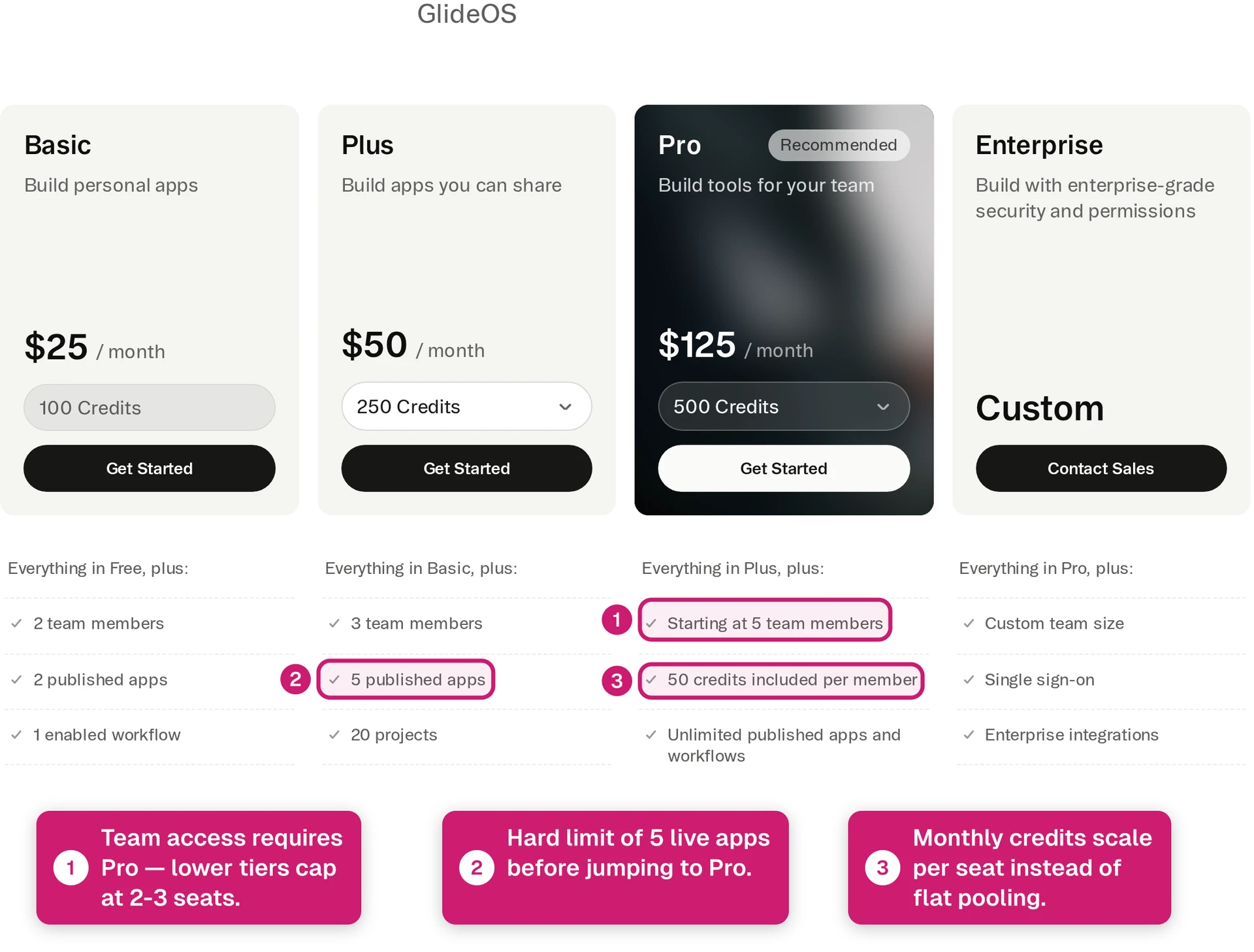
- Glide Business starts at $199/month when billed yearly.
- Extra Glide Business users are $5/month each.
- Glide updates over the included plan allowance cost $0.02 each. With a 5,000-update allowance, 8,000 total updates adds $60 before extra users.
- FlutterFlow Basic is $39/month and includes code/APK download plus one-click App Store deployment.
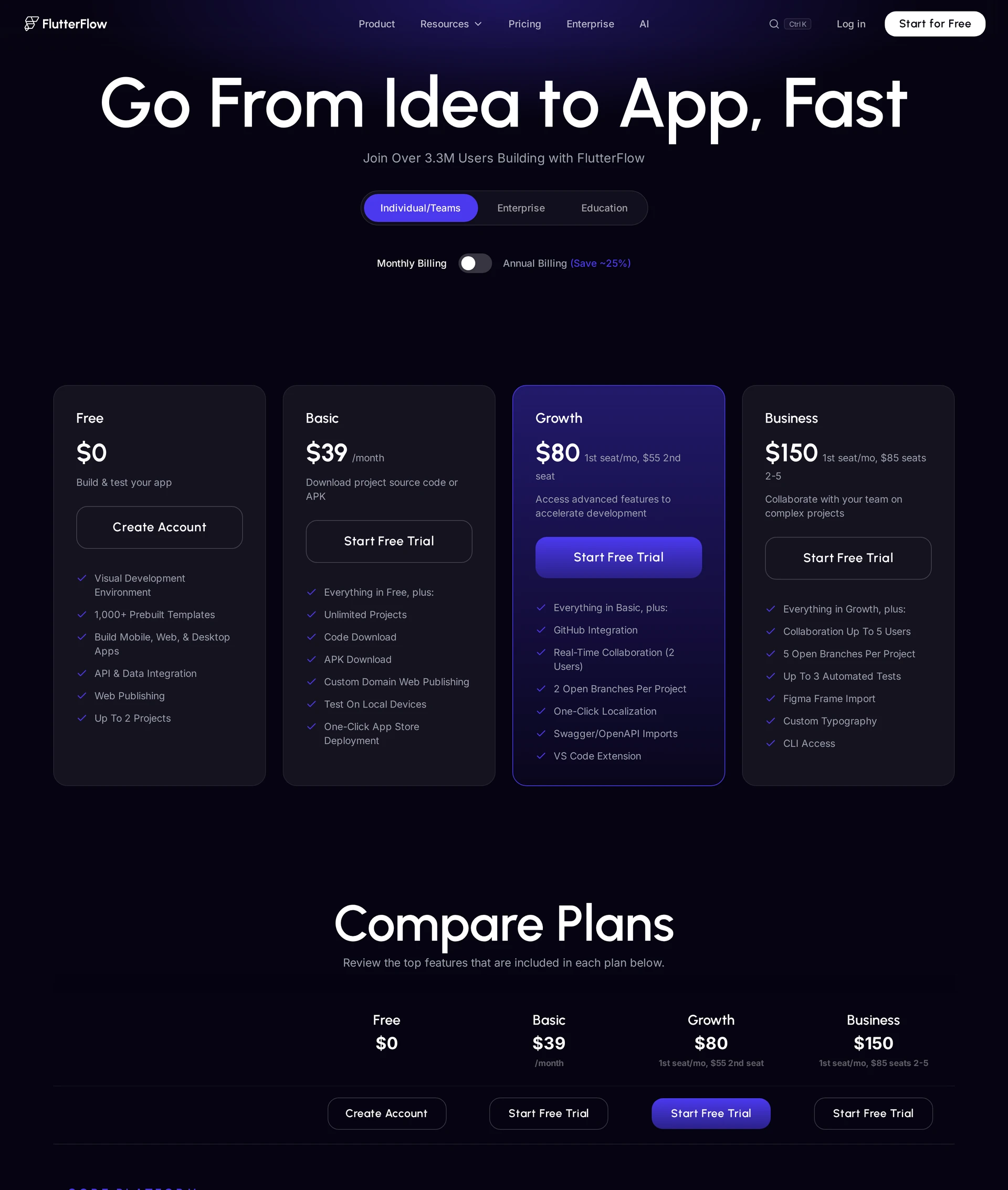
FlutterFlow does not charge per end user. The extra cost usually comes from the backend you connect to FlutterFlow.
Check the Firebase or Supabase bill for backend usage:
- database reads and writes
- storage
- authentication
- server functions
| Platform | Entry Paid Tier | App Store Publishing Tier | Database Included | Scaling Model |
|---|---|---|---|---|
| Glide | Business starts at $199/month, billed yearly | N/A (PWA/web only) | Yes, with row limits | Additional users + update overages |
| FlutterFlow | Basic starts at $39/month | Basic includes one-click App Store deployment | No, connect Firebase or Supabase | Plan features + backend provider costs |
The cost question leads straight into ownership. Once usage pushes you into overages or external backend bills, the next question is whether you can move the app without rebuilding it.
Code ownership, lock-in, and exit options
When I review a no-code build, I ask what happens after the app becomes expensive or too important to leave inside one vendor.
The exit path depends on each tool's export model.
- FlutterFlow can export standard Flutter source code on higher plans, while the free tier does not include source code or APK downloads.
- Glide gives you the hosted app experience, but there is no source-code export. Rebuilding elsewhere is the normal exit path when the app outgrows Glide.
- Bilt becomes relevant when you want ownership without a generated-code cleanup project. You get the full React Native source code, so a developer can take over the codebase.
FlutterFlow's export still needs a developer review. Generated projects may need refactoring before a team can maintain them comfortably.
Glide's lock-in is easier to spot because there is no exported codebase. The risk shows up later, when a working internal tool turns into operational software.
I check four ownership risks before choosing a builder:
- Maintenance risk: A bug needs a fix the platform does not expose.
- Handoff risk: A developer can inspect the data and workflows, but cannot take over a Glide codebase.
- Scaling risk: Row and update limits make rebuilding cheaper than another workaround.
- Roadmap risk: Pricing changes or missing native features start shaping what the product can become.
My ownership rule is simple. Source code should be required before the app becomes hard to replace.
If ownership matters on day one, Bilt is safer because it gives you React Native code you can hand to a developer later.
Choose Glide or FlutterFlow: by project type and skill level
I use two filters before comparing feature lists. Check what the app ships as and who maintains it after launch.
Glide fits fast, data-backed internal tools. FlutterFlow fits custom mobile apps where native publishing and design control matter more than setup speed.
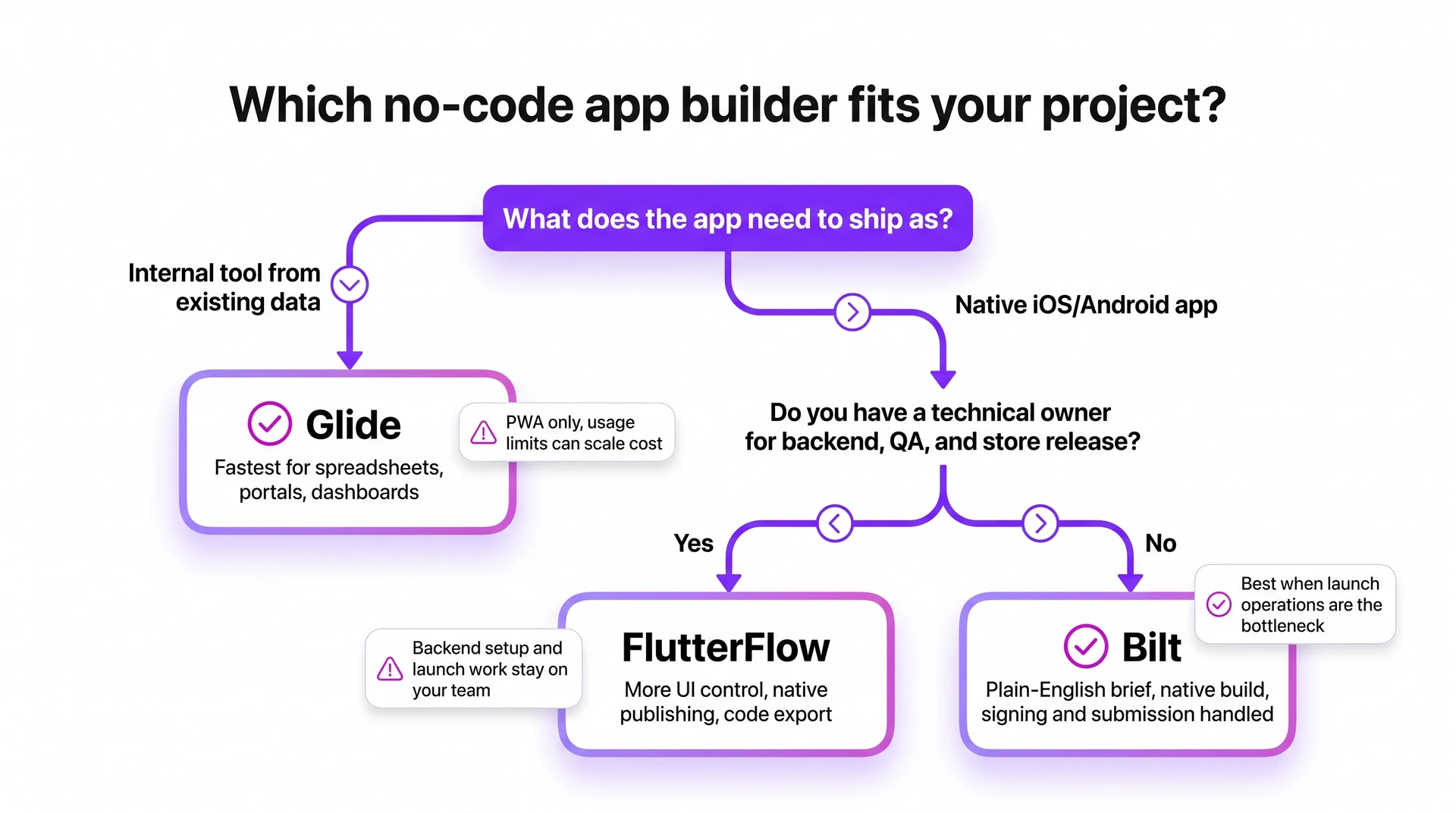
| Project signal | First read | Watch point |
|---|---|---|
| Existing sheet plus internal workflow | Glide | Check row count and update frequency against your plan. |
| Customer-facing native mobile app | FlutterFlow | Confirm someone can handle backend setup and QA before store release. |
| Native mobile without a technical owner | Neither category | Bilt becomes relevant when app generation and store submission are the bottleneck. |
Where Glide fits
In my testing, Glide made sense for internal ops apps where the data model already exists.
The cleanest Glide projects share a simple pattern.
- Defined internal audience: An HR team or field crew needs one shared tool.
- Existing data source: The app mainly cleans up Google Sheets or Glide Tables.
- Simple workflow: Users search records and update statuses, like a field-job tracker or asset checkout app.
- Limited brand requirements: Prebuilt components are acceptable because setup speed matters more than custom UI.
- Early validation: The team needs a working version in hours before deciding whether to invest in a custom build.
Glide becomes risky when plan limits or product behavior start deciding the roadmap.
I check these limits before committing:
- Glide ships web-based apps rather than App Store and Google Play binaries.
- Multi-step permissions or approvals require too many workarounds.
- Row count and update frequency sit near the plan limit.
- The interface needs branded screens instead of Glide's component system.
- Source-code export matters for a future developer handoff.
Where FlutterFlow fits
FlutterFlow asks more from the builder. In my testing, that extra setup made sense when native release or custom app behavior mattered.
Treat FlutterFlow as a requirements check before you commit.
| Requirement | What it means in a project |
|---|---|
| Native release | A customer appointment app or member portal needs iOS and Android distribution. |
| Custom screens | Branded onboarding and account settings need more control than standard admin screens. |
| Technical owner | Someone can work through APIs and tools like Firebase or Supabase. |
| Planned backend | Data relationships are designed before users depend on the app. |
| Developer handoff | Eligible plans can export the full Flutter codebase later. |
My cutoff is simple. If nobody can debug Firebase rules, API responses, action chains, or QA issues, FlutterFlow still feels technical.
When neither tool fits
At this point, I stop comparing feature grids and identify the constraint. The wrong category creates weeks of workarounds.
Use these warning signs as a category check.
- Usage limits are already close: Check projected rows, updates, active users, and role rules before you build.
- The backend is more than a table: User accounts, payments, permissions, and database rules can outgrow simple no-code workflows.
- Every new feature pulls in code: Integrations, high-load behavior, and custom logic start requiring a developer.
- Launch blockers slow everything down: Signing, store review, and expert support become product risks when every delay pushes back release.
- Native-store requirement: Glide's PWA model does not fit App Store and Google Play distribution.
The launch-blocker FlutterFlow alternatives list compares other routes when release work becomes the deciding constraint.
For a native app without a technical owner, Bilt is the clearest next step.
You describe the app in plain language. Bilt turns the prompt into React Native code with automated signing and store-build upload support.
Build the native app version with Bilt
Glide and FlutterFlow are useful when your app fits their lanes. Glide moves fast for data-driven tools, and FlutterFlow gives technical teams more control over mobile screens.
Glide can leave you with a PWA when you need store presence. FlutterFlow can still leave you managing Flutter concepts, database setup, code cleanup, and publishing tasks.
Bilt is built for that path. Describe the app in plain English, and Bilt builds a native iOS and Android app with backend, signing, and store submission support included.
Describe an app and see the native app appear in live preview.
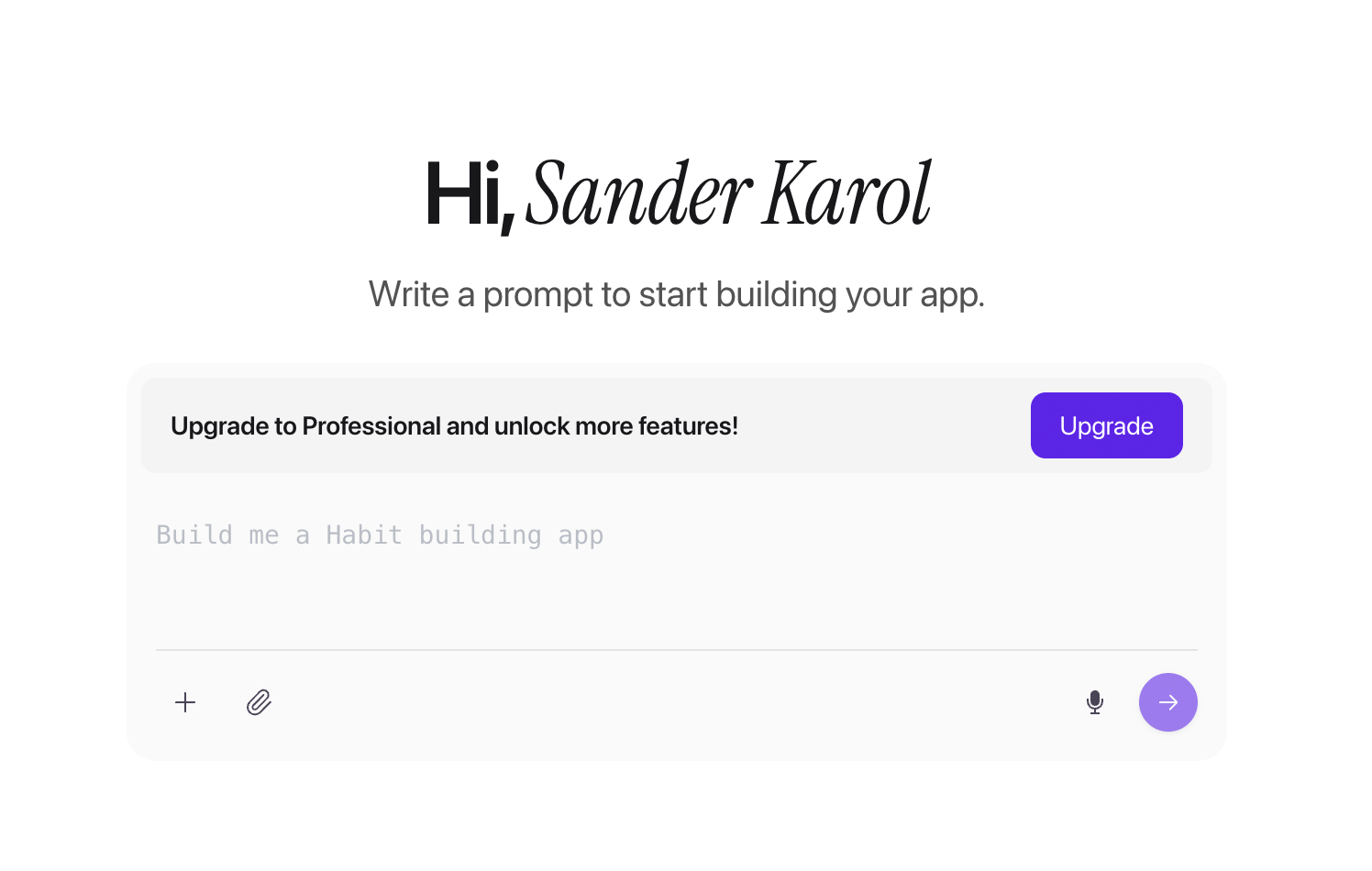
The build includes:
- React Native code you own
- Backend setup inside the workflow
- Code signing and deployment support
- App Store and Google Play submission help
If you want to ship a real mobile app, start with Bilt.
Start building free or book expert mobile advice.
FAQs
Is there anything better than FlutterFlow?
Yes, but “better” depends on the app shape. FlutterFlow is still a solid choice when you want visual Flutter development and someone on the team can think in app architecture.
The handoff point matters. Generated Dart can help, but refactoring a complex FlutterFlow project later usually needs someone who understands Flutter structure.
| Alternative | Better fit when... |
|---|---|
| Bilt | You want native iOS and Android apps from plain English, with backend setup, signing, and publishing support. |
| Bubble | You need a complex web app with backend workflows, user accounts, and admin logic. |
| Glide | You need an internal data app, portal, or dashboard from existing spreadsheets. |
| Retool | Your ops team needs authenticated internal tools connected to databases. |
The practical test is whether the main risk is product logic, mobile publishing, or internal data operations. FlutterFlow handles the middle ground, but native mobile publishing without a technical owner points to Bilt.
Is FlutterFlow the best app builder?
FlutterFlow can be the best app builder for technical founders who want visual control over Flutter apps, code export, and multi-platform deployment. The catch is the learning curve.
FlutterFlow fits when your team can learn Flutter concepts and make architecture decisions before the screens multiply. Firebase or Supabase setup also needs technical judgment.
FlutterFlow becomes harder when the app moves beyond standard screens.
- Non-technical mobile launch: Use a native mobile builder that handles backend and signing and supports store publishing.
- Internal data app: Glide or Retool may fit the workflow.
- Complex web product: Bubble may be the cleaner starting point.
- Deep custom mobile behavior: Raw Flutter gives a developer full control.
FlutterFlow vs Flutter: which should you use?
Use FlutterFlow when speed matters and the app can stay close to standard FlutterFlow patterns. Use Flutter when architecture and long-term maintainability drive the decision.
FlutterFlow covers common app work before Dart becomes necessary.
- standard screens and navigation
- Firebase-style data flows
- Supabase-style backend connections
- basic business logic
- prototypes that need a real mobile path
The exported Dart is useful for audits or developer handoff, especially because Flutter has a large ecosystem.
The painful part is refactoring generated code after months of visual-builder decisions. Plan the handoff before FlutterFlow becomes the source of production architecture.