Say you want customers to open your app and book an appointment. Rocket.new can help you build the screens, but changes to that booking flow draw on credits, and getting the app into stores takes work beyond the subscription. Paying for Rocket.new makes sense if its credits cover the build and revisions you need and you're prepared to handle the publishing steps.
Compare the plan allowances against a real build-and-fix cycle, then account for store fees and the tools you'll need to submit the app. That gives you a way to choose a tier for the app you want people to download, rather than for its first screen.
P.S. If you're comparing Rocket.new because you want an app people can download, Start building free with Bilt by describing what the app should do.
Rocket.new pricing at a glance
Rocket.new has a $0 Free plan and paid self-serve plans from $25 to $250 per month. Annual billing lowers the effective paid range to $20–$200 per month, while Custom pricing is quote-only.
Use Rocket’s pricing page as the current plan list, especially when third-party directories show older entry prices.
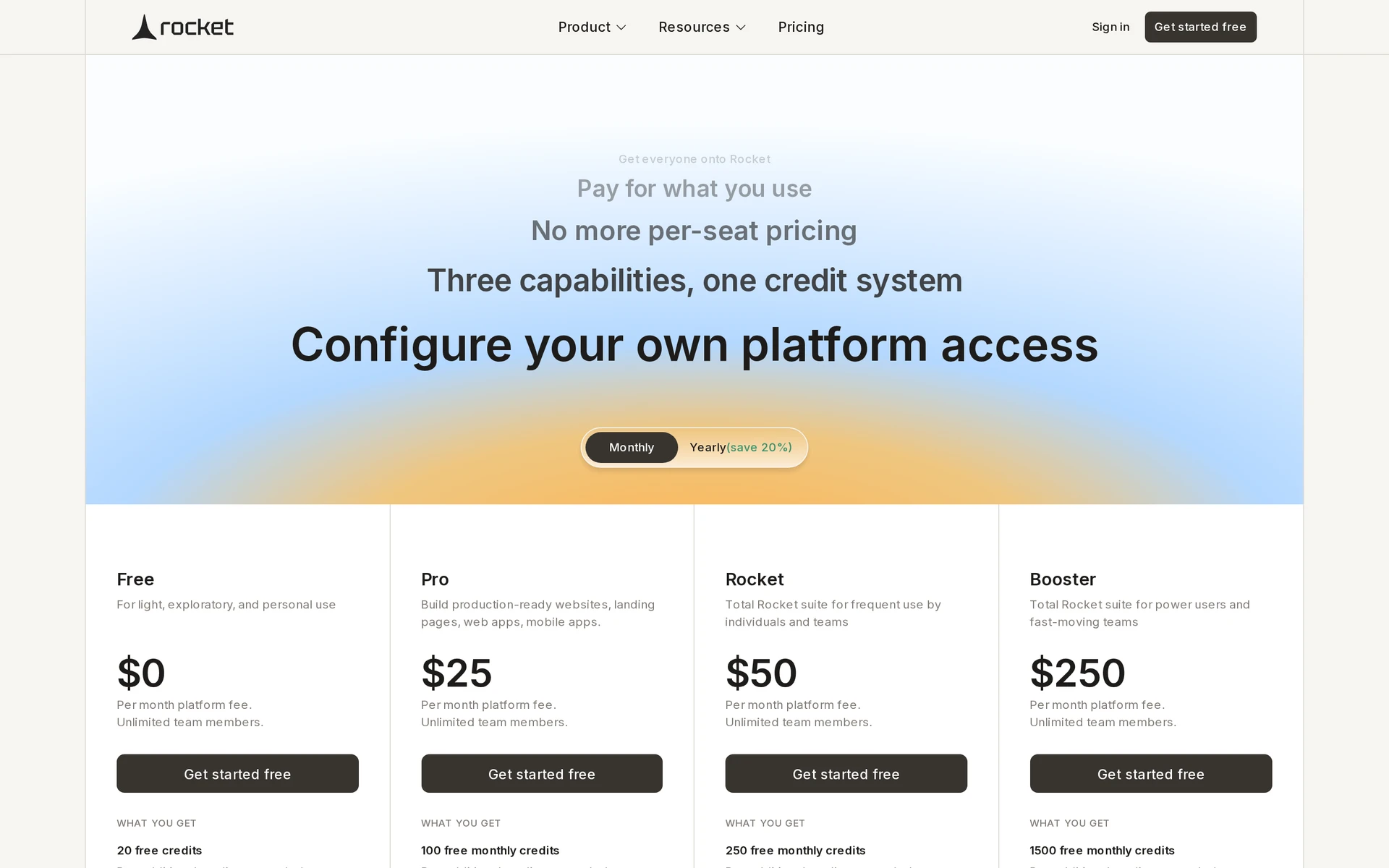
| Plan | Monthly list price | Published allowance | What to check |
|---|---|---|---|
| Free | $0 | 20 one-time credits | How far a first build and revision get you |
| Pro | $25 | 100 monthly credits | Whether fixes fit within a monthly allowance |
| Rocket | $50 | 250 monthly credits | Whether measured use exceeds Pro's allowance |
| Booster | $250 | 1,500 monthly credits | Whether sustained use exceeds Rocket's allowance |
| Custom | Contact sales | Set by quote | Whether you need SSO or premium support |
Existing subscribers keep their old plan and price unless they upgrade.
What each Rocket.new plan includes
All Rocket.new plans let teammates share a workspace. What changes is how many credits you get and which kinds of help you can use: Build creates the app, Solve helps work through problems, and Intelligence covers research. Pro includes Light Solve, while Rocket and Booster add consultant-grade solutions and competitive intelligence.
Free ($0/month)
The Free plan costs $0 and requires no credit card. It includes:
- Credits: 20 one-time credits
- Build: Included
- Light Solve: Included
Pro ($25/month)
Pro costs $25 per month. It includes:
- Credits: 100 monthly credits
- Build: Included
- Light Solve: Included
- Full Solve: Not included
Rocket ($50/month)
Rocket costs $50 per month. It includes:
- Credits: 250 monthly credits
- Solutions: Consultant-grade solutions
- Research: Competitive intelligence
Booster ($250/month)
Booster costs $250 per month and is intended for higher-volume use. It includes:
- Credits: 1,500 monthly credits
- Solutions: Consultant-grade solutions
- Research: Competitive intelligence
Custom plans for SSO and premium support (contact sales)
Rocket.new does not publish Custom plan prices. Sales provides quotes for:
- SSO
- Data localization
- Premium support
- Onboarding assistance
How Rocket.new credits actually affect your bill
Build, Solve, and Intelligence draw from one Rocket.new credit balance. If you use credits to research an idea, those credits aren't available for building and revising the app.
A credit doesn't represent a fixed amount of work. A simple screen and a build that connects to a database can use different amounts, and another attempt at a fix draws from the balance again.
On monthly plans, unused subscription credits roll over while the plan stays active. On yearly plans, they roll over within the 12-month term but expire at renewal.
Add-on credits last while the subscription is active. After you cancel, all unused credits expire at the end of that billing cycle.
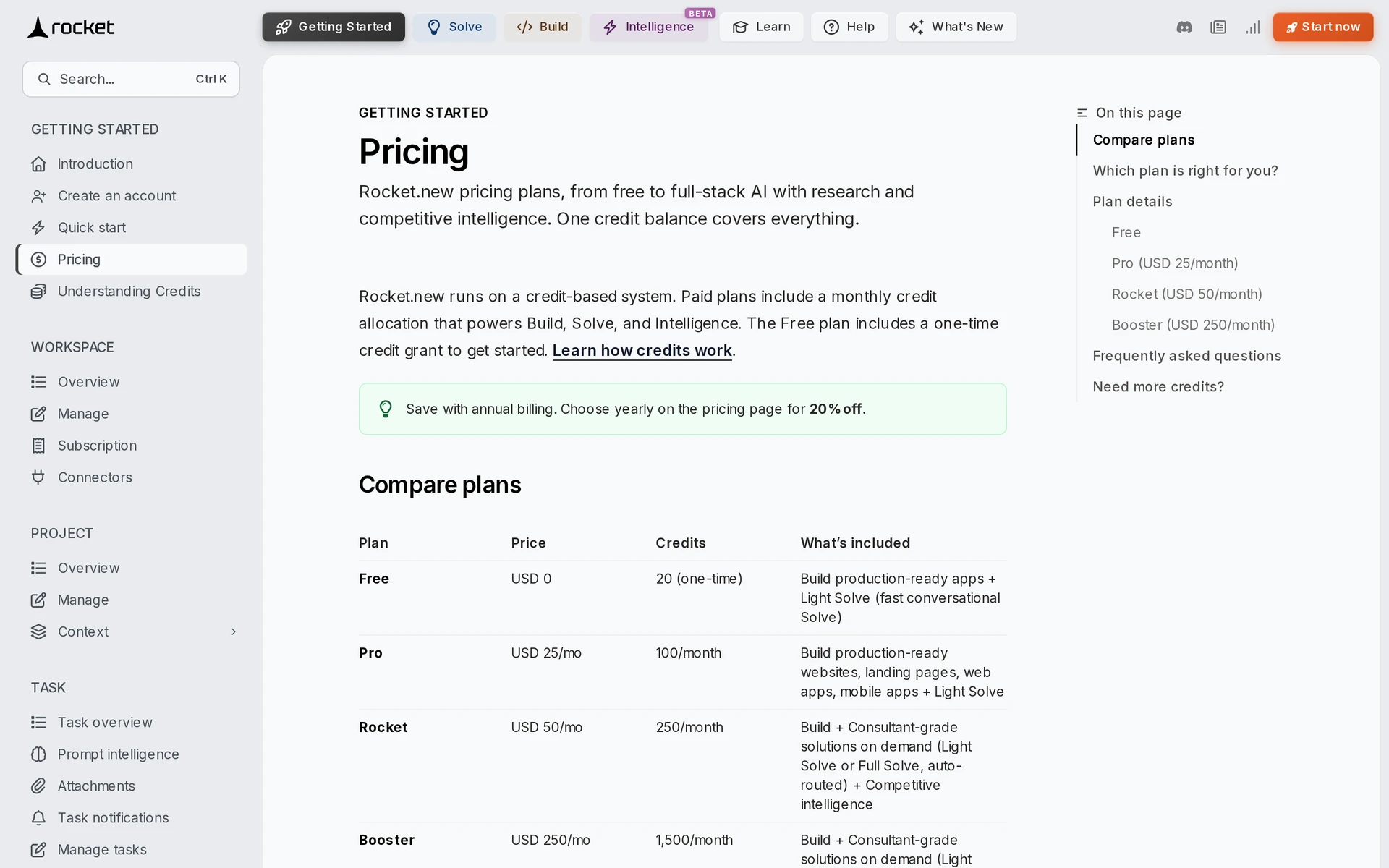
Rocket.new’s pricing page lists top-ups as one-off purchases that don't require a tier change. Your total is the plan fee plus any packs you buy.
| Work | Effect on credit use |
|---|---|
| Basic landing page or static screen | Lower relative use |
| Multi-screen app with basic authentication | Moderate relative use |
| Build request with custom APIs and database setup | Higher relative use |
| Light Solve conversation | Lower than a full strategic brief or PRD |
| Revisions and debugging | Each additional attempt consumes more credits |
| Additional competitor monitoring | Consumes credits for setup, signal tracking, and brief generation |
Rocket's credit guide describes usage as low, moderate, or high without giving a per-action figure. Fixes you request in chat use credits, while the Fix it button for errors Rocket detects is free on paid plans.
The same guide gives conflicting information on competitor monitoring: it says monitoring has no additional credit cost on Rocket and Booster, then lists it as credit-using work. Check your balance if you use it.
Monthly vs. annual billing: what you actually pay upfront
Annual Rocket.new billing is prepaid in one charge, from $240 for Pro to $2,400 for Booster. Rocket costs $480 upfront.
Monthly billing lets you change tiers before the next invoice and spreads the subscription cost across invoices. Annual billing lowers the 12-month total, but you pay it upfront and receive the same plan credit allowance.
| Plan | Monthly billing | Annual prepayment | Savings over 12 months |
|---|---|---|---|
| Pro | $25 per invoice ($300/year) | $240 upfront ($20/month effective) | $60 |
| Rocket | $50 per invoice ($600/year) | $480 upfront ($40/month effective) | $120 |
| Booster | $250 per invoice ($3,000/year) | $2,400 upfront ($200/month effective) | $600 |
Costs to budget for beyond the subscription
The subscription won't cover every cost of a mobile release. Allow for store accounts, extra Rocket.new credits if you need them, and any paid services your app uses.
Publishing to both stores means paying $124 for developer accounts in the first year. Apple's fee renews annually, while Google's is a one-time payment.
| Expense | Budget amount | When it applies |
|---|---|---|
| Apple Developer Program | $99/year | Publishing through Apple’s App Store |
| Google Play Console | $25 one-time | Publishing through Google Play |
| Extra Rocket.new credits | Shown at checkout | The plan allocation runs out while work continues |
| External services | The provider’s usage rate | The app uses a paid API or external backend |
| Rocket.new compute, storage, and hosting | None. Rocket does not bill these separately | Check current usage limits before launch |
Which Rocket.new plan should you choose?
Start with Free to see what an actual screen and a change to it cost in credits. If you need to keep building, compare that use with the paid allowances and leave room for the fixes you discover during testing.
Credit use can jump during debugging, so don't treat a clean first generation as your monthly forecast.
| Plan | Evidence for the tier | Check before moving up |
|---|---|---|
| Free | A first generation and one real revision fit within the 20 one-time credits | Compare credits used by initial generation and a real revision |
| Pro | Measured burn projects below Pro’s monthly allowance | Complete the same build-and-fix workflow before renewal |
| Rocket | Measured monthly use exceeds Pro’s allowance | Compare 30-day use with Rocket's 250-credit allowance |
| Booster | A usage log shows Rocket’s allowance repeatedly interrupts work | Separate ongoing consumption from a one-off debugging spike |
| Custom | SSO or premium support is required | Review the quoted support scope and response terms |
Is Rocket.new pricing worth it for building a mobile app?
Rocket.new can be worth paying for if its credits take you through a build and the fixes testing brings up. If you want people to download the app, add the work of preparing and submitting it to your budget before comparing subscriptions.
A clickable concept can help you get feedback on an idea. A store-ready app needs its key flows tested and a build you can submit. Decide which result you're paying for before judging the allowance.
The subscription's value depends on whether its included credits cover a complete build-and-fix cycle, not just the first generation.
Rocket’s Trustpilot reviews include complaints about credits spent on repeated fixes before the April 2026 relaunch. Other reviewers compare the subscription’s value with hiring a developer.
| Goal | Value verdict | What drives cost |
|---|---|---|
| Research and planning | Conditional value | Research shares the credit pool with generation and revisions |
| Web prototype | Conditional value | Polished screens still need interaction testing |
| Debug-heavy build | Hard to forecast | Repeated fixes consume credits without a fixed work-to-credit conversion |
| Store-ready iOS and Android app | Incomplete budget | Testing and store submission require work beyond the subscription |
What pricing alone doesn't tell you about shipping your app
Rocket.new generates Flutter code, but an App Store or Google Play launch still requires exporting the project and using local tools to prepare and submit the build.
A remaining credit balance tells you how much AI work you can request. It can't tell you whether sign-in, payments, and saved data work on a phone.
Before you submit a mobile app, test the flows people will rely on and prepare the release:
- Authentication: Test sign-in and account recovery on real devices.
- Payments: Confirm purchases and subscriptions behave correctly.
- Data: Check that records save correctly and stay private for each user.
- Device testing: Run every key flow on the phones and operating systems you support.
- Signing: Prepare the certificates and provisioning profiles required by each store.
- Listing: Supply store metadata and required compliance disclosures.
- Review: Upload the build and resolve any review issues.
Rocket.new's documented App Store route has you export the Flutter project, then use Xcode, Apple's app-building software for Mac, to archive and upload it.
For Google Play, you export the code and use Flutter tools on your computer to prepare the app bundle for upload.
Rocket.new gets you building; Bilt carries the build toward publication
Rocket.new's documented mobile route leaves the exported build and local publishing tools in your hands. Bilt builds and signs native iOS and Android apps from a description and takes them through store submission.
Describe what someone should be able to do in the app, then ask for changes as you test its screens. Here, a native app runs as mobile software on iOS or Android rather than simply displaying a website inside an app.
You'll still need your own Apple Developer or Google Play developer account, and each store reviews the submitted app. Bilt also lets you export the React Native source code if you want a developer to continue the work.
Mo-Haven was built solo with Bilt and is live on the App Store. Its builder describes it as “a safe, low-pressure place where communities can share what's really on their mind without feeling judged.”
If you want to build a native app without preparing mobile builds on your computer, Start building free by describing what someone should be able to do in it. If comparing costs comes first, See all plans before you build.
Common questions about Rocket.new pricing
Does Rocket.new offer a free trial on paid plans?
Rocket.new doesn't run a time-limited trial on paid plans. You try it on the permanent $0 Free plan.
Free includes 20 one-time credits with no time limit. You can start without a credit card.
Can you cancel your Rocket.new plan anytime?
Yes. Rocket.new's pricing documentation says billing stops immediately, but access continues until the displayed end date.
After you cancel, unused credits expire at the end of that billing cycle. Your projects stay accessible.
What happens if you run out of credits?
When your balance reaches zero, existing projects and assets remain accessible. You need more credits before Rocket.new can generate anything else.
You can restore credits by buying an add-on in Settings, or by waiting for the next refresh on a paid plan. Upgrading increases your monthly allowance, and add-on credits don't expire while the subscription stays active.
Can a team share one Rocket.new subscription?
Yes. One Rocket.new workspace plan covers unlimited members with no per-seat fees.
Members draw from one workspace credit pool, and owners can cap each Editor's use. The default cap for an invited Editor is 100 credits all-time.
Can you get a refund from Rocket.new?
Rocket.new's pricing FAQ says it doesn't offer refunds and directs questions to support. Check the renewal date before buying an annual plan.
Do bug fixes use Rocket.new credits?
Fixes you ask for in chat use credits. The Fix it button on errors Rocket detects is free on paid plans.
What happened to Rocket.new tokens?
Rocket replaced tokens with credits on 7 April 2026. One million tokens became 20 credits, and balances converted automatically at the same value.