Base44 makes the first build easy. The harder question is whether its credits, managed services, and WebView-based mobile output fit an app you plan to maintain.
We built a CRM, attempted AI-agent API and notification workflows, and inspected the ZIP export. This review combines those results with Base44's current product documentation.
Base44 in one minute
Base44 is a good fit for fast web MVPs, internal tools, and simple apps that can stay on its managed platform. Look more closely if you need independent backend hosting, deep native-mobile control, or predictable room for repeated debugging.
Paid plans start at $20 monthly, or $16 per month with annual billing. AI changes use message credits, while live integrations and automations use a separate integration-credit pool.
Base44 can generate IPA and AAB files for store submission, but the app remains the published web app inside a secure WebView wrapper. Code can be exported, while moving managed backend services still takes separate planning.
What is Base44?
Base44 is an AI builder for full-stack web apps, websites, and agents. It combines generated application code with a managed backend, then lets you publish to the web or package the published app for mobile stores.
Unlike a prompt-only code generator, Base44 keeps the interface and its managed services in one workspace.
That workspace includes two important layers:
- Managed data: database records, authentication, and file storage
- Managed runtime: functions, integrations, hosting, and deployment
Builder and higher plans add code editing, ZIP export, and GitHub workflows. Those options improve code access, but they do not automatically recreate Base44's managed services on another host.
Before committing, ask what you can export and what you would need to replace if the app leaves Base44.
How building an app with Base44 works
Base44 turns a written app description into a working app prototype, then lets you refine, deploy, or package it for mobile app stores within the same workspace.
- Describe the app. Enter the product idea, core workflow, and any styling instructions in a prompt.
- Generate the prototype. Base44 creates the interface, data schema, routes, and seed data, then presents the result for preview.
- Refine the build. Continue with AI prompts or adjust text, colors, and layout in the visual editor. AI changes draw from message credits; code editing, integrations, and backend functions support deeper work.
- Release the app. Publish it as a hosted web app, or scan it for store issues and generate an IPA and AAB. You then upload those files through App Store Connect and Google Play Console.
Base44 pros and cons
Base44 is quickest when the app fits its managed, web-first model. The tradeoffs become more important as refinement consumes credits or the product needs custom architecture, independent hosting, or native-mobile control.
- Fast start: Generate the interface, data model, authentication, and hosting without assembling a separate stack.
- Simple deployment: Publish web apps from the same workspace used to build them.
- Usage tradeoff: Refinement and live integrations draw from separate credit pools.
- Architecture tradeoff: Managed services save setup time but add migration work if you later host the backend elsewhere.
- Mobile tradeoff: Base44 creates store files, but the resulting app is a WebView wrapper rather than a React Native, Swift, or Kotlin project.
The next sections show where credits, custom logic, migration, and compliance change the decision.
Base44 pricing and how credits work
Base44 has Free, Starter, Builder, Pro, and Elite plans. Message credits cover AI building, while integration credits cover actions that run through integrations and automations.
Unused monthly credits do not roll over. Base44 says you can buy a top-up if you run out before the next reset.
| Plan | Monthly | Annual (per month) | Monthly credits | Access highlights |
|---|---|---|---|---|
| Free | $0 | $0 | 25 message / 100 integration | Up to 5 apps; app-store scan |
| Starter | $20 | $16 | 100 message / 2,000 integration | Unlimited apps; in-app code edits |
| Builder | $50 | $40 | 250 message / 10,000 integration | GitHub, ZIP export, IPA/AAB download |
| Pro | $100 | $80 | 500 message / 25,000 integration | Early-access features |
| Elite | $200 | $160 | 1,200 message / 50,000 integration | Premium support |
Free plan ($0/month)
The Free plan lets you test Base44's core builder with up to five apps. It includes an app-store scan, but downloading IPA or AAB files requires Builder or higher.
Base44 separates usage into two monthly pools:
- Message credits pay for prompts and AI-generated changes in the builder.
- Integration credits pay for actions performed by integrations and automations while an app runs.
Both allowances reset monthly. Base44's pricing page lists the current limits and top-up options.
Starter plan ($20/month, $16 annually)
Starter suits personal projects and early-stage apps that need more building and integration activity than Free allows.
Starter includes unlimited apps, in-app code edits, and custom domains. It is the paid entry point for projects that need more than Free's 100 message credits and 2,000 integration credits.
Builder plan ($50/month, $40 annually)
Builder is the first plan aimed at active projects that need more control over code and deployment.
Builder adds AI model selection, GitHub integration, a free domain for one year, and higher monthly credit allowances.
AI refinement depends on the remaining message balance, while live integrations draw from integration credits. A top-up can bridge the gap before the next reset.
Pro and Elite plans ($100-$200/month)
Pro raises both credit pools for complex apps and heavier ongoing activity.
Elite costs $200/month, or $160/month on annual billing. It includes 1,200 message credits and 50,000 integration credits per month, plus premium support beyond Pro's 500 message and 25,000 integration credits.
Where Base44 gets difficult after the first build
Base44's first build can be fast. Friction is more likely when a change needs repeated prompts, the data model keeps shifting, or the app must move beyond Base44's managed services.
Credits and unpredictable debugging costs
In our CRM test, we attempted AI-agent API and notification workflows. The attempts consumed message credits without producing a working result, but the test was not broad enough to separate prompt issues, integration failures, and product bugs with certainty.
Before spending more credits, identify which kind of problem you are fixing:
- Prompt scope: The request is too broad for one reliable change.
- Generated regression: A new patch breaks an earlier workflow.
- Integration failure: The external service, credentials, or generated connection is not working.
- Platform issue: The same action fails after the prompt and integration have been checked.
Narrow the change, save a working version, and retest one dependency at a time. If the same failure persists, stop prompting and inspect the logs or code before using more credits.
Complex logic and the customization ceiling
Base44 becomes harder to manage when business rules, structural changes, or custom integrations exceed what chat-driven generation can keep consistent.
Authentication rules, payment states, database relationships, and non-standard integrations can require JavaScript or direct architectural decisions.
Watch for these warning signs:
- A patch fixes the latest prompt but breaks an earlier flow.
- The AI keeps changing symptoms instead of resolving the underlying state or data model.
- Backend functions require technical knowledge that the original chat workflow did not demand.
- Structural changes create more repair work with each iteration.
Try one narrower prompt when the failure is isolated. Use direct code editing when the behavior is clear but the generated fix is not. Redesign the data model or plan a migration when each patch creates new breakage elsewhere.
Code, data, and backend portability
Base44's ZIP export completed smoothly in our CRM test. Builder and higher plans can export code through ZIP or GitHub, and Base44 also supports exporting app data.
GitHub support includes branches, commits, pull requests, and conflict handling. For imported GitHub projects, the connected repository remains the source of truth.
The harder part is service portability. Database records, authentication, functions, integrations, storage, and secrets may need new equivalents if you move to an independently hosted backend.
Before leaving, inspect the exported code and data, list every Base44 service the app calls, and test the replacement backend. Code access is useful, but it is not the same as a completed backend migration.
Support, reliability, and compliance
Base44 publishes SOC 2 Type II and ISO 27001 credentials, encryption controls, and security scanning. Detailed recovery commitments are available to Enterprise customers through their agreements.
For a production or regulated workload, confirm support response, uptime, recovery, data location, and audit requirements in writing before launch.
Check the controls that apply to your workload:
- SOC 2 Type II: Base44 reports an independent audit of its security controls.
- ISO 27001: Base44 reports certification for its information security management system.
- Regulated data: Confirm workload-specific terms, available agreements, and required controls with Base44.
- Reliability: Review recovery objectives and service-level commitments in the contract.
Certifications are only one part of the decision. Match data residency, access controls, audit logs, incident terms, and contractual obligations to your own requirements.
Can Base44 build native mobile apps?
Base44 can package an app for the iOS and Android stores, but it does not turn the project into a React Native, Swift, or Kotlin codebase.
The generated IPA and AAB use a lightweight native wrapper that loads the published Base44 web app in a secure WebView. Most published content and design changes can therefore appear without submitting a new store version.
Base44 scans apps against store guidelines on Free, while IPA and AAB downloads require Builder or higher. You upload those files in App Store Connect and Google Play Console, then handle each store's review requests. Base44's store guidance warns that apps using Stripe for digital content are rejected.
Who should use Base44 (and who should skip it)
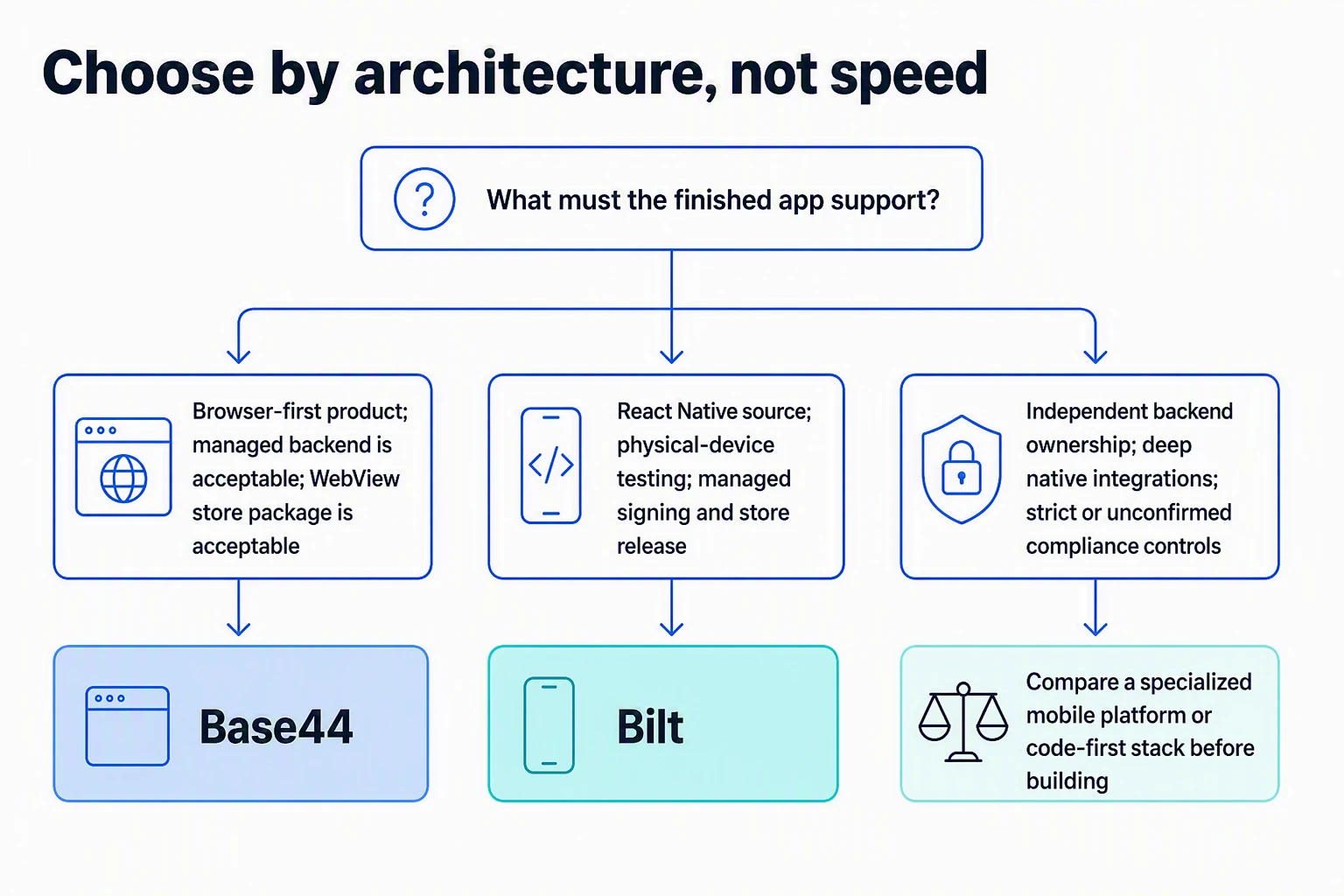
Base44 fits browser-first products that benefit from a managed stack and fast iteration. Evaluate it more carefully when native interaction, independent hosting, or contractual compliance is central to the product.
- Good fit: Internal tools, portals, dashboards, CRUD-heavy workflows, browser-first MVPs, and simple apps where a WebView package is acceptable.
- Evaluate carefully: Apps that need offline behavior, deep device integration, independent backend hosting, fixed operational limits, or contractual compliance controls.
Best for prototypes and simple tools
Base44 works best when you can validate the workflow before committing to a more specialized architecture.
That includes admin panels, customer portals, simple marketplaces, and internal record systems whose value comes from the workflow rather than native device behavior.
Skip it for complex or regulated production apps
Skip Base44 when the requirements already call for a native codebase, independent backend ownership, or controls the platform cannot confirm for your workload.
Those conditions include:
- Required compliance terms or controls are unavailable.
- Core business logic needs ongoing engineering control outside generated patches.
- The backend, database, and deployment stack must run independently from the start.
- App-store distribution is not enough because the product needs React Native, Swift, Kotlin, or deep native integrations.
- The team needs a fixed workflow for heavy, repeated build and debugging cycles.
If several of these apply, compare a mobile-first platform or code-first stack before building further.
Base44 alternatives by use case
The right Base44 alternative depends on what must change: design control, developer access, data workflows, or native-mobile architecture.
- Bolt for prompt-driven web work: Evaluate it when you want to work closer to the code. Verify how you will provide the backend, testing, and production maintenance.
- Lovable for interface-led web MVPs: Evaluate it when visual iteration and exported web code matter most. Verify the backend and mobile path before moving an existing app.
- Replit for a code-first workspace: Evaluate it when developers need to inspect and maintain the application stack. Plan the architecture and deployment rather than expecting a managed Base44 migration.
- Airtable for structured operations: Evaluate it when the product is mainly records, forms, views, and automations rather than a customer-facing generated app.
What if you outgrow Base44's web apps?
Outgrowing Base44 does not mean starting every part again. You can export code and data, but you still need a plan for any managed service the app relies on.
Start by separating portable application code from Base44-hosted infrastructure.
GitHub or ZIP can carry code out. Database records can also be exported, but authentication, functions, integrations, storage, secrets, and deployment need working replacements.
Inventory the move before changing platforms:
- Confirm which repository or ZIP contains the current frontend code and configuration.
- Export database records and map authentication users, roles, and permissions.
- List every function, integration, file store, secret, and scheduled workflow.
- Run the busiest workflows against the replacement backend before switching domains or users.
Existing IPA and AAB files do not remove that backend dependency. A new native architecture may also require rebuilding mobile-specific behavior rather than reusing the WebView package.
Stay when the managed stack still meets the product's needs. Move when replacing its services now costs less than working around them later.
How Bilt takes a native app from prompt to release
Bilt generates a React Native project for iOS and Android, rather than placing a published website inside a WebView. The source compiles into mobile apps and can be exported for future development.
Bilt's in-browser iOS simulator, browser-based Android emulator, and QR testing let you check the app before release on a simulator or a physical phone:
Describe an app and watch Bilt build it in a live preview.
The path from prompt to store has four steps:
- Describe the app. Explain the screens, user flow, and behavior in plain English. You can also provide designs or reference images.
- Refine through conversation. Ask Bilt to change the interface, data flow, or capabilities while it updates the React Native project.
- Test the build. Use the browser-based Android emulator or open the app on a physical phone through QR testing.
- Release the app. Bilt manages cloud builds, identifiers, signing, certificates, provisioning, TestFlight, and store uploads. You provide the developer accounts, complete the store listings, and submit the release for review in Apple's or Google's tools.
The complete React Native project can sync with GitHub, move into tools such as Xcode or VS Code, and enter your own CI/CD workflow. Bilt Payments and Bilt-managed backends remain service dependencies when the app uses them.
- Architecture: Base44 packages its published web app in a secure WebView. Bilt generates a React Native project.
- Testing: Base44 provides browser and store-readiness workflows. Bilt adds in-browser iOS and Android simulators, plus QR testing on a physical phone.
- Release: Base44 generates IPA and AAB files for you to upload. Bilt manages cloud builds, signing, provisioning, TestFlight, and store uploads.
- Handoff: Both provide code access. Bilt's exported React Native project can continue in a standard mobile-development workflow.
When Bilt is the right next step
Bilt is the right next step when you need a React Native project, browser-based iOS and Android testing, and a managed release workflow. Base44 suits browser-first products that fit a managed stack and a WebView store package.
Bilt builds native iOS and Android apps from a plain-English description, then lets you refine the React Native project through conversation. You can export the full source code for future development.
Ready to build a real mobile app? Start building free. Free to start, no credit card.
FAQs
Is Base44 legit?
Yes. Base44 is a legitimate AI app builder owned by Wix.com Ltd.
Who owns Base44?
Wix.com Ltd. acquired Base44 in June 2025.
Maor Shlomo founded Base44 before the acquisition.
Do Base44 credits roll over?
No. Unused message and integration credits expire at the end of each monthly billing cycle, but Base44 says you can buy a top-up before the next reset.
- Is Base44 free? Yes. Free includes core building features with lower monthly message and integration allowances.
- Can Base44 publish to the App Store? It can scan the app and generate an IPA and AAB. You upload them and manage review in the store consoles.
- Does Base44 build native apps? It creates a lightweight native wrapper around the published web app, not a React Native, Swift, or Kotlin project.
- Can you export Base44 code? Builder and higher plans support ZIP export and GitHub workflows. Base44 also supports app-data export.
- Can you move to another backend? Yes, but you must replace or migrate managed services such as authentication, functions, integrations, storage, and deployment.
- Does Base44 support GitHub? Yes. It supports repository workflows, branches, commits, pull requests, and conflict handling.
- Is Base44 suitable for production apps? It can be, when its managed architecture, limits, support terms, security controls, and WebView mobile model fit the workload.