Choosing an enterprise mobile app development platform is not about finding the longest feature list. It is about finding a build path that fits your workflows, systems, security rules, and team.
The wrong choice may produce a polished prototype, then create expensive problems with integrations, data access, deployment, or maintenance. Those problems usually surface when real users and company systems enter the picture.
This guide compares code-first, low-code, and prompt-led approaches. It also shows you how to judge security, integrations, ownership, cost, and rollout needs before you commit.
What is an enterprise mobile app development platform?
An enterprise mobile app development platform is software used to build, connect, deploy, and manage iOS and Android apps around company systems and controls.
Enterprise apps may serve employees, partners, field teams, or customers. What makes them enterprise apps is their connection to company data, identity, governance, and managed business processes, not whether the public can download them.
Types of enterprise mobile apps
Enterprise mobile apps are usually grouped by the business function they serve and by how widely they are rolled out. Those two cuts decide security, integration, and offline needs before you pick a platform.
By department and function (CRM, ERP, BI, HR)
Function-based enterprise apps are CRM, ERP, BI/analytics, and HR systems plus field, inventory, and workflow tools.
Group the app by the work it supports:
- Customer and partner: CRM, partner portals, and customer self-service
- Operations: ERP, inventory, logistics, and field service
- People and learning: HRMS, LMS, and time tracking
- Decisions and workflow: BI and analytics, plus approval workflows
By scale (employee, department, or company-wide)
Scale-based enterprise apps may support one workflow, a team or department, or the whole company.
Rollout scope changes the platform requirements:
- Single workflow: Give one role, such as a field inspector, the permissions and offline access needed for a specific task.
- Team or department: Connect a shared workflow, such as warehouse receiving, to department systems with role-based access control.
- Company-wide: Support workflows such as employee self-service with SSO, organization-wide access rules, ERP or CRM integration, and consistent offline synchronization.
Two first checks for an enterprise mobile platform
Start with security and integration. If a platform cannot protect company data or connect reliably to production systems, its design tools and prototype speed do not matter.
Security, compliance, and data privacy
Enterprise mobile security combines encryption, identity controls, and documented operating practices. A platform may support GDPR and CCPA requirements or provide SOC 2 reports, but the organization remains responsible for how the app is configured and used.
Use these controls as a security release gate:
- Encryption: Protect data in transit, at rest, and in device storage, with clear key-management responsibilities.
- Identity: Support SSO, compatible identity providers, MFA, OAuth where appropriate, and role-based access control.
- API security: Route requests through authenticated, secured API gateways.
- Privacy: Define how the app collects, stores, and removes personal data.
- Compliance evidence: Map applicable privacy laws and assurance requirements to platform controls, app configuration, and internal processes.
Integration with existing enterprise systems
Enterprise mobile integration is prebuilt connectors and APIs that attach the app to ERP, CRM, and other live backends.
Validate integration against the systems employees already use:
- Confirm connectors or APIs can reach ERP, CRM, supply-chain, and other required backends.
- Name the source of truth for each record and define whether the app reads, writes, or synchronizes it.
- Test offline changes, reconnection, and conflicting updates before rollout.
- Test retries, idempotency, partial failures, transaction handling, and conflict resolution so API errors do not create duplicate or incomplete records.
Benefits of building an enterprise mobile app
Enterprise mobile apps put secure, integrated workflows in employees’ hands. A field-service app can let a technician update a work order before leaving a customer site.
The business case begins with the workflow, not the app. That may mean removing duplicate data entry for a technician or letting a customer check an order without calling support.
- Faster daily work: Field staff can update records from the field rather than returning to a desktop. Measure task completion time against the desktop workflow after launch.
- Tighter access control: Managed authentication and role permissions keep mobile work under IT control.
- Lower process cost: Automation can remove duplicate entry and manual handoffs, but savings depend on adoption and the cost of maintaining integrations.
- Faster service: Staff and customers can act on current data at the point of need. Compare response time, repeat contacts, and unresolved requests before and after launch.
Set a baseline before development. Track task completion time, support volume, error rates, and adoption so the investment can be defended with workflow outcomes rather than download counts.
How to choose an enterprise app development platform
Choose a platform by eliminating options in order: security and governance, required integrations, device and offline needs, code ownership, internal skills, then cost. Compare prices only after a platform passes the requirements that could block the app from launching.
Native, cross-platform, or low-code?
Native development gives iOS and Android separate codebases. Cross-platform frameworks share code, low-code platforms use visual models, and prompt-led AI builders can produce a cross-platform React Native codebase from plain-English requirements.
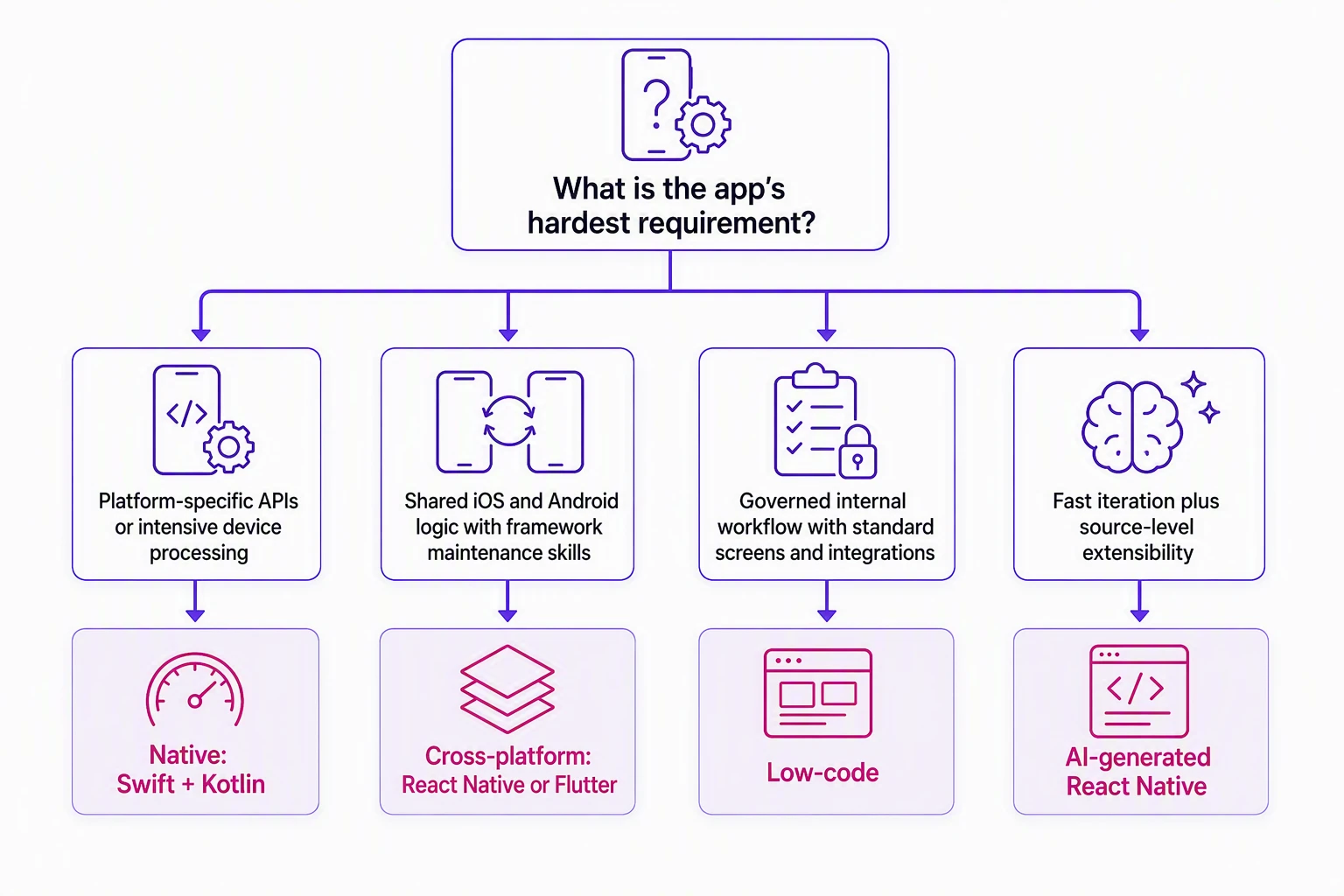
Use the least complex approach that passes the app's hard requirements:
- Native per OS: Use Swift and Kotlin when the app depends on platform-specific behavior, intensive device processing, or direct access to newly released APIs.
- Cross-platform: Use React Native or Flutter when iOS and Android should share product logic and the team can maintain framework code.
- Low-code: Use visual development for governed internal workflows with standard screens and integrations; test custom logic before committing.
- AI-generated React Native: Use prompt-led generation within the cross-platform path when you want faster iteration and source-level extensibility. Bilt generates React Native apps that compile into iOS and Android binaries.
Require a working proof for the hardest workflow. The proof should exercise authentication, one production integration, required device APIs, offline behavior if applicable, and a store-submittable build.
What it costs and how pricing scales
Enterprise app costs include the build, platform subscription, integrations, security work, store accounts, support, and maintenance. Agency-built apps often cost $30,000 to $100,000 or more, while self-serve platforms may offer a free tier.
Compare each option over the same ownership period. A low entry price can become expensive when production environments, usage, support, or source access sit outside the base plan.
Ask every vendor to quote the same operating scenario:
- Platform and usage: Named users, monthly active users, app and environment counts, AI tokens, API calls, storage, and data transfer
- Integration and infrastructure: Identity, databases, ERP, CRM, APIs, production hosting, and test environments
- Publishing and support: iOS and Android builds, signing, store submission, onboarding, training, and response targets
- Ownership and exit: Source access, export rights, dependency maintenance, migration help, and exit fees
Request line items for setup, recurring fees, usage overages, integration work, and exit costs. A defensible quote states what changes the bill and who maintains each production dependency.
| Platform | Public entry price | How enterprise pricing scales |
|---|---|---|
| Thunkable | $19/month Accelerator | Builder $59/$37, Advanced $189/$99, Enterprise custom |
| Buildfire | $165/month Standard | Growth $315/month; Scale $440/month; Enterprise custom; agency builds $5,000–$15,000 |
| Mendix | Free sandbox; Basic ~€50–$63/month per app plus users | Standard and Premium custom; Cloud Token infrastructure |
| OutSystems | Free Personal Edition | O11 and ODC custom on Application Objects, users, infrastructure |
The lowest monthly price is not always the cost of publishing or operating the app. Compare the plan that supports your real release, integration, support, and ownership needs.
How enterprise mobile apps get built
Enterprise mobile apps follow a controlled lifecycle from business scope through ongoing operations.
- Define the outcome. Set the business goal, budget, accountable owner, and technical requirements before choosing a platform.
- Design the workflow. Turn requirements into user flows and a testable prototype, then agree on acceptance criteria.
- Build the application. Teams can code manually, configure a low-code platform, or generate an app from prompts. Bilt turns a plain-English description into a working React Native app that teams can preview, refine, export, and prepare for iOS and Android deployment.
- Connect enterprise systems. Integrate the app with existing APIs and identity services, with clear ownership for architecture decisions.
- Test and deploy. Validate the app with real users and complete security review. Release through the Apple App Store, Google Play, or private MDM distribution.
- Operate the product. Assign owners to monitor crash reports, approve releases, and update dependencies. Review access policies with each release.
Before release, confirm that the generated app passes four checks:
- Users can sign in through the approved identity flow and cannot reach data outside their role.
- Production integrations handle retries, failures, and conflicting updates without corrupting records.
- Security reviewers approve data storage, permissions, dependencies, and expected load.
- Named owners control signing, distribution, monitoring, dependency updates, and incident response.
Mobile app development platforms to compare
These platforms use different build models and pricing structures. Compare their mobile output, offline behavior, integrations, deployment control, source access, and the work your team must still own.
Mendix
Mendix is a low-code platform for building and operating enterprise applications across mobile and web environments.
Its documented enterprise integration paths include:
- Siemens Xcelerator, Teamcenter PLM, and Insights Hub integrations
- An SAP Solution Extension partnership
- Pricing: Mendix offers a free sandbox and a public Basic plan. Standard and Premium plans require a custom quote.
Mendix also supports responsive web experiences and PWAs for browser-based delivery. Teams should confirm whether platform-specific device features can be handled through supported modules or require custom native work.
Offline behavior
Native Mobile applications are offline-first by default. They use embedded SQLite storage, client-side Nanoflows, and model-driven synchronization after the device reconnects.
Ask Mendix to itemize:
- Application count and user licensing
- Cloud Token consumption and deployment environment
- Support level
- Any custom-module work needed for required native integrations
Mendix supports cloud, private-cloud, and on-premises deployment. Its Native Mobile model is offline-first by default, while OutSystems supports offline synchronization patterns that buyers should configure and test for their field workflow.
OutSystems
OutSystems is a full-stack enterprise low-code platform for web, mobile, and agentic AI applications. Its Mobile Apps Build Service compiles iOS .ipa and Android .apk or .aab binaries in the cloud.
Cloud compilation removes the need for local mobile SDKs or a macOS build machine during the platform build step. Release teams still need to validate signing, store credentials, testing, and distribution within their own governance process.
Documented integration paths include:
- Native connections to SAP business logic and data
- Pre-built connectors for SQL Server, Oracle, Salesforce, and SAP
- Visual consumption and exposure of REST APIs and SOAP services
OutSystems supports offline synchronization patterns for mobile applications. Buyers should test conflict handling, data volume, and reconnect behavior against the app's actual field workflow before committing to an architecture.
The platform also includes Agent Workbench for orchestrating, testing, and deploying enterprise AI agents. AI Mentor System analyzes quality, security, and technical debt.
Pricing and implementation checks
- Personal Edition: Free for learning and prototyping.
- OutSystems 11: Custom quote required for commercial plans.
- Developer Cloud: Custom quote required for commercial plans.
Compared with Mendix's offline-first Native Mobile model, OutSystems gives teams supported synchronization patterns to design around each app. Ask the vendor to define Application Objects, user volume, environments, support, mobile build usage, and conflict-handling responsibilities in the quote.
Thunkable
Thunkable is a visual no-code builder for iOS, Android, and browser apps. One project uses block-based logic and runs through a React Native and Expo runtime.
Creators assemble screens, inputs, data connections, and workflows without writing Swift or Kotlin. Thunkable supports Apple App Store and Google Play releases, but store publishing starts with the Builder plan at $59/month.
Production constraints include:
- Collaboration: Only one Creator can actively edit a project at a time. Other collaborators refresh the canvas to see committed changes.
- Source access: Teams receive compiled binaries or web builds, not raw React Native or JavaScript source.
- Project complexity: Published G2 reviews describe a steeper learning curve once workflows require programming-style logic.
- Airtable-backed apps: Airtable's Web API allows 5 requests per second. Test data flows and complex visual logic under realistic load before rollout.
Thunkable fits prototypes, simple internal tools, classroom projects, and small-business apps. Unlike Bilt's exportable React Native output, Thunkable provides compiled builds rather than raw React Native or JavaScript source.
| Plan | Price | Publishing note |
|---|---|---|
| Free | Available | No store publishing stated at this tier |
| Accelerator | $19/month | Below store-publish gate |
| Builder | $59/month or $37/month billed annually | Store publish; 1 live published app |
| Advanced | $189/month or $99/month billed annually | Higher self-serve tier |
| Enterprise | Custom quote | Custom-quoted |
Buildfire
Buildfire is a no-code and low-code platform for native mobile apps. Its workflow combines a drag-and-drop Control Panel, a library of more than 150 plugins, and JavaScript SDK customization.
The platform covers several recurring mobile-app needs:
- Publishing: Buildfire's team manages Apple App Store and Google Play submissions.
- Push communication: Scheduled messages can use drip workflows, user segments, and geofenced triggers.
- Customization: Plugins handle standard functions, while the JavaScript SDK extends app behavior beyond the Control Panel.
- Agency delivery: Buildfire states an 8 to 10 week timeline for production apps, with typical SMB and mid-market projects costing $5,000 to $15,000.
Buildfire's plugin model and managed publishing reduce setup for repeatable app formats. Thunkable uses block-based project logic instead, but permits only one Creator to edit actively at a time.
Unusual business logic and deep enterprise integrations need closer technical review. JavaScript customization expands the platform, but bespoke workflows may require plugin development and ongoing developer involvement.
Buildfire's Standard plan is $165/month, Growth is $315/month, and Scale is $440/month. Add agency delivery or custom-plugin work before comparing the total with self-serve builders.
What if you don't have an in-house dev team?
You can build an enterprise app without an in-house mobile development team, but not without accountable owners. Prompt-led generation reduces the work needed for the first version; your organization still approves access, data flows, architecture, security, and release decisions.
Bilt spent two months with enterprise teams working through admin settings and user-experience needs. The lesson was not that generation takes two months, but that enterprise rules and ownership must be clear before rollout.
Keep named owners for:
- Scope: business requirements and acceptance criteria
- Access: user roles and admin settings
- Data: system integrations and data flows
- Risk: security and compliance approval
- Release: app store or MDM deployment, maintenance, and user support
| Delivery path | Internal engineering requirement | Typical responsibility boundary |
|---|---|---|
| Low-code platform | Reduced | Business users configure applications within platform constraints |
| AI generation | Reduced for initial creation | Prompt-led app definition and generated code; integration and architecture requirements still need ownership |
| External development agency | Not required internally | Agency-managed development, compliance, security, launch, maintenance, and support |
Build your enterprise app without an in-house mobile team
Bilt can support enterprise mobile work when you need a native iOS and Android app without building the first version by hand. Enterprise customers can use SAML SSO, SCIM, AES-256 encrypted storage, and GDPR/CCPA controls.
Mendix and OutSystems are enterprise low-code platforms built around broader application governance and integration estates. Bilt focuses on prompt-led native app creation, React Native source export, and deployment, so validate the integration and governance fit for your environment rather than assuming parity.
Describe the app in plain English, then refine it through conversation. Bilt creates the screens, logic, backend, and React Native code for iOS and Android, with browser previews for review before release.
Describe an app, get a native app in live preview.
Bilt gives you full React Native source, GitHub access, browser-based previews, and testing on real devices. Your team can keep building in Bilt or hand the code to a developer.
Bilt's Enterprise plan has flexible billing, onboarding, dedicated support, custom integrations, group-based access control, and custom design systems. Your organization remains responsible for access policy, integration approval, compliance decisions, security review, distribution policy, and post-launch ownership.
Bilt supports App Store and Google Play deployment, with engineering help when a build or release needs attention. It suits business owners, web-app teams, and non-technical product owners who need native mobile output and code ownership.
Bilt has a permanent Free plan with up to 3M tokens. Paid monthly plans are 40% off for the first month, and Bilt meters tokens, not credits.
- Free: Up to 3M tokens
- Professional: €15 for the first month, then €25/month; €19/month annually; 10M tokens
- Professional Plus: €30 for the first month, then €50/month; €39/month annually; 20M tokens
- Professional Max: €60 for the first month, then €100/month; €79/month annually; 45M tokens
- Professional Ultra: €150 for the first month, then €250/month; €195/month annually; 115M tokens
- Enterprise: Flexible billing.
Start building free, describe your enterprise app, and review the native build before App Store or Google Play deployment.
FAQs
How long does it take to build an enterprise mobile app?
Bilt can produce an initial working app in minutes or hours. A full enterprise rollout takes longer when the app needs production integrations, security review, user testing, MDM setup, or company-wide governance.
How is an enterprise app different from a regular app?
An enterprise app connects to company systems and operates under organizational identity, data, and release controls. It may serve employees, partners, or customers, while a regular consumer app usually has fewer internal integration and governance requirements.
Do enterprise apps need offline access?
Enterprise apps need offline access when critical work continues without reliable connectivity, such as field inspections or warehouse receiving. The app should protect local data and reconcile changes safely when the connection returns.
Who maintains an enterprise app after launch?
A named internal product owner remains accountable for governance and post-launch product decisions, including security reviews, integrations, and deployments. An agency or app builder can handle technical maintenance and support.