FlutterFlow pricing in 2026 looks simple at first: Free, Basic, Growth, Business, and Enterprise. The real question is whether the plan gets you all the way to a store-ready mobile app.
Native mobile publishing starts on Basic at $39/month. The bigger costs show up around code export, App Store and Google Play accounts, backend usage, AI requests, seats, and help with release work.
Pricing checked against FlutterFlow's public plan docs in June 2026. Confirm current limits before choosing annual billing or adding editor seats.
Prefer to skip the plan math?
If you already know the goal is a real native app, start building free with Bilt. Describe your idea, preview your iOS and Android app, and get publishing support without sorting through FlutterFlow credits, seats, and export limits.
TL;DR
Fast answer: FlutterFlow is free for prototyping, but native mobile publishing starts at $39/month on Basic. It is worth it when you need Flutter/Dart output, source-code export, and a visual app-building workflow.
- Free is for prototyping: Free includes the visual builder, templates, API integration, subdomain web publishing, up to 2 projects, and 5 lifetime AI requests.
- Basic is the first mobile publishing plan: Basic costs $39/month and unlocks code export, APK downloads, and app store deployment tools.
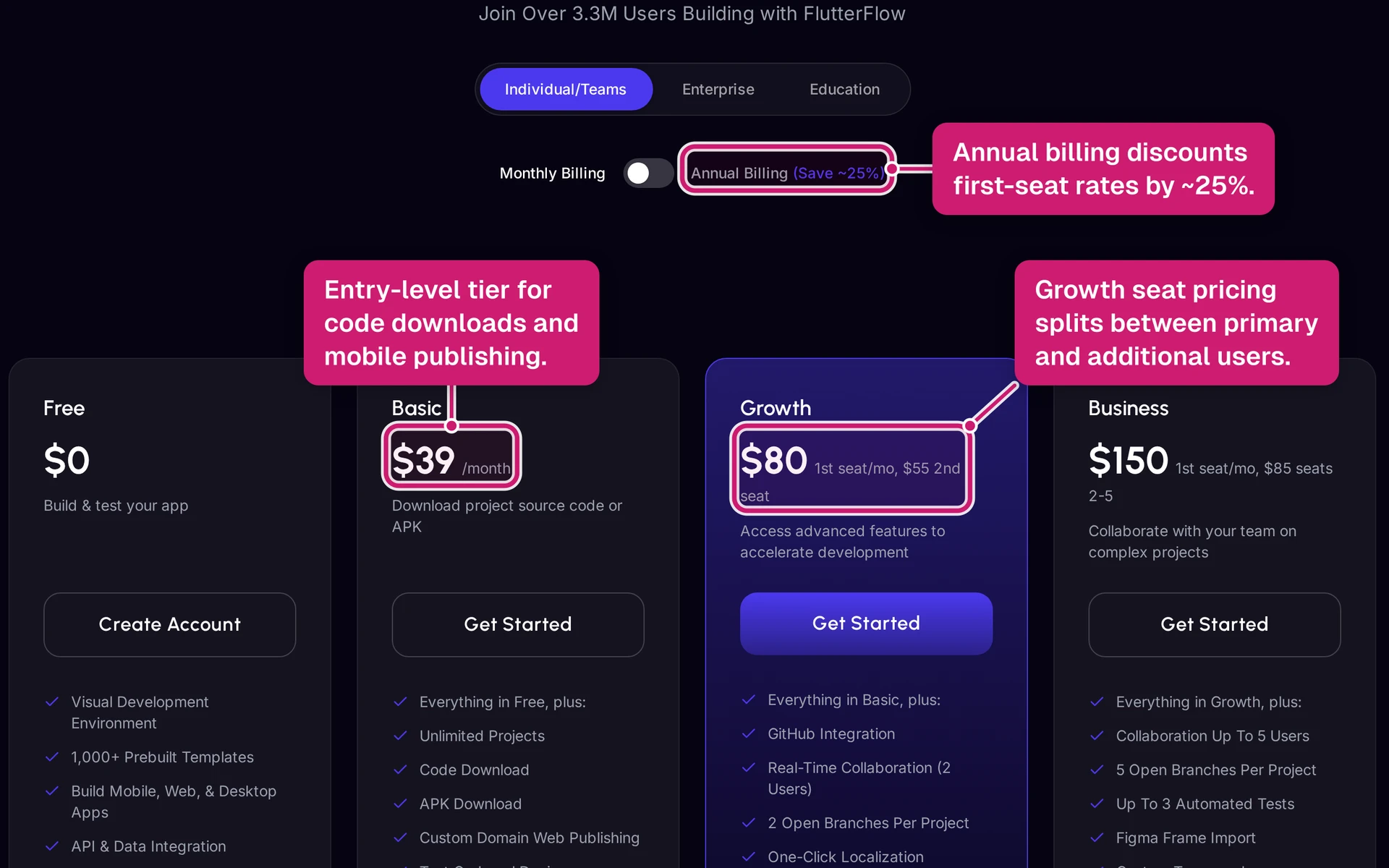
- Growth is the collaboration step: Growth costs $80/month for the first seat. A second editor adds $55/month, and the plan unlocks GitHub sync and branching.
- Business is for small teams: Business costs $150/month for the first seat. Extra editor seats cost $85/month each for seats 2 through 5, with Figma import and automated testing.
- Extra costs still apply: Apple Developer Program costs $99/year, Google Play registration costs $25 one-time, and backend tools like Firebase or Supabase are separate.
- Worth it depends on the app: FlutterFlow is easier to justify for native mobile apps with code-export needs. It is harder to justify for web-first apps, simple database apps, or founders who mainly need help getting from idea to store submission.
Quick answer: how much does FlutterFlow cost?
FlutterFlow costs $0-$150/month for the first seat before Enterprise. Basic is the first plan for native mobile publishing at $39/month.
Annual billing lowers the paid first-seat price by about 25% in FlutterFlow's plans docs: Basic $29.25/month, Growth $60/month, and Business $112.50/month.
Use this formula for the real cost:
Plan subscription + store accounts + backend/API usage + editor seats + any developer help = total budget
Budget these pieces separately:
- Store accounts: Apple Developer Program is $99/year, and Google Play registration is $25 one-time.
- Backend: Firebase, Supabase, paid APIs, and file storage are billed outside FlutterFlow.
- Team seats: Growth charges $55/month for the second editor, and Business charges $85/month per extra seat for seats 2 through 5.
- Developer help: Budget separately when the app needs custom code, debugging, release support, or native platform fixes.
FlutterFlow pricing plans at a glance
FlutterFlow currently has five tiers: Free, Basic, Growth, Business, and Enterprise. The main jump is from exploring the builder to owning a publishable build.
Use this table for the plan comparison. The annual column uses the same roughly 25% reduction noted above.
| Plan | Monthly Price | Annual Price (per month) | Best For |
|---|---|---|---|
| Free | $0 | $0 | Students and hobbyists exploring the platform |
| Basic | $39/month | ~$29.25/month | Solo founders launching a production app |
| Growth | $80/month (1st seat) | ~$60/month (1st seat) | Two-person startup teams needing GitHub and version control |
| Business | $150/month (1st seat) | ~$112.50/month (1st seat) | Teams of 3–5 editors with Figma import and automated QA needs |
| Enterprise | Custom pricing | Custom pricing | Organizations with 5+ editors or $10M+ annual revenue |
Store accounts, backend usage, API usage, and extra editor seats are separate from the first-seat subscription price.
Why other sites show different prices (Standard, Pro, Team)
Older FlutterFlow pricing articles may still mention Standard, Pro, and Teams because those were legacy plan names. FlutterFlow's plans docs say the old paid plans retired on August 18, 2025, and migration finished by September 18, 2025.
Use old screenshots with caution. Treat the table below as a rough capability benchmark, not an official migration guarantee.
| Legacy Plan Name | Approx. Current Equivalent | Current Price (first seat) |
|---|---|---|
| Free | Free | $0/month |
| Standard | Basic | $39/month |
| Pro | Growth | $80/month |
| Teams | Business | $150/month |
| (none) | Enterprise | Custom |
FlutterFlow plan breakdown
FlutterFlow pricing is easiest to read by upgrade trigger. Start with the constraint that blocks the next release, then pick the lowest tier that clears the limit.
Free ($0/month)
Free works for learning the builder and proving the app flow before money is involved.
Use Free for:
- Testing the visual builder with up to 2 projects
- Publishing rough web previews on 2 FlutterFlow subdomains
- Trying Firebase, Supabase, Cloud Functions, and API setup in a limited workspace
Free breaks down when the project needs production controls:
- No source code download
- No APK export or native app store deployment
- No custom domains
- No push notifications, payments, ads, third-party packages, or watermark removal
- 5 lifetime AI requests
Upgrade from Free when the app needs code ownership, payments, push notifications, or Apple App Store and Google Play submission.
Basic ($39/month)
Basic is the first serious shipping tier for a solo builder.
The plan unlocks Flutter and Dart source code download, APK downloads, app store deployment tools, 1 connected custom domain, push notifications, payments, ads, and unlimited API endpoints.
Basic still has the solo-builder limits:
- 1 editor per project
- 50 AI generation requests per month
- Email support only
- No GitHub sync, branching, VS Code extension sync, or automated tests
Basic fits a founder building one production app alone. Upgrade to Growth when a developer needs editor access, GitHub sync matters, or 50 AI requests/month is too tight.
Growth ($80/month, first seat)
Growth is the collaboration tier for a founder and one builder working in the same project.
The first seat costs $80/month, and the second editor costs $55/month. That puts a 2-person Growth workspace at $135/month before store accounts and backend usage.
Growth adds:
- GitHub integration
- 2 open branches per project, plus the main branch
- 200 AI generation requests per month
- In-app live chat support
- 1 automated test per project
- VS Code extension sync
- 1 additional development environment
Growth tops out at 2 editors, 2 open branches, and 1 automated test per project. Upgrade to Business when a designer, developer, and product owner all need edit access, or when QA needs more than one automated test.
Business ($150/month, first seat)
Business is the team tier for 3 to 5 editors, design handoff, and more QA coverage.
The first seat costs $150/month. Seats 2 through 5 cost $85/month each.
Seat math:
- 3 editors: $150 + $85 + $85 = $320/month
- 4 editors: $150 + $85 + $85 + $85 = $405/month
- 5 editors: $150 + 4 × $85 = $490/month
Business adds AI-powered Figma Frame Import, 3 automated tests per project, 500 AI generation requests per month, and 7-day snapshot backups.
Business still has caps: 5 standard editor seats, 5 open branches per project, 5 simultaneous real-time collaborators, and 3 automated tests per project. Upgrade to Enterprise when security review, procurement, unlimited testing, or more than 5 editors becomes the blocker.
Enterprise (custom pricing)
Enterprise is the sales-led tier for organizations that need higher ceilings and formal controls.
FlutterFlow's plan comparison lists Enterprise for organizations with more than $10M in annual revenue or teams beyond Business's 5-editor cap.
Enterprise can include:
- SSO and SAML
- Advanced audit logging
- SLA guarantees
- Dedicated support specialists
- Unlimited automated tests
- Unlimited snapshot backups
- Unlimited team seats and environments, based on contract terms
Ask for seat count, AI credit limits, SLA terms, escalation paths, environment limits, and backup terms in writing. The public pricing page does not show a monthly Enterprise number.
Once the plan clears the feature limits, price the rest separately: editor seats, AI requests, store accounts, backend usage, API usage, and release help.
How FlutterFlow credits and seats work
After the plan-by-plan pricing, the next question is how quickly limits show up in the build. FlutterFlow pricing has two moving parts: AI generation requests and editor seats.
AI generation requests reset by plan:
- Free: 5 lifetime AI generation requests total.
- Basic: 50 AI generation requests per month.
- Growth: 200 AI generation requests per month.
- Business: 500 AI generation requests per month.
- Enterprise: Custom limits negotiated with FlutterFlow.
Treat AI requests as build-time fuel. Generating a screen, revising a layout, creating an action, or asking AI for code or logic help can use requests during development.
These credits are builder-side usage. They do not cover live app costs such as:
- Firebase or Supabase usage
- OpenAI or Gemini API calls
- Storage and database activity after launch
Use the monthly caps this way:
- 50 requests/month fits light AI help for a solo builder who already knows the app flow.
- 200 requests/month gives a small team room for iteration during build week.
- 500 requests/month is safer when AI is part of daily prototyping, QA fixes, and UI refinement.
Seat pricing is separate:
- Free and Basic: no paid editor expansion.
- Growth: first seat is $80/month, and the second editor is $55/month. Growth tops out at 2 editors.
- Business: first seat is $150/month, and each additional editor is $85/month for seats 2 through 5.
- Enterprise: custom seat terms.
Use this formula for small teams: first seat + allowed extra seats = monthly subscription total.
Two examples:
- 2-person Growth team: $80 + $55 = $135/month
- 4-person Business team: $150 + $85 + $85 + $85 = $405/month
Every editor you add changes the monthly cost. A founder and developer in the same Growth project are two seats. A designer, developer, and product manager working in one project need Business or Enterprise.
| Plan | Monthly AI Credits | First Seat | Each Additional Seat | Max Editors |
|---|---|---|---|---|
| Free | 5 (lifetime total) | $0 | N/A (view-only) | 1 |
| Basic | 50/month | $39 | N/A (solo only) | 1 |
| Growth | 200/month | $80 | $55/month | 2 |
| Business | 500/month | $150 | $85/month | Up to 5 |
| Enterprise | Custom | Custom | Custom | Unlimited |
FlutterFlow hidden costs: store fees, backend, APIs, and developer help
A realistic first-year FlutterFlow budget starts with the subscription and store accounts. Backend usage and submission time come next.
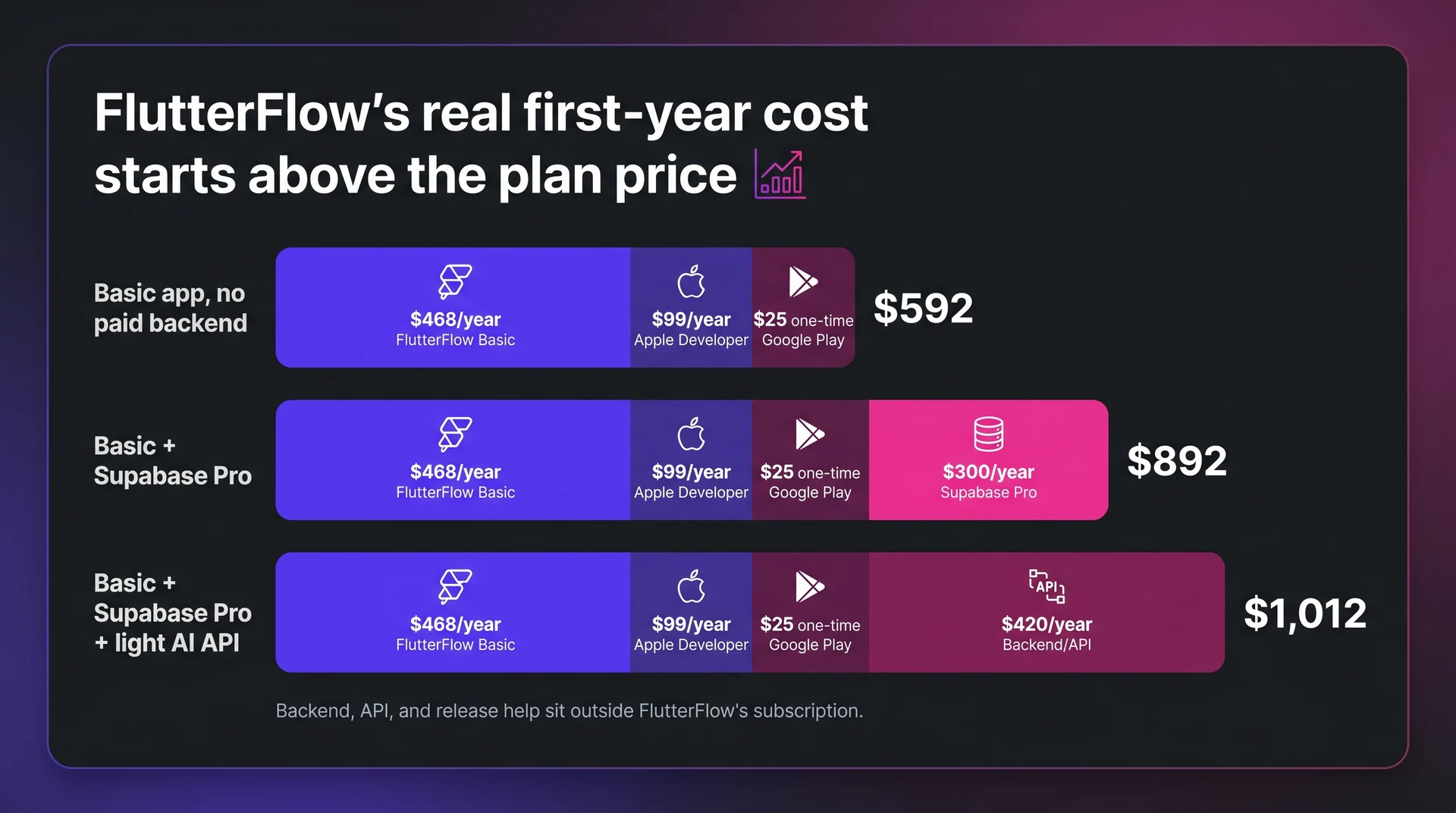
When Basic is paid monthly, the fixed first-year publishing floor is about $592 before backend costs. That includes the one-time Google Play registration fee, so year-two math can be lower if nothing else changes.
Budget for fixed publishing costs first:
- FlutterFlow Basic: $39/month, or $468/year when billed monthly, as the minimum paid tier for app store publishing.
- Apple Developer Program: $99/year through Apple Developer to publish and maintain an iOS app in the App Store.
- Google Play Console: $25 one-time through Google Play to publish Android apps.
Backend and API costs usually start small, then move with usage:
- Backend hosting: Firebase Spark and Blaze split free usage from pay-as-you-go. Supabase Free and Pro tiers start at $25/project/month for Pro, and growing apps can run $25 to $150+/month.
- AI APIs: Provider usage can add $10 to $50+/month for active AI features. Check OpenAI pricing and Gemini pricing before estimating usage.
- Usage spikes: A successful app needs cost monitoring when API traffic and database activity rise.
Example budget
| Scenario | FlutterFlow Subscription | Store Accounts | Backend/API | First-Year Floor |
|---|---|---|---|---|
| Basic app, no paid backend | $468/year | $99 Apple + $25 Google | $0 | $592 |
| Basic + Supabase Pro | $468/year | $99 Apple + $25 Google | $300/year | $892 |
| Basic + Supabase Pro + light AI API | $468/year | $99 Apple + $25 Google | $420/year | $1,012 |
Assumptions behind the example:
- Supabase Pro is counted at $25/project/month, or $300/year.
- Light AI API usage means about $10/month in model calls, paired with Supabase Pro.
- The first row excludes paid backend and API usage. Treat $592 as a publishing floor rather than a full launch budget.
Actual bills change with database reads, storage, model choice, user volume, and how often the app calls external APIs.
App Store submission also has a time cost. Before approval, you still need to line up:
- Code signing
- Certificates and provisioning profiles
- Store metadata and screenshots
- Privacy disclosures and compliance checks
For non-technical founders, one rejection can mean days spent fixing settings instead of improving the product. Repeated rejections are where a low monthly plan starts to feel expensive.
Which plan should you choose?
Choose the cheapest FlutterFlow plan that clears the next shipping constraint.
Start with the next blocker instead of the longest feature list:
- Need to test the builder: stay on Free.
- Need source code, APK download, or app store deployment: move to Basic.
- Need a second editor, GitHub sync, or more than 50 AI requests/month: move to Growth.
- Need a 3-person team, Figma import, more QA coverage, or 500 AI requests/month: move to Business.
- Need SSO, unlimited seats, unlimited automated tests, or procurement terms: move to Enterprise.
Then price the annual commitment separately:
- Basic solo builder: about $351/year when billed annually, before Apple, Google, backend, or API costs.
- Growth with 2 editors: $135/month when billed monthly. If annual discounts apply to both seats, the equivalent is about $101.25/month, or about $1,215/year.
- Business with 3 editors: $320/month, or $3,840/year when billed monthly.
Use the table below when you need the shortest version of the decision.
| Scenario | Recommended Plan | Monthly Cost (approx.) | Key Unlock |
|---|---|---|---|
| Testing the builder | Free | $0 | 5 lifetime AI requests, web preview only |
| Solo founder, production launch | Basic | $39 (or ~$29/mo annual) | Code export, APK, App Store deployment |
| 2-person startup with GitHub | Growth | $135 total (2 seats) | Second editor, GitHub sync, 200 AI req/mo |
| Team of 3-5 with QA needs | Business | $320+ total (3 seats) | Figma import, 3 automated tests, 500 AI req/mo |
| Large org, 5+ editors | Enterprise | Custom | Unlimited seats, SSO, unlimited tests |
FlutterFlow vs Bubble, Adalo, and React Native: is the price justified?
FlutterFlow's price is easiest to defend when source-code export and native iOS and Android builds matter. For web-first apps, compare the all-in budget against Bubble, Adalo, and a developer-led React Native build.
| Option | Where it fits | Cost pattern | Main tradeoff |
|---|---|---|---|
| FlutterFlow | Native mobile apps that need Flutter/Dart output, visual building, and source-code export | Subscription plus store accounts, backend usage, API usage, and any developer help | Higher builder fee, with backend and release work still priced separately |
| Bubble | Web-first apps with a built-in database and server-side workflows | Plan price plus workload-unit usage | Native mobile output and source-code ownership are not the main path |
| Adalo | Simple iOS and Android apps with built-in database needs | Paid app-store publishing plans plus platform limits | Less source-code export flexibility than FlutterFlow |
| React Native | Developer-led mobile apps where engineering owns setup and releases | No no-code subscription, but developer time drives the budget | More control, with backend, builds, testing, and release work handled by a technical team |
- FlutterFlow: Native Flutter/Dart output and source-code export can justify the higher builder fee, but Firebase or Supabase can add separate backend bills.
- Bubble: Bubble is web-first, with a built-in database and server-side workflows. Pricing uses workload units, so traffic-heavy apps can become less predictable.
- Adalo: Adalo includes a built-in database and supports iOS and Android app-store publishing on paid plans. It does not offer the same source-code export path as FlutterFlow.
FlutterFlow's price gap makes sense when native code export changes the exit plan. Bubble, Adalo, and React Native shift the same budget toward hosting capacity, simpler database setup, or developer-owned code.
For a wider tool set, the native-output AI builder comparison ranks platforms by app-store deployment and code ownership.
When FlutterFlow's pricing stops making sense
The comparison above becomes a budget decision when native Flutter output is not required, backend usage drives spend, or the team needs predictable costs before committing.
Cost lines to watch: FlutterFlow's subscription is only one budget line.
- Backend cost: Firebase or Supabase billing can grow with database reads, storage, authentication, and functions.
- API cost: Payments, email, AI features, and analytics can add separate usage-based bills.
- Seat cost: Growth and Business pricing rises when more collaborators need edit access.
Longer builds need a risk check, too.
Community complaints often cluster around tier changes and paid-plan requirements. The budget problem grows when a client project depends on the same builder features for months.
FlutterFlow usually fails the price test in these cases:
- Web-first product: A hosted web-app platform may be easier to budget than FlutterFlow plus Firebase or Supabase for dashboards, client portals, or internal tools.
- Simple database app: A lightweight app builder with built-in collections may cover directories, booking apps, or form-driven workflows that do not need source-code export.
- Developer-led mobile app: A direct React Native build can make more sense when custom native modules, testing, and releases already sit with an engineering team.
FlutterFlow keeps more ability to take the code elsewhere than builders without source-code export, but only on the right paid plan. Price the export path before building too far.
Bottom line: FlutterFlow is worth the price when code export, Flutter/Dart ownership, and native mobile publishing matter more than simplicity.
It is less attractive when the app is web-first, the all-in cost is hard to predict, or the founder wants help from idea to store submission. If that math feels heavier than the app idea, Bilt offers a one-workflow path from idea to a real native app for iOS and Android.
Skip the credit math: Bilt turns your idea into a native app in one workflow
FlutterFlow makes sense when you want a visual builder, Flutter/Dart export, and control over the build process. The tradeoff is that you still manage AI request limits, backend services, code signing, certificates, store metadata, screenshots, privacy disclosures, and release support.
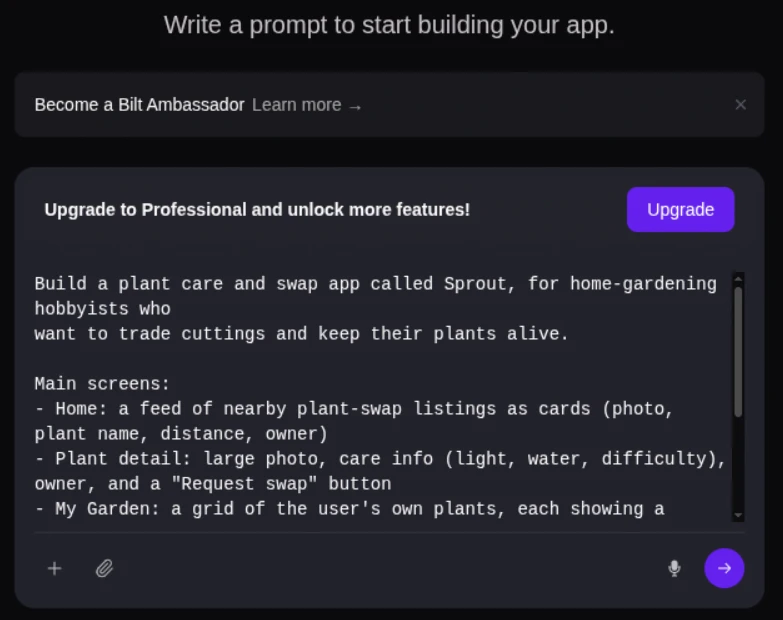
Describe an app and watch Bilt turn it into a native app in live preview.
Bilt is built for non-technical builders who want to ship a real native app without turning the last 5% into a separate technical project.
Describe your idea in plain English, preview the iOS and Android app, then keep iterating by chatting. Bilt handles backend support, code signing, and App Store submission support in the same workflow. You keep the generated React Native code.
Bilt pricing is simpler to plan around:
- Free tier: up to 3M monthly AI tokens, with free backend, authentication, database, storage, and live preview.
- Professional: €25/month for 10M monthly AI tokens.
- Professional Plus: €50/month for 20M monthly AI tokens.
- Top-ups: Extra tokens are available when you need more before the next reset. One-time top-ups expire after 30 days.
If your goal is to learn FlutterFlow, the FlutterFlow plan math can make sense. If your goal is to get a native app into the stores, start building free with Bilt, or see all plans first.
FAQs about FlutterFlow pricing
How much does a FlutterFlow developer cost?
FlutterFlow developer costs vary by project, so treat developer help as a separate budget line. The subscription covers the builder; custom code, integrations, debugging, and release support can become paid work.
Bilt fits the solo-builder path when the goal is a first iOS or Android app without hiring. Bilt keeps code signing and App Store submission support inside the build workflow.
Does FlutterFlow offer a free trial?
FlutterFlow offers a free plan you can use before paying. Treat it as a free plan for testing, not a full production trial.
| Option | What it gives you |
|---|---|
| Free plan | 5 lifetime AI generation requests and publishing on 2 FlutterFlow subdomains |
| Basic, $39/month | Code export, APK downloads, and app store publishing |
Students and educators should check FlutterFlow's current academic program before paying for a plan.
Can you cancel anytime?
FlutterFlow subscriptions can be canceled from billing settings, with paid access normally continuing through the current billing period.
Cancel before renewal if the next month or year no longer makes sense. Annual billing can reduce the monthly equivalent, but the upfront commitment matters, so check FlutterFlow's current billing terms before choosing a full-year subscription.
Can you switch plans at any time?
FlutterFlow lets users change plans through subscription settings, but the billing impact can depend on the plan and billing cycle.
Before switching, check:
- When the new price starts.
- Whether proration applies.
- Which features turn off if you downgrade.
Use a downgrade when a FlutterFlow project pauses and you still want the workspace. Cancel when paid features are no longer needed.