Glide pricing runs from Free to $199/month on public annual plans, with custom Enterprise pricing and usage-based update overages.
Glide can turn a spreadsheet into a web app without a traditional codebase. The pricing question gets harder when the app needs external users, higher update volume, custom domains, or app-store distribution.
The jump usually shows up after the first prototype. Once customers or teammates rely on the app, user limits, update volume, external access, and polish matter more than the starter price.
If your goal is a native iOS and Android app, compare Glide’s web-app pricing with Bilt’s build-to-publish workflow before you pay.
TL;DR
Glide pricing runs from Free to $199/month on public annual plans. Glide’s pricing page lists Business update overages at $0.02 per update, and Enterprise pricing is custom.
- Plan range: Public tiers are Free, Explorer, Maker, Business, and Enterprise. Paid public plans are $19/month, $49/month, and $199/month when billed annually.
- Business tier: Business includes 30 users, unlimited apps, API access, custom domains, and 5,000 updates/month before overages.
- Update overages: Extra updates cost $0.02 each, so a month with 2,000 extra updates adds $40.
- Store fees: App Store or Google Play distribution adds the Apple Developer Program at $99/year and Google Play Console at $25 one-time.
- Free tier reality: Free is for learning Glide and testing layouts; paid fit starts with the project's user limit, app count, and update volume.
- Native alternative: If the goal is a native iOS and Android app, Bilt has a free tier and keeps the build-to-publish workflow in one place. Use the Glide table below first if you are still choosing between web app and native app paths.
Quick answer: how much does Glide cost?
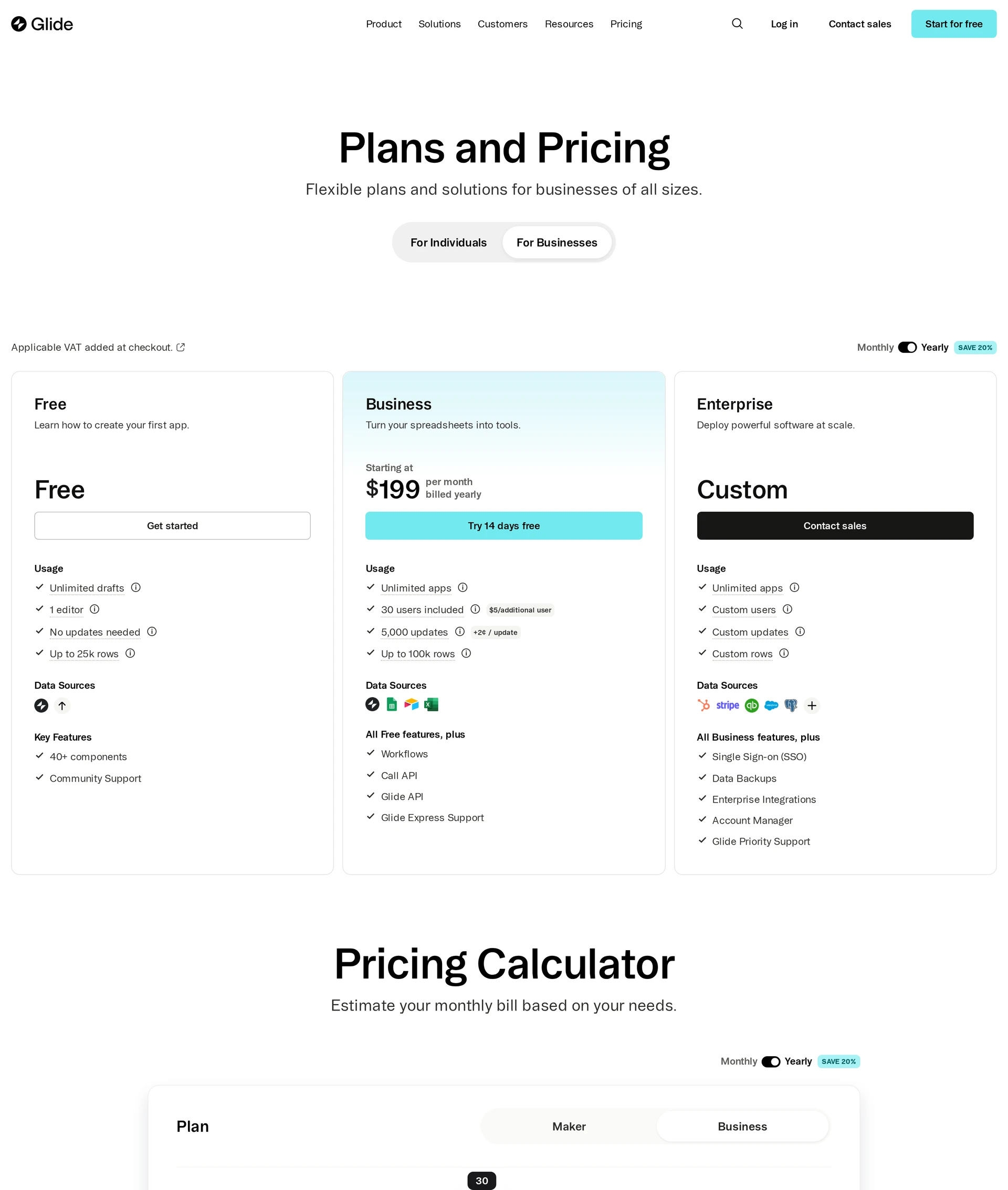
Glide costs $0/month to $199/month on public annual billing, with custom Enterprise pricing. Explorer is $19/month, Maker is $49/month, and Business is $199/month when billed annually.
Month-to-month pricing can differ, and Glide can change plan names or limits. Check Glide pricing before buying.
For most buyers, the first paid decision is whether the app can stay inside Glide’s web-app model or needs native app-store distribution. Business includes 30 users, unlimited apps, and 5,000 updates/month before overages.
| Plan | Price (billed annually) | Users included | Apps |
|---|---|---|---|
| Free | $0/month | Limited | Limited |
| Explorer | $19/month | Up to 100 users | 1 published app |
| Maker | $49/month | Personal users unlimited | 3 published apps |
| Business | $199/month | 30 users base | Unlimited |
| Enterprise | Custom | Custom | Unlimited |
Why other sites show different Glide prices
Older Glide pricing articles disagree because Glide has changed its plan structure over time.
The older screenshots can show plan names, prices, or publishing assumptions that no longer match the current pricing page.
Treat Glide's live pricing page as the source of truth before budgeting. Older screenshots and comparison posts can understate the cost of moving from a prototype to a shareable, branded app.
- Recent plan changes: Glide has moved more publishing and business-ready features into higher paid tiers, which makes older free-plan guidance less reliable.
- Current tiers: Glide now lists Free, Explorer, Maker, Business, and Enterprise plans, so older tier names should be treated as outdated.
Glide pricing plans at a glance
Glide's current pricing has five tiers. The right plan usually depends on who uses the app, how many apps you need, and how polished the final version should feel.
Upgrades usually happen when you need more monthly updates, less Glide branding, custom domains, API access, team controls, or app-store planning.
Free ($0/month)
Free is the right place to learn Glide and test a data model. Treat Free as a sandbox, not a launch plan for a public or branded app.
- Best for: Testing a Glide idea and checking whether the data structure works before anyone depends on the app.
- Branding: Free apps include Glide branding.
- Domain: Free apps cannot use a custom domain.
- Upgrade trigger: Free is useful until the prototype needs a cleaner shareable version. Explorer is the next check once customers, clients, or teammates need access.
Explorer ($19/month, billed annually)
Explorer is Glide’s $19/month plan for one small app that needs a cleaner shareable version after Free.
- Best for: A small personal app, customer-facing demo, or early project with a known user list.
- Branding: Glide branding is removed, which is the visible upgrade if customers or clients will open the app.
- Watch-out: Monthly updates are still the limit to model. Form submissions, row edits, and workflow-triggered writes can all count toward usage.
- Upgrade trigger: Move to Maker when one published app is no longer enough. Move to Business when you need API access, custom domains, custom branding, or team controls.
- Skip Explorer if: You need multiple published apps, custom domains, API access, or business controls.
Maker ($49/month, billed annually)
Maker is Glide’s $49/month plan for builders managing a small portfolio of personal apps. The headline upgrade is three published apps; the watch-out is the 500 monthly update cap.
- Best for: Small personal app portfolios with a known audience and light update needs.
- Users: Personal users are unlimited, which helps when the audience is known and the app does not need business controls.
- Apps: Three published apps are included, so Maker fits a small portfolio better than Explorer’s single-app use case.
- Upgrade trigger: Business becomes the next option when the project needs custom domains, custom branding, API access, team controls, or more update room. Business moves the cap from 500 to 5,000 monthly updates.
- Skip Maker if: The app needs a custom domain, API access, custom branding, or team controls.
Business ($199/month, billed annually)
Business starts at $199/month billed annually with 30 users, unlimited apps, and 5,000 monthly updates. Usage drives the final bill.
- Users: The plan includes 30 users, then charges $5/month for each additional user when billed annually.
- Updates: The plan includes 5,000 monthly updates. Overage is $0.02/update, so 10,000 extra updates adds $200/month.
- Apps: Unlimited apps are included, so the user and update limits become more important than app count.
- Storage and rows: Business includes 500GB storage, up to 100,000 high-scale rows, and a 25,000 spreadsheet row limit.
Business also adds API access and custom domains. Custom branding is included, but SSO belongs in Enterprise.
Quick math: 10 extra users add $50/month, and 10,000 extra updates add $200/month. Model both before comparing Enterprise.
- Skip Business if: SQL sources, SSO, formal compliance review, or predictable large-scale licensing are already required.
Enterprise (custom pricing)
Glide Enterprise is the custom-priced tier for organizations that have outgrown Business. The usual fit is internal deployment, such as company portals or field tools.
Enterprise pricing is negotiated, so bring expected user count and monthly update volume to the sales call.
Buying approvals and security requirements are usually the trigger:
- Large internal deployments: Teams rolling Glide out across departments or employee groups.
- Negotiated user count: Organizations that need more predictable licensing than standard plan limits.
- SSO, SLA, or compliance needs: Buyers that require SSO or formal security review before rollout.
- Dedicated support: Companies that need account management, setup help, or faster escalation paths.
Public iOS or Android distribution still needs separate App Store planning. Before you contact sales, model monthly updates because credits are where Glide costs can move fastest.
How Glide credits work
Glide measures usage with updates. An update is consumed when a connected data record changes, such as a Google Sheets row edit, Airtable sync, or integration action.
Updates are separate from app screens and user seats. A 5-screen operations app can use more updates than a 30-screen directory if records change all day.
| Plan | Included updates | Overage note |
|---|---|---|
| Free | Layout testing only | No public overage detail |
| Explorer | 250/month | $0.02 per additional update |
| Maker | 500/month | No public overage detail |
| Business | 5,000/month | $0.02 per extra update |
| Enterprise | Negotiated | Custom terms |
Free and Maker are useful for layout tests and small personal apps. They are weak signals for production cost because Business is the first public plan in this article with a clear overage model.
Update risk is highest when your app writes to external data sources rather than displaying static content:
- Google Sheets: Frequent row edits and imports can add activity quickly.
- Airtable: Synced records and automation-heavy bases can push usage higher than screen count suggests.
- Excel: Spreadsheet changes matter when a team uses Glide as an operational front end.
- APIs and integrations: Automated actions can consume updates even when no one edits a row manually.
On Business, the math is simple: 10,000 extra updates × $0.02 = $200/month. That overage is slightly more than the $199/month base price before extra users.
Treat included updates as a monthly operating limit, not a footnote.
What Glide costs if you need app-store distribution
If you use Glide as a web app or internal tool, Apple and Google store fees do not apply. They matter only when you are trying to reach App Store or Google Play users.
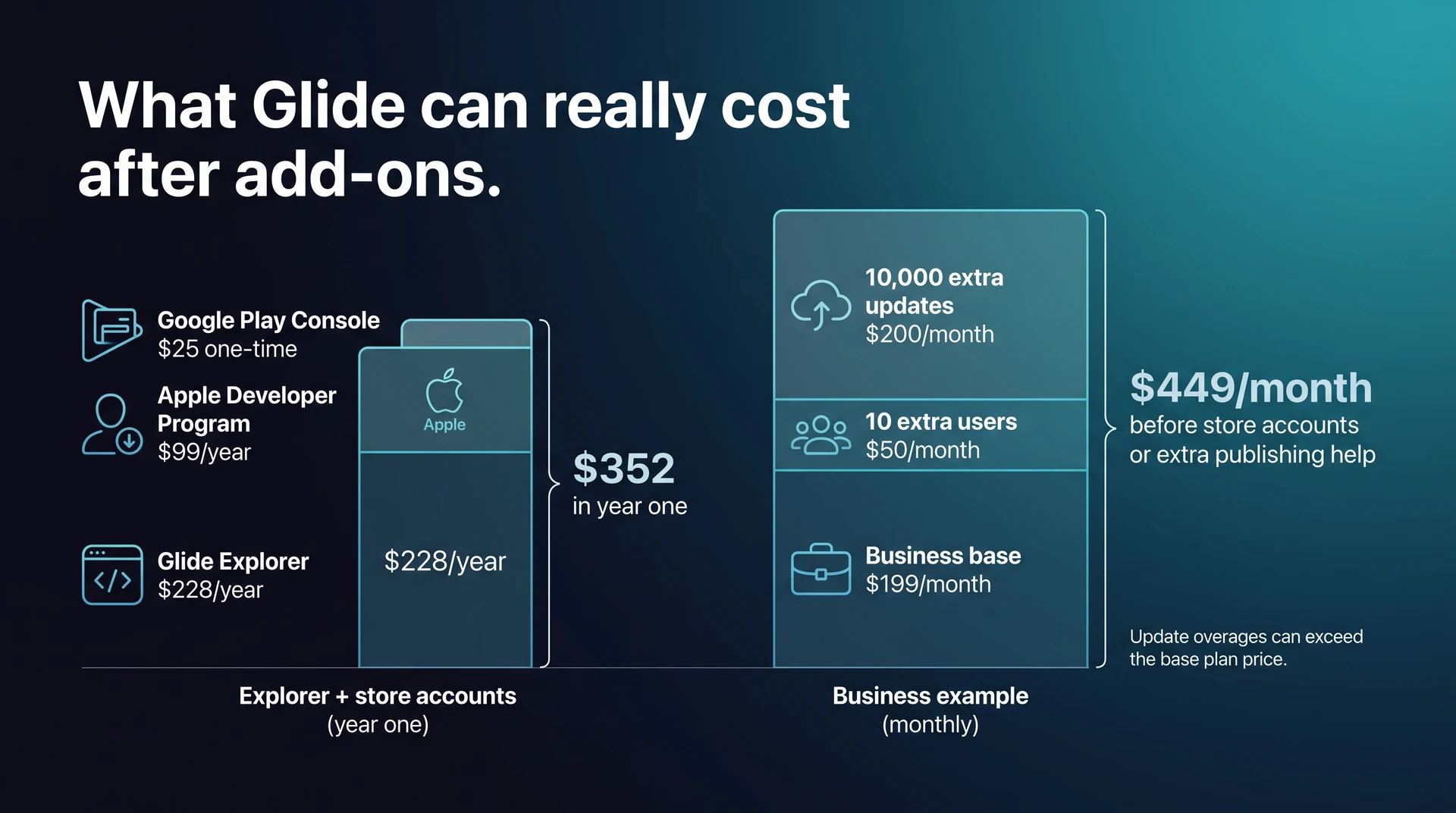
For that store-listed scenario, the cleanest year-one baseline is $352 before extra tools, setup help, or overage charges.
Use this simple model: estimated monthly cost = Glide plan + extra users + update overages + external tools or publishing help.
For a store-listed path, the fixed year-one fees start with:
- Glide Explorer: $19/month billed annually, or $228/year.
- Apple Developer Program: $99/year, paid directly to Apple.
- Google Play Console: $25 one-time, paid directly to Google.
- Total: $352 in year one for Explorer plus both store accounts.
Example Glide math: Business with 40 users and 15,000 total monthly updates equals $199 base + $50 for 10 extra users + $200 for 10,000 extra updates = $449/month before store accounts or extra publishing help.
Store fees are separate from Glide. They do not buy code signing, native build generation, App Store compliance work, or a managed submission workflow.
If you need native iOS and Android distribution, you may still need another tool, a developer, or a wrapper workflow to bridge the gap between a Glide app and the app stores.
Workflow cost matters as much as subscription cost here. Bilt automates build generation, code signing, compliance checks, and publishing support for the App Store and Google Play in one workflow, while generating React Native code for iOS and Android.
If your app needs to live in the App Store and Google Play, test the same idea in Bilt before you commit to a Glide plan. You can start building free and see whether the native path fits better.
Which plan should you choose?
If Glide fits how people will use the app, plan choice starts with user type. Internal work-email users, external signups, and public visitors can push you toward different tiers before features matter.
A user usually means someone who signs in, accesses protected data, or counts toward a plan limit. Seat rules can change plan fit more than raw traffic.
| Use case | Recommended plan | Monthly cost | Watch this limit |
|---|---|---|---|
| Learning or prototyping | Free | $0 | Glide branding |
| Solo personal app | Explorer | $19 annual billing | Update volume |
| Public side project | Maker | $49 annual billing | No API access |
| Internal team tool | Business | $199 annual billing | 30-user base |
| SQL or compliance needs | Enterprise | Custom | Contract terms |
Use the table as a starting point, then look for the first limit that would break your project.
- Choose Free if you only need to test Glide's builder, layout options, and app feel before paying.
- Choose Explorer for a small personal app with a known user base and low update volume.
- Choose Maker when you are managing a small personal app portfolio and the projects can stay within Maker’s update and business-control limits.
- Choose Business when the app is for employees, needs work-email sign-in, custom branding, API access, or more serious admin controls.
- Choose Enterprise when SQL sources, SSO, advanced security, high-scale rows, or compliance requirements become part of the buying decision.
The main upgrade signal is a blocked workflow. The current plan no longer supports the way the app needs to run.
If plan fit turns on native publishing, the Glide versus FlutterFlow plan comparison shows the next fork.
Glide vs native app builders: what the price buys
Glide pricing only makes sense after you know what kind of app you are buying. A web app, PWA, wrapper, and native app can look similar in a pricing table, but they do not give you the same publishing path.
Rork sits closer to the native-mobile category than web-first builders. That makes Rork's native-mobile pricing easier to compare with Bilt than with Glide, which is built more around database-backed web apps and internal tools.
| Platform | Best understood as | Pricing model | Main output | Native publishing fit |
|---|---|---|---|---|
| Glide | Web app and internal-tool builder | Users + updates | PWA/internal tools | Needs extra planning |
| Rork | AI mobile app builder | Credits | Mobile app project | Check export and publishing path |
| Lovable | AI web app builder | Messages/credits | Web apps/PWAs | Not mobile-first |
| Bolt.new | AI full-stack/web prototyping | Usage-based build work | Web prototypes/apps | Not mobile-first |
| Bilt | AI native mobile app builder | Token budget | React Native iOS/Android apps | Built for store submission |
PWA and web-wrapper outputs can reach mobile users through a browser bookmark or a wrapped store listing, but they are different from native iOS and Android apps.
For small-business owners, small business app builders make the trade-off clearer: web apps and PWAs prioritize browser access, wrappers package that experience for app stores, and native apps are built for iOS and Android.
Native apps get deeper access to device features such as camera, push notifications, and biometrics. React Native or SwiftUI output matters when App Store review, performance, or native behavior is part of the requirement.
Entry price is the easiest number to compare and the least useful number to trust by itself.
- Credits, messages, and tokens are different units. Rork credits, Lovable messages, and Bolt.new tokens measure different work, so fixes, edits, and regeneration loops consume usage differently across tools.
- Rollover rules change practical value. Some tools reset usage monthly while others allow limited rollover, so check the rule before starting a long build.
- Output type matters more than price. Glide is built for database-backed web apps and internal tools. Rork sits closer to native mobile generation, while Bolt.new and Lovable are better understood as web or full-stack app builders.
- Native publishing changes the comparison. Bilt generates React Native apps for iOS and Android and supports the full build-to-publish workflow, so its €25/month paid starting point buys a different outcome.
Glide's pricing is easiest to justify when the app is an internal business tool with known users, structured data, and admin needs.
Rork’s credit model gets separate treatment in the native-mobile Rork pricing breakdown, including credits, GitHub, and release costs.
When Glide's pricing stops making sense
Glide stops making sense when the price starts following usage, team access, data sources, and switching risk instead of app complexity. The starting plan can look fine until those limits show up.
Watch for these four signals:
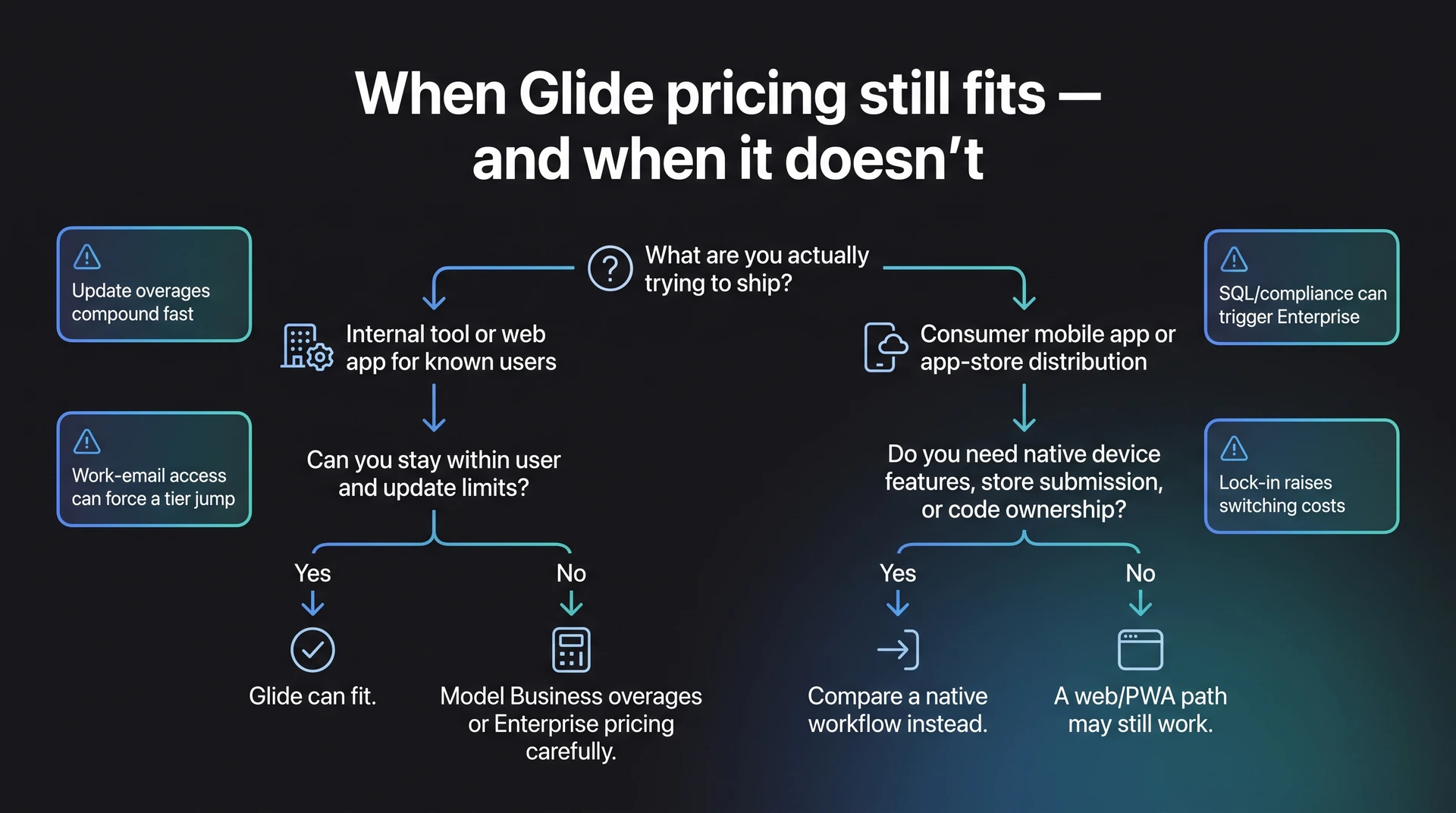
- Update overages compound fast. A consumer app with 1,000 active users making 10 data writes each month creates 10,000 updates. On Business, that is 5,000 above the included limit, so $0.02 per extra update adds $100/month on top of the $199/month base plan.
- The work-email cliff hurts small teams. An internal app can jump tiers when work-email users or team controls enter the picture. Moving from $49/month to $199/month means an extra $150/month before the app itself changes.
- Data needs can force an Enterprise conversation. If your app depends on MySQL, BigQuery, SQL Server, or heavier outside data sources, Glide can move from public pricing into custom pricing. Airtable-heavy setups can also become expensive once integration costs sit above the builder subscription.
- Lock-in makes every paywall feel bigger. The more your app depends on a platform-specific setup, the harder it is to leave when pricing changes or features move tiers. Code ownership changes the switching-cost math: with Bilt, you can export the React Native source code, push it to GitHub, or hand it to a developer without rebuilding from zero.
The better question is whether the plan still works once customers, teammates, integrations, and switching costs show up.
Skip the credit math: Bilt goes from idea to App Store in one workflow
Glide works when the app can stay inside Glide’s web or internal-tool model. Bilt makes sense when the goal is a native iOS and Android app from one idea.
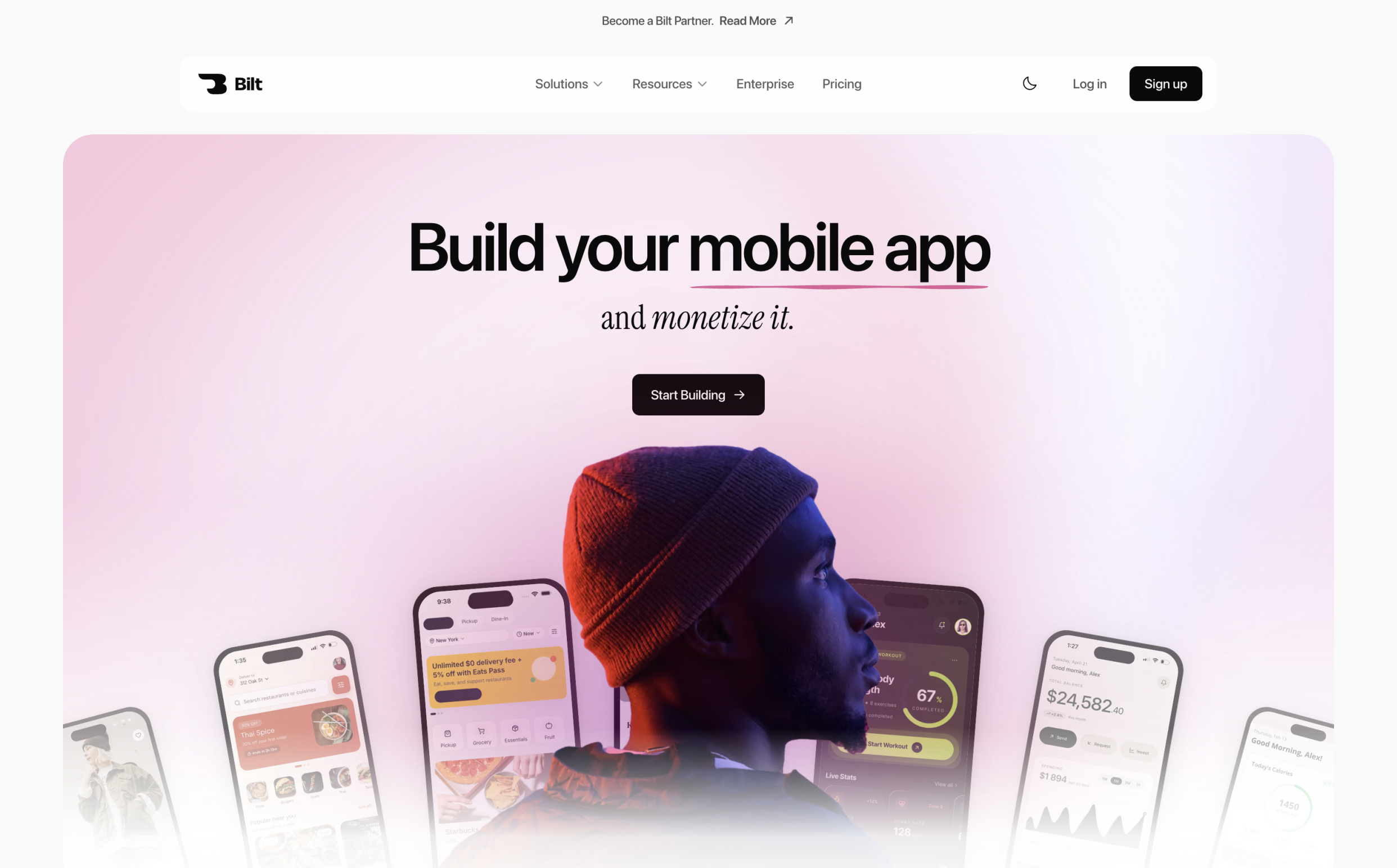
Glide pricing usually depends on users, updates, and tier gates. Bilt pricing works more like an app-building iteration budget, then keeps preview, build, signing, and publishing support in one workflow.
Read Bilt plans as iteration budgets. Each tier includes AI token capacity, which maps roughly to prompt volume:
- Free: €0 with 3M monthly AI tokens.
- Professional: €25/month with 10M monthly AI tokens.
- Professional Plus: €50/month with 20M monthly AI tokens.
- Annual billing: Pay yearly and get the equivalent of 2 months free compared with monthly billing.
Token count is only part of the value. Bilt keeps the native app path in one place:
- Native app build: Bilt creates React Native apps for iOS and Android, with connected screens and navigation plus working app logic.
- Backend in the same place: Add authentication, then connect the database and storage pieces without moving the project into a separate setup step.
Describe an app and watch Bilt turn it into a native app in live preview.
- Payments and paywalls: Add monetization inside the app workflow when the app needs payments or gated access.
- Signing help: Bilt automates code signing and provisioning profiles, which removes the Apple certificate maze from your setup list.
- Store publishing: Use one publishing path for App Store and Google Play release work.
- Exportable code: Export the React Native project when you need a developer to take over or make deeper changes.
Use this quick fit check:
| If you need... | Glide fit | Bilt fit |
|---|---|---|
| Internal web tool | Good fit | Usually more than needed |
| Native iOS and Android app | Needs extra planning | Built for this path |
| App Store submission | Outside the core workflow | Build and upload included; submit for review in App Store Connect |
| Exportable React Native code | Not the core model | Included |
Want to see whether your Glide idea works better as a native app? Start building free. Want to compare token limits first? See all plans.
Common questions about Glide pricing
These answers cover the Glide pricing questions people usually ask before choosing a plan.
Is Glide worth it?
Glide is worth it for internal tools and small-team business apps when the $199/month Business plan can replace spreadsheet work or delay a custom build.
The value gets harder to defend when the goal is a consumer mobile app, App Store distribution, native device behavior, or fast iteration under usage limits.
When control matters more than spreadsheet speed, the Glide-to-FlutterFlow comparison contrasts internal-tool efficiency with native publishing flexibility.
- Custom development comparison: The Business plan costs $199/month, or $2,388/year, compared with a $50,000+ custom internal-tool build.
- Best-fit use case: Business includes 30 users, 5,000 updates/month, API access, and custom domains, so the plan fits teams replacing spreadsheet-heavy workflows.
- Where value breaks: Glide gets harder to justify when public distribution or MySQL/BigQuery data sources matter, or when usage exceeds 5,000 updates/month.
What is the free alternative to Glide?
Bilt is a free alternative to Glide if your goal is a native iOS and Android app. You describe the app in plain English, and Bilt builds a native mobile app with no coding required.
Glide's free tier is still useful if you want to test a spreadsheet-backed web app. Publishing constraints show up when you need a branded product for customers or app-store users.
- Input: Describe the app in plain English.
- Native output: Bilt generates native iOS and Android screens.
- Build foundation: Bilt adds app logic, forms, backend setup, and React Native code.
Publishing support stays in the same workflow:
- Bilt handles code signing before submission.
- Bilt generates the required store assets.
- Bilt supports App Store and Google Play submission.
Try one practical test: rebuild one Glide idea in Bilt, then compare the native publishing workflow against Glide's paid plan before you commit.
Does Glide publish to the App Store?
Glide is primarily built around web apps and internal tools. If your goal is App Store and Google Play distribution, compare the full publishing workflow before choosing a plan.
Store accounts, code signing, native builds, store assets, and submission work sit outside a simple monthly plan comparison.
Does Glide charge per user?
Glide charges per user on the Business plan after the first 30 included users.
- Business: $199/month includes 30 users, and each additional user costs $5/month when billed annually.
- Work-email access: Glide also uses email-domain based user tiers, so internal work-email users can affect plan fit.
- Explorer: Explorer is capped at 100 users total, with no simple per-user overage path.
- Maker: Maker is personal-use oriented, so it is not the right plan for team or multi-user deployments.
What happens if I go over Glide updates?
On Business, extra updates cost $0.02 each. That means 5,000 extra updates adds $100/month, and 10,000 extra updates adds $200/month.
Update overages matter when the app writes to connected data sources all day. Frequent spreadsheet edits, synced records, and automated actions can push cost above the base plan.
Use these checks before you choose a Glide plan:
- user count and work-email access
- publishing path and store requirements
- data source complexity and update volume
If those checks push you beyond $199/month plus $5/month for each extra Business user, compare the Bilt workflow before choosing your build path.
Glide is easiest to justify when you need a web-based internal tool with known users and predictable updates.
If your goal is a native app for iOS and Android, compare the full publishing path before you buy. You can start building free with Bilt and see whether your idea works better as a real mobile app.