Replit and Lovable both help you turn prompts into web software, but they start from different assumptions. Replit gives you a browser IDE with an agent, files, terminal, and deployment controls.
Lovable gives you a chat-first web app generator for polished React and TypeScript MVPs.
That means the winner depends on the product shape. Use this comparison for web builds first, then treat native mobile as a separate branch of the decision tree.
Quick answer: which one should you use?
Replit is a cloud IDE with an AI agent and direct workspace control. Lovable is a chat-first generator for polished React and TypeScript web apps.
Use Replit when you need to inspect files or work in the terminal.
Use Lovable when a polished first UI draft matters more than direct workspace control.
Replit supports Expo previews and a guided TestFlight and App Store path. Lovable remains focused on web apps.
For an App Store or Google Play workflow with less release setup, jump to the native-mobile section below.
| Goal | Better fit | Why |
|---|---|---|
| Build a web app with workspace control | Replit | Files, terminal, database, and deployment controls live in the browser IDE. |
| Generate a polished web MVP from prompts | Lovable | Chat-first React and TypeScript generation prioritizes the first UI draft. |
| Prototype an Expo-based mobile app | Replit | Replit supports mobile previews and a guided iOS submission path. |
| Reduce mobile release setup | Mobile-first workflow | Review the native-mobile options before committing to a web-first build. |
Web app generator vs AI cloud IDE: how the working environment differs
Lovable and Replit both start in the browser, but the workspace changes how you think.
Lovable feels like directing a web app generator. Replit feels like working inside a cloud development environment with an AI agent beside you.
- Lovable: You describe a web product, then Lovable generates and revises a React and TypeScript app through chat.
- Replit: The Agent creates files, writes code, and configures the project while you can inspect the workspace directly.
- Debugging: Lovable keeps fixes in the chat loop. Replit can send you into the terminal, file tree, database, or deployment settings.
- Mobile scope: Lovable's working model is web app generation. Native iOS and Android publishing is a separate problem.
| Category | Lovable | Replit |
|---|---|---|
| Primary output | Generated React and TypeScript web app | Project files inside a browser IDE |
| User control | Chat-first prompting with less direct environment control | Direct access to code, terminal, database, and deployment controls |
| Working style | Describe, generate, and revise in chat | Generate, inspect, edit, run, and debug in the workspace |
| Mobile fit | Web app generation first; native mobile publishing needs another path | Web app development first; native mobile publishing needs another path |
Speed and first output
Lovable was faster to first visible output in my same-app test. That gap matters when you are testing layout direction or demoing a concept.
Test method: I used the same product prompt for both tools and measured two moments:
- Time to first visible app output
- Time to a complete same-app build
- Whether the project included auth, metrics, settings, and a Stripe prompt
These timings are test results, not universal promises. Your results can change with prompt length, feature scope, platform load, and how many fixes the agent attempts.
- First render: Lovable about 45 seconds; Replit about 3 minutes.
- Full same-app build: Lovable around 15 minutes; Replit around 25 minutes.
- Why Replit takes longer: Replit Agent creates files, writes code, installs dependencies, and configures the environment before output appears.
- Quality caveat: A fast first screen can still need iteration, debugging, and feature checks before launch.
Read the speed result as a workflow signal. Lovable gets you to a visible draft sooner; Replit spends more early time setting up the editable project.
Design quality and UI control
Lovable usually produces the cleaner first screen. Its sweet spot is a website that needs to look good fast, with Tailwind-based styling doing much of the visual work.
Replit gives you more direct control because you are working in an IDE. The first UI can be plainer, but the code is available for precise edits.
- Lovable: Default output tends to look more modern, with clean spacing and SaaS-like layouts. Design iteration happens through prompts and limited click-to-edit controls rather than a full visual canvas.
- Replit: Default output is usually more functional than polished. UI control comes from editing the frontend code directly inside the IDE.
- Practical difference: Lovable compresses the early design pass. Replit gives developers more room to tune the interface after generation.
Backend, database, and auth
Lovable now has two backend paths. Built-in Lovable Cloud is the default, while an external Supabase project remains an option.
Lovable Cloud includes:
- Core data: Database, storage, authentication, and realtime features
- Server tools: Edge functions and background jobs
- Operations: Secrets, logs, SQL tools, and user management
Lovable Cloud reduces initial setup, but production checks still matter.
A preview can work while signed-in users fail because row-level database policies assign the wrong access.
Before handoff:
- Review database policies for each user role
- Keep privileged keys in Secrets
- Test every role with real accounts
- Inspect logs for auth and database failures
- Rotate credentials exposed during development
- Check usage and test export behavior
Replit keeps more backend setup inside the workspace. Technical users get more room to inspect server code, adjust environment variables, and manage deployment behavior without leaving the IDE.
| Backend area | Lovable | Replit |
|---|---|---|
| Database | Built-in Cloud database or external Supabase | Database setup and connections inside the workspace |
| Auth | Cloud authentication and user management, or external Supabase Auth | Auth logic or connected services managed in the workspace |
| Server tools | Edge functions, background jobs, realtime, and SQL tools | Direct access to application and server-side code |
| Secrets and logs | Built-in Secrets and logs | Environment variables and runtime logs in the workspace |
| Control model | Managed Cloud by default, with external Supabase available | Full-stack IDE with deployment controls |
Lovable Cloud reduces initial backend setup through a managed service, with external Supabase available when needed.
Replit leaves more backend decisions visible in the codebase and workspace.
Debugging and iteration
Replit made the debugging loop easier to follow in my tests because terminal output stayed inside the workspace.
Lovable could repair issues, but each fix depended more on a clear failure report and a fresh test of the same flow.
Lovable needed more manual steering in these failure modes:
- Manual error input: I had to paste the failing state or explain that a file upload rendered in the UI but did not parse correctly.
- Repeat-fix risk: A broad repair prompt could bring back a previous bug, especially after Lovable changed several components at once.
- Careful prompting: A reliable prompt was one small fix with a verification step, such as "repair CSV parsing only, then tell me what changed."
Replit gave me more context inside the debugging loop:
- Replit Agent could read terminal output during the run instead of making me copy each error into chat.
- Fix with AI can analyze logs and stack traces, then suggest changes in the project.
- Replit works best when Agent handles the initial build and Assistant-style follow-up edits handle targeted fixes.
The important caveat: Replit and Lovable still needed follow-up prompts after the first repair. In my tests, generated screens could look done while file parsing or save actions still failed.
Logs make Replit easier to diagnose when a build fails. Lovable works better with narrow repair requests and manual retesting, especially when repeated fixes consume credits.
Pricing and credit mechanics
Pricing changes often, so treat these numbers as at the time of writing and check current pricing before you buy. The bigger issue is workflow cost.
Subscription price and workflow cost are different. A low monthly plan can still feel expensive when debugging, regeneration, compute, or deployment usage eats through the allowance.
Replit credits can cover AI usage, compute, and deployments. Lovable plans use message allowances and paid top-ups, so the cost depends on how many generations and edits you run.
Credit details to check
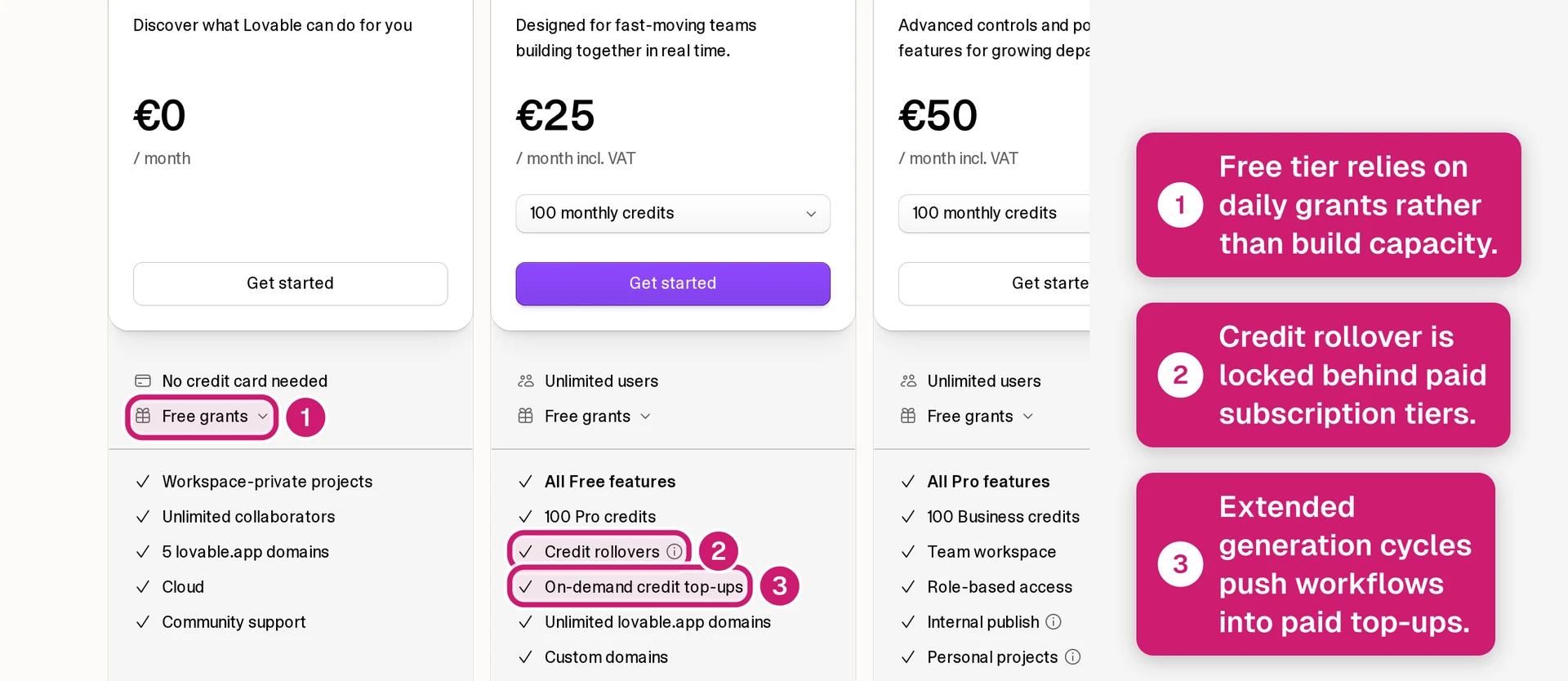
- Lovable free tier: The Free plan uses daily and monthly message limits, so it is better for testing the workflow than finishing a serious build.
- Lovable paid plans: Starter and Pro increase monthly message allowances, but subscription messages do not roll over.
- Replit Core credits: Core includes monthly credits that can go toward AI, compute, and deployments.
- Repair-loop caveat: Repeated agent fixes can change the cost picture, especially when AI usage and cloud usage share the same credit pool.
Check Lovable's and Replit's official pricing pages before buying. Pricing and credit rules below were checked in February 2026.
| Plan | Replit | Lovable |
|---|---|---|
| Free | $0; usage limits apply | $0; free credits for testing |
| Entry paid | Core: $20/month, or $18/month billed annually, with $20 monthly credits | Pro: $25/month with 100 monthly credits and rollover |
| Higher paid | Check the current plan display for higher-tier credit allowances | Business: $50/month with 100 monthly credits |
| Enterprise | Check Replit's current enterprise options | Enterprise: custom plan |
| Credit use | AI, compute, and deployments can draw from the same credit pool | Default Mode varies by task; Plan Mode uses one credit per message. Credits can also fund Cloud hosting and app AI features. |
Verdict: Lovable is easier to budget when work stays inside generation credits. Replit’s shared-credit pricing is harder to forecast when Agent debugging and cloud usage share one credit pool.
Code ownership, export, and lock-in
Pricing is the first commitment; ownership is the harder exit question. Replit and Lovable let you own generated code, but leaving either builder still takes handoff work.
In my handoff check, Replit was easier to archive because I could use GitHub sync or zip download. That gives a developer a clear starting point for local inspection.
Lovable's main portability path is GitHub sync. In my check, moving a Supabase-backed project still meant validating environment variables and install steps outside Lovable.
Primary lock-in risk
- Lovable: GitHub sync is the primary handoff path; direct migration can require debugging when the project does not run cleanly elsewhere.
- Replit: GitHub sync and zip download give you two code retrieval paths, but hosted services still need their own migration plan.
Secondary lock-in risk
- Replit: Projects that rely on workspace-managed database setup need a separate data and connection plan before the app leaves Replit.
- Lovable: Supabase starts outside Lovable, so the backend path is clearer once API keys, auth settings, and database access are documented.
Verdict: Replit has fewer code export steps; Lovable separates backend state through Supabase. Before choosing by project type, clone the repo locally and start the app outside the builder.
Choose Replit or Lovable: by project and skill level
Start with the target platform. If the product is a browser-based MVP, compare Replit and Lovable directly.
If the product must be installed from the App Store or Google Play, treat native mobile as a separate requirement.
Then ask who will maintain the build. Lovable favors prompt-to-web-app speed; Replit favors people comfortable inspecting files and server logic.
Choose Lovable if:
Lovable fits best when the output is a web MVP that needs to look credible quickly.
- Fast web MVP: Lovable is aimed at a non-technical founder turning a plain-language prompt into a React/TypeScript web app.
- Pitch-screen polish: Lovable is easier to judge when the output is a landing page or dashboard-style demo where visual polish carries the pitch.
- Stack boundary: The project should fit a React plus Supabase setup without unusual infrastructure on day one.
- Budget check: I would not plan a serious Lovable build on the Free tier alone. Check the current pricing page before budgeting around credits.
Lovable is the cleaner pick when the goal is a polished web app and the main risk is getting a presentable first version.
Choose Replit if:
Replit fits best when you want an AI coding workspace for a web app or backend-heavy prototype.
The tradeoff is maintenance. Someone needs to inspect generated code when the AI makes a wrong assumption.
Replit makes more sense when the project needs:
- File-level control: You want direct access to files and the terminal instead of a mostly abstracted no-code interface.
- Python or Node work: The project uses Python, Node.js, or Next.js outside Lovable's React web-app lane.
- Server logic: The build depends on API calls, auth logic, or backend behavior more than first-pass visual polish.
- Debugging ownership: You can review generated files before trusting an AI-generated fix.
- Loop control: Users have reported Replit Agent getting stuck in long loops while credits continue to burn on complex tasks. Stop the run when a task starts looping.
When neither fully covers the finish line
Replit and Lovable can validate a web app quickly. The gap appears when the demo needs production release work and long-term maintenance.
Native mobile distribution is a separate decision.
Watch for these signals:
- Long-running AI edits break earlier UI logic or bindings.
- Generated code becomes hard to maintain after several prompt-based changes.
- Replit Agent retries a complex task instead of producing a working fix.
- The project needs permission rules and environment handling before release.
- The product needs iOS or Android installation from app stores.
Match the gap before you switch tools:
- Visual precision gap: Use a visual builder only when layout control is the main blocker.
- Code ownership gap: Export to GitHub, then continue in Cursor or Claude Code if a developer will maintain the app.
- Enterprise structure gap: Use an internal-tool builder when permissions, environments, and data layers are the main problem.
- Native mobile gap: Bilt is the no-code route for publishing native iOS and Android apps. React Native or Expo are the code-owned routes.
At that point, Replit vs Lovable stops being the main comparison. The next question is how to publish a real native app.
What if your goal is a native mobile app?
If your end goal is the App Store or Google Play, choose mobile architecture before you pour hours into a web-first build.
Describe an app, then watch Bilt build a native app in live preview.
Lovable is a web-app builder. Replit can generate React Native code through Expo, but setup, builds, and submission still require mobile judgment.
The last 5% is where many AI-built apps stall:
- Backend wiring still has to support authentication, database, storage, and payment logic.
- Signing and build configs have to match iOS and Android requirements.
- Store metadata, review prep, and real-device behavior have to be checked before submission.
That is where Bilt fits. We built Bilt for non-technical builders who want a real native iOS and Android app, not a web prototype or wrapper.
Describe your app in plain English, and Bilt builds the native iOS and Android version. Bilt also handles backend, native preview, code signing, store compliance prep, and store build uploads.
You still need your own Apple Developer or Google Play developer account to publish. Bilt keeps you from managing Expo configs, signed binaries, and store metadata by yourself.
Pricing is simple:
- Permanent Free plan
Professional: €25/month, billed monthly
Professional Plus: €50/month, billed monthly
Use Bilt when the finish line is a shipped mobile app instead of another prototype.
Ready to ship a native app instead of a web prototype? Try Bilt.
Replit and Lovable are useful for web-first products. A native app has a different finish line: backend wiring, signing, store metadata, review prep, and behavior on real phones.
Bilt is built for the handoff that usually gets messy. You describe the app in plain English, then keep chatting as Bilt builds and refines the iOS and Android version.
With Bilt, you can move through the full mobile path in one workflow:
- Build a native app from a text description, with the core backend included.
- Preview the app in a native iOS simulator in your browser before you publish a build.
- Launch with code signing and store uploads handled inside the workflow, then submit for review in Apple’s or Google’s tools.
- Iterate by chatting, then export the React Native code if you want a developer to keep building.
That is a different cost curve from hiring an agency for $30k-$100k+ before you know whether users want the app. If you want the mobile finish line handled in one place, start free.
Is Replit worth it?
Yes, Replit is worth it if you want a cloud IDE with AI help, built-in Postgres, deployments, and support for more than one language. The Core plan is $20/month.
Replit's paid pricing is straightforward at the Core level:
- Core: $20/month, or $18/month billed annually, with $20 in monthly AI and compute credits.
- Annual billing: Replit advertises savings of up to 10%.
(Replit pricing page, checked March 2026.)
Replit makes the most sense for projects that need:
- Multiple languages: Python, Node.js, Go, and React in one workspace.
- Backend basics: PostgreSQL, environment variables, hosting, and a live
.replit.appURL. - AI debugging: Replit Agent can read terminal output, identify errors, and attempt fixes in the workspace.
Lovable is faster for a polished landing page or simple React web prototype. Replit earns its price when the project needs server-side logic, API integrations, or a language outside the React ecosystem.
For native iOS and Android, Replit is still a coding workspace; Bilt is the option when backend, signing, store compliance, and store uploads need to be handled for a non-technical builder.
Is Lovable actually good?
Yes, Lovable is good for visual MVPs, landing pages, and SaaS-style web prototypes that need to look polished quickly. It is strongest when clean UI matters more than backend depth.
Lovable does well at:
- Visual output: Clean spacing, hierarchy, and SaaS-style layouts in the first draft.
- Figma import: Existing mockups can become React code without rebuilding each screen by hand.
- GitHub sync: Projects can be exported to a personal repository for work outside Lovable.
- Backend options: Lovable Cloud provides its built-in database, storage, authentication, realtime features, functions, secrets, logs, SQL, and background jobs. You can also connect an external Supabase project.
Lovable Cloud reduces the initial backend setup. Before production, review database policies, secrets, logs, usage, and export behavior.
The tradeoff is maintainability. As the app grows, Lovable-generated code can accumulate technical debt.
For native iOS and Android, treat Lovable as web-first; Bilt handles the mobile build, backend, signing, store compliance, and store-upload path.
Can you use Lovable and Replit together?
Yes. Lovable can generate the frontend, then the project can move through GitHub into Replit for backend logic, debugging, and deployment.
A typical Lovable-to-Replit workflow looks like this:
- Generate the interface in Lovable.
- Export the project to GitHub.
- Import the repository into Replit.
- Use Replit Agent to add backend logic.
- Deploy from Replit.
You still need a few pieces in place:
- A Lovable account with GitHub export access.
- A Replit account.
- Enough comfort with GitHub to manage the transfer.
Watch integration limits if the app gets traffic. Shared connectors for tools like Supabase, Stripe, Slack, and Shopify can have project-level quotas.
Bilt fits the native-mobile version of this workflow: iOS and Android apps with backend, signing, store compliance, and store uploads handled for a non-technical builder.
How do Replit and Lovable compare to Bolt or v0?
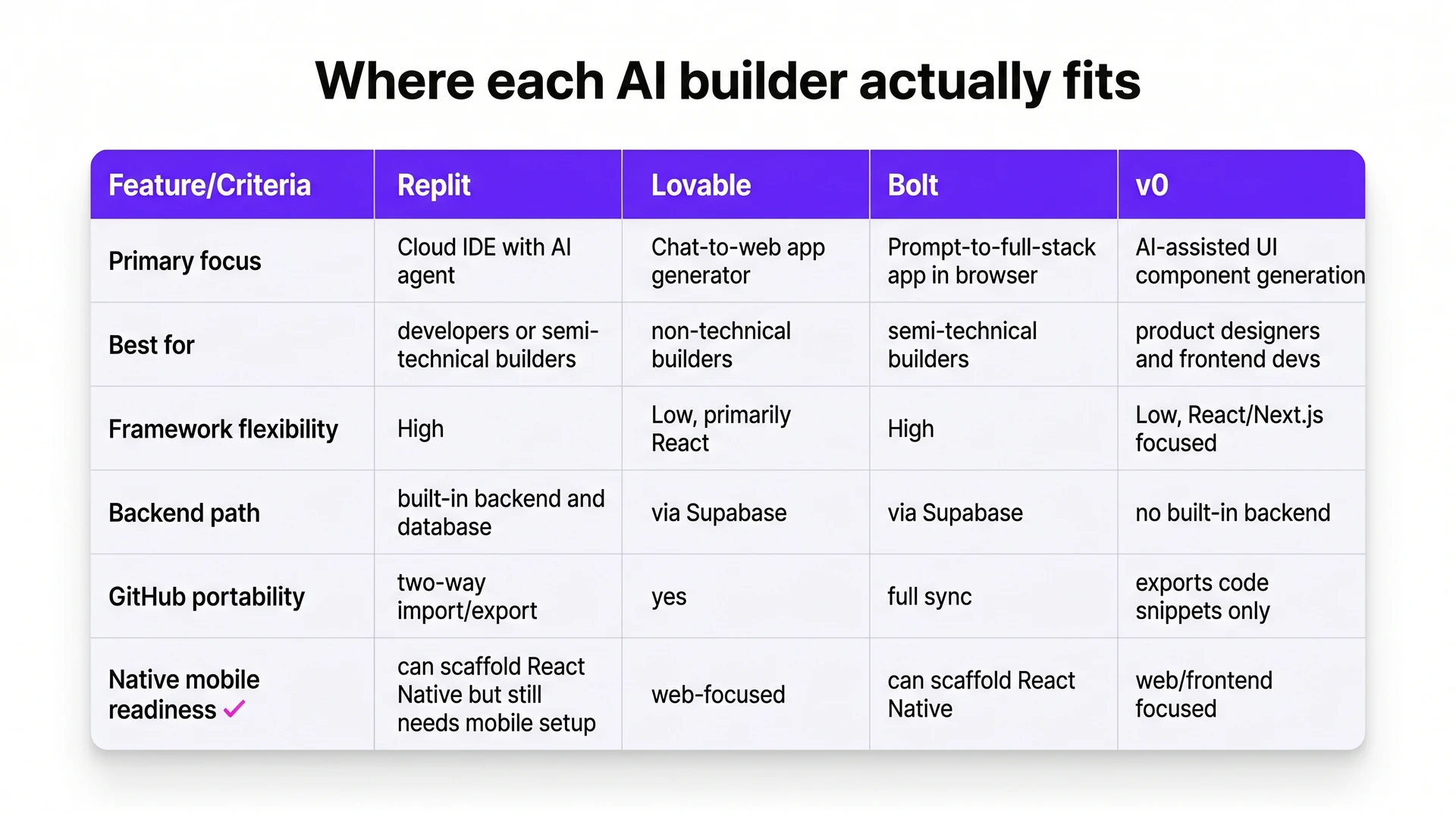
Bolt and v0 sit on different sides of the Replit vs Lovable comparison. Bolt is closer to Lovable for prompt-to-web-app building, while v0 is mainly for frontend UI generation.
Use the table below as the quick map.
The practical differences are simple:
- Bolt vs Lovable: Bolt gives more framework flexibility, while Lovable is easier for visual web prototypes. Both commonly use the Supabase backend pattern.
- v0's role: v0 starts free and has a paid plan at $20/month, but it is focused on frontend UI generation rather than full app building.
- React Native support: Replit and Bolt can scaffold React Native projects. Lovable and v0 are mainly web-focused.
React Native scaffolding or responsive web code is different from a no-code native publishing path for iOS and Android.