
Plans and monthly limits
Every account is on a plan. Each billing period gives you the plan’s monthly limit — granted upfront on paid plans, daily on the free plan.
Annual is billed once a year at 12× the annual rate — two months free. Both monthly and annual subscriptions reset tokens monthly, not annually; annual just affects how often you’re billed.
Your plan also sets your Bilt Cloud limits — how many projects can have a backend, and how much traffic, storage and users each one gets. Customizing your sign-in emails needs Professional Plus or above.
New subscribers get 40% off the first month on any monthly paid plan. Applied automatically at checkout when eligible — one-time per account, not available on annual billing.
Free plan tokens arrive daily
The free plan doesn’t hand you 3M at the start of the month. It grants 500,000 tokens per day, up to a 3M monthly cap. New accounts also get a one-time 1M signup bonus on top of the first day’s grant. So a free account has 1.5M available on day one, and the daily grants stop once the running total for the period reaches 3M. You can see the current accrued amount and the next grant time in Settings → Billing & Usage. Paid plans are not dripped — the full monthly limit is available at the start of the period.When your balance resets
Your balance resets on the same day of the month your subscription started — not the 1st of the calendar month. If you subscribed on January 15, your tokens reset every month on the 15th. Edge cases (subscribed on Jan 31) anchor to the last day of shorter months: Feb 28, Mar 31, Apr 30, and so on. You can see your next reset date in the Billing & Usage tab of Your account settings.Rollover
On Free, Professional and Professional Plus, unused plan tokens expire at reset — the plan gives you a fresh allocation each period. On Professional Max and Professional Ultra, whatever you didn’t use rolls into the next period. Rolled tokens only roll once, so a banked balance tops out at twice the plan limit (90M on Max, 230M on Ultra). Changing plan resets the rollover: the period in which you switched isn’t carried forward. What carries forward on every plan:- Token packs you purchase keep their tokens for 30 days from purchase.
- Manual credits issued by support persist until their expiry date.
Example: Pro plan (10M) + a 10M pack. In a month where you use 12M, the first 10M comes from your plan and the extra 2M comes from your pack — leaving 8M of the pack for next month.
Token packs
If you run low mid-period, you can buy a one-time pack instead of upgrading.
Paid subscribers save 40% on every pack. The subscriber price requires an active paid plan at checkout; non-subscriber prices are available to everyone. Prices are in EUR, excluding VAT.
Token packs:
- Don’t reset monthly — they sit on your account and only deplete when a period’s usage exceeds your plan limit.
- Expire 30 days after purchase. Anything unused at expiry is gone.
- Are spent soonest-expiring first when you hold several packs or credits, so the most durable balance is what’s left.
- Are non-refundable on their own, but if you’re refunded for the payment, the tokens come off your balance.
A subscription is better value than topping up. Every pack works out at €3 per million tokens for paid subscribers, or €5 without a subscription. A plan is cheaper per token at every rung — €2.50 on Professional and Professional Plus, €2.22 on Max, €2.17 on Ultra, and under €2 on annual billing. If you’re buying packs most months, upgrading gets you more tokens for the same spend, plus priority agent access and higher cloud limits. Packs are for the occasional overflow month.
Tips to use fewer tokens
- Be specific. Vague prompts cause the agent to read more files. “Change the login button color to
#6320EE” beats “make the login look nicer.” - Iterate small. Five small prompts usually cost less than one big one — short outputs cost less, and cached context reuse is 0.1×.
- Reference existing code. “Match the style of the Home page button component in the Settings page” is cheaper than describing the style from scratch.
- Ask for a plan first. If a change feels big, ask the agent to outline the plan before it edits. A short plan costs far less than a wrong build.
- Stop runaway runs. If a build is going wrong, click stop instead of letting the agent loop.
My balance looks wrong
A few things to check before contacting support: Your usage lives in Settings → Billing & Usage — the usage chart and per-project breakdown show exactly where tokens went: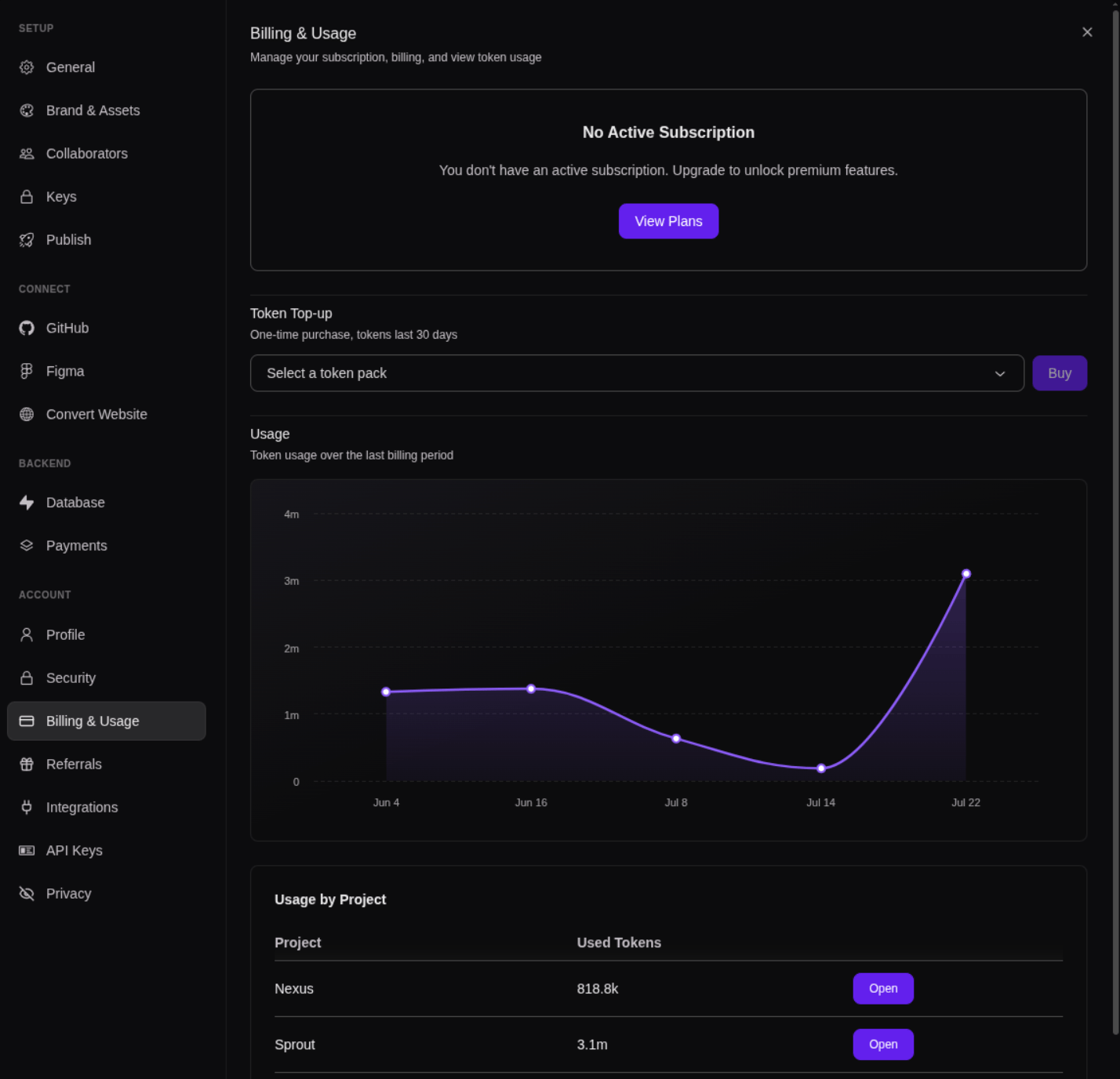
It dropped while I was idle
It dropped while I was idle
Tokens are only consumed when the agent runs. There’s no background process that drains tokens — if you weren’t actively chatting and the agent wasn’t running a build, your balance shouldn’t move.Two things look like idle drain but aren’t:
- Async recording. Tokens for a run are sometimes posted a few seconds after the run finishes. If you stopped chatting at 16:00 and saw the drop at 16:01, that’s the previous run being recorded.
- Long-running builds. If you kicked off a build before stepping away, it may have continued running in the background.
It dropped more than I expected for one prompt
It dropped more than I expected for one prompt
A prompt that produces a lot of code is much more expensive than a prompt that produces a short reply. A change that touches multiple files runs many tool calls, each billed.
My token pack disappeared
My token pack disappeared
Token packs expire 30 days after purchase. Check your purchase history on the Billing & Usage tab of settings. If a pack was refunded or charged back, its tokens are removed from your balance.
None of these explain it
None of these explain it
Get in touch with us through the support bubble on the bottom right of Your screen or email support@bilt.me with:
- Your account email
- The balance you expected
- The balance you see now
- A timestamp window when you noticed the drop
Subscription cancellation
Cancel your subscription from Settings → Billing & Usage — open Manage billing on your plan card.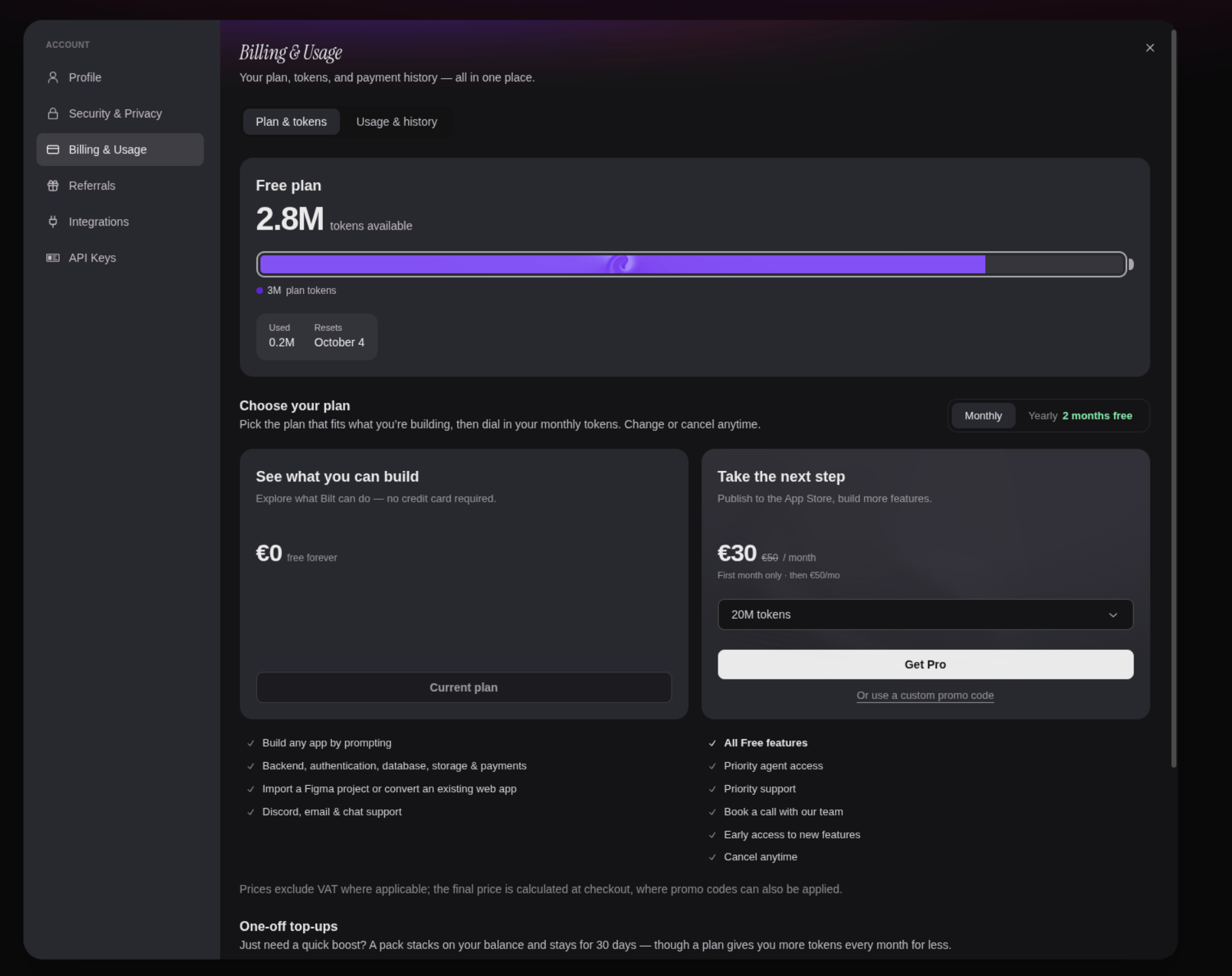
- You keep paid-plan access until the end of the current billing period.
- After that, your account drops to the free plan — 500k tokens per day, up to 3M per month.
- Your projects, exported code, and unused token packs are preserved.