If you're comparing Base44 vs Replit, you're probably not looking for a generic feature chart. You want to know which one gets an app working faster, with fewer surprises.
Disclosure: Bilt publishes this article and focuses on native mobile apps, which lets us assess these two web builders independently.
I tested both from a non-technical founder's point of view: a CRM-style app in Base44 and a simple task manager in Replit.
Base44 got the web MVP on screen faster; Replit made more sense once I needed to inspect and maintain the code.
TL;DR: quick verdict
- Choose Base44 if: You want a guided path to a web MVP, especially for a CRM-style first version.
- Choose Replit if: You want source files you can inspect, debug, and keep maintaining after the first AI pass.
- Be careful if native mobile matters: Neither tool gives you a native iOS and Android release pipeline by default.
- My overall pick for non-technical founders: Base44 for a web MVP; Replit for production apps that need long-term code ownership.
What to evaluate before you pick
A good first prompt only proves the tool can make a demo. Judge Base44 and Replit by what happens after the app has users and edits.
Use this lens before you commit:
- First-run speed: Can you reach a usable flow, such as adding a CRM contact, without setup work?
- Technical control: Can you inspect source files or recover when the AI makes a bad edit?
- Product quality: Does the first user flow still work after a second or third change?
- Backend readiness: Can the tool explain where user data lives and who can access it?
- Output type: Do you need a browser-based app, or native iOS and Android binaries?
- Long-term ownership: Can another builder maintain the project after the first version ships?
Base44 vs Replit at a glance
Base44 and Replit overlap with prompt-led builders like Lovable and Bolt, but they sit in different lanes. Base44 guides the build; Replit keeps the codebase visible.
Base44 lists a lower annual-billing entry price. Replit Core offers monthly or annual billing and includes usage credits:
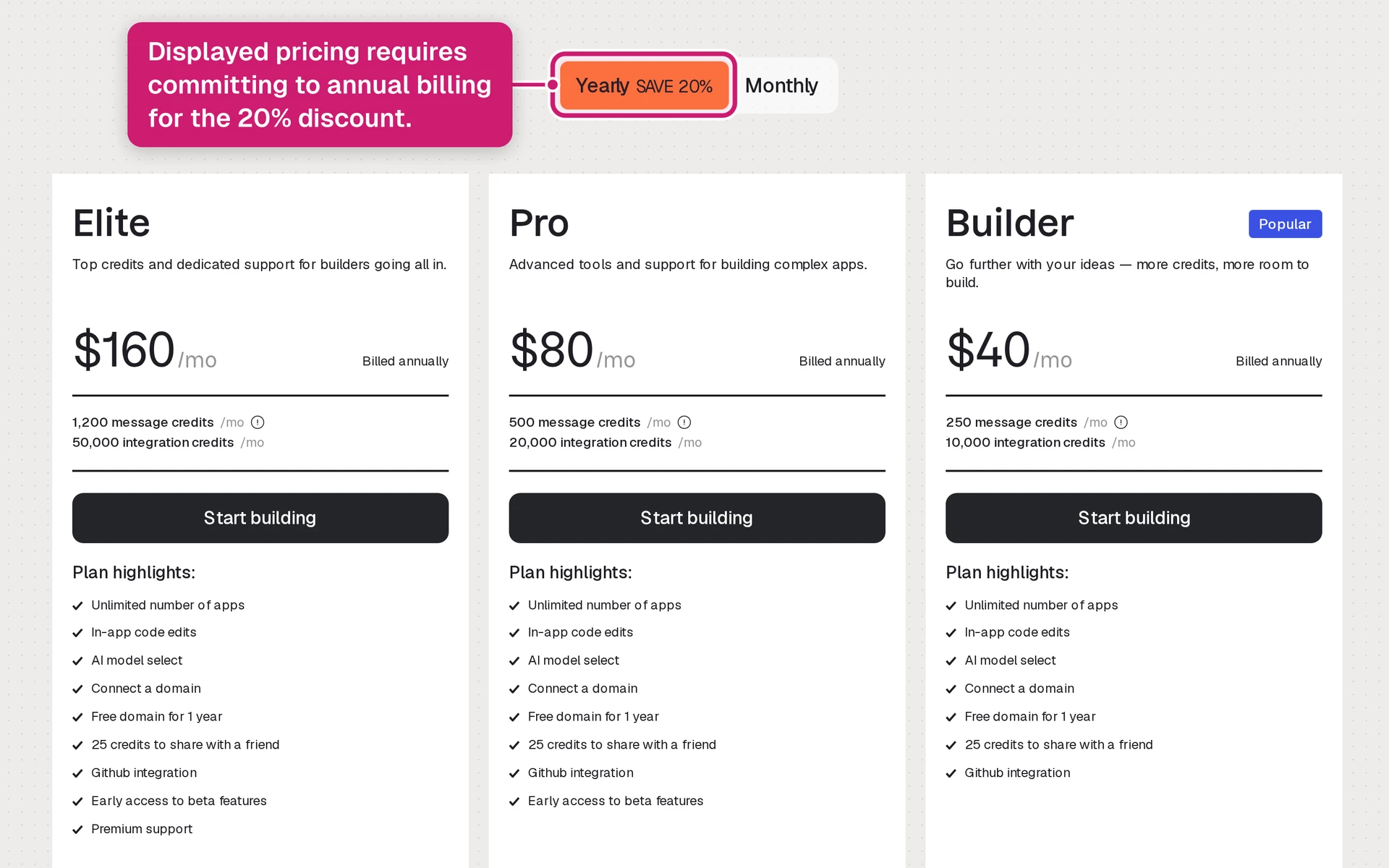
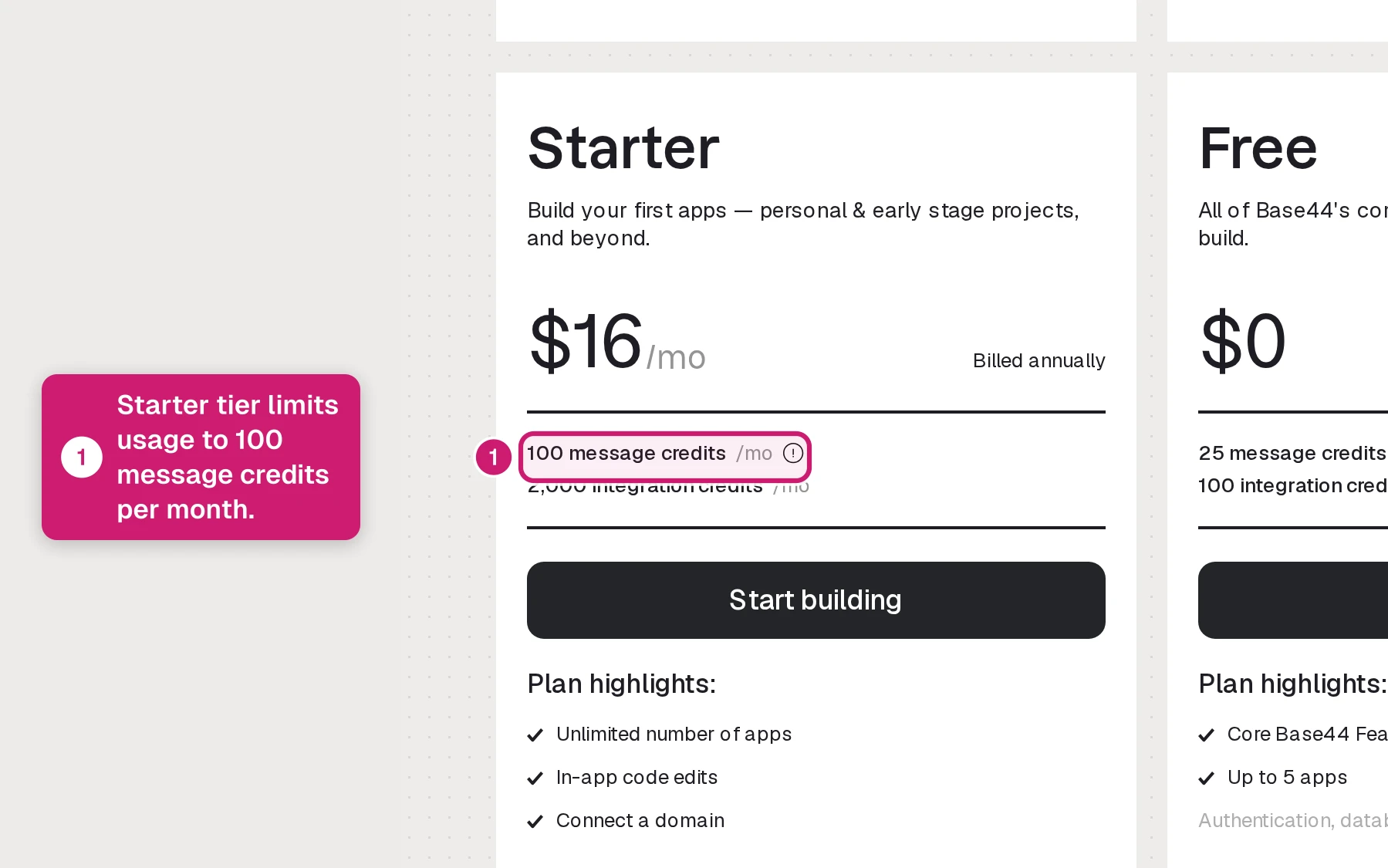
- Base44: With annual billing, Starter is $16/month, Builder $40/month, Pro $80/month, and Elite $160/month.
- Replit: Core is $20/month, or $18/month billed annually, and includes $20 in monthly usage credits for AI Agent runs, compute, and deployments.
Plans, credits, and billing discounts can change. Check the official pricing pages before choosing a plan.
Output type still matters. Base44 is web-based by default, while Replit's current mobile path should be verified against your iOS or Android release needs.
What is Base44?
Base44 is an AI no-code platform for building full-stack web apps from plain-language prompts. It creates the app inside Base44, with the interface, database, authentication, and hosting handled by the platform.
The differentiator is Superagents. They give Base44 an agent layer for AI workflows inside the app, which matters when the product needs more than static forms.
Base44 is mainly built for people who want a fast web app without working directly in a code editor:
- Audience: Non-technical founders, solopreneurs, hobbyists, and teams building early MVPs or internal tools.
- Use cases: Personal tools, back-office apps, customer portals, prototypes, and simple business apps.
- Integrations: Email providers, SMS tools, and third-party APIs can be connected with user-supplied API keys.
- Mobile output: Base44 apps are web-based by default, not native iOS or Android binaries.
- Code and portability: Paid plans advertise in-app edits, while Builder and higher add GitHub. Verify export and off-platform use.
In testing, Base44's strength was the guided path: the CRM-style app reached a usable web flow without opening a code editor.
The ceiling is output type. Base44 can move quickly on web apps, but native iOS and Android release still requires another path.
What is Replit?
Replit is a browser-based coding workspace. It started as a place to write and run code online, then added AI workflows around that workspace.
In my task-manager test, Replit Agent produced source files and a runnable project from a plain-language prompt. The remaining work moved into normal developer territory.
With Replit, the AI works inside an IDE, so the important differences show up in source files and configuration:
- Files are visible: The generated app lives as source files inside the workspace.
- Dependencies are part of the process: The agent can install packages and set up the project structure.
- Configuration still exists: Environment variables, database settings, and deployment choices remain part of the app.
- Deployment is built in: Replit can take the project from workspace to hosted app without a local machine.
Replit's audience is broader than non-technical app builders. It serves students, educators, hobbyists, developers, and technical founders who want a cloud IDE with AI help layered on top.
Replit's visible files make debugging the handoff point. The Replit alternatives roundup compares code visibility, hosting, and mobile output.
Base44 vs Replit: feature comparison
I used two small builds for this section: a CRM-style Base44 app and a task-manager Replit app.
The split appeared before advanced features mattered. Base44 behaved like a guided app builder, while Replit exposed the project underneath.
Setup: fastest path to a usable first build
I measured setup by the first point where the app could be clicked. Project inspection came after the first clickable app.
| Tool | What happened in the test | Friction point | My read |
|---|---|---|---|
| Base44 | I described a CRM-style app and clicked into the generated live app. | No framework choice or local environment setup came first. | Base44 reached a usable screen first. |
| Replit | Replit Agent started a task-manager app inside a full code workspace. | I had to review the generated project structure and configuration before shaping the app. | Replit exposed project ownership earlier. |
- Base44 made the first review about app flow. Replit made the first review about whether the generated project looked safe to keep building.
Coding requirements: where prompting turns into debugging
The biggest Replit surprise for a non-developer was debugging. When the task-manager build needed refinement, the Agent's output still left me reviewing files and errors.
The workflows split during refinement:
- Base44: I changed CRM fields by prompt and described screen behavior in plain language. The builder kept the work inside app concepts.
- Replit: I could prompt the Agent, but refinement required reading files and inspecting errors. That is a different skill from describing the desired feature.
- My read: Base44 punished vague product instructions. Replit punished weak technical review after the first scaffold.
Backend and database: who owns the data model?
Backend was the first category where the two tools stopped feeling adjacent. Base44 treated the data layer as generated app infrastructure; Replit treated the data layer as code I had to inspect.
What changed during testing:
- Base44: The CRM data model followed the app description. I could revise records and workflow behavior by prompt before touching backend setup.
- Replit: The task-manager build exposed source files and database-related configuration. The Agent could create code, but schema and connection choices stayed inside the project.
My stance: Base44 reduces backend risk for non-developers. Replit makes the data layer inspectable, which helps when someone can review the implementation.
Authentication and permissions: login is only the start
Authentication looked easy in both tools until permissions entered the test. A login screen still needs clear rules for record access.
- Base44: Auth can be generated as part of the app flow, so account setup stays inside the guided build. For the CRM-style app, login stayed closer to screens and workflows.
- Replit: The Agent can help build auth, but service choice and permission logic live in code. That control matters with code review.
- Permission check: Before trusting either build, create one admin user and one regular user. Verify who can view records and who can edit records.
UI control and frontend quality
Base44 gets to a usable screen faster. Replit offers more frontend control once the work moves into the chosen framework.
- Base44: Generates the frontend UI with the rest of the app, which helps non-technical builders get to a working screen quickly.
- Replit: Generates UI through the chosen framework, so layout, styling, spacing, and component quality depend heavily on the prompt and follow-up edits.
The production reality is simple: generated UI is a starting point, not a finished product. Plan to clean up screens before putting the app in front of real users.
Code access and export
Code access differs during day-to-day work, while portability depends on what can run outside each platform.
- Replit: You work inside a browser IDE where files, dependencies, commands, and runtime behavior are visible as you build.
- Base44: The main surface is the generated web app, not the source code, so it is better suited to users who want to stay inside the platform.
- Export expectations: Replit feels closer to a standard developer handoff because the project already lives as code.
- Base44 portability: GitHub integration can help with handoff and version control. Before relying on it for migration, verify repository contents, data export, backend portability, and whether the project runs outside Base44.
- Mobile output in testing: Base44 produced a web app, and the Replit task-manager project ran as a hosted web project.
Deployment and hosting
Base44 makes web deployment feel more automatic. Replit gives you more deployment control, but you need to understand the resources your app uses.
- Base44 hosting: Hosting is part of the build flow, so non-technical users can get a live web app without setting up separate infrastructure.
- Replit Deployments: You trigger deployment from Replit, then the platform handles the live URL, SSL, and hosted runtime.
- Custom domains: Both platforms support connecting a custom domain from inside their environments.
- Replit Core limits: Core costs $20 month to month or $18/month billed annually, includes $20 in monthly credits, and lists up to 4 vCPUs, 8 GiB RAM, 50 GiB storage, and 100 GiB monthly outbound transfer per app.
- Scaling cost: If a Replit app needs more than the included resources, usage can move into credit-based billing beyond the base plan.
- Tested deployment: Replit hosted the task-manager project, while Base44 hosted its generated web app.
Scalability and maintenance
Neither platform publishes a universal traffic or record-count limit. Base44 manages more infrastructure, while Replit exposes more controls for teams that can operate them.
Known limits to watch:
- Base44: Its managed backend reduces setup, but there are no published case studies showing it handling high-traffic production loads.
- Base44: The AI-managed setup reduces maintenance for small apps, but limits custom backend optimization if the app outgrows the platform.
- Replit: Small projects can run reliably, but production workloads still need monitoring, resource planning, and someone who can debug the hosted environment.
- Replit: Long-term production maintenance falls back on the developer when hosting, data, dependencies, or deployment needs become more complex.
Base44 is easier to babysit while the app stays in its lane. Replit gives you more room to customize, but the operational burden comes with it.
Pricing: which platform is actually more predictable?
Base44's pricing model is more predictable if your main concern is avoiding surprise spend. Replit is more flexible, but that flexibility depends on usage-based credits.
Here is the clean pricing comparison. Check Base44 pricing and Replit pricing before you publish, because both pages can change.
| Plan | Base44 annual billing | Replit pricing |
|---|---|---|
| Free | $0/month | $0/month |
| Starter / Core | Starter: $16/month | Core: $20 monthly; $18 annual |
| Builder | $40/month | No matching tier |
| Pro | $80/month | $100 monthly; $95 annual |
| Elite / Teams | Elite: $160/month | Teams: $35/user/month |
The edge case is the real difference:
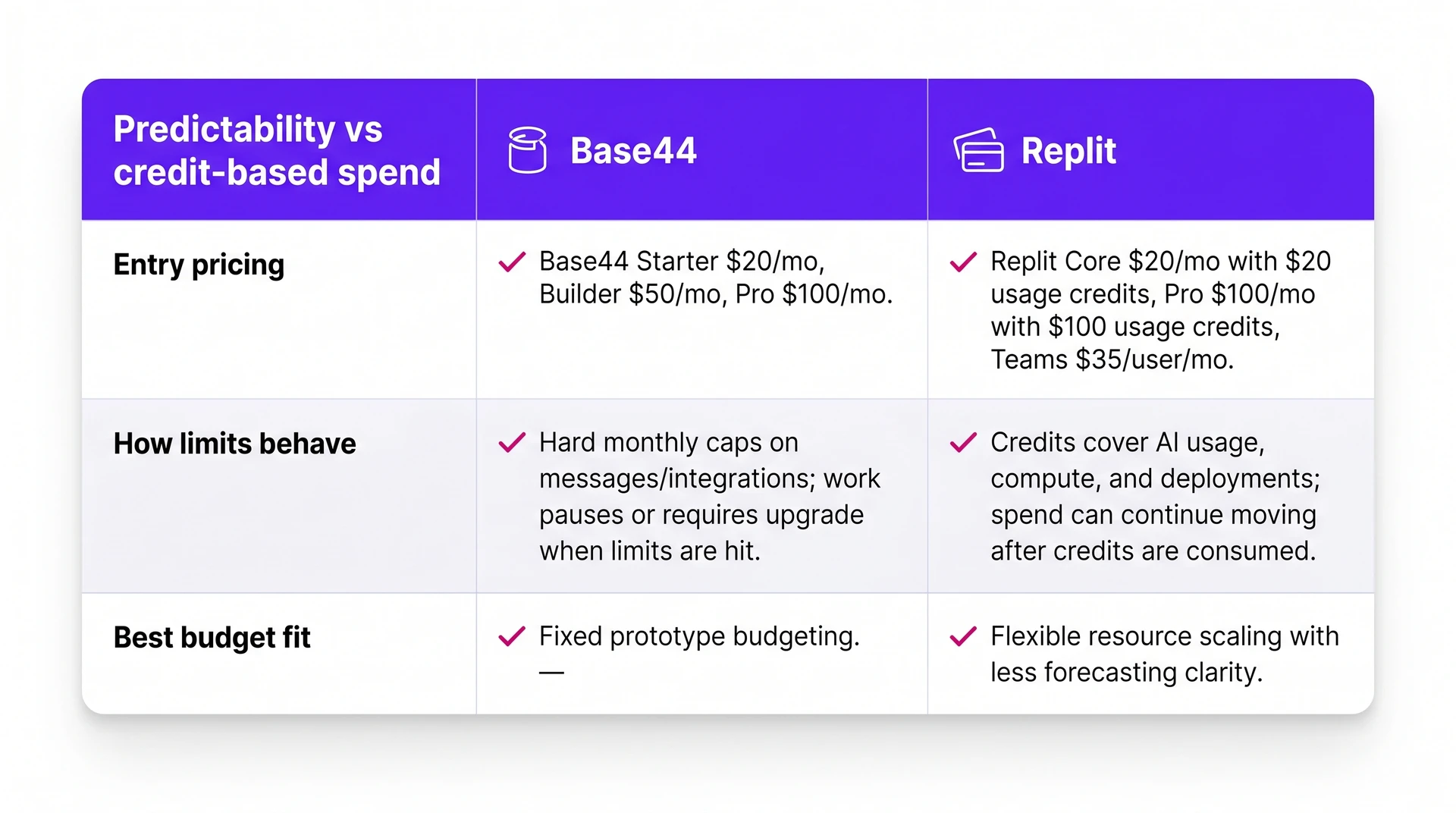
- Base44: Usage works more like a hard cap. When you hit the limit, work stops until the next cycle or an upgrade.
- Replit: Credits cover AI usage, compute, and deployments. If usage continues after credits are consumed, spend can keep moving.
- Budget risk: Base44 can waste unused capacity because credits reset monthly. Replit can be harder to forecast because technical work does not always have an obvious cost before you run it.
That makes Base44 easier to budget for fixed prototype work. Replit is more comfortable when you can monitor usage and want room to scale resources.
Which tool fits your situation?
Base44 and Replit overlap in the demo phase. The better choice depends on what happens after the first working version.
Start with the scenario closest to yours. That will tell you which tradeoff matters most.
| Use case | Base44 | Replit | Bilt |
|---|---|---|---|
| Non-technical MVP | Fast web prototype | More setup | Native mobile route |
| Custom web app | Prompt-led builder | Visible files and tools | Mobile app conversion |
| Internal dashboard | Forms and portals | APIs and custom logic | Native companion app |
| Learning code | Product exploration | Files and debugging | No-code mobile build |
| Long-term mobile app | Verify portability | Plan operations | Owned React Native source |
- Fit: Simple marketplaces, directories, booking flows, portals, and proof-of-concept apps where speed matters more than custom architecture.
- Tradeoff: You get more abstraction, but less control when the product needs unusual workflows or deeper system changes.
- Watch-out: Base44 is web-first. App Store or Google Play publishing requires a wrapper path, which adds technical steps.
Base44 reduces the need to touch code. Replit keeps the code visible, which is useful only if someone understands what they are looking at.
Internal tool or admin dashboard
For internal tools, start with the workflow complexity.
- Choose Base44 for back-office forms, lightweight CRMs, admin portals, reporting dashboards, and permissioned web tools.
- Choose Replit for custom integrations, scheduled jobs, internal APIs, or workflows that depend on specific business logic.
- Watch-out: Base44 can hit constraints around portability and high-frequency usage, while Replit still needs deliberate implementation.
For a team that just needs an internal workflow on screen, Base44 has the smoother path. For a technical team owning the system, Replit gives more room.
Student or learner
If learning to code is the goal, Replit gives you real files, real errors, and real debugging practice.
- Fit: Students learning syntax, debugging, file structure, collaboration, and how web apps are assembled.
- Tradeoff: The code is visible, so beginners also see real coding problems instead of a fully guided builder.
- Watch-out: Replit is helpful for learning, but it can frustrate someone who expected a no-code product builder.
Base44 fits a different kind of learner: someone exploring product ideas before learning implementation details.
- Fit: Hobbyists, product thinkers, and beginners who want to turn an idea into a working web app quickly.
- Tradeoff: The platform hides much of the implementation, so fewer lessons transfer into coding skill.
- Watch-out: If the end goal is to become a developer, Replit teaches more of the underlying craft.
Production app needing long-term maintenance
| Platform | Fit | Watch-out |
|---|---|---|
| Replit | Better when you already have technical help, need source visibility, want code review, or plan to move into a traditional development workflow. | Portability is better than a closed builder, but deployment settings, environment variables, dependencies, and AI-generated code still need ongoing review. |
| Base44 | Better when the app can stay inside Base44's hosted web environment and does not need heavy custom infrastructure. | Less code access means fewer options when uptime, migration, independent hosting, or platform limits start to matter. |
Where each platform falls short
Both tools are strongest before the app becomes complex. The table below is the practical version of the limitation story.
| Platform | Limitation | What it means |
|---|---|---|
| Base44 | Web-first output | Native stores need wrapper work |
| Base44 | Limited code control | Custom changes get harder |
| Base44 | Platform dependency | Hosting path matters early |
| Base44 | Usage constraints | Busy apps need scrutiny |
| Base44 | Prompt-based iteration | Failed generations can waste credits |
| Replit | Agent loops | Complex tasks can stall |
| Replit | Credit usage | Iteration can become unpredictable |
| Replit | Raw-code exposure | Debugging remains your job |
| Replit | Hosted environment | Production may need migration |
| Replit | Infrastructure judgment | Scaling still needs engineers |
Base44 hides more complexity at the cost of control. Replit exposes more control, which means you inherit more production decisions.
Generated demos are only the first checkpoint.
Before launch, you still need answers for:
- Uptime and monitoring
- Payments and integrations
- Maintenance after the first version ships
When neither tool is the right fit
Base44 and Replit work well for browser-based products. In the tests, Base44 produced a web app and Replit produced a task-manager web project.
Native mobile needs a separate evaluation. Check framework, device preview, build generation, code signing, and store submission before relying on a web-first builder for iOS or Android.
A web wrapper renders site content inside a native shell. Its on-phone experience still depends on the site's network, JavaScript, caching, and device performance.
- Native mobile delivery: If you need iOS and Android apps in the App Store and Google Play, a web wrapper adds another technical layer.
- Device features: Camera, GPS, and push notifications are native signals. They need a builder designed around phone hardware, not just browser screens.
- Submission workflow: Build generation, code signing, store metadata, and review handoff become the project if the platform does not manage them.
- Long-term ownership: If you expect to keep improving the app, native React Native source code gives you a cleaner path than a wrapped prototype.
A store-installed product changes the shortlist — use the store-ready iOS builder roundup to compare no-code mobile paths.
Build and ship a native app without the web-app ceiling
Build a native app when a web-first prototype has reached its limit. Bilt takes an idea through backend setup and signed App Store and Google Play builds.
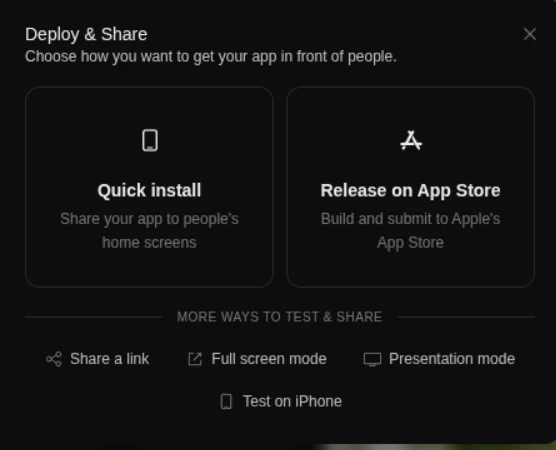
Describe the app in plain English, then preview it before local setup. Bilt generates a React Native project for iOS and Android that you can keep refining through conversation.
The mobile-specific pieces matter. Scan a QR code to test the app on a real phone before publishing.
Describe an app and watch Bilt turn it into a native app in live preview.
- React Native source code: Bilt generates exportable mobile code for iOS and Android, rather than a website inside a shell.
- Prompt-based app changes: Ask for a new screen or flow change in plain English, and Bilt updates the mobile project.
- Streamed mobile preview: Preview the app in iOS and Android environments from the browser before setting up local simulators.
- Publishing support: Bilt helps with mobile builds and store submission workflows, including code signing.
Phone-specific behavior points toward a native build:
- Camera capture
- GPS-based flows
- Push notifications
- App Store and Google Play distribution
Use these questions before choosing Base44, Replit, or Bilt:
- Do users need to install the app from the App Store or Google Play?
- Does the app depend on device access during everyday use?
- Will you keep refining the product after launch?
- Do you want to avoid local mobile setup and code-signing work?
Several yes answers point to a native-mobile workflow first. Base44 and Replit can still help with web apps, but they are a poor starting point for this job.
Ready to test a native workflow? Start building free and preview your app before publishing.
Want help planning the mobile path first? Get expert advice in a free planning call.
Common questions
A few questions come up repeatedly when people compare Base44 and Replit. Here are the short answers.
Is Replit better than Base44?
Neither is universally better. Base44 suits founders who want authentication, database features, hosting, and app changes managed through a guided builder.
Replit suits teams that expect to inspect files, choose dependencies, debug issues, and maintain deployment configuration.
Base44 lists in-app code editing on paid plans and GitHub integration from Builder upward. Check backend and deployment portability before committing.
Current entry pricing, based on the official Base44 and Replit pages:
- Base44 Starter: $16/month when billed annually.
- Replit Core: $20/month, or $18/month when billed annually, with $20 in credits.
Is Google buying Replit?
Google is not buying Replit. The public relationship between the companies has centered on AI tooling, not an announced acquisition.
That relationship does not change the basic product decision. Replit is still a developer-focused cloud IDE, not a no-code builder like Base44.
How do Base44 and Replit compare to Lovable and Bolt?
In my head-to-head test, Base44 handled the image-upload task with less setup, while Replit made backend behavior easier to inspect because the files and configuration were visible. That is a narrow comparison, not a universal verdict.
Here is how I would separate the four:
- Base44 is aimed at no-code web app creation from prompts.
- Replit is a cloud coding environment with AI assistance.
- Lovable focuses on generating editable React and TypeScript web app code.
- Bolt is strongest for fast browser-based prototyping, especially when the app is still simple.