
You can describe the app you want, screen by screen, and you'd rather do that than learn to code it. What you're after is a link people can tap to install it from the App Store or Google Play.
The snag is that "build natively" gets used for two different jobs. One puts a website you already have inside an app shell. The other produces a real native app from your description, using the phone's own buttons, menus and features.
Pick the wrong one and you can spend the money and the weeks, then have Apple turn the app away at review for being a website in a wrapper. Here's what native actually means, and how to tell which job your starting point calls for.
What does building natively mean?
Building natively means making an iOS or Android app that uses the phone's own interface components (the buttons, lists and menus the operating system draws) and reaches device features through native APIs.
Tapping a notification and landing on the matching screen, or pressing a scan button that opens the camera inside the app, is native behaviour at work.
Native apps vs website wrappers
A website wrapper puts web content inside an app shell, so what you see after opening it is a website running in a web view. Both kinds can be listed in the App Store and Google Play, but WebView-only apps with no native interaction are a common reason for App Store rejection.
The difference is what each can do. A wrapper mostly shows what your website already does. A native app can reach the camera, notifications or health data, depending on how it's built and which permissions the user grants.
Where React Native fits
React Native shares most of the code between the iOS and Android apps, with room for platform-specific adjustments when one phone needs them. The framework builds its screens from native interface components, which a wrapper doesn't use. Separate native apps are written in Swift for iPhone and Kotlin for Android.
An AI builder that generates React Native writes the code from your description, so you never touch Swift, Kotlin or React Native yourself. You still test on both iOS and Android, because each platform can behave a little differently.
Five ways to build natively, compared
Each route asks something different of you, from the first build to the store listing:
| Route | What you need | What you get | How you make changes | Store submission |
|---|---|---|---|---|
| Website wrapper, such as Natively (buildnatively.com) | A working website | Your website inside an app shell | Update your website and configure the wrapper | Your store accounts, sometimes with upload help |
| Visual builder, such as Buildfire or Thunkable | An idea | A native iOS and Android app | Arrange screens and configure behaviour | Follow the platform's publishing workflow |
| AI builder generating React Native, such as Bilt | An app description | A native iOS and Android app | Describe changes | Bilt handles signing and submission |
| DIY code, including AI-generated code | Requirements and coding ability | A native app you assemble yourself | Edit and test code | You manage builds, signing and submission |
| Agency or developer | A brief and agreed scope | A native app built to your brief | Agree on changes with specialists | Get responsibility for submission in writing |
A wrapper suits a website that only needs a store listing. For a new idea, device features or a future developer handoff, an AI builder that generates React Native and lets you export the source covers more ground. DIY with AI-written code still leaves assembling, debugging and submission to you.
How to build a native app without code
Here's how that works in Bilt, the AI mobile app builder we make. You describe the app, refine it, test it, then submit it.
Step 1: Describe what the app should do
A first description can be rough. Mine, for a fitness coach app, went in with one image as a design reference and read: “Build me a personal coach app that i can serve to my clients. Thats using AI to recommend workouts, track calories and meals… i also want to be able to add feedback after wrokout about how i felt… ask for weight, height, etc, to calculate bmi.”
Name your users, their main actions, what gets saved and any outside services needed. A finished design can wait.
Step 2: Refine it through conversation
One change per message makes the result easier to check. If feedback disappears, a correction could be: “On the workout feedback screen, my feedback disappears when I reopen it. Save it so I can read it later.”
After each change, open the preview and recheck sign-in, payment and saved data, if your app has them, before asking for more.
Step 3: Test on simulators and your own phone
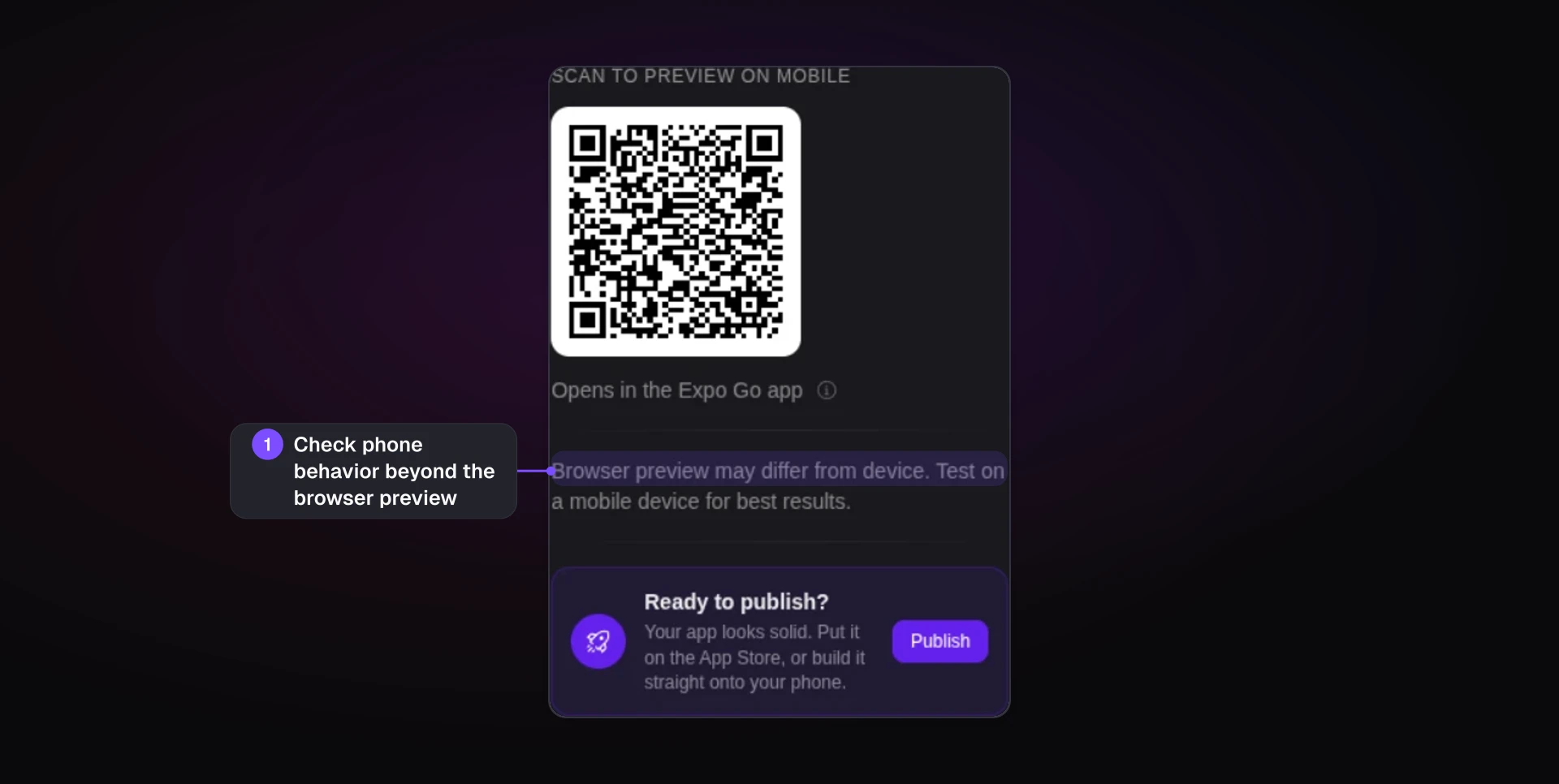
You can tap through both versions in your browser without installing developer tools, using Bilt's streamed iOS simulator and cloud Android emulator, but you still need to test on physical phones.
One builder noticed a camera animation on their phone that the browser preview hadn't shown. On your phone, open the native test app through Bilt's QR code. Try letters in the weight field or stop onboarding halfway.
Step 4: Submit to the App Store and Google Play
Bring your developer accounts, listing details and images. Bilt prepares and submits the build, which still awaits Apple's and Google's review.
Apple can reject a missing permission “purpose string”: text explaining why the app wants camera or Health data access. One app only read Health data but was rejected because its HealthKit entitlement lacked the required usage description.
Bilt's support usually spots this in the App Store Connect email and sends the exact prompt to paste into the agent, such as “Add a short usage description for every permission this app touches in app.config.ts.” After a rebuild, you resubmit and Apple reviews the app again.
Already have a website or web app?
You don’t have to start over. There are two ways to reuse what you’ve built: keep your site’s pages inside an app, or convert the web app into native screens if the tool supports your web platform.
A wrapper is only as good as your mobile site, because users get the same pages in an app frame. I’d keep that route on the shortlist if you mainly need a store link.
If you want push notifications or a paywall for content, look for a web-to-native conversion tool that supports those features.
Murat built his web app in Lovable, then converted it to native iOS and Android with Bilt's Web-to-App feature in one click, without a mobile developer. His first changes in the native version were animations and user experience.
Once your conversion runs, open it on your phone and refine the animations and how it feels before adding anything new.
Before choosing a conversion tool, settle what it can reuse and where you’ll make future changes:
- Ask whether it converts apps built with your platform, such as Lovable, V0 or Next.js.
- Decide which version you’ll edit, and ask whether website changes sync to the native app. Ongoing sync isn’t guaranteed for every web framework.
How much does a no-code native app cost?
Publishing on both stores costs $124 in the first year: $99 for Apple’s annual developer membership plus Google’s $25 one-time fee. After that, the account fees total $99 a year, on top of your builder subscription.
For a live website, a wrapper subscription sits on top of the same store fees. Webtonative’s separate entry plans start at $9/month for Android and $14/month for iOS. Natively offers a free plan and a $699 lifetime option.
For an AI builder, the subscription is the main cost on top of the store fees. Bilt has a permanent free tier, and paid plans add more AI tokens each month as you need them.
Cloud-based no-code building doesn’t require buying a Mac. If you choose local DIY iOS development with Xcode, add a Mac if you don’t own one. A Mac mini starts around $599, and code-signing setup takes a few hours.
Start testing on your own phone. If you need access to phones you don’t own, device-cloud testing options include BrowserStack from around $29/month or AWS Device Farm around $0.17 per device-minute.
One developer quoted €200/hour to turn finished Figma designs into a native app.
If you sell content or subscriptions inside the app, Apple's and Google's native in-app purchases carry a 15–30% store cut on those purchases.
What you own and what you still handle
If a developer takes over one day, they start from the code you export. With Bilt, you own the code it creates and can export it at any time, then push it to GitHub or hand it to a developer.
An export can still leave pieces behind. Some services the app depends on run outside the exported files and won't move with them automatically.
Who owns the code is a separate question from what the export contains. A builder can let you download every file while its terms say something different about rights.
Before you pay, put two questions to the builder:
- Whose name do the terms put on the code?
- Which services stay behind after an export?
Owning the code still leaves the app's day-to-day decisions with you, whichever route you pick:
- Decide what each user can see. In a personal trainer's coaching app, one client should never see another client's meals, weight or workout feedback.
- Check that saved records end up in the right place, then try unexpected inputs and unusual paths, such as signing in on a second phone.
- Name the person who reads store review emails, fixes what users report and ships updates.
If that person is you, upkeep lasts as long as the app is live, because real users keep finding paths nobody tested.
What to check before you pick a builder
Polished screens are the easy part of a demo. Non-technical builders tend to stall in four places: sign-in, payments and subscriptions, how the data is structured, and deployment.
A builder that leaves those four to you has handed you a prototype, with the path to a store listing still ahead of you.
These checks separate a demo from an app you can publish:
- Native output: confirm the builder generates a native app rather than loading a website in an app shell, and that the camera or notifications work if you need them.
- A real sign-in and saved record: sign up as a new user, save a record, then close and reopen the app. If you sell anything, run the payment flow too.
- Phone testing: tap through the iOS simulator and Android emulator, then make sure you can run the build on your own phone before you submit it.
- Signing and submission: ask who handles code signing, provisioning profiles (the files that let a build install on phones) and store submission, and who helps fix a rejection.
- Code you can take away: check that you can export a source code project a developer can keep working on, beyond access inside the builder.
- Usage cost: ask how a failed change or a retry counts against your tokens or credits, so you can budget for rounds of refinement.
- Web app conversion: convert one screen that shows live data, so you know your existing backend connections still work.
Describe your app, then take it to the stores with Bilt.me
Building natively without code usually stalls on the way from demo to store listing, at sign-in, payments, saved data and submission.
Bilt is an AI mobile app builder that keeps that whole path in one place. You describe what the app should do, and Bilt turns it into native iOS and Android apps in React Native code you can export and hand to a developer.
When the build works on your own phone, Bilt handles the signing and submission to the App Store and Google Play, and Apple and Google review the app before it goes live. If your idea has been waiting for a store link, start building free on the permanent free tier, or see all plans.