Building a first version of an app has never been easier. Turning it into something reliable and publishable is still the hard part.
Describe your idea to an AI tool and you can have screens, navigation, and a convincing demo in an afternoon. Accounts, payments, real data, testing, and store review determine whether it can ship.
This guide explains realistic app-development timelines, where the difficult work sits, and how to choose a route that gets your app published.
The short answer
A simple first build can take hours or days. A reliable, published app takes longer because real data, testing, store requirements, and maintenance begin after the screens work.
Difficulty depends more on features and integrations than screen count. Login, payments, live data, device features, and unusual business rules add more work than a larger set of simple screens.
The predictable sticking points are authentication, payments, live data, real-device testing, store approval, and the fixes that arrive after launch.
What counts as “making an app”?
“Making an app” can mean several different endpoints. A prototype has tappable screens, while a published app has working data, passed testing, store approval, and a plan for updates.
First-time builders often plan for visible screens but miss the systems, release work, and maintenance behind them. An app can look nearly finished long before it is ready for users.
These milestones make the difference clear:
| Part of making an app | What it includes |
|---|---|
| Product planning | Idea validation, market research, feature scope, monetization |
| App experience | UI design, screen flows, front-end behavior |
| App systems | Backend, database, authentication, payments, integrations |
| Release work | Testing, deployment, publishing |
What makes an app hard to build?
An app becomes difficult when its visible screens must work reliably with accounts, data, payments, devices, and store rules.
A polished screen can hide unfinished work. The real test is whether the app handles slow connections, failed payments, unusual inputs, and different phones without losing data or confusing the user.
Non-technical builders usually stall at the same points:
- User authentication: Sign-up, login, password resets, and sessions must work before the rest of the app feels dependable.
- Payments and subscriptions: The app must handle charges, renewals, refunds, failed payments, and each store's billing rules.
- Live data: Messages, feed items, and updates must stay consistent across every device signed into the same account.
- Real-world use: Logic that works with sample data can break when more people, unusual inputs, and failed connections arrive.
Release adds another challenge. Your build and store listing must meet Apple's App Review Guidelines and Google Play policies, and TestFlight lets you test an iOS build before submission.
Security and privacy belong in the build, not in a last-minute checklist. Protect stored data and login secrets, request only needed permissions, and make privacy disclosures match what the app actually collects.
Where the work actually goes
Delays usually come from scope changes, outside services, real-device testing, store materials, and fixes found after launch.
Backend work and integrations create long feedback loops. A small change to login, payments, or stored data can affect multiple screens and trigger another round of testing.
Release work can also block an otherwise finished app. Store copy, screenshots, privacy details, account setup, and signing all have to match the build being submitted.
Release work has two parts: preparing a trusted build and preparing an accurate store listing.
- Build signing: Apple uses certificates and provisioning profiles to connect an iOS build to its publisher and enabled features. Google Play uses its own app-signing and upload process.
- Store listing and compliance: Screenshots, support details, reviewer notes, permissions, and privacy disclosures must match the features in the submitted build.
Which build route is hardest?
Traditional native development is the hardest build route because it requires separate coding, testing, and maintenance work across iOS and Android.
Custom-coded apps add setup, deployment, signing, store submission, and ongoing maintenance. The timeline depends on scope and the people building it.
A web app can be packaged for app stores and launched quickly. The experience still depends on the wrapper, native bridges, and how much the product relies on device-specific behavior.
- Performance: Complex wrapped experiences may respond more slowly than code designed around native components.
- Interface feel: Transitions and gestures require careful implementation to feel at home on each platform.
- Device features: Wrappers can reach cameras, location, and notifications through native bridges, but setup and support vary by tool.
- Flexibility: Visual builders differ. Check whether the platform supports your business rules, integrations, source export, and data export before committing.
Bilt takes a cross-platform native approach. It generates React Native code that becomes iOS and Android apps, rather than packaging the product as a browser view.
Camera, GPS, and push notifications work as native features, and you can export the full source code at any time and hand it to a developer.
Each route shifts the effort to a different part of the build:
- Platform-specific native coding: Separate iOS and Android work offers detailed platform control at the cost of more implementation and maintenance.
- Visual builders and web-based routes: Setup can be faster, but capabilities, performance, export options, and device integration vary widely by tool.
- AI-generated native code with Bilt: Manual coding and deployment work are reduced while app stores receive native binaries.
How long does it usually take?
A first working build can appear in minutes or days. A tested, published app often takes weeks or months, depending on its features, integrations, build route, and store requirements.
Treat every estimate as a scope range, not a promise. A habit tracker with local data is a different project from a chat app with accounts, payments, moderation, and live updates.
- Custom development: The first build and the store-ready release are separate milestones, with design, integrations, testing, and review between them.
Useful planning ranges by endpoint:
- Simple prototype: Often hours to days when it uses standard screens and sample or local data.
- Working first build with Bilt: The initial native build can be generated in minutes, before testing and store review.
- Basic published app: Plan for additional time to connect real data, test core flows, prepare the listing, and complete review.
- More complex published app: Chat, location, subscriptions, offline behavior, and unusual integrations can push the work into several months.
- Store review: Approval is a separate step, and required testing or a rejection can extend the launch date.
Three choices shorten the route without pretending the release work disappears:
- Keep the first mobile MVP focused on one job and only the screens needed to complete it.
- Use a live preview and test each change before adding the next feature.
- Automate repetitive build, signing, and upload steps when your workflow supports them.
How to make app development easier
You make app development easier by shrinking the first version, testing in small steps, and choosing a workflow that reduces manual setup and release work.
Start with the product, not the architecture. Describe the app's main job, build that flow, and add accounts, payments, notifications, or integrations only when the core experience works.
Revisions can make a project harder to manage. Choose a workflow that lets you see each change quickly, test it, and roll it back before the next feature depends on it.
- With Bilt, you make revisions in the same conversation. Experienced engineers can help when a bug or publishing issue needs hands-on troubleshooting.
A first-time builder can keep the project manageable with this sequence:
- Define the one job version one must do for its user.
- List the few screens needed to complete that job from start to finish.
- Add login, payments, notifications, or other extras only after the core flow works.
- Test every key action on a real phone, then prepare store copy, screenshots, privacy details, and support information.
How to choose the right path for your app
The right path depends on four things: how complex your app's logic is, how fast you need to launch, whether you need native performance and app-store presence, and whether you need to own the code later.
Work through them in that order. Each one narrows the options:
- Complexity: List the app's rules, data, and outside services. Then check whether a template or builder supports them without awkward workarounds.
- Speed and flexibility: A web-first version can validate a standard flow quickly. It is not automatically cheaper once the product needs complex logic, mobile-specific features, or separate web and app experiences.
- Native behavior and distribution: Choose native or cross-platform native when push notifications, camera access, GPS, subscriptions, or store distribution shape the product. Choose web-first when search discovery and desktop access matter more.
- Ownership: Check whether you can export source code and data, connect external services, and host elsewhere. Those options matter when the app outgrows its original workflow.
Start web-first when search discovery or desktop use drives the product. Choose native output when device features and store distribution are central; Bilt fits that route and keeps the React Native source exportable.
Frequently asked questions
What percentage of apps fail?
There is no single reliable app-failure percentage because “failure” can mean abandonment, store rejection, low retention, or no revenue.
Watch three observable failure points instead:
A rejection is a diagnosis, not only a delay. Repeated rejections can point to permissions, metadata, behavior, or the app's underlying structure.
- Release failure: The builder cannot identify why the store rejected the app or what must change.
- Reliability failure: Bugs appear after launch, but nobody can trace or safely fix them.
- Business failure: The app launches but does not retain users or earn enough to justify continued work.
From app idea to published app with Bilt
Getting an app published takes three moves: turn the idea into a working build, test and refine it, then prepare it for store review.
Bilt puts those moves in one workflow. You describe the app, refine it through conversation, and automate build, signing, and store-upload work, while Apple and Google retain final approval authority.
1. Idea to first build
Describe the app in plain English, including who it is for and the one job it should do first. You do not need a technical specification or wireframes to begin.
Bilt generates the interface, core features, and backend connections from that description. The initial native build can appear in minutes, but testing and store approval remain separate stages.
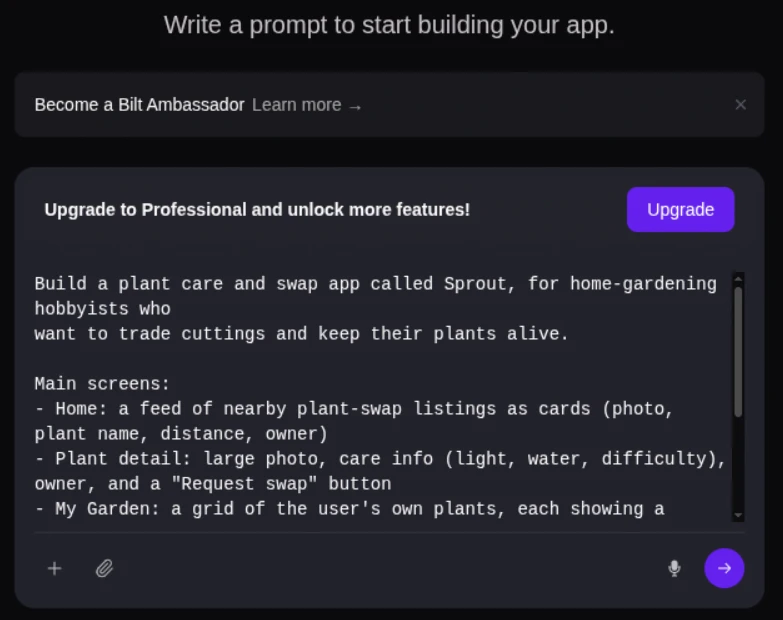
Describe an app and watch Bilt turn it into a native app in live preview.
You start by describing the app in a single text box:
2. Refine and test
Use the same conversation to revise the app. You can ask for a different layout, an extra screen, or a change to how data is stored, and Bilt applies the update to the build.
Four parts of the workflow help you refine an app without reading code:
- Live preview: See the change as it is applied and judge the result without reading code.
- Shareable preview links: Send a co-founder or tester a link before submitting the app.
- Incremental testing: Confirm login, storage, and each core action separately instead of discovering every integration problem at submission.
- Engineering help: Ask experienced engineers for direct support when a difficult bug or publishing issue needs hands-on troubleshooting.
3. Getting to the stores
Bilt prepares builds and supports submissions to the App Store and Google Play. For iOS, that includes certificates and provisioning profiles; Google Play follows its own signing and upload process.
Use TestFlight to test iOS builds before submission. Prepare screenshots, reviewer notes, support details, and privacy information against Apple's guidelines and Google Play policies.
DailyHorse and View Finder: Photo Spots are two Bilt-built apps published on the App Store.
Between them, their launches ran into two common review problems: weak reviewer notes in the submission metadata, and no permission button before collecting user data.
Fixing and resubmitting took a day or two, and both apps were approved. From first prompt to App Store approval took about 2 to 3 weeks.
| Stage | Typical workflow | With Bilt |
|---|---|---|
| Start | Define the idea, choose app type, then select a platform | Describe the app in natural language |
| Build | Assemble the app in a builder or custom workflow | Generate UI, features, and backend from the prompt |
| Test and refine | Test on devices, collect feedback, update manually | Use live preview, shareable previews, and conversational changes |
| Publish | Submit to App Store and Google Play as separate steps | Automate builds, store uploads, certificates, and provisioning profiles |
Ready to move from an app idea to a first build? Start building free, review the native app, then keep refining it through conversation.
Is it hard to make an app if you're not a developer?
Yes, you can build an app without being a developer. You still need to test its data, permissions, payments, and key actions before publishing.
Three realities matter most:
- Core systems: Login, stored data, payments, and outside services must work together.
- Safety and testing: Protect user information and test failures, permissions, and account recovery on real phones.
- Publishing accounts: You need the relevant developer account and store materials even when a builder handles the technical submission steps.
The standard Apple Developer Program costs $99 per membership year. Google Play Console registration has a one-time $25 fee.
Store requirements to plan for
- Apple: Apple reports that most submissions are reviewed within 24 hours, but an individual review can take longer or return with requested changes.
- Google Play: New personal accounts must complete a closed test with at least 12 opted-in testers for 14 continuous days before applying for production access.
What's the easiest way to start making an app?
Start by describing the smallest version of your app in plain English, then test the first build with a real user.
No-code and AI-assisted tools let you test a simple version before investing in a custom build.
Use this simple starting loop:
- Describe what the app should do in plain English.
- Let the tool generate the screens, code, and backend for that first version.
- Open the result in a browser preview or on your own phone.
- Ask for changes until the core flow works, then publish the app or export the code.
The path from prompt to production is clearer in turning plain English into native apps, including previews without local setup.
Can I build an app without coding experience?
Yes. Choose a drag-and-drop builder for prebuilt screens or an AI builder for a first version from a plain-English description.
- Visual builders: Use prebuilt screens and common flows without writing code.
- Conversational AI builders: Start with a plain-English description instead of arranging every screen by hand.
Either way, check what you own at the end. Bilt generates React Native code that you can export and hand to a developer.
Should I learn to code before building an app?
You do not need to learn code before building an app. Build and test the smallest version first, then learn coding if the project needs custom work beyond a builder’s workflow.
Use an early build to learn which user flows need more work before investing in a custom build.
Before deciding that you need custom code, test the failures a normal user will encounter:
- Lost connection: What happens if the internet drops while the user saves or edits something?
- Account trouble: Can someone reset a forgotten password and use the same account on another phone?
- Payment failure: Does the app explain a failed charge without granting access or losing the user's place?
If the builder cannot express or safely fix those behaviors, bring in an engineer. Learn code later if you want deeper control, not because you need permission to test the idea.
Should I build for iOS or Android first?
Start with the store your first users are likeliest to use and where you can support launch feedback.
Bilt can produce both builds from one description. You can still launch one first to focus testing, reviewer feedback, support, and marketing on the audience you know best.
Choose using three practical questions:
- Audience location. Where do early users live, and which device do they use?
- Revenue model. Which store fits how you plan to charge, whether through subscriptions, purchases, or ads?
- Launch capacity. Can you prepare store copy, screenshots, support, and marketing for both?
App-store revenue is only one input. Early-user location, device use, support capacity, and the revenue model should decide the first launch; with Bilt, “first” sets the order rather than requiring a rebuild.