How long does it take to turn an app idea into something people can actually download?
Most conventional mobile apps take 2 to 4 months for simple scope, 4 to 8 months for mid-level scope, and 8 to 12+ months for complex or regulated apps.
For a simple app with a clear scope, Bilt can create a first working native build in hours. That is not the same as a published app. Launch still needs testing, store setup, review, and early fixes.
TL;DR:
- Simple AI-first app: first working native build in hours, then testing and store review.
- Basic conventional app: 2 to 4 months.
- Mid-level app: 4 to 8 months.
- Complex or regulated app: 8 to 12+ months.
- Best first move: define version one, then choose the fastest path that can still pass QA and store review.
If your app has one clear workflow, start building in Bilt before you plan a months-long custom build.
How long mobile app development takes
Mobile app development time depends on scope. A basic conventional app usually takes 2 to 4 months, while a mid-level app usually takes 4 to 8 months.
For a simple app, the build path can change the estimate dramatically. Bilt takes a solo, non-technical builder from a prompt to a first working native build in hours.
Describe an app and watch Bilt turn it into a native app in live preview.
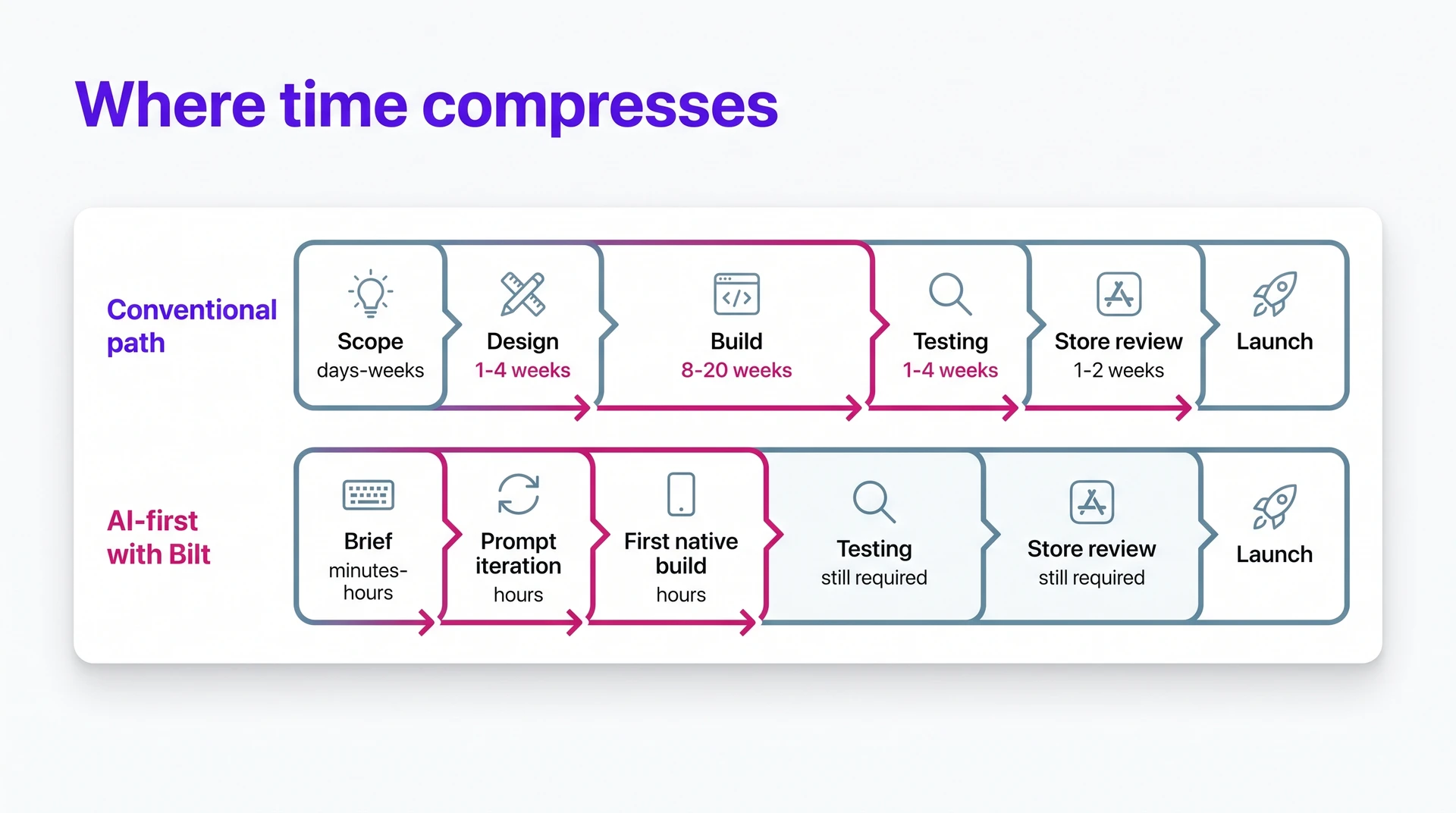
Conventional builds take longer because planning, design, engineering, QA, deployment, and review happen in separate passes. Use the table below to choose a starting estimate, then add time for testing and App Store or Google Play review.
| Path | Typical timeline | What the timeline usually includes |
|---|---|---|
| AI-generated app | A few hours | First working build, before full testing, store review, and maintenance |
| Web-to-app conversion | Compressed path | Native build from an existing web product with less net-new scope |
| Basic conventional app | 2 to 4 months | Planning through deployment for a focused utility app |
| Mid-level conventional app | 4 to 8 months | More screens, APIs, real-time data, or device features |
| Complex or regulated app | 8 to 12+ months | Advanced workflows, compliance work, and extensive validation |
Here is the same mobile app development timeline by phase:
| Phase | Conventional timeline | Bilt or AI-first timeline |
|---|---|---|
| Scope | Days to weeks | Minutes to hours for a first brief |
| Design | 1 to 4 weeks | Included in prompt-based iteration |
| Build | 8 to 20 weeks | Hours for suitable first working builds |
| Testing | 1 to 4 weeks | Still required |
| Store review | Plan a 1 to 2 week buffer | Still required |
What Bilt changes in the timeline
AI compresses build time. It does not remove product decisions, testing, compliance, store review, or maintenance.
| Timeline phase | Conventional path | Bilt path |
|---|---|---|
| First build | Weeks of design and engineering | Describe your idea and generate a native app |
| iOS and Android | Separate setup or shared-framework work | One project creates both platforms |
| Store prep | Signing, provisioning, and build upload | Guided release workflow |
| After launch | Separate analytics and dev support | Monitoring and support inside the project |
1. Set timeline assumptions
Before you count weeks, pin down what you are actually building. A solo builder planning a habit tracker for iOS has a different timeline than someone launching payments and Android on day one.
Write down the assumptions that change the estimate:
- Development path: AI-generated native app, conventional custom development, or web-to-app conversion.
- App goal: The one outcome version one must deliver, such as booking, tracking, learning, or selling.
- Target users: The first audience you are building for, not every possible user group.
- MVP features: The smallest must-have feature set needed for a usable first release.
- Weekly availability: The hours you can spend prompting, reviewing builds, testing changes, and making decisions.
- Dependencies: Integrations, accounts, compliance needs, data sources, or approvals that can block progress.
- Launch deadline: A fixed date, investor demo, customer commitment, or flexible release window.
- Risk buffer: Add 10% to 20% for revisions, blockers, and unexpected technical work.
Milestone check: Track visible completions, such as onboarding complete or first test build.
Add the 10% to 20% buffer after the milestone list is clear. Then use Step 2 to lock the smallest version one scope that is worth testing.
2. Define requirements and scope
Define the first version before you estimate the timeline. In Bilt, you can start with a plain-English concept brief instead of a technical spec.
Example prompt: “I want a habit tracker for busy parents with reminders, streaks, and progress charts.”
Version one should do one job well enough for real users to test. Keep it boring on purpose.
Use that brief to answer the scope questions that change build time:
- Primary goal: What the app helps users accomplish.
- Target users: Who the first version is for.
- Core workflow: The main action users repeat inside the app.
- MVP features: What must exist for version one to be useful.
- Out-of-scope features: What can wait, such as social sharing in the habit tracker.
- Platform targets: iOS, Android, or both.
- Data needs: Accounts, saved content, user profiles, files, or records.
- Integrations: Payments, maps, notifications, analytics, APIs, or other outside systems.
If you are still choosing a path, compare AI, no-code, and developer-first app-building options against your scope.
3. Choose your build path
Choose the simplest build path that can ship version one and still survive version two. For a solo builder, the choice usually comes down to a new mobile app or a mobile version of an existing web product.
Use this quick split:
- Separate native builds: Plan the longest route when iOS and Android need different custom behavior.
- One shared mobile codebase: Use one React Native codebase for iOS and Android.
- Web-to-app conversion: Start with your web product, then estimate native work for performance and store approval.
With Bilt, you describe the app once and get a React Native project for iOS and Android. You can export the source code later if a developer needs to extend it.
Before you commit, compare native output, deployment help, and code ownership.
4. Design and prototype
Once the scope is clear, sketch the main screens and how users move between them. For a solo builder, a rough screen flow is enough to catch confusion before code hardens around it.
A conventional design pass usually moves through 4 outputs:
- Wireframes: Rough layouts for screens and navigation.
- UI mockups: Polished screens that define the visual style.
- Clickable prototype: A tappable flow you can test before engineering starts.
- Revision round: Feedback that catches confusing screens before they become code.
Bilt moves more of that work into the build loop. You still need a visual direction, but you do not need a full Figma handoff before the first working build.
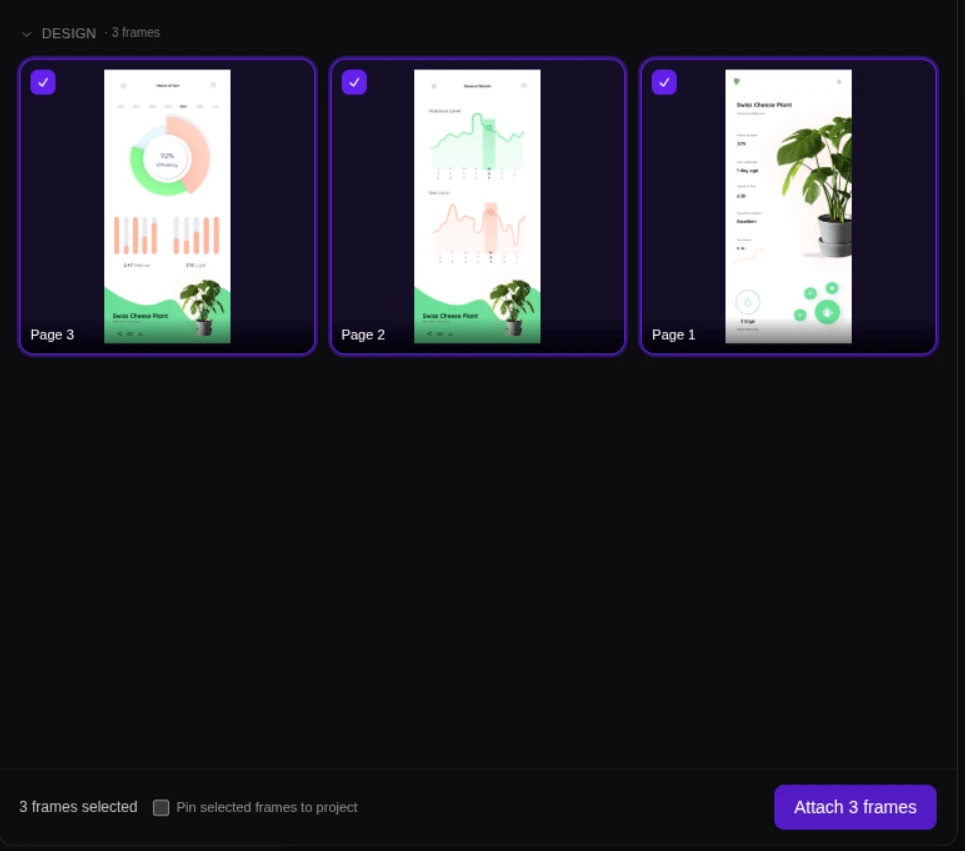
Bring the inputs that help the app look like yours: logo and icon files, brand colors, screenshots from an existing site, and reusable UI patterns for repeated screens.
Pro tip: Choose one visual direction before build starts, even if the design is rough.
Fewer design handoffs mean fewer places for the timeline to stall. Once the main screens feel right, you are ready to connect them to working app logic.
5. Build frontend and backend
Start with the core user flow, then connect the screens to real data and backend logic.
Use 8 to 20 weeks as a planning range for conventional frontend and backend work alone. Larger agency timelines can run 3 to 6 months when design, QA, and deployment move through separate handoffs.
Bilt changes that first-build window for suitable projects. From a plain-English description, it can generate a working native app with frontend and backend pieces in hours.
Before polishing, check for:
- Native screens with working navigation.
- User input, forms, and feature logic that respond correctly.
- Accounts, saved data, media uploads, or API connections.
- Exportable React Native code if a developer will extend the app, with React Native docs as the reference point for handoff.
| Approach | What gets built | Typical duration |
|---|---|---|
| Conventional development | Screens, APIs, databases | 8 to 20 weeks |
| Larger agency workflow | Separate frontend and backend | 3 to 6 months |
| Bilt first build | Full-stack native app | Hours for suitable projects |
An AI full-stack builder can connect generated screens to backend logic, so you can see the pieces as one working app.
6. Iterate on changes
Treat iteration as a short decision loop: change one thing, review the build, then decide whether the app is closer to launch.
Bilt keeps that loop conversational, so a solo builder can request a screen change or a new flow without writing tickets.
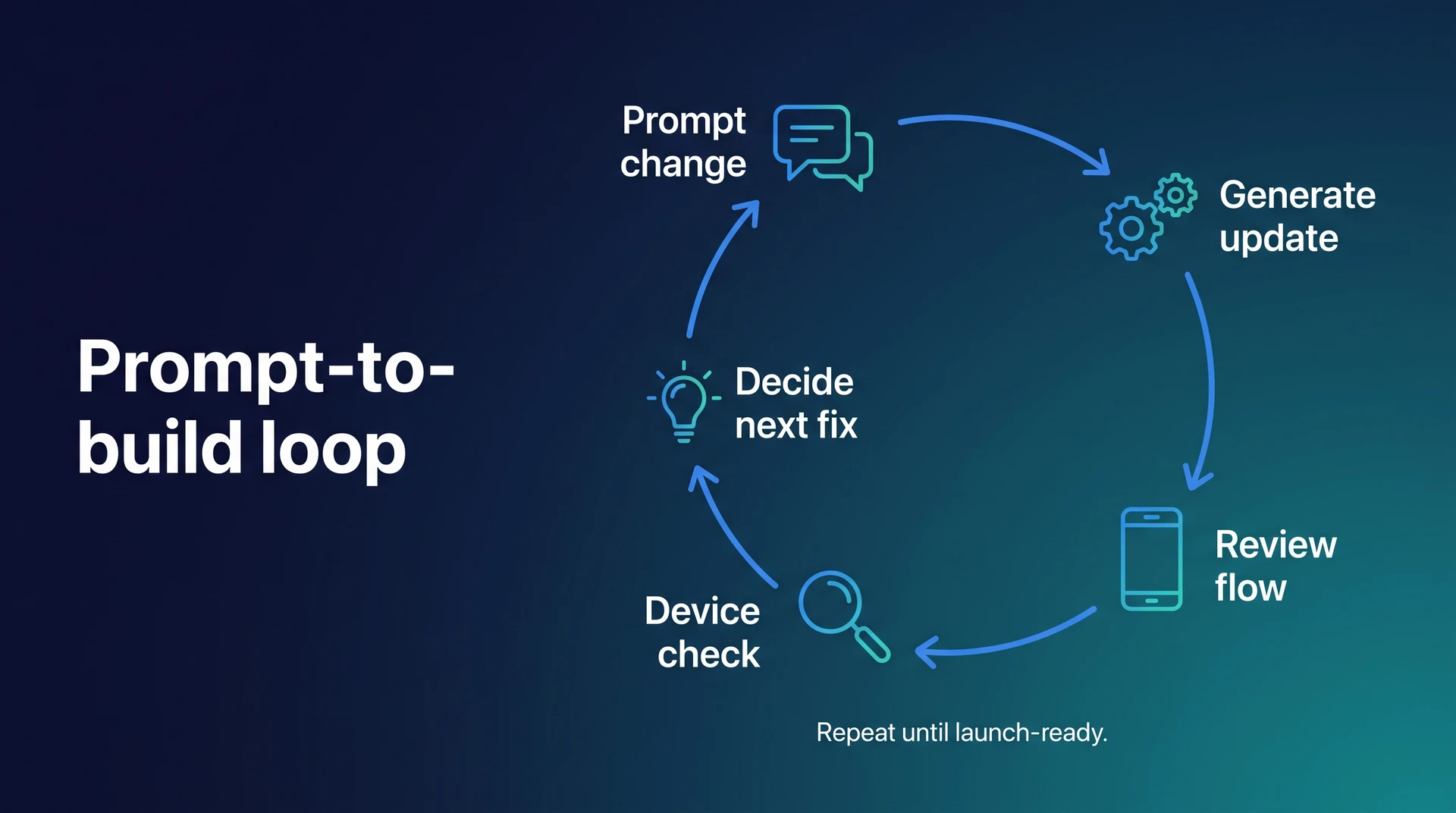
Use revision prompts for one clear change at a time:
- Change button copy or screen order.
- Add one missing field or form step.
- Adjust one feature behavior after user feedback.
A weak prompt sounds like this: “Make the app better.”
A better prompt is specific: “Move the Save button to the bottom of the habit detail screen and rename it ‘Log today.’”
Fast prompting still creates QA work. Retest the changed flow before adding another prompt.
When the build stops changing every few minutes, move into device testing with a stricter checklist.
7. Test across devices
Start testing before the app feels finished. Every changed flow needs a quick simulator pass, then a real-device check before release.
Bilt removes the local setup step. You can test in browser simulators and then scan a QR code for real-phone checks.
Use two testing paths before launch:
Minimum test path:
- Start with Bilt preview.
- Scan the QR code on one iPhone and one Android phone.
- Verify taps, scrolling, camera access, uploads, login, and the core user flow.
Advanced test path:
- Confirm tricky layouts in Xcode Simulator and Android Studio Emulator.
- Use Maestro, Detox, or Appium for repeatable onboarding, login, and purchase checks.
- Use Firebase Test Lab for Android coverage and TestFlight docs for iOS beta installs.
- Add the Firebase Crashlytics SDK or the Sentry SDK, then review new crashes before release.
| Approach | Environment | Setup needed | What it checks |
|---|---|---|---|
| Manual baseline | Devices and browsers | Device access and installs | Compatibility and visual issues |
| Bilt simulator flow | Browser iOS and cloud Android | No local emulator setup | UI, flows, interactions |
| Bilt phone flow | Physical iOS or Android | Scan a QR code | Real-hardware behavior |
End-stage QA expands when bugs wait until the last pass. Keep the supported device list tight enough that you can test every core flow before release.
8. Resolve security and payments
Treat security and payments as launch gates. Before launch, prove the app can protect accounts, store data safely, and process money without creating review, compliance, or trust issues.
For account-based apps, work through these five checks:
- Account access: Verify sign-up, login, password reset, MFA if used, session expiration, and permissions.
- Data safety: Confirm users cannot open another user's records through direct URLs, API calls, cached screens, or admin-only actions.
- Sensitive data: Review encrypted storage, privacy disclosures, API keys, server logs, backups, and third-party SDKs before adding real user data.
- Abuse prevention: Test form validation, sanitization, throttling, and abuse-prone endpoints.
- Compliance: Check whether GDPR, CCPA, HIPAA, COPPA, PCI DSS, or another obligation applies to your app category, region, user age, or data type.
Bilt includes platform-level controls such as encrypted storage. Before adding sensitive production data, confirm the current Bilt data policy and your project settings.
Payment work needs a sandbox pass before store review. Create App Store Connect and Google Play Console products early, then test the exact purchase type your app uses.
When enabled, Bilt Payments connects iOS subscriptions and paywalls to StoreKit through native in-app purchases, with Google Play support in progress. The backend tracks transaction verification, renewals, cancellations, and who gets paid access.
Run payment testing before review:
- Buy, cancel, renew, and restore a subscription in sandbox mode.
- Test failed payments, expired cards, refunds, and account deletion.
- Confirm receipt validation updates who gets paid access inside the app.
| Area | Manual or generic path | Bilt handling |
|---|---|---|
| Security hardening | Configure controls manually | Platform security controls included |
| Compliance impact | Can extend launch timing | App obligations still apply |
| Digital purchases | Implement purchase APIs | Native in-app purchases supported |
| Product setup | Configure store products | Store setup still required |
| Subscription state | Build verification logic | Centralized backend handling |
If the app processes cardholder data directly, assess PCI DSS separately. App-store purchases or tokenized processors reduce the card data your app handles, but sandbox testing is still required before submission.
9. Submit and launch
Launch work starts when the build seems finished. You still need signed builds, store metadata, review notes, and a plan for handling review feedback.
Many timelines slip after QA because store readiness and review feedback create extra work. A broken support URL or missing demo login can stall an otherwise finished app.
Prepare these before submission:
- Store assets: App name, description, keywords, screenshots, category, age rating, support URL, and privacy policy.
- Signed builds: Production-ready iOS and Android builds generated for the correct store targets.
- Signing credentials: Certificates, provisioning profiles, bundle IDs, package names, and release keys.
- Review support: Demo account, test credentials, supporting documents, and notes for regulated or account-based features.
- Release workflow: Beta testing path, phased rollout plan, and one place to track rejection fixes.
Bilt takes several release chores off your plate: build generation, code signing, certificate management, provisioning profiles, and store submission workflows.
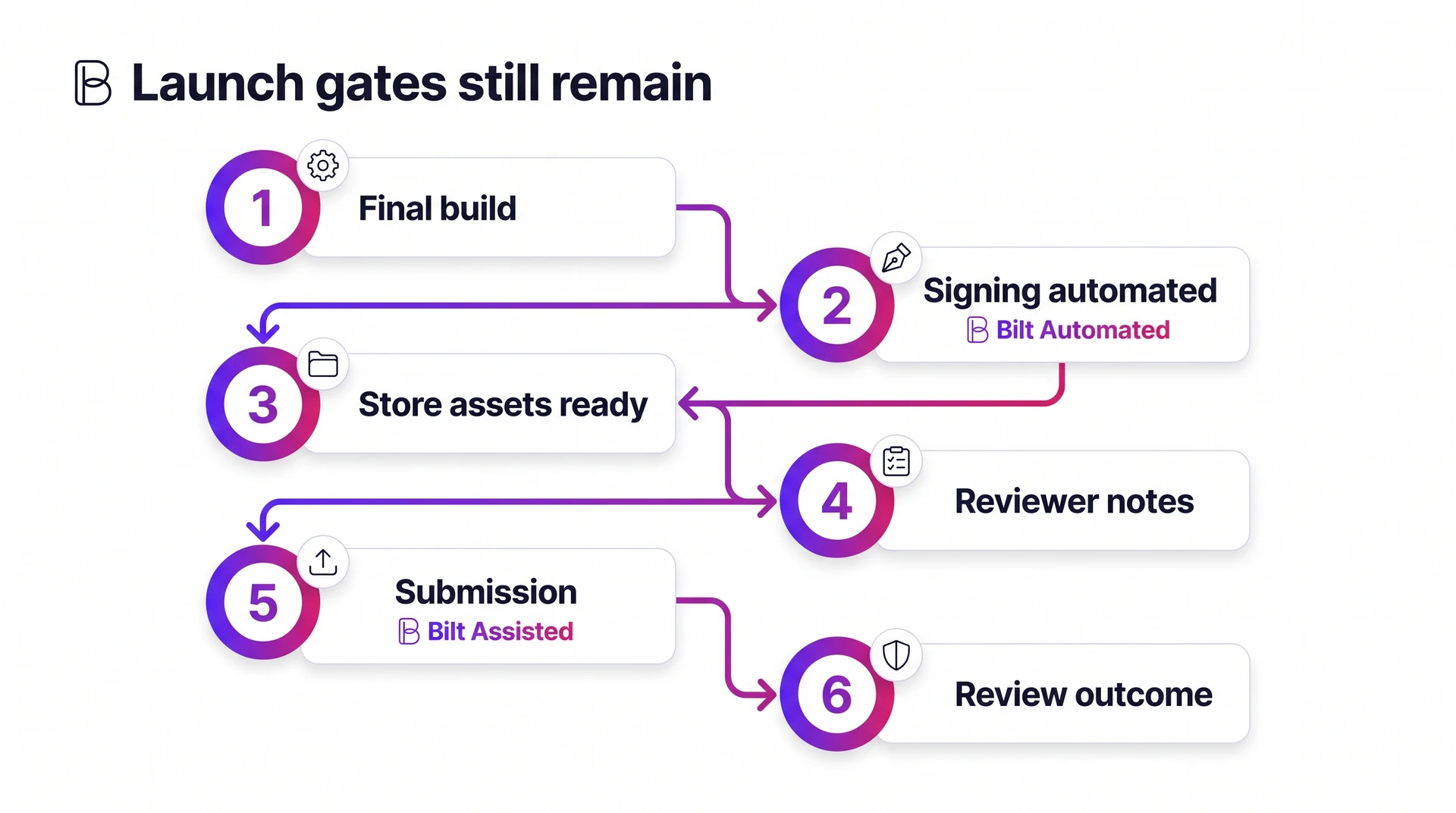
You still need the store assets, reviewer notes, and a tested build. You just do not have to manage the signing maze by hand.
| Release stage | Manual workflow | Bilt workflow |
|---|---|---|
| Build preparation | Compile final build | Automated build workflow |
| Signing credentials | Manage certificates manually | Automated signing management |
| Store assets | Upload metadata and screenshots | Guided submission workflow |
| Store submission | Submit in each console | Bilt uploads to App Store Connect; sends Android builds to internal testing when configured |
| Review handling | Resolve issues manually | Review and rejection handling in the store consoles |
Apple reports that 90% of submissions are reviewed in less than 24 hours on its App Review page.
If a review rejection comes back, treat the rejection as a small release cycle:
- Read the exact guideline or policy note in App Store Connect or Google Play Console.
- Reproduce the issue with the reviewer account, device conditions, and build version.
- Fix the flagged problem first, unless the rejection exposes a broader defect.
- Add a short response explaining what changed, then resubmit when the fix is tested.
Common delay triggers include crashes, broken links, placeholder content, missing demo accounts, and policy questions.
Plan 1 to 2 weeks for store preparation, submission, and review handling, even when Apple review is fast. Do not plan your launch-day marketing around first submission.
10. Monitor and update
After launch, real users will hit devices, networks, and payment paths your test plan missed. Use the table below as your day-one monitoring plan.
| Signal | Tools | Day-one event or trigger |
|---|---|---|
| Crash rate and performance | Firebase Crashlytics, Sentry, Datadog | Investigate new crash clusters or a meaningful slowdown from your baseline |
| Signup and onboarding | PostHog, Amplitude, Mixpanel, Firebase Analytics | Track app_open, sign_up_started, sign_up_completed, and onboarding_completed |
| Store performance | App Store Connect, Google Play Console | Watch installs, listing conversion, rating changes, review themes, and update adoption |
| Payments | App Store Connect, Google Play Console, Stripe, or RevenueCat if used | Track paywall_viewed, purchase_started, purchase_completed, purchase_failed, and subscription_cancelled |
The first few weeks matter most because users find edge cases your internal testing missed. A signup flow may pass QA, then break when a real user logs in with an old device or weak connection.
Use a simple triage rule: fix crashes and payment failures before cosmetic issues. Then group smaller requests into the next scheduled update.
Bilt keeps the day-one loop inside the project:
- Built-in analytics
- Feedback tools
- App-store statistics
- Payment signals
When your plan includes support, Bilt can help fix bugs inside the project.
| Post-launch task | Standard workflow | Bilt workflow |
|---|---|---|
| Monitor app health | Check crashes and feedback | Built-in analytics and feedback tools |
| Track store results | Review installs and ratings | App-store statistics surfaced in Bilt |
| Watch payments | Check processor dashboards | Payment analytics in the workflow |
| Fix bugs | Schedule maintenance work | Direct engineering support |
| Add improvements | Plan future releases | Requested features added after launch |
11. Calculate your timeline
Separate your build date from your launch date. A working build can run on a device; a published app has passed QA, store setup, review, and early fixes.
Use this formula for a realistic mobile app development timeline:
Build estimate + launch work + 10% to 20% buffer = realistic timeline.
- Choose the build track. AI-first, conventional custom development, and web-to-app conversion have different time units.
- Estimate the core build. Count the time to create the working app, not the full release.
- Add launch work. Include device testing, security, payments, approvals, store setup, and external tester limits.
- Add a buffer. Reserve 10% to 20% for revisions, blockers, and unexpected technical work.
Testing limits affect the calendar once you invite people outside your own devices. Apple's TestFlight docs allow up to 10,000 external testers, and beta builds expire after 90 days.
AI-first builds can produce a first working version in hours or days. That speed applies to the build, not the launch.
Before you call it launch-ready, check authentication, payments, native UI components, TestFlight or Play Console testing errors, and store review readiness.
For conventional development, keep the earlier ranges consistent:
- Simple apps: 2 to 4 months
- Moderate apps: 4 to 8 months
- Complex apps: 8 to 12+ months
Treat QA and deployment as part of those ranges unless the scope changes.
Use separate buffers for QA and store review:
- QA: For a solo builder, reserve 10% to 20% for revisions, rejected builds, broken purchases, and device-specific bugs.
- Store review: Keep 1 to 2 weeks in the launch buffer because rejections and resubmissions can add days.
| Track | Estimate first | Typical unit | Extends launch date |
|---|---|---|---|
| AI-first build | Shippable build | Hours or days | QA, payments, approvals, fixes |
| Conventional development | Milestones by phase | Weeks or months | Revisions, dependencies, QA, deployment |
| Web-to-app conversion | Native packaging | Days to months | Device testing and mobile UX |
Once the baseline is set, check the delay factors most likely to move the launch date.
Timeline delay factors
Timeline delays usually come from late decisions and production checks, not typing code.
Use official review windows as guardrails before you promise a launch date:
- Apple App Review: Apple says 90% of submissions are reviewed in under 24 hours on average, but incomplete submissions can take longer (Apple review).
- Google Play review: Google says app reviews can take 7 days or longer in exceptional cases, so do not schedule launch-day marketing on first submission (Google Play).
- Device QA: Use Firebase Test Lab or BrowserStack for device coverage, then add Appium when repeatable automation matters.
- Look for early warning signs before they turn into timeline slips:
AI-first builds move the bottleneck to production readiness. Bilt compresses the first build, giving you more time for testing and launch prep.
| Delay factor | How it slows the timeline |
|---|---|
| Unclear requirements | Creates rework and revisions |
| Slow feedback loops | Blocks decisions and sprint flow |
| Integration issues | Breaks auth, payments, or APIs |
| Weak QA | Finds device bugs too late |
| Compliance gaps | Adds privacy and policy work |
| Release friction | Slows builds, testing, approvals |
The best fix is usually to remove the handoff or unresolved decision behind the delay.
Ways to shorten development
Shortening development means removing rework and handoffs while keeping testing and launch prep in the plan.
The fastest path depends on what already exists:
- Starting from an idea: Generate the first native build with Bilt. Describe the app in plain English, then use prompts to refine the build before deployment.
- Already have a web app: Convert the working browser product instead of rebuilding every feature from scratch. Capacitor can package web code for iOS and Android when a wrapper is enough (Capacitor).
- Scope is too big: Cut the MVP before you build. One core workflow and reusable components usually save more time than adding people after the project has sprawled.
- Already have a dev team: Automate build and release work once the app is stable. EAS Submit and Fastlane reduce manual upload steps, while QA still needs a device pass.
| Approach | How time is reduced | What still remains |
|---|---|---|
| Prompt-driven native app generation | Cuts manual coding and design-to-code handoffs | Product decisions, testing, security review, store submission |
| Web-to-app conversion | Avoids rebuilding an existing web product from scratch | Native feature decisions, QA, release, maintenance |
| MVP scope and reusable components | Cuts rework and custom build time | Requirement definition, integration testing |
| Agile and DevOps practices | Cuts approval, release, and feedback delays | Does not eliminate implementation or validation work |
If you are comparing code-free options, the native no-code builder roundup covers submission support and pricing.
Examples by app type
Use these examples as planning benchmarks, not a calculator. Start with the closest app type, then adjust for the riskiest dependency.
Check the schedule driver before you trust the range:
- Simple MVP: a basic login flow and light backend logic create fewer QA paths than a marketplace or enterprise app.
- Web-to-app conversion: an e-commerce or SaaS product can reuse existing product logic, but native UX and store release work still take time.
- Marketplace or fintech: Stripe Connect and RevenueCat subscriptions add payment checks, while PCI DSS and trust workflows add compliance review.
- Enterprise app: SSO and permission design often control the timeline more than screen count, especially when deployment approval sits outside your hands.
- AI-integrated app: model integration is only one part; data handling and output testing usually decide readiness.
Use the table as a planning range, then add time for device testing, submission, and store review.
| App type or scenario | Conventional timeline | Compressed or alternate path | Main timeline drivers |
|---|---|---|---|
| Simple MVP or utility app | 2 to 4 months | Initial AI-generated build can move toward hours for suitable low-complexity apps | One core workflow, basic login, light backend |
| E-commerce app | 4 to 6 months | Can shorten if core logic already exists in a web app | Catalog, payments, accounts, tracking, notifications, admin flows |
| Existing web app converted to native | Usually shorter than a net-new build | Conversion path reuses existing product logic | Native UX adaptation, device testing, store release work |
| Marketplace or fintech app | 9 to 12+ months | Initial generation helps less than validation and compliance work | Transactions, trust and safety, reporting, stricter compliance |
| Enterprise internal app | 9 to 18+ months | Compression is limited by approvals and integrations | Permissions, integrations, deployment constraints, stakeholder alignment |
| AI-integrated app | 8 to 12+ months | AI-assisted coding is different from shipping AI product features | Data handling, model work, integration, optimization |
The FAQ turns those broad ranges into specific timeline decisions.
Common questions about app development timelines
Does cross-platform development reduce the timeline?
Yes. Cross-platform development can shorten a two-platform launch when iOS and Android share the same screens, logic, backend, and feature set.
With Bilt, you describe the app once and generate native iOS and Android apps from the same project.
Cross-platform saves less time when platform-specific work dominates:
- Native feature tuning: Camera, GPS, push notifications, and payments may need extra validation on each operating system.
- Performance differences: Animations, load times, and offline behavior can vary between iOS and Android.
- Store requirements: Apple and Google review different metadata, privacy, and compliance details.
| Approach | Timeline effect | Why |
|---|---|---|
| Shared cross-platform codebase | Usually reduces duplicated work | One build path covers the shared iOS and Android experience |
| High platform-specific complexity | Savings shrink or disappear | Native features and performance tuning require separate work |
| Bilt two-platform generation flow | Reduces setup and repeated implementation | One project generates both platforms with platform-specific optimization |
What stage takes the longest?
Frontend and backend development usually take the longest in conventional app projects. Screens, databases, authentication, payments, integrations, debugging, and change requests all hit during that phase.
With AI-assisted generation, the bottleneck moves to decisions and validation.
Plan extra time for these timeline sinks:
- Unclear scope: Every vague feature becomes a decision later.
- Backend complexity: Auth, databases, and third-party APIs create hidden work.
- Launch readiness: Store assets, privacy details, testing, and compliance still need review.
| Scenario | Stage that usually takes longest | Why |
|---|---|---|
| Conventional custom development | Frontend and backend development | Code, integrations, debugging, and iterative fixes stack up in one phase |
| AI-assisted generation workflow | Scope, testing, launch readiness, or iteration | Code generation is faster, so delays move to decisions and validation |
How long does ongoing maintenance take?
Maintenance starts on launch day and continues for the life of the app.
The first few weeks are usually busiest because testing never matches real usage. Keep time open for fixes after real users arrive.
Use the first maintenance sprint for:
- Fixing crashes and urgent bugs
- Monitoring performance and usage
- Reviewing user feedback
- Updating for new OS versions
- Shipping small improvements
After the first sprint, set a recurring release rhythm. The schedule depends on support volume, OS changes, and how aggressively you improve the product.
How much does it cost to build an app?
Cost rises because time rises. Every extra feature adds design, build, QA, and revision work.
Use build path as the first cost decision. Custom development usually means agency or contractor quotes, while Bilt lets you start free and upgrade only when you need more tokens or support.
Use these rough cost ranges for different app types to sanity-check custom quotes:
| App type | Typical cost | Timeline signal |
|---|---|---|
| Basic MVP | $15k–$40k | 2–4 months |
| Mid-level app | $40k–$120k | 4–8 months |
| Advanced app | $100k–$250k+ | 8–12+ months |
| Enterprise app | $250k–$500k+ | 12–18+ months |
Treat the custom ranges as quote-planning bands, not fixed prices. Longer projects cost more because every feature adds design, engineering, testing, and revision time.
Bilt changes the cost curve. Start on the free tier, then move to Professional at €25/month or Professional Plus at €50/month when you need more tokens and support.
That makes the first decision lower risk: build something usable before you commit to an agency quote.
Publishing adds platform fees: Apple Developer is $99/year, and Google Play is a $25 one-time registration fee.
Is the web app timeline different from mobile?
Yes. A web app timeline is usually shorter on discovery, but mobile still needs release work.
Treat web-to-app conversion as its own path:
| Path | Timeline signal | What changes |
|---|---|---|
| Separate native builds | Longest path | Two codebases and separate platform work |
| Cross-platform build | Usually shorter | One shared mobile codebase |
| Web app conversion | Shorter discovery and build | Mobile testing and release work remain |
A converted app still needs native UX decisions, device testing, app-store setup, and approval. If you add push notifications or paywalls, plan time for setup and review.
Use Bilt when you already have a web app and want native iOS and Android versions without restarting the build. Your web app stays the source of truth while Bilt handles the mobile conversion path.
Copy-paste launch checklist
Use this during the final launch sprint:
- Confirm the first version solves one clear user problem.
- Test the app on your target iOS and Android devices.
- Complete app-store metadata, screenshots, privacy details, and support links.
- Create Apple Developer and Google Play Console accounts before submission week.
- Run one final payment, login, push notification, and crash check.
- Decide who reviews feedback and ships the first post-launch fix.
Want to see the timeline difference before you spend a dollar? Describe your app in plain English and start building free.
Build a working native iOS and Android starting point first. Then decide how much time and budget the idea deserves.