Adalo and FlutterFlow solve different versions of the same problem. Adalo is easier when you need a simple MVP fast. FlutterFlow gives you more control when someone on the team can handle app logic, backend setup, and developer handoff.
Feature lists only tell part of the story. The better choice is the tool that gets your app closer to launch without creating work you cannot own later.
This guide compares ease of use, backend setup, design control, performance, code ownership, pricing, and release risk for non-technical founders and vibecoders.
Quick answer: which one should you use?
Use Adalo when the app is a simple MVP and speed matters more than custom code. Use FlutterFlow when Flutter/Dart export, backend flexibility, and developer handoff matter enough to justify the learning curve.
- Choose Adalo: For non-technical founders building simple MVPs, directories, customer portals, or internal tools where a first working version matters more than custom code.
- Choose FlutterFlow: For founders or teams with technical support who need custom logic, external backend control, and Flutter/Dart export.
- Choose Bilt: If your real goal is a published native iOS and Android app, and you do not want to manage code signing, build pipelines, or store submission alone.
| Your priority | Better fit | Why |
|---|---|---|
| Fast simple MVP | Adalo | Lower setup burden for records, forms, and standard screens. |
| Code export | FlutterFlow | Paid plans can export Flutter/Dart code for technical review or handoff. |
| External backend control | FlutterFlow | Firebase, Supabase, and REST APIs are easier to make part of the build. |
| Least setup for a non-technical founder | Adalo | The database, screens, and basic app logic stay inside one visual builder. |
| Published native app without release plumbing | Bilt | Bilt handles more of the build, signing, and store-submission path. |
Adalo vs FlutterFlow at a glance
Adalo and FlutterFlow both let you build apps visually, but they sit at different points on the no-code spectrum.
Adalo keeps more of the app inside one managed builder. FlutterFlow exposes more control through Flutter code, visual logic, and separate backend options.
- Adalo: Built for non-technical beginners, solo makers, and simple MVPs such as directories, booking flows, internal tools, and basic CRUD apps.
- FlutterFlow: Built for technical users and developer-adjacent teams that want visual development, Flutter/Dart code export, and deployment across more platforms.
| Dimension | Adalo | FlutterFlow |
|---|---|---|
| Typical user | Non-technical beginners and solo makers | Technical users and developer-adjacent teams |
| Main app fit | Simple MVPs, directories, internal tools, and basic customer apps | More complex consumer or business apps with custom logic |
| App output | Web and native iOS/Android apps from one builder | iOS, Android, web, and desktop apps through Flutter |
| Backend model | Built-in database inside the platform | Firebase, Supabase, and custom REST API connections |
| Code access | No source code export | Flutter/Dart code export on paid plans |
| Logic model | Drag-and-drop actions and simple app logic | Visual action flows for more complex interactions |
| Learning curve | Lower setup burden | Steeper because Flutter concepts still matter |
One note on “native”: Adalo publishes mobile apps through its no-code platform, FlutterFlow outputs Flutter apps, and Bilt outputs React Native code while managing more of the release path.
Managed simplicity vs visual low-code control
The core difference is architecture. Adalo keeps the app, database, publishing flow, and hosting decisions inside one managed builder.
FlutterFlow gives you a visual low-code workspace that generates Flutter/Dart code and connects the app to services such as Firebase, Supabase, and REST APIs.
| Architecture choice | Adalo | FlutterFlow |
|---|---|---|
| Backend | Built-in database keeps the data layer inside Adalo. | Firebase, Supabase, and REST APIs sit outside the visual builder. |
| Code ownership | No source code export, so app logic stays tied to Adalo. | Paid plans can export Flutter/Dart code for developer inspection or handoff. |
| Platform targets | Web and native iOS/Android apps from one visual build. | Flutter targets iOS, Android, web, and desktop from a shared codebase. |
Ask 3 ownership questions before picking a builder: where the data lives, who can inspect the code, and who controls the release path.
Ease of use and learning curve
Verdict: Adalo is easier for non-technical founders because the first workflow can stay inside screens, components, and a simple database.
FlutterFlow’s learning curve shows up when you are also learning state, responsive layout, action flows, and external backend setup.
To compare first-build friction, test one practical task: build a signup flow that saves profile data.
- In Adalo, you build a screen, add a form, connect a collection, and preview the flow.
- In FlutterFlow, you also decide where state lives, how actions run, and how backend calls return data.
- If a field fails to save in FlutterFlow, the fix may sit in Firebase rules, an action chain, or a widget binding.
Adalo’s ceiling appears when the app needs custom logic, unusual data relationships, or behavior outside Adalo’s component model.
For first-time builders, Adalo wins on ease of use. FlutterFlow makes more sense when someone can debug app logic instead of only arranging screens.
What kind of app are you building?
Match the tool to the work that will be hardest after the first draft. Simple records and forms point toward Adalo; custom state, APIs, and handoff point toward FlutterFlow.
A quick filter works better than a feature checklist:
| Project shape | Cleaner starting point | Why |
|---|---|---|
| Directory, ordering app, or internal CRUD tool | Adalo | Records, forms, lists, and simple user flows stay inside the managed builder. |
| Simple web and mobile launch | Adalo | One visual build can publish web and native iOS/Android apps. |
| SaaS, marketplace, healthcare, finance, or consumer product | FlutterFlow | These projects often need dynamic screens, conditional logic, and external data systems. |
| Logic-heavy workflow | FlutterFlow | Action flows support conditional behavior, multi-step interactions, and dynamic data rendering. |
| Growth-oriented Adalo 3.0 app | Adalo can stretch further than older guidance suggested | Adalo 3.0 lists support for 1M+ MAU, so the old 5,000-user cutoff should not guide the decision. |
| Simple MVP validation | Adalo | The faster start helps when the goal is testing a simple concept before deeper setup. |
Failed the signup, save, edit, and login test? Use the MVP-to-native Adalo alternatives list to map stronger paths.
Backend, database, and data management
Verdict: Adalo handles backend better for simple apps because the database, relationships, and editor live in one place.
FlutterFlow gives technical teams more backend options, but Firebase, Supabase, and REST APIs become separate systems to configure and debug.
- Adalo backend fit
Adalo supports tables, records, and relationships between collections without setting up Firebase or Supabase.
External Collections can connect Adalo to outside data through an API when customer data already lives in another system.
Adalo is the cleaner backend path for CRUD apps, internal tools, and MVPs with predictable permissions.
FlutterFlow backend fit
FlutterFlow commonly pairs with Firebase or Supabase for authentication, database work, and cloud functions. It can also call REST APIs when the app needs third-party data.
That flexibility adds project management work:
- Create the external backend project
- Set auth and database rules
- Add API keys or environment settings
- Map each read and write action in FlutterFlow
- Debug whether the failure lives in FlutterFlow, Firebase, Supabase, or the API
Backend check: Before trusting the build, sign up, save a profile record, edit the record, then log back in.
Verdict: Adalo is simpler to keep working. FlutterFlow is more flexible only if someone can own the second service and debug where failures happen.
Design quality and UI control
Verdict: FlutterFlow gives more UI control when a project needs custom layouts or developer help. Adalo is easier when the app can stay inside standard mobile patterns.
Use FlutterFlow when the interface needs:
- Breakpoint-specific layout tweaks
- Custom animations
- Custom Dart widgets
- Action flows that combine validation, API calls, navigation, and conditional states
Use Adalo when setup speed matters more than custom UI. A directory, booking app, or simple customer portal can come together faster in its structured drag-and-drop system.
Adalo’s tradeoff is control. Branded gestures and unusual card layouts usually become component workarounds.
Before shipping either tool, test generated screens on current iOS and Android devices. Check for:
- Deprecated packages
- Overflowed text
- Broken tap states
- Slow screen loads
Performance and scalability
Verdict: FlutterFlow has the higher performance ceiling for interaction-heavy apps because it compiles to Flutter. That does not make every FlutterFlow app fast by default.
Adalo’s current public guidance says the platform supports 1M+ MAU, so old 5,000-user ceiling claims should not drive the decision. Scale still depends on app complexity, screen design, database shape, and backend calls.
When reviewing a performance-sensitive build, test these flows before judging either platform:
- List scrolling
- Image-heavy cards
- Search screens
- Feed screens
- Dashboards
- Repeated database reads
FlutterFlow still needs architecture work when the app depends on Firebase, Supabase, custom REST APIs, or heavy no-code logic. Native rendering raises the ceiling, but backend latency can still dominate.
Practical verdict: FlutterFlow is better when speed depends on custom UI logic or external services. Adalo is fine for simpler workflows if you keep screens lean and load-test the flows that matter.
Code ownership, export, and lock-in
Verdict: FlutterFlow is better when code ownership matters. It gives teams an exit path through exported Flutter code and GitHub.
Export helps when developers need to work on:
- Custom Flutter packages
- Native debugging
- Release work outside the visual builder
- Pull requests before payment or login changes
That exit path is useful, but it is not a magic handoff. Visual action logic can produce code that is harder for a Flutter developer to read than hand-written feature modules.
Adalo fits when the plan is staying no-code. A member directory, booking app, or internal approval tool may never need source-code export or custom code injection.
Watch for rebuild signals:
- Custom onboarding
- Role-based permissions
- Offline behavior
- Complex payment logic
Those requirements can force a move into Flutter, React Native, or native iOS and Android code.
When export and migration costs outweigh the builder, the lock-in-aware FlutterFlow alternatives list compares paths beyond Flutter.
Pricing and credit mechanics
Verdict: Adalo is simpler to forecast for small apps because hosting and the database live inside the plan. FlutterFlow gets harder to budget when backend services, AI request caps, and seats enter the workflow.
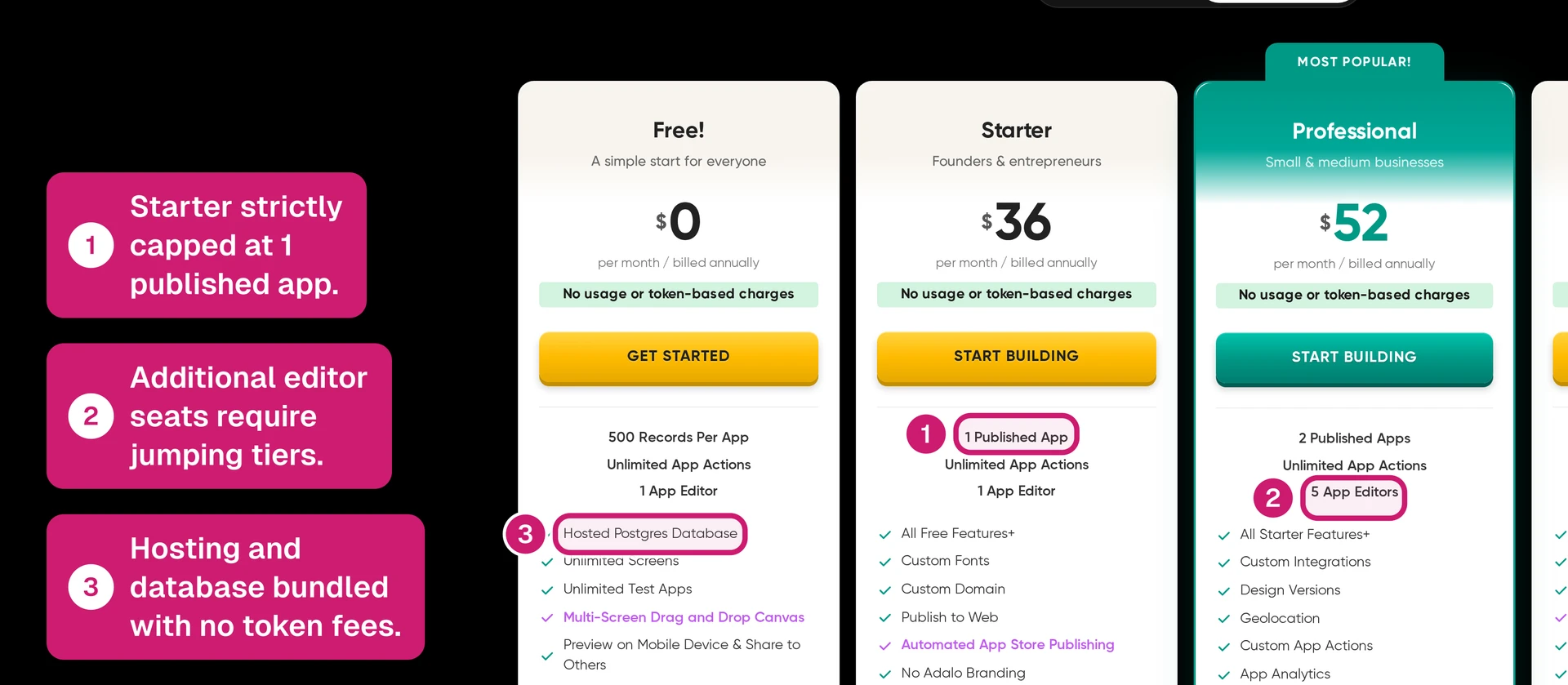
Pricing changes often. Treat these screenshots and numbers as at the time of writing, then check Adalo pricing and FlutterFlow pricing before buying.
Adalo’s main upgrade triggers are easy to see:
- Record and storage limits: The free tier is for basic prototyping; paid plans increase storage from 5GB on Starter to larger allowances on higher tiers.
- Native mobile publishing: In the provided pricing data, App Store and Google Play publishing starts on Pro at $52/month, not Starter.
- Published apps: Starter includes 1 published app, Professional includes 2, and additional published apps cost $25/month.
- Team members: Additional editor seats cost $15/month, so collaboration stacks on top of the base plan.
FlutterFlow’s subscription is only one part of the budget:
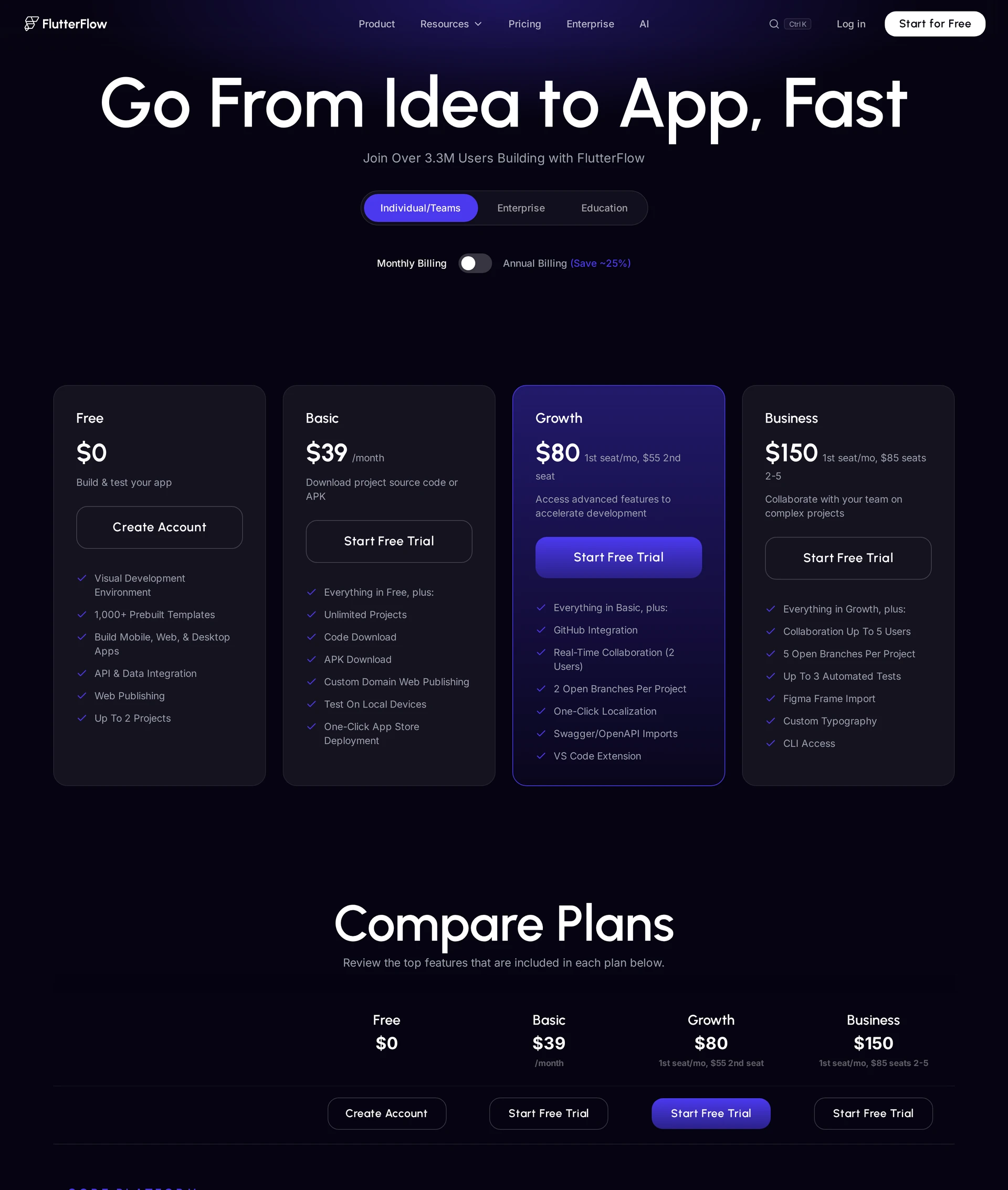
- Plan progression: Provided monthly pricing runs from Free to Basic at $39/month, Growth at $80/month for the first seat, Business at $150/month for the first seat, and Enterprise custom.
- AI requests: AI generation is capped by tier: 5 lifetime requests on Free, 50/month on Basic, 200/month on Growth, and 500/month on Business.
- Backend infrastructure: Apps using Firebase, Supabase, or another backend carry separate infrastructure costs outside the FlutterFlow subscription.
- Seat scaling: Growth’s second seat is $55/month. Business seats 2-5 are $85/month each.
- Code export: Code export belongs in the paid-plan decision, while Adalo source-code export is not available in the provided data.
Read the numbers through one question: which plan gets you to a store-ready build?
Adalo is easier to model while your app stays inside Adalo. FlutterFlow needs a second pass for backend services, seats, and AI request caps.
| Cost area | Adalo | FlutterFlow |
|---|---|---|
| Free tier | $0; prototype tier with record caps | $0; 5 lifetime AI requests in the provided plan comparison |
| Entry paid | Starter $36/month; 5GB storage; 1 published app | Basic $39/month; 50 AI requests/month |
| Native publishing | Pro $52/month and higher for App Store and Google Play publishing | Paid launch workflow plus any separate backend setup costs |
| Team scaling | Additional editor $15/month; additional published app $25/month | Growth $80/month first seat plus $55/month for seat 2; Business $150/month first seat plus $85/month for seats 2-5 |
| Backend cost | Hosting and database bundled inside plan limits | Firebase, Supabase, or another backend billed separately |
| AI usage | No AI request cap provided in the target data | Basic 50/month, Growth 200/month, Business 500/month |
| Upper tier | Team $160/month; Business $250/month | Enterprise custom after Business |
Pricing check: Price the plan that gets you through a store-ready build, not the plan that only proves the prototype.
For FlutterFlow, include Firebase, Supabase, extra seats, and store setup before treating Basic at $39/month as the full budget.
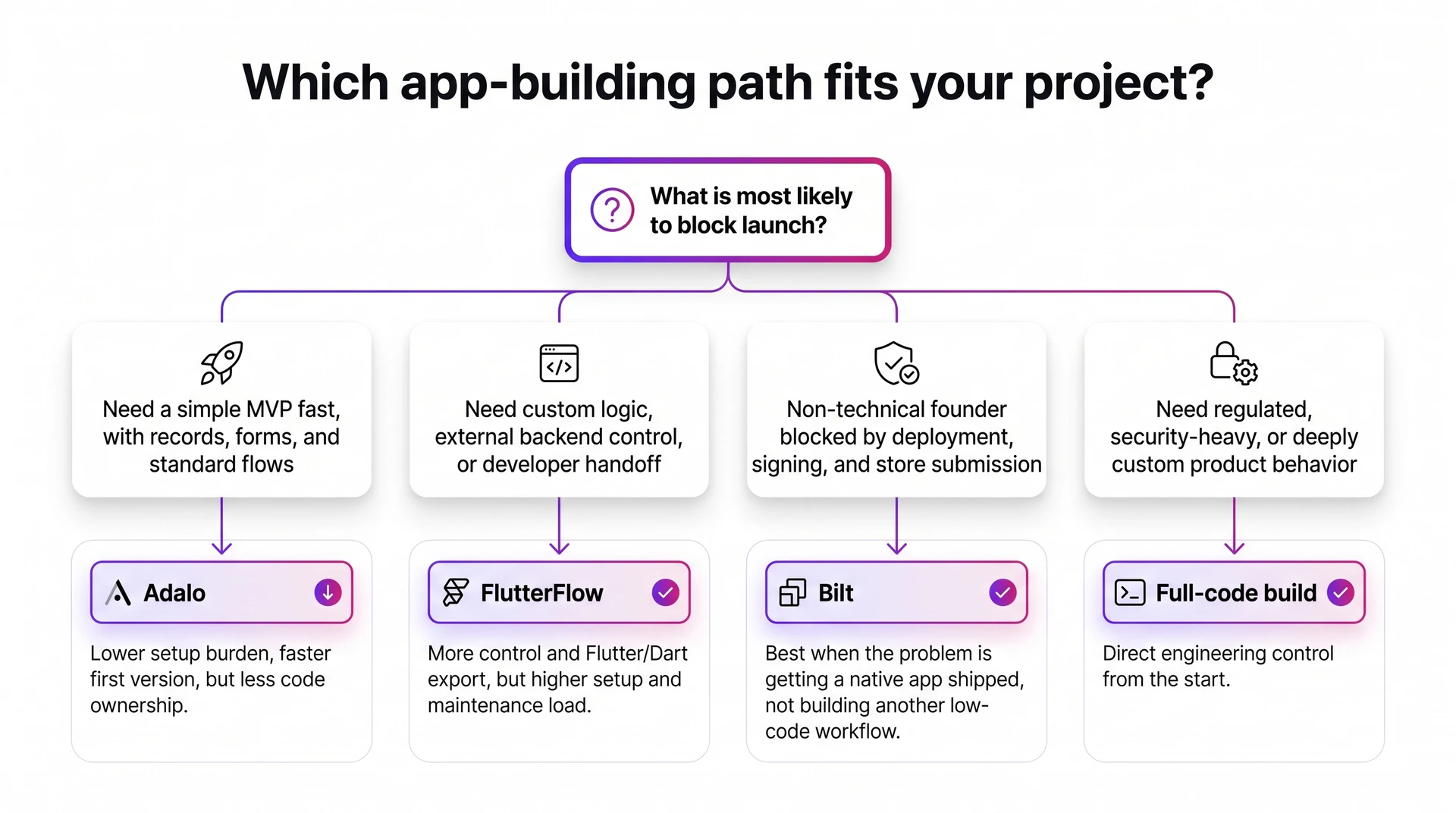
Choose Adalo or FlutterFlow: by project type and skill level
Use two filters before comparing feature lists: how much logic the app needs, and who will maintain the build after launch.
Those filters put the decision closer to the handoff, where no-code builds get expensive or stuck.
| If your situation is... | Choose... | Why |
|---|---|---|
| Simple MVP with records and forms | Adalo | Faster setup and less backend wiring. |
| Custom logic, external backend, or developer handoff | FlutterFlow | More control, code export, and backend flexibility. |
| Non-technical founder blocked by deployment | Bilt | More of the native release path is managed for you. |
| Regulated, security-heavy, or deeply custom product | Full-code build | You likely need direct engineering control from the start. |
Choose Adalo if:
Start in Adalo when the first milestone is a simple working MVP, especially if the builder wants to test workflows before hiring a developer.
Adalo is a good fit when:
- The data model is simple. The app mostly uses records, forms, lists, and standard user flows.
- The builder cannot become another technical project. Drag-and-drop setup matters more than custom code.
- You need the first user test quickly. Validation matters more than owning the codebase on day one.
The tradeoff is control. Use Adalo for a clear MVP, then plan a handoff if custom logic, unusual permissions, or product-specific workflows become the constraint.
Choose FlutterFlow if:
Start in FlutterFlow only when the project can absorb setup time and technical review. More control helps only when someone can own that control.
Use FlutterFlow when these signs are present:
- Someone can debug the app logic. State, visual actions, and backend calls need patience before the app feels predictable.
- The backend is part of the build. FlutterFlow connects with Firebase and Supabase for authentication and database work.
- The app needs visual logic. Action flows connect UI events to backend sequences and conditional user paths.
- A developer handoff is likely. Code export on paid plans gives technical teams a clearer path into Flutter than a fully closed builder.
Avoid FlutterFlow when the founder cannot learn low-code concepts or bring in technical help before launch.
When neither fully covers the finish line
Sometimes the blocker appears after the builder has done its job. The screens exist, but review, signing, backend wiring, or production testing still stand between the prototype and release.
Watch for these finish-line signals:
- Repeated App Store rejections. Store review problems often come from code quality, missing metadata, privacy disclosures, code signing, or compliance details.
- The 80-90% almost-done trap. The app looks close, but the final features require backend wiring, debugging, or deployment steps outside your comfort zone.
- Advanced product requirements. Real-time collaboration, complex payment flows, regulated data, or multi-role permissions may need a more specialized path.
- Tool-hopping without progress. Rebuilding the same app in Adalo, FlutterFlow, Bubble, or Glide usually means the delivery path is unclear.
Match the path to the launch blocker:
- Managed native deployment: Bilt fits non-technical founders whose blocker is native deployment rather than screen design.
- Full code ownership: React Native or Flutter is cleaner when a developer team needs direct control over architecture, testing, and long-term maintenance.
- Enterprise custom logic: Full-code development or a backend-heavy platform may be necessary when the app depends on complex business rules or deep data infrastructure.
The launch gap is about completion. If native deployment is the blocker, the next section explains how Bilt handles that final release step.
What if your goal is a published native app, not a prototype?
A native release has to do more than prove screens and logic. The app needs to compile cleanly, pass review, connect to a backend, and run well on phones.
Apple’s 2025 report listed 2,093,244 rejected submissions out of 9,100,620, with performance as the largest category at 1,354,418 rejections. That is not an Adalo or FlutterFlow knock; it shows why review readiness matters for any store-bound app.
The gap usually shows up in 4 places:
- Native compilation: A store-bound app needs reliable builds, smooth phone performance, and direct device behavior.
- Review readiness: Apple Developer Program enrollment, certificates, provisioning profiles, app metadata, privacy details, and screenshots need to line up before review.
- Backend wiring: Sign-in, databases, file storage, payments, and notifications need to work outside the happy path.
- Ownership: Exportable source code matters when custom logic, branding, or scale pushes beyond the first template.
When comparing builders for launch, check what happens after the editor. FlutterFlow gives more visual control than Adalo, but store launch still has build, signing, backend, and review work.
Bilt is built for that finish-line problem. You describe the app in plain English, and Bilt turns the prompt into a React Native app for iOS and Android.
Describe an app and watch Bilt turn it into a native app in live preview.
Bilt covers 4 launch jobs:
- Build: Generate React Native screens, native components, and app navigation for iOS and Android.
- Preview: Use the live browser preview or cloud-streamed iOS simulator, then scan a QR code to test on iPhone or Android.
- Connect: Add backend support for sign-in, database work, storage, and app logic.
- Submit: Handle build generation, code signing, provisioning, and App Store and Google Play submission workflows.
How Bilt handles the native launch path
For example, describe a habit tracker that saves entries and shows a weekly progress screen. Bilt gives you a working starting point instead of a blank canvas.
The build loop is simple:
- Describe: Start with a habit tracker or booking app in plain English.
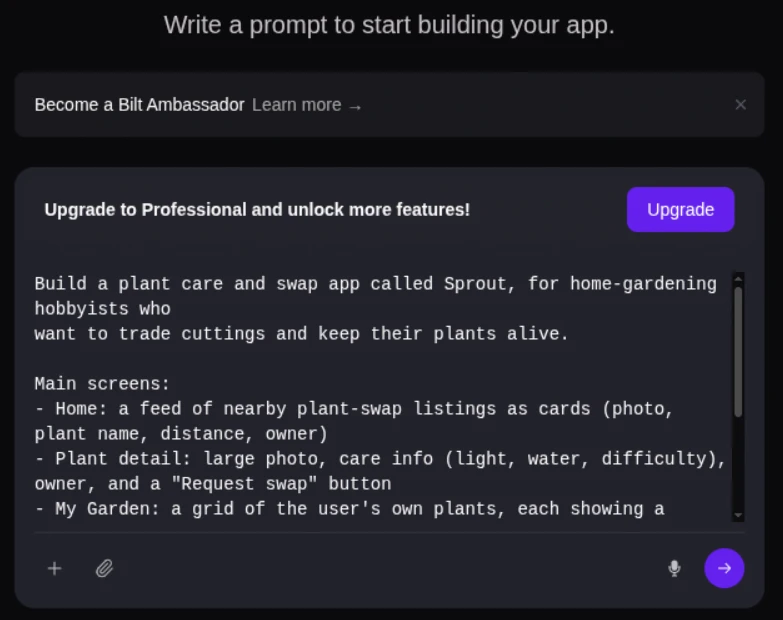
Bilt dashboard prompt box for describing an app - Refine: Ask Bilt to add a screen, change colors, or update a flow through chat.
- Test: Open the live browser preview or cloud-streamed iOS simulator, then scan a QR code to try the app on iPhone or Android.
- Hand off: Export React Native source code when a developer needs to take over.
- Publish: Move from preview to App Store and Google Play submission without building the pipeline from scratch.
You still bring Apple Developer Program and Google Play Console accounts. For iOS, Bilt builds, signs, and uploads the app to App Store Connect; you submit it for review in Apple’s tools. For Google Play, Bilt builds the .aab and can send it to internal testing, though the first release may require a manual upload in Play Console.
Bilt is the better fit when launch pain blocks the release. Adalo and FlutterFlow still make sense when their builder model matches the job.
FAQs
Is Adalo worth it?
Yes. Adalo is worth it for validation builds, booking apps, customer portals, directories, and internal workflows.
Adalo gets risky when simple app logic turns into product-specific workflows, unusual permissions, or custom UI behavior. Treat it as a fast first stage, then plan a handoff if those requirements become central.
Is FlutterFlow the best app builder?
FlutterFlow can be the best app builder for teams that want visual low-code control and can handle the setup work.
Control is the appeal. One Flutter-based project can target iOS, Android, web, or desktop, and Dart export gives developers a handoff path.
Use FlutterFlow when someone can own state, data flow, generated code, and store submission. If the goal is a published native app without managing that middle layer, compare FlutterFlow with Bilt too.
Is there anything better than FlutterFlow?
Yes, when the job is native publishing instead of visual Flutter control.
FlutterFlow fits teams that can manage the technical middle. Bilt fits non-technical builders who want iOS and Android publishing handled with less release work.
Compare alternatives by the job they remove from your plate:
| Tool / Approach | Best fit | Code / native output | Deployment handling |
|---|---|---|---|
| FlutterFlow | Visual Flutter apps with code export | Flutter / Dart output | Manual store setup |
| Adalo | Simple prototypes and early MVPs | No-code app output from one project | Manual publishing work |
| Custom Flutter / React Native | Complex, high-security, AI-heavy apps | Full native code ownership | Manual engineering workflow |
| Bilt | Non-technical builders shipping native iOS and Android apps | React Native code you own | Managed builds, signing, and store-upload workflows |
Ready to build a native app without living in store setup and signing? Start building free and turn your idea into an iOS and Android app you can preview, refine, and publish.