Mobile app development cost in 2026 is not just a developer-rate question. The real price depends on what you are building, how much backend work it needs, who builds it, and whether you are paying for a prototype or a store-ready app.
A $50K+ quote can be normal, inflated, or premature. The difference is scope.
Use this mobile app development cost breakdown as a planning guide, not a guaranteed quote. The ranges below are based on common agency-style quote patterns, public marketplace rate bands, app-store fees, and current AI builder pricing.
This guide covers:
- real cost ranges
- the timeline behind those ranges
- what drives the cost to develop an app
- faster paths when speed matters more than managing an agency process
This guide prices two routes. The traditional one means hiring a freelancer, agency, or in-house team and paying by the hour.
The AI-native one means describing your idea to a tool like Bilt and getting a real iOS and Android app for a monthly fee. We cost out both.
Bilt product demo — describe an app, get a native app in live preview
TL;DR
Traditional mobile app development usually costs $25,000 to $500,000+, depending on scope, platform choice, backend depth, team location, and timeline.
- Simple publishable apps: $25,000-$75,000 for a focused store-ready app with limited backend needs.
- MVPs with backend: $75,000-$200,000 when you need accounts, payments, APIs, saved data, or real user workflows.
- Complex or enterprise apps: $200,000-$500,000+ for advanced security, compliance, AI features, heavy integrations, or operational rollout.
- Timeline planning range: 2 to 12+ months overall. Simple apps often take 2 to 4 months, backend MVPs often take 4 to 7 months, and complex or enterprise builds can take 6 to 18+ months.
- Agency-style average: In the quote patterns reviewed for this guide, full agency schedules often clustered around 11 months because discovery, design, development, QA, and launch usually run in sequence.
- Main cost drivers: Feature complexity, hourly rates, iOS versus Android scope, backend depth, integrations, QA, store submission, and post-launch maintenance.
- Modern alternative: If an agency quote feels too slow or expensive, compare it with Bilt, which turns plain-English prompts into production-ready React Native apps. You can start free, with paid plans from €25/month.
App development cost breakdown: cost tiers at a glance
The cost to build an app depends on which version you are buying. This table is the baseline for the whole guide, so map every quote you get back to one of these tiers.
| App type | Typical cost | Best fit |
|---|---|---|
| Prototype | $5,000–$25,000 | Testing the idea |
| Simple app | $25,000–$75,000 | Basic store-ready launch |
| MVP with backend | $75,000–$200,000 | Accounts, data, payments |
| Complex app | $200,000–$500,000+ | Security, AI, scale |
The range gets wide because labor stacks up fast. At about $200/hour, months of discovery, design, development, and QA can turn a fixed-scope estimate into a six-figure budget.
Platform choice matters too. Separate native iOS and Android builds cost more than one cross-platform codebase because the team repeats feature work, bug fixes, and QA.
Before you compare quotes, decide whether you are buying a prototype, a store-ready app, or a backend MVP.
Prefer to skip the tier math? You can describe the app to Bilt and see a working version before you price a single quote.
Tier-by-tier cost breakdown
Now break that model down by scope. The same app idea can land in different tiers depending on whether it needs accounts, payments, live data, two stores, or enterprise review.
Pick the tier that matches the next decision you need to make. A prototype budget is wasted if the next milestone is an App Store release.
Prototype (no backend, not store-ready)
A prototype usually costs $5,000 to $25,000. You are buying a clickable demo, not a store-ready app.
The common trap is reading polished screens as proof the product can work. A Figma flow is not production software, and it can hide the data logic that makes accounts, payments, and saved content work.
Bilt's Figma plugin can import selected frames as build context and turn them into working native screens instead of leaving the design as a tap-through prototype.
Keep the scope narrow:
- Design flows: wireframes or high-fidelity screens for the main journeys.
- Tap-through navigation: clickable paths in Figma, Framer, or another preview tool.
- Mock data: sample content that makes the demo feel usable during stakeholder reviews.
Excluded:
- User accounts or saved profiles
- Databases, APIs, or payment processing
- Push notifications and App Store or Google Play submission
Use a prototype to pitch investors or test the UX path before code starts.
Upgrade when the test depends on:
- Live accounts or saved data
- Device features such as camera or GPS
- Stripe payments or a public store listing
Simple publishable app ($25,000–$75,000)
In 2026, a focused app that can pass Apple App Store or Google Play review usually runs $25,000 to $75,000.
This tier usually means one platform first, or a simple cross-platform build with limited integrations. When the scope stays tight, expect 2 to 4 months.
The scope should stay boring:
- One platform: iOS or Android first, with the second platform delayed until demand is clearer.
- Basic authentication: email login, account creation, and password reset.
- Small backend: a Firebase, Supabase, or PostgreSQL database with basic read and write actions.
- Store submission: screenshots, metadata, review preparation, and one release path.
Founders get burned by the word publishable. A store listing does not include scale planning or post-launch support.
Excluded from this tier:
- Second platform: launching iOS and Android together increases build and QA time.
- Monetization: Stripe payments, in-app purchases, or subscriptions require policy and edge-case testing. Bilt Payments supports iOS in-app purchases and subscriptions, with mock purchase, restore, and entitlement testing in previews and development builds. Google Play billing support is still in progress.
- Live interactions: chat, feeds, delivery tracking, or inventory status require backend rules beyond a simple app.
Upgrade when live user actions must sync instantly, or when the first release needs a second platform or custom admin tools.
MVP with backend ($75,000–$200,000)
An MVP with backend typically runs $75,000 to $200,000. At this tier, users can create accounts, save data, and complete the product’s core workflow.
Backend work is where the budget usually moves because saved actions need permissions, recovery paths, and real data rules.
- 12 to 25 screens: enough for onboarding, core workflows, account settings, and support or admin flows.
- 6 to 12 main functions: enough functionality to test the business model and the first retention loop.
- Backend infrastructure: Firebase Auth or Auth0 can handle login, with PostgreSQL or Firestore for data and S3-style file storage. Bilt Cloud is the Bilt-native option for sign-in, PostgreSQL data, file storage, and server-side logic.
- Store-ready polish: QA, bug fixing, app store assets, metadata, and release preparation.
The lower end fits a focused MVP with familiar patterns and limited integrations. The upper end appears when backend work becomes the product.
Common budget pushers:
- Data integration: Salesforce, Shopify, NetSuite, or a legacy ERP can consume 10% to 35% of development effort when fields and permissions do not match.
- Real-time features: chat and social feeds need WebSockets or similar event systems, plus moderation, ordering, delivery states, and failure handling.
- Platform coverage: separate native iOS and Android builds increase implementation, QA, release, and bug-fix work.
- Backend changes: late schema changes in PostgreSQL, Firestore, or Supabase can force rework across screens and API contracts.
Excluded from a normal MVP budget:
- Enterprise SSO or formal compliance work
- Historical data migration from old systems
- Guaranteed high-availability support
Upgrade to enterprise when a buyer asks for SAML SSO or audit logs before signing, or when a legacy system dictates the data model.
If duplicate mobile work is the cost risk, Bilt can reduce that initial build risk.
Bilt generates production-ready React Native code from a natural-language brief, so the first iOS and Android build starts from one codebase.
Complex or enterprise app ($200,000–$500,000+)
A complex or enterprise app can run $200,000 to $500,000+. At this tier, the app is part of how the company runs.
The quote should explain systems, security, and support, not just screens.
- Role-based access: permission models for admins, employees, customers, vendors, or partners.
- SSO and identity: SAML, Okta, Azure AD, audit trails, session rules, and security review.
- Compliance work: HIPAA, SOC 2, procurement review, and internal governance requirements.
- Advanced integrations: Salesforce, SAP, Oracle NetSuite, Epic, payment processors, legacy APIs, and custom business logic.
- High-availability infrastructure: monitoring, alerts, backups, recovery planning, load handling, and production support.
The exclusions matter as much as the feature list. Treat these as separate budget lines unless the contract names them.
Excluded unless the contract names them:
- Security audits and penetration testing
- Legal review for privacy, HIPAA, or procurement
- Data migration from SAP, Oracle NetSuite, Epic, or a custom ERP
- Training, rollout, and post-launch support
Upgrade into this tier when the app has to survive procurement, security review, or operational rollout. Those checkpoints create work long before engineering starts.
Once multiple teams and approval paths are involved, the timeline stretches to 6 to 18 months.
Early prototypes can still move quickly, but enterprise scoping needs human review for security evidence, compliance, procurement, rollout, and support.
The estimate depends on those checkpoints as much as the feature list.
The practical move is to compare quotes by scope, not headline price.
Staffing becomes the budget:
Bilt Collab lets founders, designers, clients, and teammates work together in the same workspace and project. Specialist security and compliance work still needs the right experts.
- Product and design
- Backend and mobile engineering
- QA, DevOps, and compliance
Why published estimates vary so much
Published mobile app cost estimates vary because they compress very different projects into one headline number. A prototype, backend MVP, and enterprise platform do not belong in the same average.
Location can move the quote before anyone touches scope. A 2,000-hour project at $35/hour costs $70,000; at $150/hour, it costs $300,000.
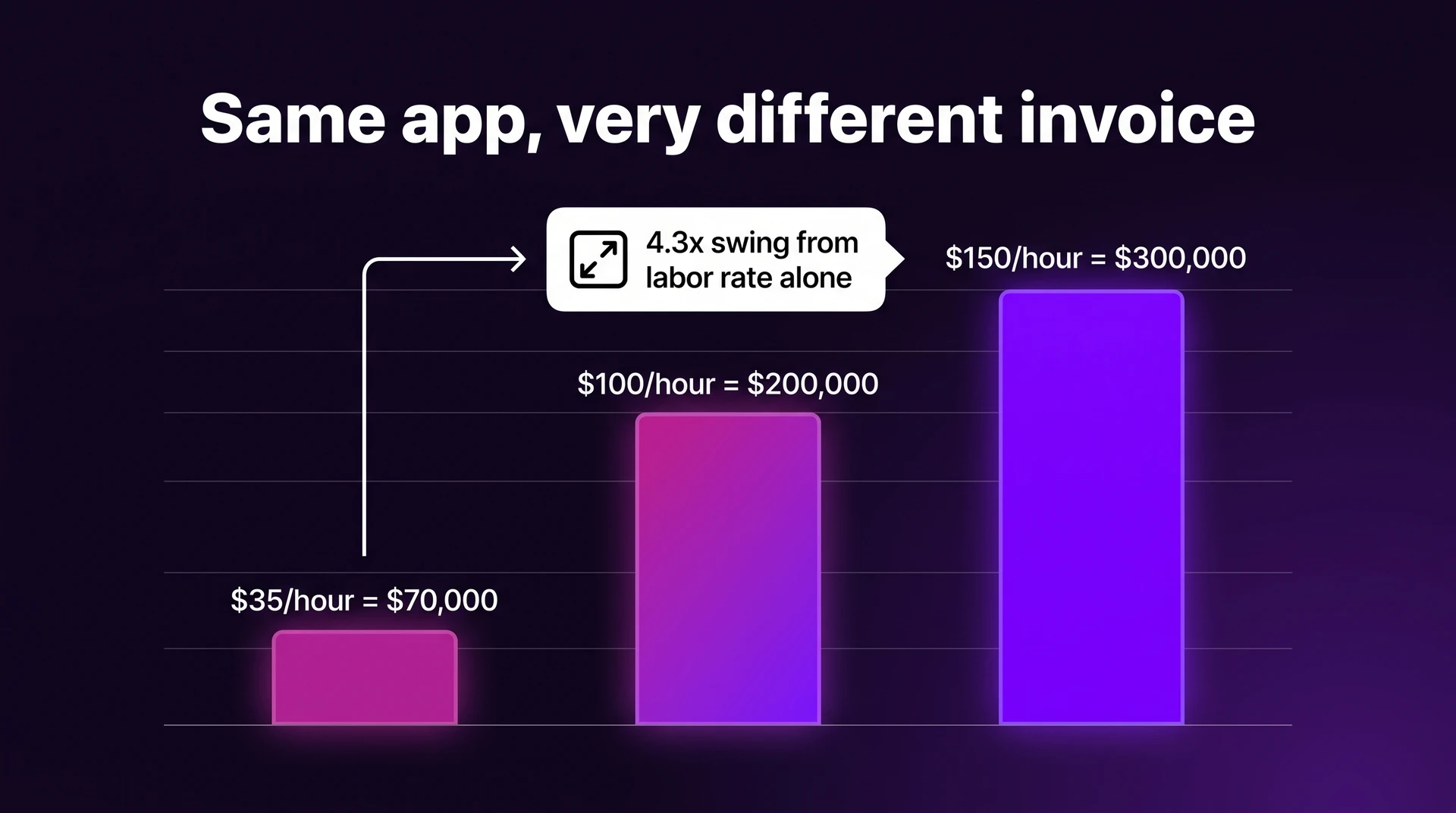
That is the same product with a different invoice: a 4.3x swing from labor rate alone.
The biggest estimate gaps usually come from:
- Team location: the same scope can cost three to four times more depending purely on where the team sits (rate bands are broken down below).
- Scope definition: one estimate may mean a prototype, while another includes backend, QA, deployment, and store submission.
- Platform strategy: one codebase, two native codebases, and web plus mobile all create different engineering loads.
- Integration depth: backend data work can consume 10% to 35% of total effort on connected apps.
- Timeline assumptions: a 3-month prototype and an 11-month production build should not produce the same estimate.
This is why “simple app” is not a useful pricing term by itself. Ask what screens, platforms, backend systems, integrations, testing, and release work are included.
Before you compare totals, compare scope line by line. A lower quote may simply leave out QA, deployment, maintenance, or store-review support.
What actually drives app development cost
The headline number usually moves because several costs compound at once.
A useful formula is: app cost = hours × hourly rate + QA + deployment + maintenance.
Use these quote-checking questions before you compare vendors:
- Backend: Do users need accounts, saved data, payments, subscriptions, files, or admin tools?
- Feature complexity: Are you adding chat, feeds, maps, offline sync, AI, camera access, or real-time updates?
- Team model: Are you hiring freelancers, an agency, or in-house engineers, and where are they located?
- Integrations: Does the app need Stripe, Shopify, Salesforce, ERP, EHR, analytics, ads, or custom APIs?
- QA and store review: Who tests on real devices, fixes App Store or Google Play issues, and handles release setup? Bilt supports real-device testing through Expo Go on iPhone and Android, plus Test on iPhone for a native binary when a Mac and Xcode are available.
- Maintenance: Who owns bugs, OS updates, compatibility fixes, and post-launch iteration?
Platform choice: iOS, Android, or cross-platform
Native means the app is built separately for one platform, usually Swift for iOS or Kotlin for Android. Cross-platform means one shared codebase, often React Native or Flutter, produces versions for both stores.
The savings come from reuse, not a flat discount. Cross-platform savings depend on shared product logic and interface behavior that works against the same backend on iOS and Android.
- One native app costs least upfront: iOS-only or Android-only avoids duplicated testing, store setup, and platform-specific design work.
- Two native apps cost much more: Separate iOS and Android codebases can roughly double engineering hours because each feature needs separate build, QA, and maintenance work.
- Cross-platform can reduce duplication: React Native and Flutter help when one shared component can serve the same screen flow on iOS and Android.
- Savings narrow with native-heavy features: Features tied to native SDKs or offline sync often still need iOS and Android-specific code and QA.
If iOS is the first store, the no-code iOS publishing roundup compares builders by native output and submission support.
Team model and location
Hourly rate looks simple, but total cost is hours multiplied by rate, plus the coordination needed to turn those hours into a finished app.
As shown earlier, the same 2,000-hour build can cost roughly four times as much based purely on where the team sits, before you add management, QA, or revisions.
Treat these as benchmark bands from public marketplace and compensation data, then verify them against live quotes before you budget.
- South and Southeast Asia: $20-$45/hour
- Eastern Europe: $25-$50/hour
- North America and Western Europe: $100-$200/hour
The team model changes the real number too:
Bilt Collab supports multiple people building and reviewing the same project in one workspace.
- Freelancers: Lower sticker price, but you manage scope, QA, handoffs, and schedule risk yourself.
- Agencies: Higher quote, often with a 20% to 40% coordination markup, but design, QA, and project management are usually included.
- In-house engineers: US salary and benefits benchmarks can push one engineer to a $150,000-$250,000 fully loaded annual cost after recruiting and equipment.
For a first app, the cheapest hourly rate is not always the cheapest path. Ask who owns the messy middle: requirements, testing, bug fixing, store submission, and maintenance.
What you actually pay for: cost by development phase
Treat the phase percentages below as planning benchmarks from agency scoping templates and vendor proposals. They will not add up perfectly across every quote because each vendor defines the phases differently.
| Phase | Typical Share | What It Pays For |
|---|---|---|
| Discovery & planning | 5-7% | Scope, feasibility, roadmap |
| UI/UX design | 10-15% | Research, wireframes, visual system |
| Frontend & backend development | 50-70% | Screens, APIs, databases, integrations |
| QA & testing | 10-15% | Bugs, devices, performance, security |
| Deployment | 2-3% | Signing, assets, store submission |
Development takes the largest share because every visible screen depends on invisible build work behind it.
- Frontend: screens, navigation, forms, states, and platform-specific polish.
- Backend: authentication, databases, payments, storage, APIs, and business logic.
- Integrations: analytics, notifications, ads, subscriptions, maps, or third-party services.
- Rework: scope or design changes after coding starts, such as adding subscriptions after checkout was already built.
Discovery is a small share of the budget, but expensive to skip. On a $100,000 build, 5-7% means $5,000-$7,000 before design or code begins.
Skip discovery and the first sprint becomes guesswork: wrong user roles, missing admin flows, or a Stripe integration that changes the backend plan.
- Design shortcut: Weak wireframes leave developers guessing about edge states and permissions, which usually turns into frontend rework.
- QA shortcut: Rushed testing leaves device bugs and store-review blockers until launch week; deployment still has signing, assets, release settings, and submission. Bilt uploads App Store builds, provides a TestFlight button, and increments build numbers automatically. You attach the build and submit it for review in App Store Connect.
Check each quote against the phases:
- Does it include QA on real devices?
- Does it include App Store and Google Play submission?
- Does it include backend work, or only the mobile screens?
- Does it include post-launch fixes?
- Does it explain what happens if Apple or Google rejects the app?
Deployment is only a small line item; the non-technical App Store deployment guide details signing, assets, and review.
The real first-year cost (beyond the build)
Your first-year cost is the build plus everything required to keep the app live, compatible, and improving.
Set aside 15-25% of the initial build for maintenance, then ask the vendor to show what that covers. Budget store fees and launch marketing separately.
First-year cost checklist:
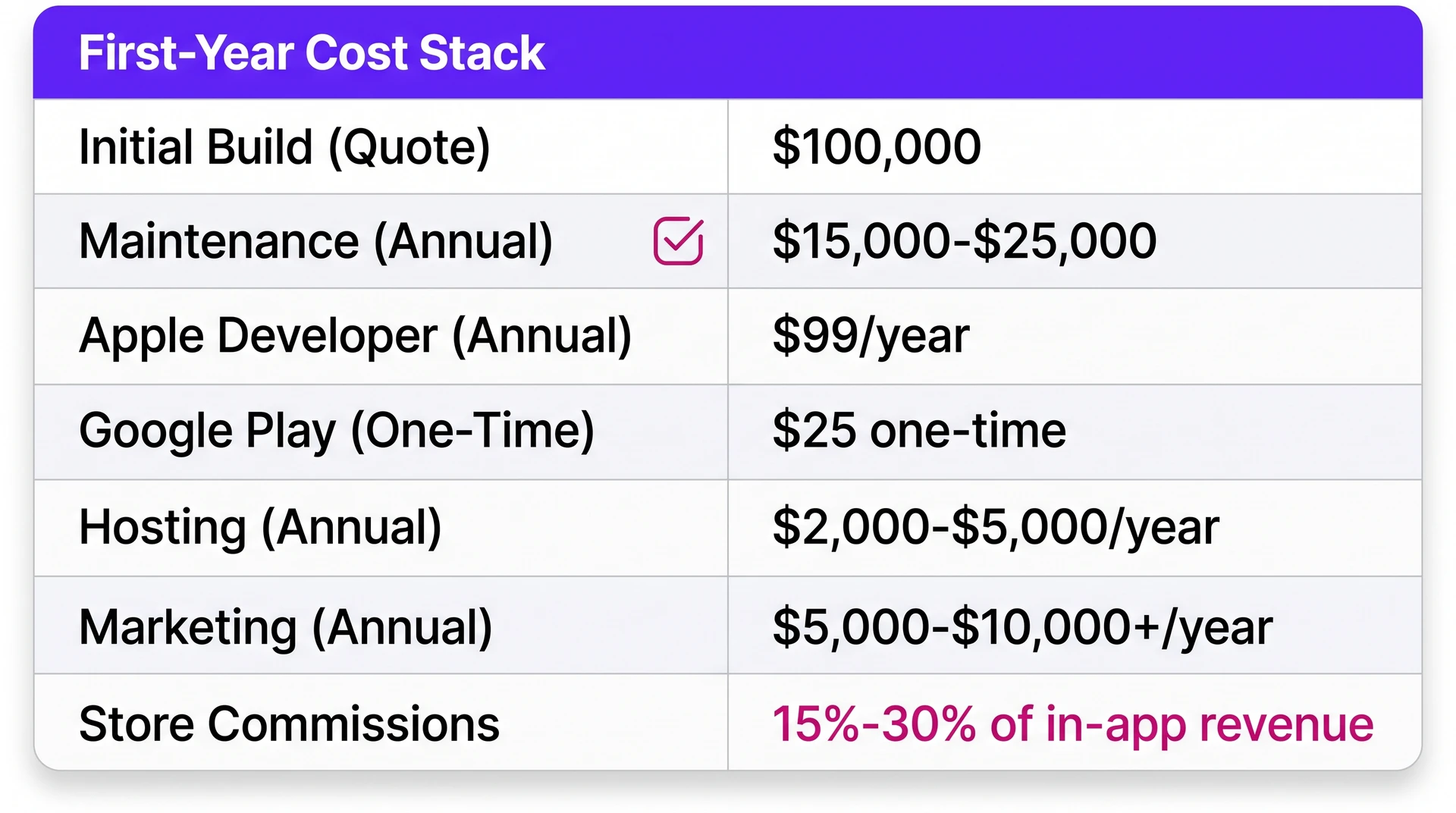
- Maintenance: bug fixes plus iOS and Android compatibility work after Apple or Google releases updates.
- Store accounts: Apple Developer Program at $99/year and Google Play Console at $25 one-time.
- Hosting: backend, database, storage, file delivery, and traffic-based infrastructure. Bilt plans include Bilt Cloud capacity with plan-based limits for projects, requests, active users, storage, and database size.
- Store commissions: Apple App Store and Google Play can take 15-30% of in-app purchase or subscription revenue.
- Marketing: launch assets, app store optimization, ads, email, community, and creator outreach.
On a $100,000 traditional build, a 15-25% maintenance allowance adds $15,000-$25,000 in year one. That number still excludes launch marketing and operating costs.
Post-launch iteration is where the cheap quote usually gets exposed. In traditional development, even small edits can require ticketing and another QA release.
The build path you choose affects this loop. A workflow that lets you change screens, copy, simple logic, and payment flows without opening a new agency ticket can lower iteration friction after launch.
Bilt supports two-way GitHub sync and full React Native code export, so you can work outside Bilt without losing the Bilt iteration loop.
To compare workflows that reduce post-launch ticketing, the iteration-friendly no-code iOS roundup evaluates publishing support, AI features, and pricing.
Which development path should you choose?
Start with one decision test: are you building a native mobile app that users download from the App Store or Google Play?
When store distribution is optional, the store-download wrapper comparison clarifies when web-based shortcuts beat native builds. Bilt can publish the project directly to a permanent public URL as an installable PWA.
A quick way to decide:
- **Choose **Bilt if you want Bilt to build, sign, and upload the iOS build before you attach it and submit it for review in App Store Connect, with backend and iteration handled in the same project. For Google Play, Bilt targets internal testing; you handle production release steps in Play Console.
- Choose cross-platform development if you have developers and want one codebase for iOS and Android.
- Choose native development if performance, advanced device APIs, AR, or complex animations are central to the product.
- Hire an engineer or specialist team if you are building a 3D mobile game or advanced custom hardware connections.
- Use an agency or in-house team if the app is enterprise-grade, heavily integrated, or already funded.
| Scenario | Recommended Path | Typical Cost | First Version |
|---|---|---|---|
| Non-technical founder, published app | AI-native platform, like Bilt | Platform subscription | Hours to days |
| Developer team, two stores | React Native or Flutter | $25,000-$75,000 | 3-6 months |
| Deep native performance needs | Native iOS or Android | $75,000-$500,000+ | 6-18 months |
| Existing web app going mobile | Bilt Web App Sync, using a Lovable, v0, or other GitHub-hosted app as a read-only reference for the native build | Varies | Days to weeks |
| Enterprise app, large budget | Agency or in-house team | $200,000-$500,000+ | 12-18+ months |
Cross-platform development tools can reduce duplicate work because React Native or Flutter shares one codebase across both stores. Native modules and App Store or Google Play QA still need platform-specific attention.
For lean teams, Bilt can cover the first build and iteration loop when the app uses standard mobile patterns. Once you choose a path, cost control comes from ruthless v1 scope.
How to reduce app development cost without cutting corners
The cheapest app proves the core idea before you pay to build everything around it.
Cut cost in this order:
- Ship the smallest useful MVP first. Pick the one action that proves demand, such as booking an appointment or paying for a plan.
- Cut v1 scope traps early. Social feeds add ranking and moderation. Real-time chat adds socket handling and message-state sync.
- Push custom features to v2. Add custom dashboards, complex roles, feeds, or chat only after users prove the core flow matters.
Lock the spec before coding starts:
- screens and navigation
- user flows
- data rules
- acceptance criteria
Use React Native or Flutter when native-only work is unnecessary.
Platform-specific work still remains for:
- native modules
- device permissions
- App Store and Google Play QA
Use AI only where it fits the risk. General AI coding tools can make a prototype fast, but mobile cost shows up in backend logic, device testing, store rules, code signing, and post-launch fixes.
That is the last 5% where many projects get stuck.
Bilt is built around that mobile workflow:
- Own the code: Keep two-way GitHub sync while you build, or export the full React Native source for work outside Bilt and developer handoff.
- describe the app idea in plain English
- get React Native output for iOS and Android
- iterate in the same project
- move toward store submission without stitching tools together
Product judgment still matters. The win is removing the manual setup work that makes early mobile builds expensive.
When traditional app development stops making sense
Traditional development makes sense when the app is complex enough to justify a custom team. It stops making sense when the process costs more than the learning you need from the first version.
Use these cutoffs as decision rules:
- Launch window under 2 to 4 months: Even basic apps usually need months for planning, design, build, QA, deployment, and store review. If you need market feedback sooner, traditional development is usually too slow.
- Feature set uses standard patterns: Basic login with profiles or forms usually does not require a custom engineering team from day one. Add custom logic after users prove the core flow.
- V1 depends on fast iteration: If you expect weekly changes after user feedback, agency retainers and change requests compound quickly. A slower build cycle also makes each wrong assumption more expensive.
- Complexity is self-inflicted: Social feeds create ranking and moderation work before the product has users. Real-time chat adds sync logic, so push both into v2 unless the app depends on them.
Keep the custom route when at least one constraint is genuinely hard:
- unusual business logic that changes per customer
- deep integrations with ERP, EHR, or payment systems
- regulated data under HIPAA or SOC 2 expectations
- store policy risk under App Store Review Guidelines or Google Play rules
Those constraints can justify a custom team because the risk sits in the product logic, not the UI.
Start with a lighter path when the goal is demand validation and quick iteration. If the app fits standard mobile patterns, the next step can be a build-to-store workflow instead of a full agency process.
Skip the agency quote: Bilt goes from idea to App Store in one workflow
You describe the app. Bilt creates the native iOS and Android project.
From there, you can preview, test, iterate, and move toward store submission in one workflow.
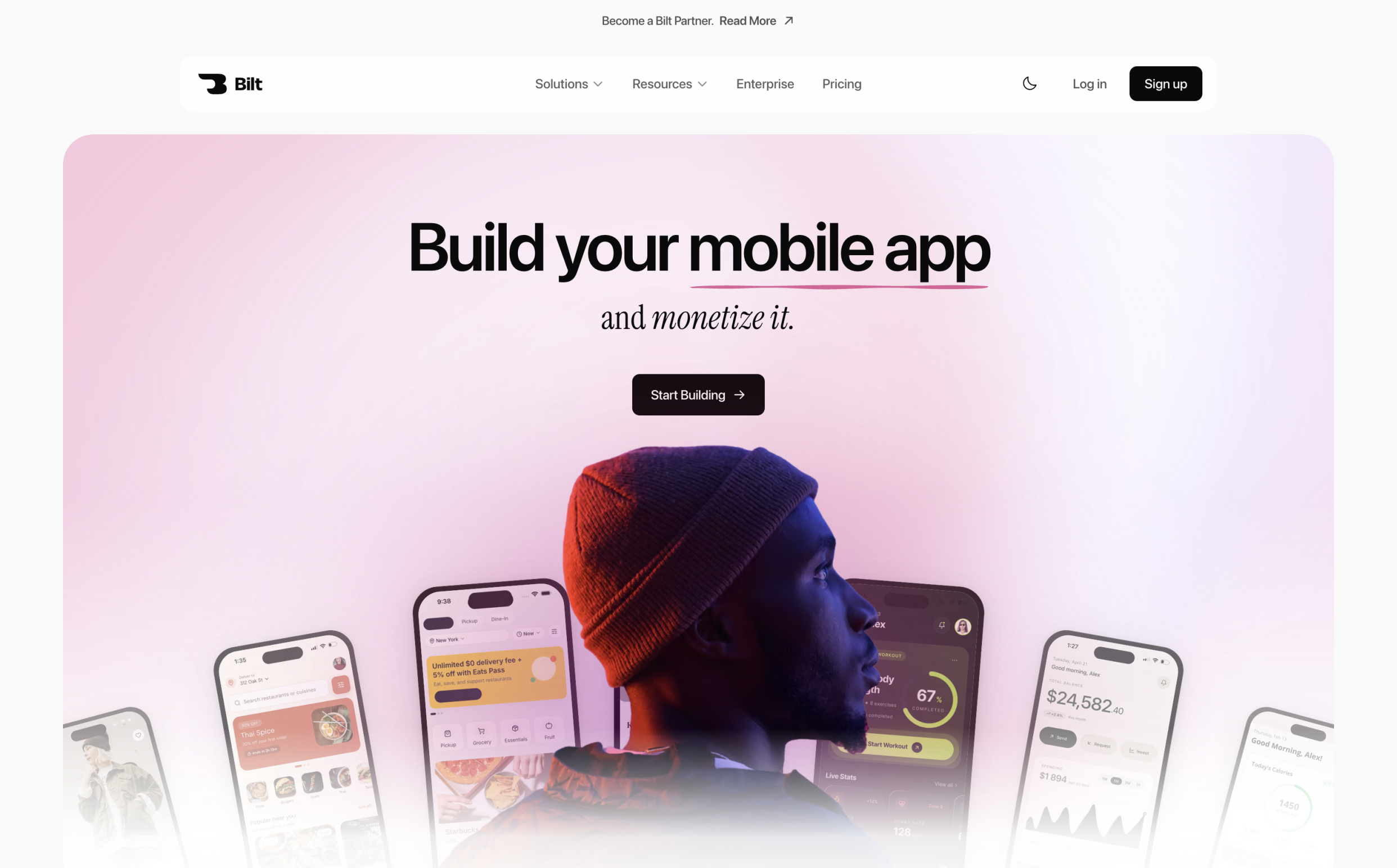
The output is a real iOS and Android app, not a web wrapper. Backend integrations and React Native code stay in the same workspace.
You own the React Native source and can export it or keep it synchronized with GitHub for development outside Bilt.
- Prompt: Tell Bilt what the app should do, from screens and user flows to data and monetization.
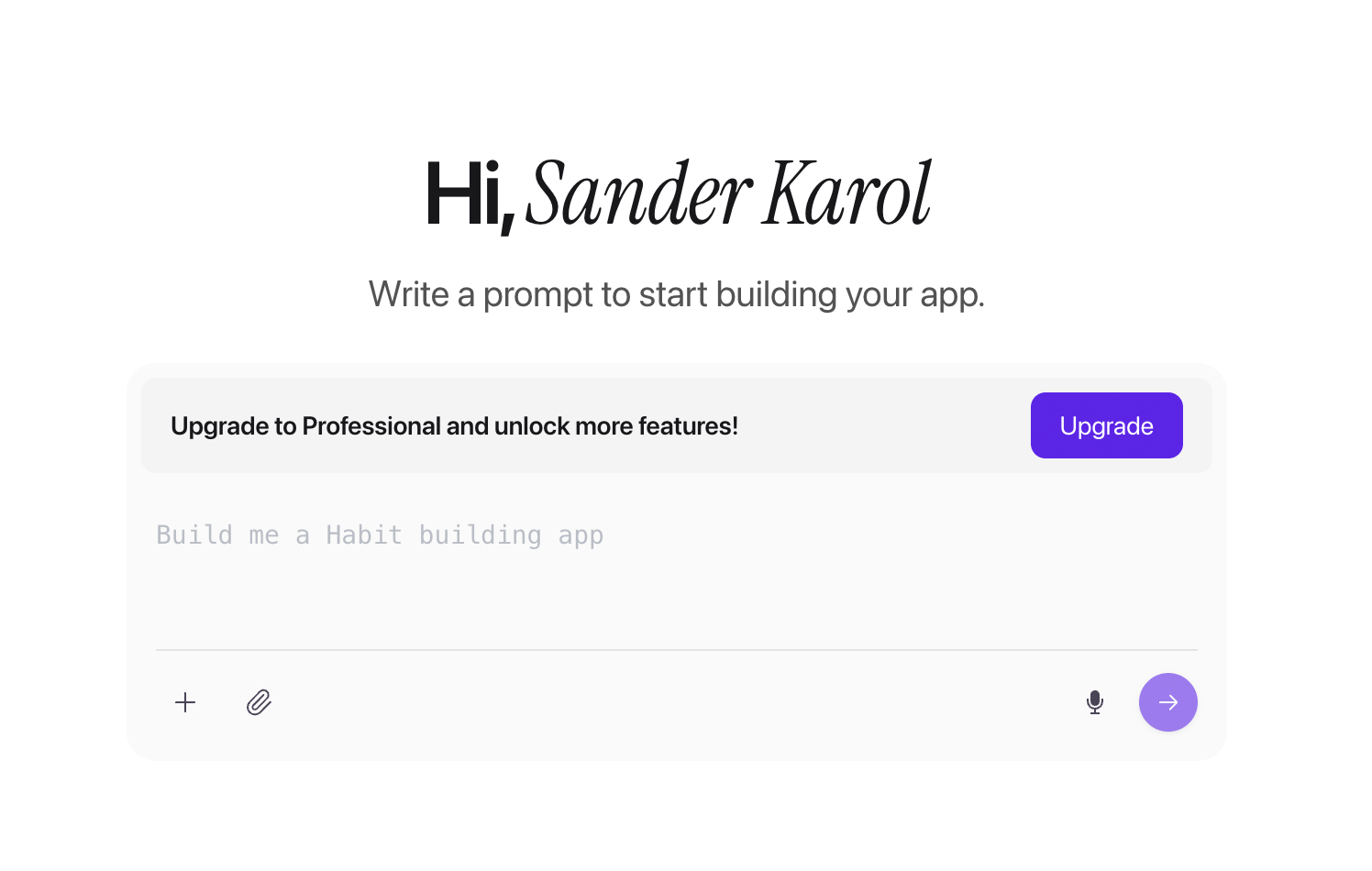
Bilt app-creation screen with a prompt input for describing a new mobile app - Preview: Open the browser simulator and see the app without setting up Xcode or Android Studio.
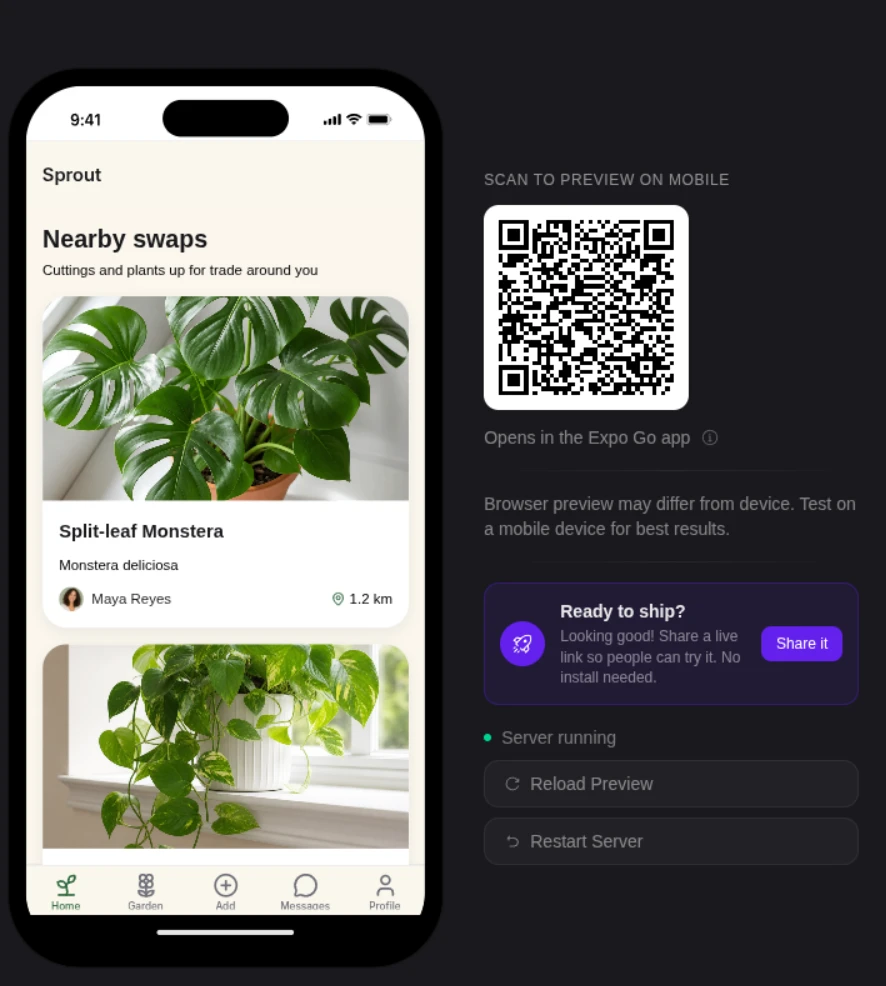
Bilt — The preview panel: phone frame, Expo Go QR code, server status, and Reload Preview / Restart Server buttons (Bilt docs: Live Preview) - Test: Scan a QR code to load the current build on a physical iOS or Android device.
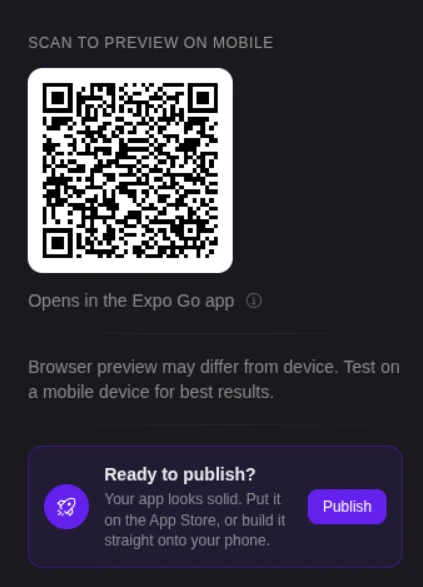
Bilt — The preview panel QR code that opens the app in Expo Go (Bilt docs: Get & Share Your App › Expo Go on your phone) - Iterate: Keep chatting to refine the interface and app logic in the same workspace, including copy and edge cases.
- Deploy: Provisioning profiles and code signing happen in the same workflow as build generation and store delivery.
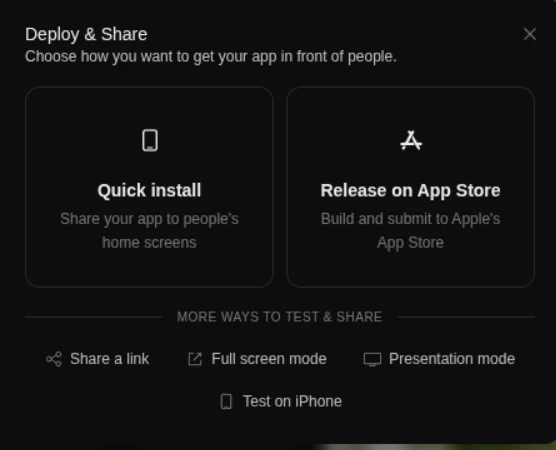
Deployment can add budget when store setup is split across tools. Bilt keeps code signing and store delivery in the same workflow as build generation.
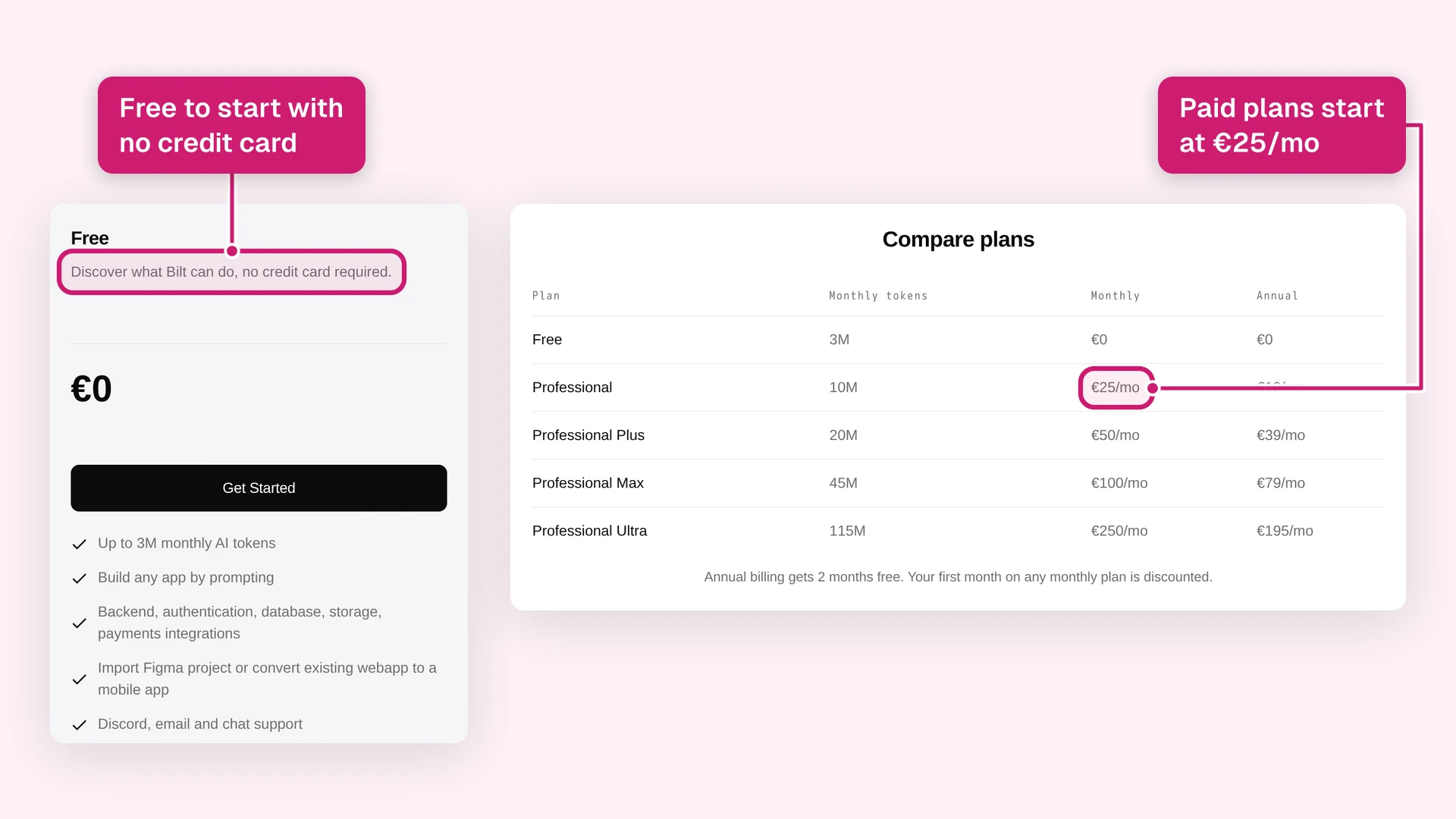
Bilt pricing is based on monthly AI token allowance, with rough prompt ranges to make usage easier to estimate. The free plan starts at €0 with no credit card, and annual billing saves 2 months on paid plans.
Eligible new subscribers get 40% off the first month of any monthly paid plan. The discount is one-time per account and does not apply to annual billing.
| Plan | Monthly Price | Annual Price | Token Allowance | Prompt Estimate |
|---|---|---|---|---|
| Free | €0 | €0 | 3M tokens | ~12-30 prompts/month |
| Professional | €25/month | €19/month billed annually | 10M tokens | |
| Professional Plus | €50/month | €39/month billed annually | 20M tokens | |
| Professional Max | €100/month | €79/month billed annually | 45M tokens | |
| Professional Ultra | €250/month | €195/month billed annually | 115M tokens |
If you already have an app idea, the cheapest next step is to see the app running.
Start building free. You can start free with no credit card.
Want to compare usage tiers first? See all plans.
Common questions about mobile app development cost
These answers help you sanity-check the numbers before you request quotes: simple-app ranges, timelines, hidden costs, AI tradeoffs, and estimate accuracy.
How much does it cost to develop a simple mobile app?
A simple publishable app usually costs $25,000 to $75,000 when the scope stays around 5 to 10 screens with login and standard UI patterns.
| Cost cue | What it means |
|---|---|
| Scope that fits | 5 to 10 screens with login, standard UI patterns, and limited custom backend work. |
| US labor math | 300 to 400 hours at about $120/hour lands around $36,000 to $48,000. |
| Lower hourly rate math | At $30/hour, the same build lands near $9,000 to $12,000 before project management, QA, and launch work. |
| Often excluded | Store accounts, post-launch maintenance, paid SDKs, and compliance work usually sit outside the simple build quote. |
| Upgrade trigger | Payments, real-time chat, geolocation, or custom admin tools can move the app out of the simple tier. |
How long does it take to build a mobile app?
Mobile app development usually takes 2 to 12+ months as a planning range. Simple apps sit near the low end, backend-heavy apps take longer, and enterprise builds stretch because QA, security review, and approvals add more passes.
Here's how the timelines usually break down:
- Simple utilities or to-do apps often take 2 to 4 months from planning through deployment.
- Apps with chat, payments, geolocation, or heavier backend logic often take 4 to 7 months.
- Enterprise-grade products often take 6 to 12+ months.
- Agency-style production builds often cluster around 11 months when discovery, design, development, QA, and launch run in sequence.
The 11-month average usually comes from repeated loops:
- discovery changes the scope
- design changes the user flow
- QA finds defects
- security review adds fixes
- approvals create another pass
Cross-platform builds add another pass because fixes need testing on iOS and Android before store review.
What hidden costs should I budget for?
Budget beyond the build quote because launch and post-release work often appear as separate line items.
| Hidden cost | What to budget for |
|---|---|
| Store accounts | Apple Developer at $99/year and Google Play at $25 one-time before you can publish. |
| Maintenance | 15-25% of the build cost per year for bug fixes and iOS/Android compatibility after OS updates. |
| Hosting and backend | Ongoing infrastructure for the database, storage, and traffic, which grows with usage. |
| Store commissions | Apple and Google can take 15-30% of in-app purchase or subscription revenue. |
| Post-launch changes | Every update means another QA and re-release cycle, which adds up fast in traditional development. |
How do I get an accurate quote for my app?
Send the same detailed brief to 2 to 3 vendors. Ask each vendor for an itemized estimate by feature, phase, assumptions, exclusions, and hourly rate.
Structure the brief like this:
- Define the product goal and target audience.
- List must-have screens and core user flows.
- State platform targets and backend needs.
- Name integrations, compliance requirements, expected user volume, and data-handling rules.
- Ask vendors to break out discovery, design, development, QA, deployment, and maintenance.
Assumptions, exclusions, and hourly rates should sit below the phase estimate.
If one quote is far lower than the others, compare the exclusions first. A missing QA phase or launch-support line can explain the price gap. If you would rather not run the quote cycle at all, you can describe your idea in Bilt and see a working version before you commit to any agency.
Is it cheaper to build an app with AI?
Bilt can be operated through seven MCP tools. Compatible AI agents can create projects, send build instructions, monitor progress, and retrieve previews.
It can be, but only when AI mobile app builders handle more than screen generation. A prototype is cheap to create; the expensive parts are backend logic, device testing, code signing, store upload, and changes after launch.
Bilt keeps building, device testing, signing, and upload together. You submit iOS for review in App Store Connect; Google Play production promotion and review remain your steps in Play Console.
Bilt is cheaper for many standard mobile apps because it keeps those steps in one workflow. If the app needs deep native performance, unusual hardware, or enterprise compliance, a specialist team may still be the better path.
So, is mobile app development worth the cost?
Bilt can publish an installable PWA at a permanent public URL, giving you a low-friction validation path when an app-store launch is not yet necessary.
Yes, if the app has a clear job, a tight v1 scope, and a path to real users. No, if you are paying for months of custom work before you have proof that people want the first version.
Traditional development can be worth it for complex products, regulated workflows, or funded teams with hard technical requirements. For many non-technical founders, the first step does not need to be a $50K quote.
Describe your idea in Bilt and see the first version running before you commit to an agency process. Start building free, no credit card needed.